
Entwodiksyon
This manual provides comprehensive instructions for the proper setup, operation, and maintenance of your MIPRO ACT-32H UHF Handheld Transmitter. Please read this manual thoroughly before using the device to ensure optimal performance and longevity.
The MIPRO ACT-32H UHF Handheld Transmitter is designed for professional audio applications, offering reliable wireless performance and high-fidelity sound reproduction. Its robust construction and advanced features make it suitable for singers, presenters, and audio/video professionals.
Pwodwi souview
The ACT-32H handheld transmitter features a durable housing, an integrated microphone capsule, and controls for power and frequency selection.
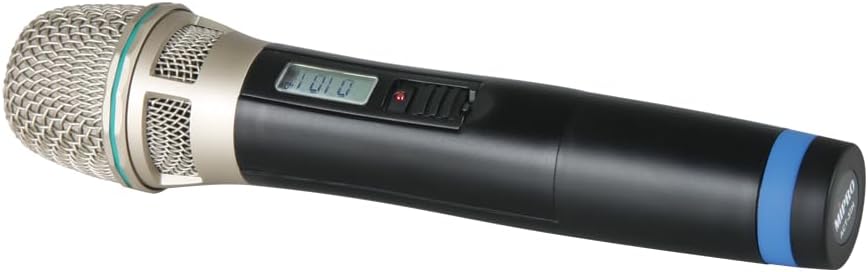
Figure 1: MIPRO ACT-32H UHF Handheld Transmitter. This image shows the black handheld microphone with a silver mesh grille at the top, a small display screen, and a power switch on the body. A blue band is visible near the bottom of the handle.
Konpozan kle:
- Grille Mikwofòn: Protects the microphone capsule and helps shape the sound.
- Kapsil: High-quality condenser capsule for clear audio capture.
- Ekspozisyon LCD: Shows frequency, battery status, and other operational information.
- Power/Mute Switch: Controls power on/off and mutes the microphone output.
- Lòj batri: Kay batri ki nesesè pou operasyon an.
- Antèn: Integrated antenna for wireless signal transmission.
Ki sa ki nan bwat la
Lè w ap ouvri pake a, tanpri verifye si tout atik ki nan lis la prezan epi yo an bon eta:
- MIPRO ACT-32H UHF Handheld Transmitter (Microphone)
- Manyèl Itilizatè (dokiman sa a)
- (Note: Batteries may or may not be included depending on the specific package. Please check packaging for details.)
Enstalasyon
1. Enstalasyon batri:
- Unscrew the bottom cap of the handheld transmitter to access the battery compartment.
- Insert two fresh AA alkaline batteries, observing the correct polarity (+/-) as indicated inside the compartment.
- Vise bouchon anba a byen fèm sou transmetè a.
2. Pairing with Receiver:
The ACT-32H transmitter must be paired with a compatible MIPRO wireless receiver (sold separately) to function. Refer to your receiver's user manual for specific pairing instructions. Generally, the process involves:
- Powering on both the transmitter and the receiver.
- Initiating the ACT (Automatic Channel Targeting) sync function on the receiver.
- Aligning the IR (Infrared) ports of the transmitter and receiver for data transfer.
- Confirming successful pairing on both devices' displays.
Enpòtan: Ensure the transmitter and receiver are set to the same frequency band (e.g., 904-925 MHz for this model) to avoid compatibility issues.
Operasyon
Limen/Etenyen:
- To power on, slide the power switch to the "ON" position. The LCD display will illuminate.
- Pou etenn aparèy la, glise switch pouvwa a nan pozisyon "OFF".
Fonksyon bèbè:
- While powered on, briefly slide the power switch to the "MUTE" position and release to mute the microphone. The LCD display may indicate "MUTE".
- Repeat the action to unmute the microphone.
Siveyans eta batri:
The LCD display on the transmitter will show the current battery level. Replace batteries promptly when the low battery indicator appears to avoid interruption during use.
Itilizasyon Optimal:
- Hold the microphone approximately 2-6 inches from your mouth for best vocal pickup.
- Avoid covering the antenna area (typically at the bottom of the microphone) with your hand, as this can reduce wireless range and signal quality.
- Maintain a clear line of sight between the transmitter and the receiver whenever possible.
Antretyen
- Netwayaj: Use a soft, dry cloth to clean the exterior of the transmitter. Do not use liquid cleaners or solvents.
- Swen batri: Remove batteries if the transmitter will not be used for an extended period to prevent leakage and damage.
- Depo: Sere transmetè a nan yon kote ki fre epi sèk, lwen limyè solèy dirèk ak tanperati ekstrèm.
- Manyen: While robust, avoid dropping or subjecting the transmitter to severe impacts.
Depanaj
| Pwoblèm | Kòz posib | Solisyon |
|---|---|---|
| Pa gen son nan mikwofòn |
|
|
| Intermittent signal or static |
|
|
| Move son kalite |
|
|
Espesifikasyon
| Karakteristik | Detay |
|---|---|
| Modèl | ACT-32H |
| Mak | MIPRO |
| Repons Frekans | 904-925 MHz (UHF) |
| Mikwofòn Fòm Faktè | Pòtatif |
| Modèl polè | Inidireksyon |
| Sous pouvwa | Battery Powered (AA) |
| Pwa atik | 4 liv |
| Karakteristik espesyal | Wireless, Lightweight |
| Aparèy konpatib | PA Sistèm |
Garanti ak sipò
MIPRO products are designed for durability and performance. For specific warranty information, please refer to the warranty card included with your product or visit the official MIPRO websit la. Kenbe resi acha ou kòm prèv acha pou reklamasyon garanti.
For technical support, troubleshooting assistance beyond this manual, or service inquiries, please contact MIPRO customer support or your authorized dealer. Contact information can typically be found on the manufacturer's websit.
Note: Protection plans may be available for purchase separately from third-party providers. These plans are distinct from the manufacturer's warranty.