
1. Entwodiksyon
Thank you for choosing the SIFENE Mini Single Serve Coffee Maker, Model KC211. This manual provides essential information for the safe operation, maintenance, and troubleshooting of your new coffee maker. Please read it thoroughly before first use and retain it for future reference.

Image 1.1: SIFENE Mini Single Serve Coffee Maker in operation, showing coffee pouring into a white mug.
2. Enstriksyon Sekirite Enpòtan
Lè w ap itilize aparèy elektrik, yo ta dwe toujou swiv prekosyon sekirite debaz yo pou redwi risk pou dife, chòk elektrik ak/oswa blesi moun, tankou sa ki annapre yo:
- Li tout enstriksyon yo.
- Pa manyen sifas cho. Sèvi ak manch oswa bouton.
- Pou pwoteje tèt ou kont dife, chòk elektrik, ak blesi, pa plonje kòd la, ploge yo, oswa machin kafe a nan dlo oswa lòt likid.
- Sipèvizyon sere se nesesè lè nenpòt aparèy itilize pa oswa toupre timoun yo.
- Debranche soti nan priz lè yo pa itilize ak anvan netwaye. Kite refwadi anvan ou mete oswa retire pati yo, epi anvan ou netwaye aparèy la.
- Pa opere nenpòt aparèy ki gen yon kòd oswa ploge ki domaje oswa apre aparèy la fonksyone byen, oswa li te domaje nan nenpòt fason. Retounen aparèy la nan sant sèvis otorize ki pi pre a pou egzamen, reparasyon oswa ajisteman.
- Itilizasyon akseswar manifakti aparèy la pa rekòmande pou yo ka lakòz dife, chòk elektrik oswa blesi sou moun.
- Pa sèvi ak deyò.
- Pa kite kòd pandye sou kwen tab oswa kontwa, oswa manyen sifas cho.
- Pa mete sou oswa toupre yon gaz cho oswa recho elektrik, oswa nan yon fou chofe.
- Toujou branche ploge a nan aparèy la an premye, answit branche kòd la nan priz miray la. Pou dekonekte li, vire nenpòt kontwòl sou "off", epi retire ploge a nan priz miray la.
- Pa sèvi ak aparèy pou lòt itilizasyon ki gen entansyon an.
- Aparèy sa a se pou itilize nan kay la sèlman.
3. Pwodwi souview
3.1 Karakteristik kle
- 2-in-1 Brewing: Compatible with K-pods and fresh coffee grounds using the included reusable stainless steel filter.
- Customizable Water Levels: Clear water window with measurements from 6 to 12 oz for precise filling.
- Brasaj rapid: Brews a 12 oz cup in approximately 2 minutes.
- Kontwòl One-Touch: Simple operation with a single button.
- Konsepsyon kontra enfòmèl ant: Ideal for small spaces (4.3" D x 7.8" W x 9.4" H).
- Self-Cleaning & Descaling Reminder: Indicator light for descaling and easy cleaning process.
- Materyèl ki san BPA: Constructed from non-BPA materials for safety.
3.2 Eleman

Imaj 3.1: Plis paseview of the coffee maker with key dimensions and features. The image shows the compact size of the coffee maker (7.8" W x 4.3" D x 9.4" H) next to a water bottle and a coffee mug, highlighting its small footprint and the water window with cup size markings (6, 8, 10, 12 oz).
- Water Reservoir with Water Window
- Kouvèti
- Brew tèt
- Control Button / Descale Indicator
- Plato degoute
- K-pod Holder (removable)
- Ground Coffee Filter Basket (removable)
4. Enstalasyon ak Premye Itilizasyon
4.1 Debake
Carefully remove all packaging materials and inspect the coffee maker for any damage. Ensure all components listed in Section 3.2 are present.
4.2 Netwayaj Premye
Before first use, clean all removable parts (K-pod holder, ground coffee filter basket, drip tray) with warm, soapy water. Wipe the exterior of the coffee maker with a damp twal. Pa plonje inite prensipal la nan dlo.
4.3 Premye Sik Enfuzyon (Sik Netwayaj)
To prime the machine and remove any manufacturing residues:
- Fill the water reservoir with fresh water up to the MAX (12 oz) line.
- Mete yon tas vid sou plato degoute a.
- Close the lid without any K-pod or ground coffee filter inserted.
- Press the power button once. The white light will illuminate, and the machine will begin a brewing cycle, dispensing hot water into the mug.
- Yon fwa sik la fini, jete dlo cho a. Machin kafe ou a pare pou itilize kounye a.
5. Operasyon Enstriksyon
5.1 Brewing with K-pods
- Louvri kouvèti kafe a.
- Insert a K-pod into the K-pod holder. Ensure the K-pod is seated correctly.
- Fill the water reservoir with fresh water to your desired level (6-12 oz). Do not exceed the MAX line.
- Mete tas kafe ou a sou plato degoute a.
- Close the lid firmly. Ensure the handle of the holder is placed horizontally for proper closure.
- Press the power button once for hot coffee. The white light will indicate brewing.
- Wait for the brewing cycle to complete. Do not open the lid during brewing.
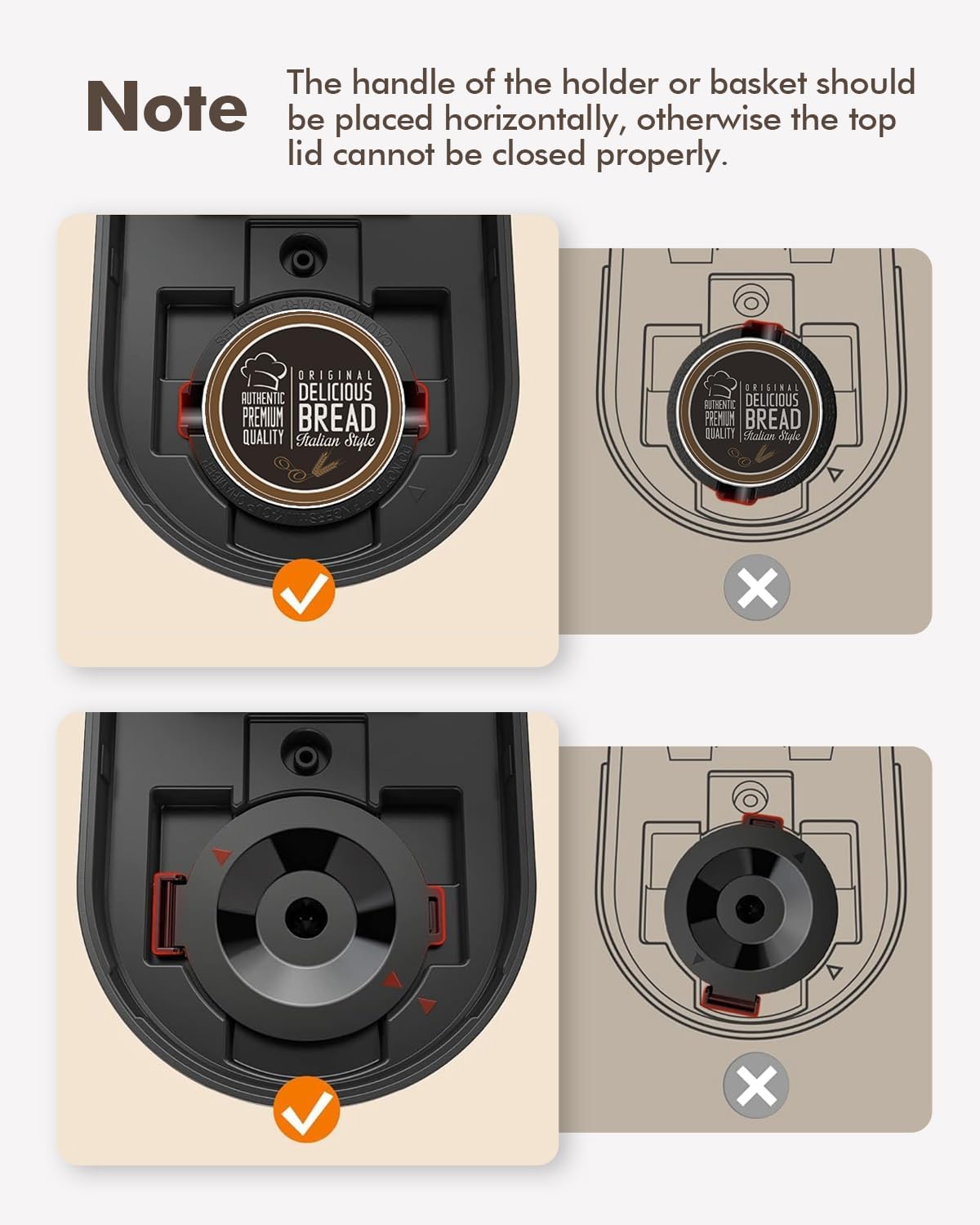
Image 5.1: Correct placement of K-pod and ground coffee filter. The image illustrates the proper horizontal alignment of the holder handle for both K-pods and ground coffee filters to ensure the lid closes securely.
5.2 Prepare kafe ak kafe moulu
- Louvri kouvèti kafe a.
- Insert the reusable ground coffee filter basket into the brew head.
- Add your desired amount of ground coffee to the filter basket. Do not overfill.
- Fill the water reservoir with fresh water to your desired level (6-12 oz). Do not exceed the MAX line.
- Mete tas kafe ou a sou plato degoute a.
- Close the lid firmly. Ensure the handle of the filter basket is placed horizontally for proper closure.
- Press the power button once for hot coffee. The white light will indicate brewing.
- Wait for the brewing cycle to complete. Do not open the lid during brewing.
5.3 Iced Coffee Function
The coffee maker features an iced coffee brewing mode. Follow these steps:
- Prepare your K-pod or ground coffee as described above.
- Fill the water reservoir with fresh water to your desired level (6-12 oz).
- Fill your coffee mug with ice and place it on the drip tray.
- Fèmen kouvèti a byen fèm.
- Press the power button twice. The blue light will illuminate, indicating iced coffee brewing mode.
- Rete tann pou sik enplikasyonJwi a fini.

Image 5.2: Control panel with power button and descale reminder. The image shows the power button and the "DESCALE" indicator light, along with simple operating instructions printed on the lid.
6. Antretyen ak netwayaj
6.1 Netwayaj chak jou
- After each use, remove and rinse the K-pod holder or ground coffee filter basket.
- Vide epi rense plato degoute a.
- Siye eksteryè a nan machin nan kafe ak anonsamp twal.
6.2 Detartraj
Over time, mineral deposits (scale) can build up in your coffee maker, affecting performance and coffee taste. The "DESCALE" indicator light will illuminate red when descaling is recommended.

Image 6.1: Preparing descaling solution. The image shows a hand pouring descaling powder into a measuring cup filled with water, next to the coffee maker.
Pwosedi dekalifikasyon:
- Prepare a descaling solution according to the manufacturer's instructions (e.g., a mixture of white vinegar and water, or a commercial descaling agent).
- Pour the descaling solution into the water reservoir up to the MAX (12 oz) line.
- Place a large empty mug or container on the drip tray to collect the solution.
- Close the lid without any K-pod or ground coffee filter inserted.
- Press and hold the power button for 2 seconds to initiate the descaling cycle. The red "DESCALE" light will illuminate.
- The machine will run a descaling cycle, dispensing the solution. This may take longer than a regular brew cycle.
- Once the cycle is complete, discard the used solution.
- Rinse the reservoir thoroughly and run 2-3 cycles with fresh water to flush out any remaining descaling solution.
- The "DESCALE" light should turn off after successful descaling.
NAN. Depanaj
| Pwoblèm | Kòz posib | Solisyon |
|---|---|---|
| Coffee not brewing / No water dispensed. |
|
|
| Kafe a gen yon gou fèb oswa dlo. |
|
|
| Limyè "DESCALE" la limen. | Akimilasyon mineral nan machin nan. | Fè pwosedi detartraj la (Seksyon 6.2). |
| Machin koule. |
|
|
8. Espesifikasyon
| Karakteristik | Detay |
|---|---|
| Mak | SIFENE |
| Non modèl | KC211 |
| Dimansyon pwodwi | 7.79"D x 4.33"W x 9.48"H |
| Kalite Coffee Maker | Machin kafe gout-a-gout, pòsyon endividyèl |
| Kalite Antre Kafe | Both K-pods and ground coffee |
| Voltage | 120 Volts |
| Karakteristik espesyal | Auto Clean Function, Auto Shut-Off, Permanent Filter, Descaling Reminder |
| Konpozan ki enkli | Single Serve Coffee Maker, 2 Filters (K-pod holder, ground coffee filter) |
| Pwa atik | 2.5 liv |
9. Garanti ak sipò
9.1 Enfòmasyon sou Garanti
Detay espesifik sou garanti a tipikman bay ak anbalaj pwodwi a oswa sou dokiman ofisyèl manifakti a. websit la. Tanpri gade sous sa yo pou jwenn kondisyon garanti ki pi egzak ak ajou yo.
9.2 Sipò pou Kliyan
For technical assistance, troubleshooting beyond this manual, or warranty claims, please contact SIFENE customer support. Contact information can usually be found on the product packaging, the official SIFENE websit entènèt la, oubyen atravè revandè ou a.
Ou ka vizite tou SIFENE Store on Amazon pou plis enfòmasyon sou pwodwi a ak resous sipò.