
1. Entwodiksyon
The AiXun PF26 Intelligent Multi-Channel Fast Charger is a versatile charging station designed to efficiently power multiple devices simultaneously. Featuring 4 channels and 8 ports, it delivers a total power output of 260W, with each single port capable of up to 65W. This device supports various fast charging protocols and includes an intuitive 3.5-inch IPS display for monitoring charging status. Its intelligent design incorporates an automatic standby function for energy saving and a 1/4-inch standard screw hole for flexible installation.
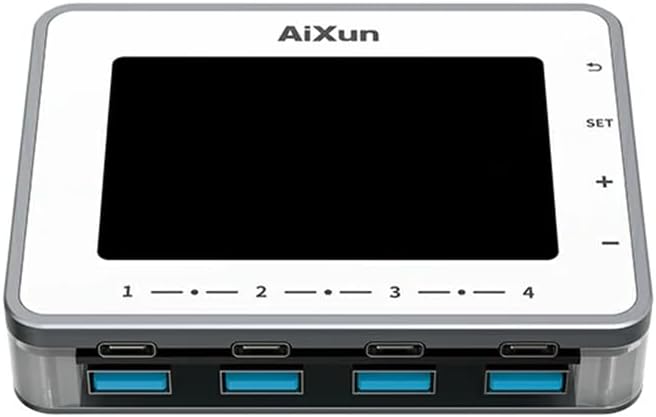
Imaj 1.1: Devan view of the AiXun PF26 Intelligent Multi-Channel Fast Charger, showing the display screen and the eight USB ports (four USB-C and four USB-A).
2. Enfòmasyon sou Sekirite
Please read all safety instructions before using this product to prevent injury or damage.
- Pa ekspoze aparèy la nan dlo, imidite, oswa tanperati ekstrèm.
- Use only compatible power adapters. An external 24V power adapter is required and sold separately.
- Evite lage aparèy la oswa soumèt li a gwo enpak.
- Do not attempt to disassemble or modify the charger. This will void the warranty and may cause damage.
- Kenbe soti nan atenn timoun yo.
- Asire bon vantilasyon pandan operasyon an pou anpeche surchof.
3. Pake kontni
Verifye ke tout atik yo prezan nan pakè ou a:
- 1x AiXun PF26 Intelligent Multi-Channel Fast Charger (Base Unit)
Note: The power adapter is not included and must be purchased separately. Refer to the specifications for compatible adapter requirements.
4. Pwodwi Features
The AiXun PF26 charger offers advanced features for efficient and intelligent charging:
- Segondè pwodiksyon pouvwa: Total 260W strong power across 4 channels and 8 ports. Each single port can achieve a peak power of 65W.
- Wide Protocol Compatibility: Supports various fast charging protocols including PPS, PD, QC, AFC, FCP, SCP, PE, and SFCP.
- Deteksyon Entelijan: Automatically detects and recognizes connected devices for optimal charging.
- Sibstitisyon otomatik: Built-in function to reduce energy consumption and prolong device lifespan. Standby time is adjustable from 1 to 60 minutes.
- Ekspozisyon IPS 3.5-pous: Bay yon klè view of charging status, voltage, current, and power parameters.
- Enstalasyon fleksib: Features a standard 1/4-inch BSP Thread Hole on the bottom, allowing adaptation to various brackets (brackets sold separately).
- Remote Upgrades: Supports firmware upgrades via PC connection.

Image 4.1: The AiXun PF26 charger in use, illustrating its 260W total power and 65W per port capability. An external power adapter is shown connected.
5. Espesifikasyon
| Paramèt | Valè |
|---|---|
| Non pwodwi | Intelligent Multi-channel Fast Charger |
| Mak | AiXun |
| Modèl | PF26 |
| Antre Voltage | 24V DC |
| Total pouvwa Sòti | 260W |
| Max Single Port Power | 65W |
| Max Dual Port Output (per channel) | 30W |
| Kantite pò | 8 (4x USB-C, 4x USB-A) |
| Kalite ekspozisyon | IPS 3.5-pous |
| Entèfas kominikasyon | Kalite-C kab |
| Sipòte pwotokòl chaj rapid | PPS/PD/QC/AFC/FCP/SCP/PE/SFCP |
| Dimansyon pwodwi | 102 x 78 x 7 mm (4.02 x 3.07 x 0.28 pous) |
| Pwa atik | 4.4 liv |
| Mounting Feature | 1/4-inch BSP Thread Hole |
Recommended Power Adapter Specifications:
The AiXun PF26 requires an external 24V DC power adapter with a 5.5*2.5mm DC port. The required current depends on the desired total power output:
| Pouvwa | Voltage | Kouran |
|---|---|---|
| 144W | 24V | 6A |
| 192W | 24V | 8A |
| 260W | 24V | 12A |

Image 5.1: Reference table for selecting a compatible charging power adapter, detailing DC port specifications and power output options.
6. Enstalasyon
- Konekte adaptè pouvwa: Connect a compatible 24V DC power adapter (purchased separately) to the DC input port on the AiXun PF26 charger. Ensure the adapter meets the power requirements listed in Section 5.
- Pouvwa sou: Once the power adapter is connected, the device will automatically power on, and the 3.5-inch IPS display will illuminate.
- Montaj si ou vle: If desired, use the 1/4-inch BSP Thread Hole on the bottom of the unit to attach it to a compatible bracket or stand (sold separately).

Image 6.1: Bottom design of the AiXun PF26 charger, highlighting the 1/4-inch BSP Thread Hole for easy adaptation to various mounting brackets.
7. Operasyon Enstriksyon
7.1 Aparèy Chaje
- Connect your devices (smartphones, tablets, laptops, etc.) to the available USB-C or USB-A ports using appropriate charging cables.
- The charger will automatically detect the connected device and initiate charging, utilizing compatible fast charging protocols.
- Monitor the charging status, voltage, current, and power for each port on the 3.5-inch IPS display.
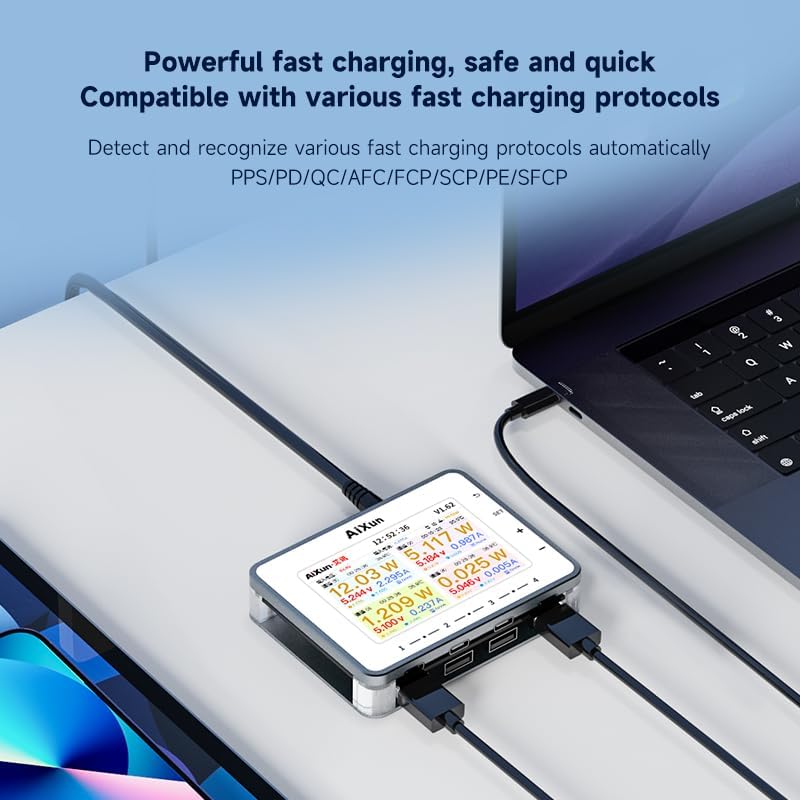
Image 7.1: The AiXun PF26 charger actively charging multiple devices, with its display showing detailed charging parameters for each port.
7.2 Display Navigation and Settings
The charger features a 3.5-inch IPS display and control buttons for navigation:
- SET bouton: Access settings menu.
- + / - Bouton: Navige nan opsyon meni yo oubyen ajiste valè yo.
- Bouton Retounen: Retounen nan ekran anvan an oubyen sòti nan yon meni.
Within the settings, you can customize parameters such as standby time (1-60 minutes) and view enfòmasyon sistèm.

Image 7.2: The AiXun PF26 charger's display showing intelligent features and a connected smartphone indicating 36% charge, demonstrating the energy-saving standby function.
7.3 Connecting to AiXun Platform (PC)
The device can be connected to a PC via a Type-C cable to the AiXun platform software. This allows for:
- Real-time monitoring of current and voltage curves.
- Performing remote firmware upgrades to ensure the device has the latest features and improvements.
8. Antretyen
- Netwayaj: Sèvi ak yon twal mou epi sèk pou netwaye deyò plato a. Pa sèvi ak pwodui netwayaj likid oswa ayewosòl.
- Depo: Sere aparèy la nan yon kote ki fre epi sèk, lwen limyè solèy dirèk ak tanperati ekstrèm lè w pa ap itilize li.
- Jesyon kab: Ensure charging cables are not excessively bent or tangled to prevent damage.
NAN. Depanaj
- Aparèy pa soumen: Ensure the 24V DC power adapter is correctly connected and functioning. Verify the adapter meets the specified voltage ak kondisyon aktyèl yo.
- Aparèy pa chaje: Check if the charging cable is securely connected to both the charger and the device. Ensure the device supports the fast charging protocols offered by the AiXun PF26. Try a different port or cable.
- Ekspozisyon an pa fonksyone: If the display is blank or unresponsive, try disconnecting and reconnecting the power adapter. If the issue persists, contact customer support.
- Chaje dousman: Asire w adaptè kouran ou a bay ase dlotage for the number of devices being charged. Some devices may not support the highest fast charging speeds.
10. Garanti ak sipò
For warranty information and technical support, please refer to the documentation provided with your purchase or visit the official AiXun website. You may also contact AiXun customer service directly for assistance with product operation, troubleshooting, or warranty claims.