
Ebitcam 8311
Manyèl Itilizatè Kamera Sekirite Ebitcam
Model: 8311 | Brand: Ebitcam
1. Entwodiksyon
Thank you for choosing the Ebitcam Security Camera. This manual provides detailed instructions on how to set up, operate, and maintain your camera. This 3-megapixel camera offers robust security features, including IP66 weather resistance for both indoor and outdoor environments, two-way audio, and advanced AI-powered detection capabilities. Enjoy peace of mind with 24-hour monitoring and remote access from your smartphone.

The Ebitcam security camera provides high-resolution monitoring for various environments.
2. Pake kontni
Tanpri tcheke pake a pou atik sa yo:
- Ebitcam Security Camera (Model 8311)
- Adaptè pouvwa
- Vis ak ploge miray pou monte
- Manyèl itilizatè
3. Pwodwi souview
Familiarize yourself with the components of your Ebitcam security camera:

The camera features a lens, status LED, microphone, and a durable IP66-rated casing.
- Lantiy: Kaptire videyo footage.
- Ki ap dirije Status: Indicates camera status (e.g., power, connection).
- Mikwofòn: Pou antre odyo ak kominikasyon bidireksyonèl.
- Oratè: Pou pwodiksyon odyo ak kominikasyon bidireksyonèl.
- Plas kat SD: Supports up to 512GB microSD card for local storage. Located under the lens.
- Bouton Reyajiste: Used to reset the camera to factory settings. Located under the lens.
- Pouvwa Port: Konekte ak adaptè pouvwa a.
- Base Montage: Integrated base for various installation options.
4. Enstalasyon
4.1 Premye pouvwa-up
- Konekte adaptè kouran an nan pò kouran kamera a epi branche li nan yon priz kouran.
- Wait for the camera's status LED to indicate it is ready for setup (refer to app instructions for specific LED behavior).
4.2 Telechaje Aplikasyon an ak Enskripsyon Kont
- Download the "Ebitcam" app from your smartphone's app store (available for iPhone and Android).
- Louvri aplikasyon an epi swiv enstriksyon ki sou ekran an pou enskri yon nouvo kont oubyen konekte si ou deja genyen youn.
- Add your camera by scanning the QR code located on the camera body using the app.
4.3 Koneksyon Wi-Fi
- The camera supports 2.4GHz Wi-Fi networks only. Ensure your smartphone is connected to a 2.4GHz Wi-Fi network during setup.
- Follow the app's prompts to connect the camera to your Wi-Fi network.
- For optimal performance, choose an installation location with a strong Wi-Fi signal.
4.4 Enstalasyon Fizik
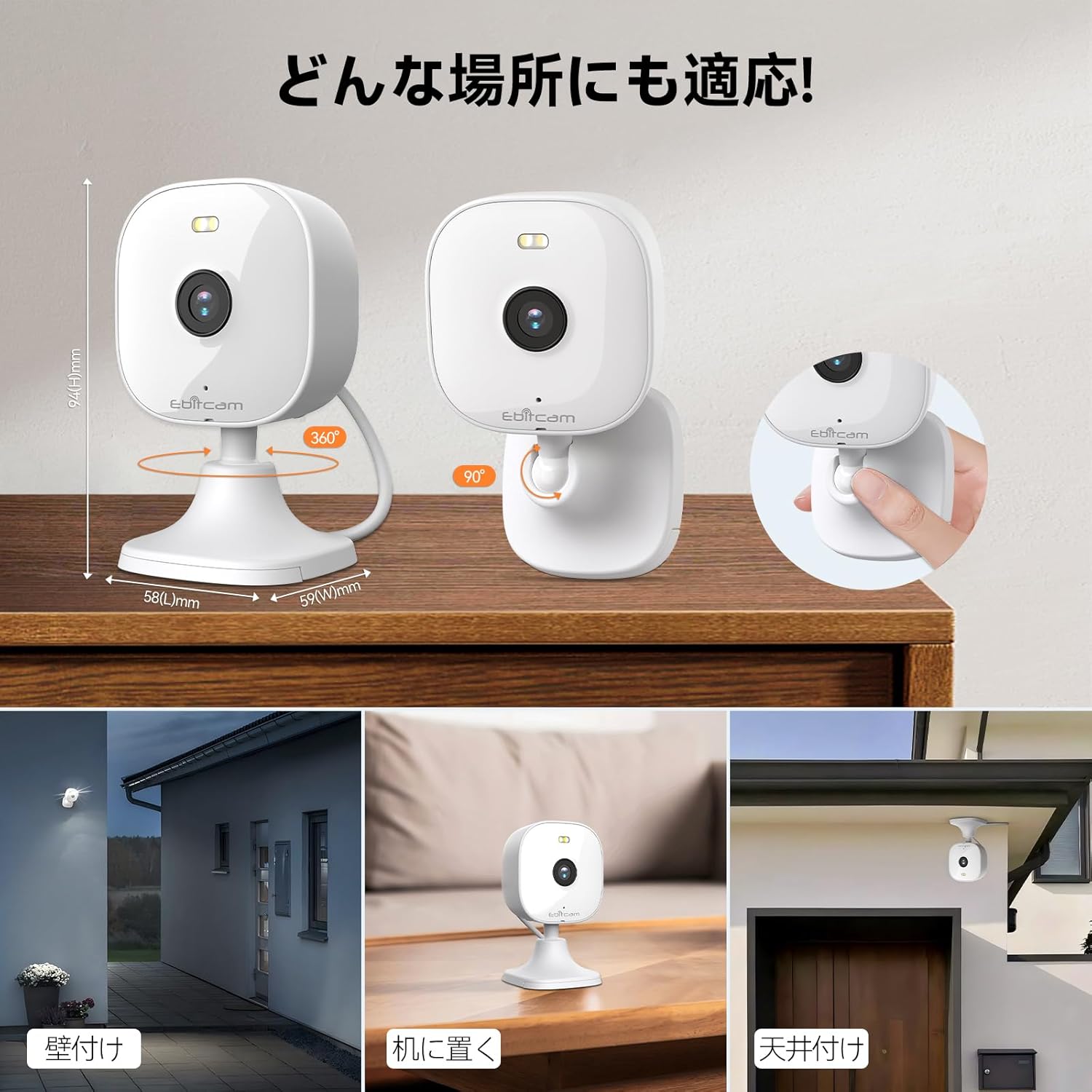
The camera offers versatile mounting options:

The camera can be mounted on walls, ceilings, or placed on a tabletop.
- Plasman Tabletop: Simply place the camera on a flat surface. The integrated base allows for stable positioning.
- Mòn miray/plafon: The camera's base can be detached by gently pulling the camera from its base. Use the included mounting screws and wall plugs to secure the base to your desired wall or ceiling location. Then, reattach the camera to the mounted base.
Note: The product package includes matching screw mounting tools for installation.
5. Operasyon Enstriksyon
5.1 Viv View ak Anrejistreman
Access the live video feed and manage recordings through the Ebitcam app.

The camera supports 2K (1296p) resolution for clear video capture.
- Live Feed: Louvri aplikasyon an epi chwazi kamera ou a view the real-time video stream.
- Anrejistreman kontinyèl: If an SD card is inserted or cloud storage is active, the camera can record continuously 24/7.
- Event-Triggered Recording: Configure settings to automatically start recording when motion, sound, or human presence is detected.
5.2 Odyo De-fason
Communicate with people or pets on the camera's side using the built-in microphone and speaker.
Engage in real-time conversations through the camera's two-way audio feature.
- Tap the microphone icon in the app to speak. Your voice will be transmitted through the camera's speaker.
- The camera's high-sensitivity microphone captures audio from the environment.
5.3 Motion, Sound, and Human Detection & Alerts
The camera utilizes advanced AI to detect specific events and notify you.

AI detection accurately distinguishes between humans and other moving objects.
- AI Deteksyon: The camera can differentiate between human movement, general motion, and sound events.
- Alèt mobil: Receive instant push notifications on your smartphone when an event is detected.
- Automatic Lighting/Alarm: Configure settings to trigger automatic white light illumination or an audible alarm to deter unwanted visitors upon detection.
5.4 Mòd Vizyon Lannwit
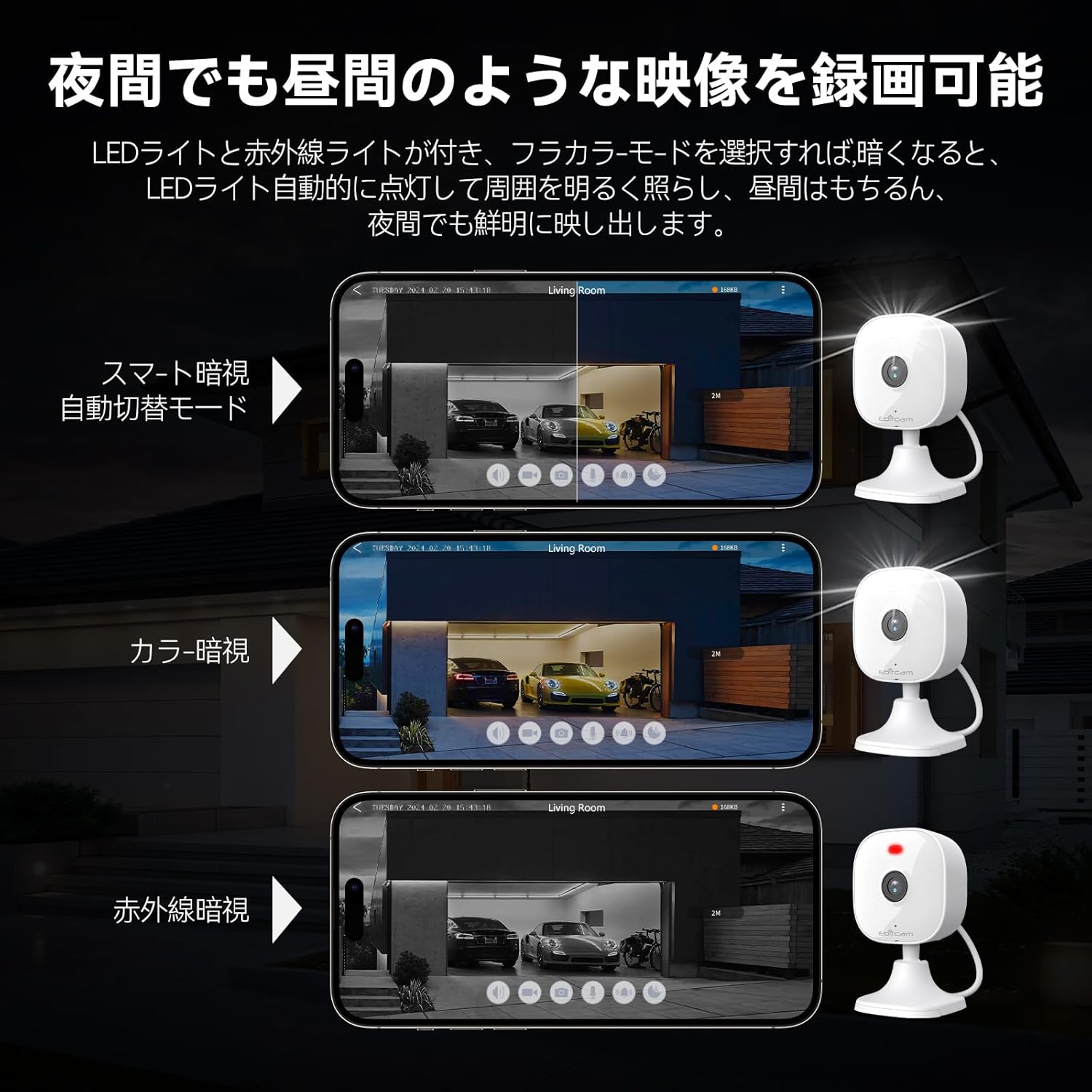
The camera provides clear visibility even in low-light or dark conditions.

Choose from various night vision modes for optimal clarity.
- Vizyon lannwit tout koulè: Utilizes built-in white lights to provide color video footage in darkness (requires settings).
- Vizyon lannwit enfrawouj: Provides clear black-and-white video in complete darkness using infrared LEDs.
- Otomatik chanje: The camera can automatically switch between day and night modes based on ambient light.
5.5 Zoom dijital
Agrandi detay yo nan emisyon an dirèk la view oubyen manje anrejistretage.

The camera supports up to 8x digital zoom.
- Use the pinch-to-zoom gesture on your smartphone screen within the app to digitally zoom in or out.
5.6 Entegrasyon Alexa
Control your Ebitcam camera using voice commands with Amazon Alexa.
Integrate your camera with Alexa for convenient voice control.
- Enable the Ebitcam skill in your Alexa app.
- Use commands like "Alexa, show me the [camera name]" to view the live feed on compatible Alexa devices.
5.7 Pataj Fanmi
Share access to your camera with family members or trusted friends.
- Within the Ebitcam app, navigate to the sharing settings for your camera.
- You can share access by generating a QR code for others to scan, allowing them to view manje kamera a.
6. Antretyen
6.1 Jesyon kat SD
The camera supports up to a 512GB microSD card for local video storage.

Insert a microSD card for local video storage.
- Ensèsyon: Gently insert the microSD card into the slot located under the camera lens until it clicks into place.
- Fòma: It is recommended to format the SD card through the camera settings in the app before first use.
- Retire: Push the SD card gently to release it, then pull it out.
6.2 Netwayaj
- Wipe the camera lens with a soft, clean cloth to ensure clear image quality.
- Netwaye kò kamera a ak piblisiteamp twal. Pa sèvi ak pwodui chimik piman bouk oswa pwodui netwayaj abrazif.
6.3 Mizajou Firmware
- Periodically check for firmware updates through the Ebitcam app. Updates can improve performance, add new features, and enhance security.
- Follow the app's instructions carefully when performing a firmware update.
NAN. Depanaj
Men kèk solisyon pou pwoblèm komen ou ka rankontre:
- Unstable SD Card Performance: If you experience issues with recording or playback, an unstable SD card may be the cause. Please replace your SD card with a reliable, high-quality one and try again.
- App Not Functioning Correctly / Unstable Network: If the app does not function correctly, it might be due to an unstable network environment. Please ensure you have a stable 2.4GHz Wi-Fi connection.
- Camera Offline / Connection Issues: Ensure the camera is powered on and within range of your 2.4GHz Wi-Fi router. Check your Wi-Fi password in the app.
- Forgetting Login Password / Changing Network Environment: If you change your network environment or forget your login password, you can reset the camera. The camera's restart button is located under the lens. Press and hold it for a few seconds until the camera resets.
- False Alarms from Motion Detection: Adjust the motion detection sensitivity settings within the app. Consider setting specific detection zones to reduce unwanted alerts from areas like busy streets or swaying trees.
8. Espesifikasyon
| Karakteristik | Spesifikasyon |
|---|---|
| Nimewo Modèl Pwodwi | 8311 |
| Kantite Atik | 1 |
| Teknoloji kominikasyon san fil | Wi-Fi |
| Kalite aliye | Freestanding, Wall Mount, Ceiling Mount, Tabletop Mount, Door Mount |
| Vizyon lannwit Range | 10 mèt |
| To Frame | 25 fps |
| Dimansyon pwodwi (LxWxH) | 10 x 5 x 5 cm |
| Nivo ki enpèmeyab | IP66 ki enpèmeyab |
| Pwa pwodwi | 190 g |
| Itilizasyon Rekòmande | Interior, Home, Living Room, Bedroom, Pet, Shop |
| Koneksyon Teknoloji | WiFi |
| Andedan kay la / Deyò Itilizasyon | Andedan kay la, deyò |
| Aparèy konpatib | iPhone, TV, Tablet, Desktop, Smartphone |
| Sous pouvwa | Fil elektrik |
| Koneksyon Pwotokòl | Wi-Fi |
| Rezolisyon Capture Videyo | 1296p (2K) |
9. Garanti ak sipò
Ebitcam provides the following warranty and support for your product:
- Garanti: A 2-year warranty is provided from the original purchase date.
- Sipò sou entènèt: Online support is available Monday to Friday, from 8 AM to 5 PM (local time). Please refer to the Ebitcam app or official websit pou detay kontak.
Dokiman ki gen rapò - 8311
 |
Manyèl Itilizatè Kamera Ebitcam: Enstalasyon, Karakteristik, ak Operasyon Manyèl itilizatè konplè pou Kamera Ebitcam la, ki kouvri enstalasyon, itilizasyon aplikasyon an, koneksyon rezo a (Wi-Fi, Ethernet), videyo an dirèk. viewing, konfigirasyon anrejistreman, paramèt aparèy, ak web aksè navigatè. Aprann kijan pou maksimize karakteristik kamera sekirite ou a. |
 |
Tapo Smart Home Ecosystem: Cameras, Security, Lighting, and Automation Discover the comprehensive Tapo smart home ecosystem, featuring advanced security cameras, smart doorbells, intelligent locks, efficient robot vacuums, versatile smart plugs, dynamic lighting solutions, and essential sensors. Enhance your home's security, convenience, and automation with Tapo's innovative and user-friendly products. |
 |
Tutorial Técnico: Especificações de Câmeras Mibo com Holofote Intelbras Guia técnico detalhado sobre as especificações das câmeras de segurança Mibo da Intelbras com tecnologia Full Color e holofote, abordando alcance, resolução, áudio e configurações. |
 |
Jovision JVS-N97-X3 3MP Full-Color Wi-Fi Pan/Tilt Camera Datasheet Detailed specifications and features of the Jovision JVS-N97-X3, a 3MP Full-Color Wi-Fi Pan/Tilt security camera. Includes image sensor, resolution, compression, frame rate, lens details, audio, network, and general specifications. |
 |
Kamera Sekirite Deyò San Fil HEIYOUCAM ak WorldGolbal: Manyèl Itilizatè ak Detay sou Pwodwi a Eksplore seri kamera sekirite san fil HEIYOUCAM ak WorldGolbal pou deyò. Dokiman sa a bay detay sou modèl tankou IP66, BW4, QW5, 3MP, A20/A20QQ, ak kamera Kat Lantiy Kat Ekran an. Karakteristik yo kouvri rezolisyon soti nan 2K rive nan 10K, vizyon lannwit avanse, deteksyon mouvman IA, odyo bidireksyonèl, enpèmeyabilite IP66, ak opsyon enèji solè. |
 |
Gid pou kòmanse rapidman ak kamera sekirite Wi-Fi Imou Cell PT 3MP la Gid demaraj rapid pou Kamera Sekirite Imou Cell PT 3MP Wi-Fi Battery la. Aprann plis sou karakteristik li yo tankou enèji solè, deteksyon PIR moun, vizyon lannwit koulè, odyo bidireksyonèl, ak klasman IP66, epi swiv enstriksyon konfigirasyon yo. |
Ask a question about this manual
Ask about setup, troubleshooting, compatibility, parts, safety, or missing instructions. Manuals+ will review the question and use this page’s manual context to help answer it.