
1. Pwodwi souview
The FITCAMX 4K Dash Cam (Model HD2-6386) is designed to integrate seamlessly into your Land Rover Range Rover (2023-2026) or Range Rover Sport Hybrid, providing an OEM factory look without visible wiring. It captures Ultra High Definition (UHD) 2160P video, ensuring clear and detailed recordings of your journeys. Key features include loop recording, G-sensor for impact detection, Wi-Fi connectivity with a dedicated app, and enhanced night vision capabilities.

Image: Before and After installation of the Fitcamx dash cam, highlighting its seamless integration for an OEM factory look.
2. Pake kontni
Tanpri verifye ke tout atik yo prezan nan pakè ou a:
- FITCAMX Front Camera (4K)
- Kat SD 64GB
- Y Cable (for power connection)
- Lektè kat
- Pry Zouti
- Manyèl itilizatè

Imaj: Detaye view of the FITCAMX dash cam package contents.
3. Enstalasyon ak Enstalasyon
The FITCAMX dash cam is designed for a plug-and-play installation, utilizing existing power sources from your vehicle's rearview mirror assembly. No complex wiring is required.
3.1 Verifikasyon Konpatibilite
Ensure your vehicle is a Land Rover Range Rover or Range Rover Sport Hybrid manufactured between 2023 and 2026. If unsure, compare your rearview mirror style and year of manufacture, or contact FITCAMX support with a picture of your rearview glas.
3.2 Etap enstalasyon yo
- Prepare zòn nan: Carefully remove the existing plastic cover around your rearview mirror base. Use the provided pry tool to gently separate the console and mirror base pieces.
- Disconnect Mirror Power: Once the mirror base is exposed, disconnect the existing power cable from the rearview glas.
- Connect Y-Cable: Connect the provided Y-cable to the vehicle's power source and then to the rearview mirror. The Y-cable will split the power to both the mirror and the dash cam.
- Install Dash Cam: The FITCAMX dash cam comes in a casing that replaces the original mirror base cover. Carefully route the dash cam's power cable through the new casing.
- Secure Casing: Align the new dash cam casing with the mirror base and snap it into place. Ensure all clips are securely engaged.
- Fonksyonalite tès: Before fully reassembling, turn on your vehicle to ensure the dash cam powers on and records correctly.
- Final Asanble: Reattach any remaining console pieces, ensuring a clean and secure fit.
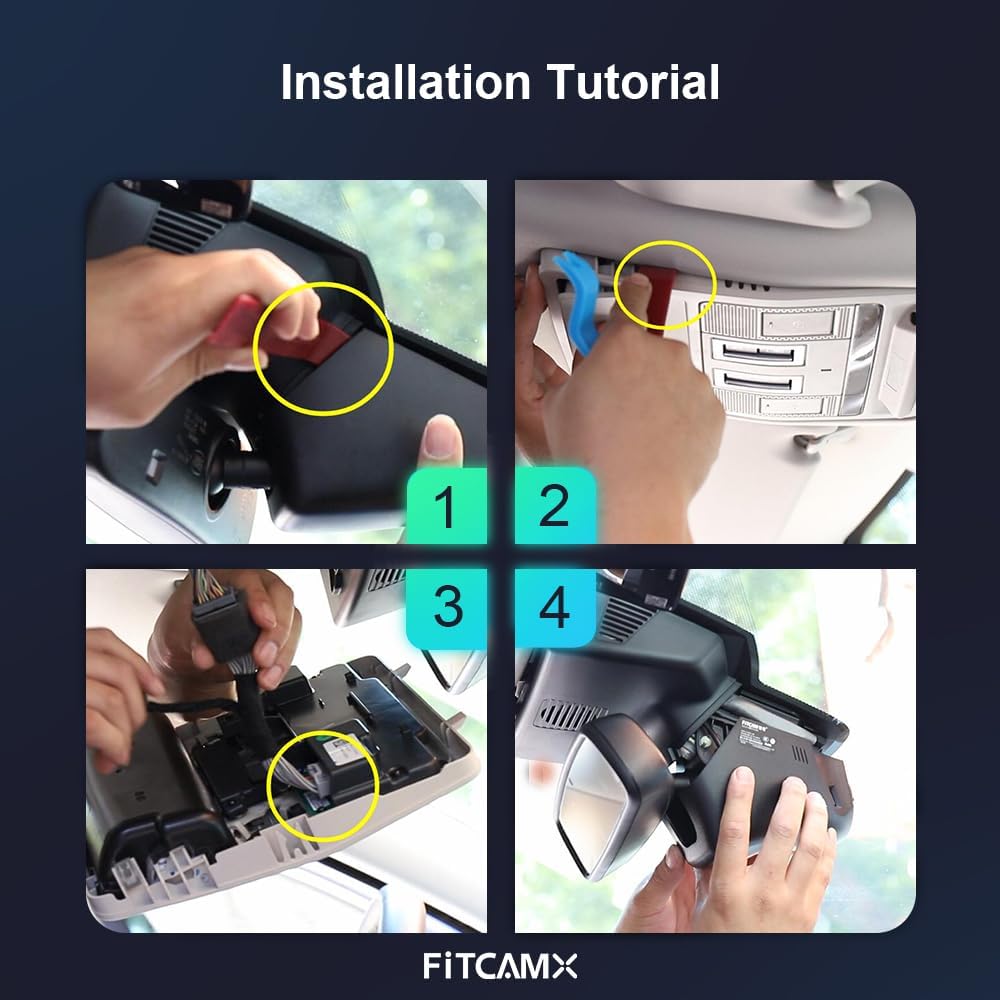
Image: Visual guide illustrating the key steps for dash cam installation.
3.3 Gid Enstalasyon Videyo
For a detailed visual walkthrough of the installation process, please refer to the official installation video below. This video demonstrates the steps for Land Rover Range Rover (HD2-6386) models.
Video: Official installation guide for the FITCAMX Dash Cam (HD2-6386) in a Land Rover Range Rover. This video provides step-by-step visual instructions for removing trim, connecting power, and securing the dash cam.
4. Operasyon Enstriksyon
4.1 Anrejistreman Otomatik
The dash cam will automatically begin recording when your vehicle starts. No manual intervention is required for standard operation.
4.2 UHD 2160P Video Recording
Equipped with a state-of-the-art CMOS sensor and f/1.6 large aperture lens, the dash cam records video at up to 2160P/30fps. Wide Dynamic Range (WDR) technology ensures precise color and superior picture quality, even in low-light conditions, making details like license plates and road signs clearly visible.

Image: Demonstration of the UHD 2160P video quality captured by the dash cam.
4.3 Anrejistreman bouk
The dash cam features loop recording, which automatically overwrites the oldest videos when the memory card is full. This ensures continuous recording without manual management. Recording time can be set to 1, 3, or 5-minute segments via the FITCAMX APP.

Image: Explanation of the automatic loop recording feature.
4.4 G-Capteur (Anrejistreman Ijans)
The built-in G-sensor detects sudden impacts or collisions. When an event is detected, the current video footage is automatically locked and protected from being overwritten, serving as a reliable witness.

Image: The G-Sensor automatically locks video during impacts.
4.5 Wi-Fi & FITCAMX APP
Connect your smartphone to the dash cam via Wi-Fi to access the FITCAMX APP. Through the app, you can view real-time video, download recordings, and manage settings. The camera records automatically, so continuous Wi-Fi connection is only needed for video management or downloads, not for recording itself. This does not affect CarPlay or Bluetooth functionality.
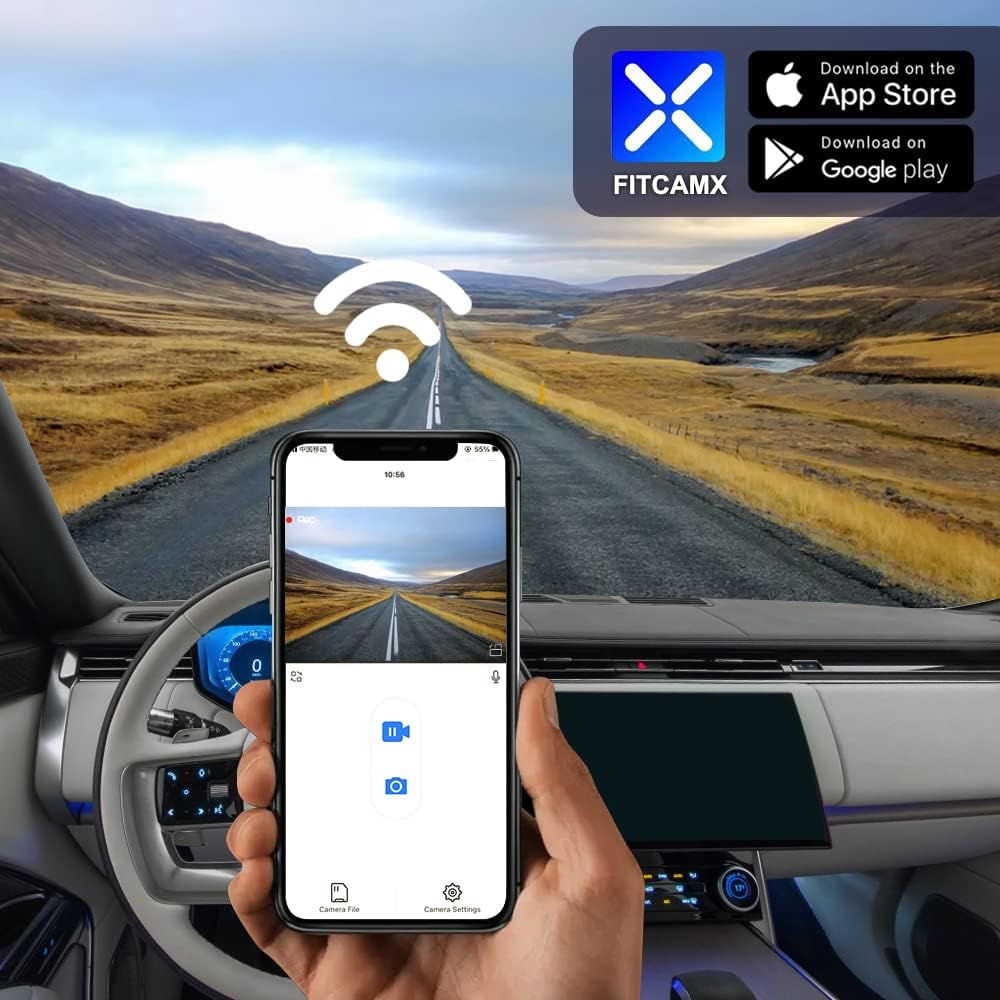
Image: Using the FITCAMX App to view and manage dash cam footage.
4.6 Vizyon lannwit
The dash cam is equipped with advanced night vision technology, ensuring clear video capture even in low-light or nighttime driving conditions.

Image: Enhanced night vision capability for clear recordings in the dark.
4.7 Parking Mode (Optional Upgrade)
To enable parking monitoring, an optional fuse box cable is required. This accessory allows the dash cam to continue recording or monitor impacts while the vehicle is parked. Chèche pou ASIN: B09PQ9KDYX to order the fuse box cable.

Image: Optional accessory for enabling parking mode.
5. Antretyen
To ensure optimal performance and longevity of your FITCAMX Dash Cam, regular maintenance is recommended:
- SD Kat Jesyon: Periodically format the microSD card (every 1-2 months) to prevent data corruption and ensure smooth loop recording. Back up any important footage anvan fòma.
- Netwayaj lantiy: Gently clean the camera lens with a soft, lint-free cloth to remove dust or smudges that could affect video clarity.
- Mizajou mikrolojisyèl: Check the FITCAMX official website or app for any available firmware updates to ensure your dash cam has the latest features and bug fixes.
- Ranje Tanperati: The dash cam is designed to operate in temperatures from -20°C to 85°C (-4°F to 185°F). Avoid exposing it to extreme temperatures outside this range for extended periods.
NAN. Depanaj
Here are some common questions and their solutions:
- How to ensure the correct model?
Compare your vehicle style, year, and rearview mirror cover shape. If uncertain, contact FITCAMX with vehicle details. - Can I use CarPlay/Bluetooth when driving?
Yes. The dash cam records automatically after the car starts, so you do not need to keep Wi-Fi connected to the camera constantly. Your phone can connect to CarPlay/Bluetooth independently. - Can I add a rear camera if I already have a front cam?
No, the PCB boards are different for front-only and front+rear camera systems. You would need to replace the entire unit if you wish to change video resolution or add a rear camera.
7. Espesifikasyon
| Mak | FITCAMX |
| Non modèl | Fitcamx |
| Nimewo Modèl | HD2-6386 |
| Kalite Sèvis Machin | Range Rover 2023-2026 & Sport/SportHybrid |
| Koneksyon Teknoloji | Powerline, Wi-Fi |
| Karakteristik espesyal | FITCAMX APP, OEM Style, G-Sensor, Loop Recording, WDR, Night Vision |
| Rezolisyon Capture Videyo | Front 2160P Only |
| Teknoloji detèktè optik | CMOS |
| Kalite memwa flash | microSD |
| Ouverture maksimòm | f/1.6 |
| To Frame | 30 fps |
| Flash memwa sipòte gwosè maksimòm | 256 GB |
| Koulè | Nwa |
| Pwa atik | 1 liv |
| Dimansyon atik (D x W x H) | 9"D x 7"W x 4"H |
8. Garanti ak sipò
The FITCAMX Dash Cam comes with a 1-ane garanti. We are committed to providing prompt responses and lifetime after-sales support. Should you have any questions or require assistance with your product, please do not hesitate to contact FITCAMX customer service.