
1. Entwodiksyon
Thank you for choosing the pxton 666S Walkie Talkie. This manual provides essential information for the safe and efficient operation of your two-way radio. Please read this manual thoroughly before use to ensure optimal performance and to prevent damage to the device.

Image 1.1: pxton 666S Walkie Talkies in use, highlighting key features.
2. Pwodwi souview
2.1 Konpozan ki enkli yo
- pxton 666S Walkie Talkie Unit(s)
- 1500mAh ityòm-ion batri
- Chaje baz
- Adaptè pouvwa
- Clip senti
- Antèn
- Headphones (earpiece with microphone)
- Manyèl itilizatè
2.2 Karakteristik kle
- VOX (Echanj ki opere pa vwa): Kominikasyon men lib.
- Rediksyon bri: Improves audio clarity in noisy environments.
- TOT (Time-Out Timer): Prevents accidental long transmissions.
- Flach entegre: Pou ekleraj nan kondisyon ki pa twò klere.
- Fonksyon siveyans: Allows listening to weak signals.
- Fonksyon eskanè: Scans active channels.
- Long Range: Up to 3 miles in open areas, 1.2 miles in suburban, 0.6 miles in urban.
- 1500mAh Li-ion batri: Provides extended standby and talk time.
- Rezistan dlo: Ofri pwoteksyon kont ekla.
- 16 chanèl: For diverse communication needs.
2.3 Parts of the Walkie Talkie
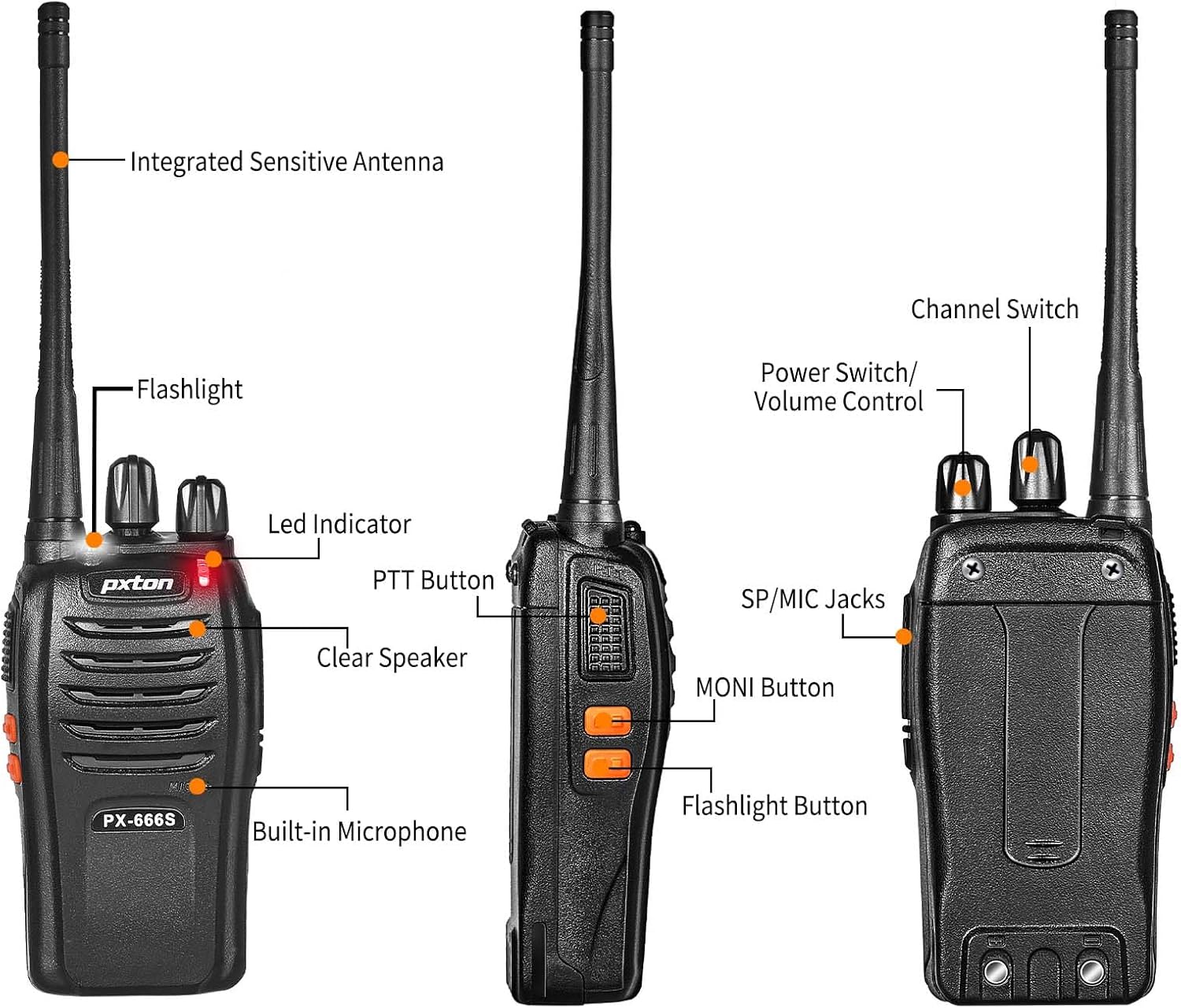
Imaj 2.1: Devan ak bò view of the pxton 666S with labeled components.

Imaj 2.2: Angle view of the pxton 666S with labeled components.
3. Enstalasyon
3.1 Enstalasyon ak Chaje Batri
- Asire w ke walkie-talkie a etenn.
- Aliyen batri Li-ion 1500mAh la ak konpatiman batri a sou dèyè radyo a.
- Dousman pouse batri a an plas jiskaske li klike byen.
- To charge, place the walkie talkie into the charging base. Ensure the charging contacts align.
- Konekte adaptè kouran an nan baz chaje a epi branche li nan yon priz miray.
- The LED indicator on the radio will typically show red during charging and turn green when fully charged.
- Tan pou chaje a se apeprè 3-4 èdtan pou yon chaj konplè.

Image 3.1: Battery installation and specifications.

Image 3.2: Walkie talkie in charging base.
3.2 Tache Pwodwi pou Telefòn
- Antèn: Screw the antenna clockwise into the connector on top of the radio until it is firm. Do not overtighten.
- Clip senti: Attach the belt clip to the designated slots on the back of the radio using the provided screws.
- kas ekoutè: Insert the headphone jack into the SP/MIC jacks on the side of the radio. Ensure it is fully inserted for proper connection.
4. Operasyon Enstriksyon
4.1 Pouvwa pou limen/etenn ak kontwòl volim
- Pouvwa sou: Rotate the Power Switch/Volume Control knob (top left knob) clockwise until you hear a click. The radio will emit a tone, and the LED indicator will flash.
- Pouvwa Off: Rotate the Power Switch/Volume Control knob counter-clockwise until you hear a click.
- Ajisteman Volim: After powering on, continue rotating the Power Switch/Volume Control knob clockwise to increase volume or counter-clockwise to decrease volume.
4.2 Seleksyon chanèl
- Rotate the Channel Switch knob (top right knob) to select your desired channel (1-16).
- Asire w ke tout radyo nan gwoup ou a yo mete sou menm kanal la pou kominikasyon.
4.3 Transmèt ak Resevwa
- Pou Transmèt: Press and hold the PTT (Push-To-Talk) button on the side of the radio. Speak clearly into the microphone (located below the speaker grille). Release the PTT button to stop transmitting.
- Pou resevwa: When the PTT button is not pressed, the radio is in receive mode. You will hear incoming transmissions through the speaker or connected headphones.
4.4 Fonksyon VOX
The VOX function allows for hands-free operation. When activated, the radio will automatically transmit when it detects your voice, without needing to press the PTT button. Refer to your radio's programming software for VOX activation and sensitivity adjustment (programming cable sold separately).
4.5 Operasyon flach
Press the dedicated Flashlight Button (often located below the PTT button) to turn the built-in LED flashlight on or off.
4.6 Monitoring and Scan Functions
- Bouton MONI: Press and hold the MONI (Monitor) button to temporarily disable squelch and listen to all activity on the current channel, including weak signals.
- Fonksyon eskanè: The scan function allows the radio to automatically sweep through programmed channels to detect active transmissions. Activation and channel programming for scan typically require programming software.
4.7 Communication Range
The actual communication range varies significantly based on terrain and obstructions:
- Open Areas (e.g., flat terrain, mountain peaks): Up to 3 miles.
- Suburban/Countryside: Approximately 1.2 miles.
- City Limits (with buildings and obstructions): Approximately 0.6 miles.

Image 4.1: Communication distance in various environments.
5. Antretyen
- Netwayaj: Sèvi ak yon mou, damp twal pou netwaye deyò radyo a. Pa sèvi ak pwodui chimik ki agresif oswa solvan.
- Swen batri: Avoid fully discharging the battery frequently. Charge the battery regularly, even if not in use, to maintain its lifespan. Do not expose batteries to extreme temperatures.
- Depo: Sere walkie-talkie a nan yon kote ki fre epi sèk lè w pa ap itilize li. Retire pil la si w ap sere l pou yon bon bout tan.
- Antèn: Do not bend or modify the antenna, as this can affect performance.
NAN. Depanaj
| Pwoblèm | Kòz posib | Solisyon |
|---|---|---|
| Radyo a pa limen. | Batri a fèb oswa li pa byen enstale. | Chaje batri a nèt. Remete batri a byen fèm. |
| Pa ka ni transmèt ni resevwa. | Chanèl ki pa kòrèk la chwazi. Pa nan zòn nan. Pil la fèb. | Ensure all radios are on the same channel. Move closer to other radios. Charge battery. |
| Move kalite odyo oswa estatik. | Weak signal. Obstructions. Volume too low/high. | Move to an open area. Adjust volume. Use MONI button to check for weak signals. |
| Lavi batri se pi kout pase espere. | Frequent transmissions. Old battery. Extreme temperatures. | Reduce transmission time. Replace old battery. Operate in moderate temperatures. |
7. Espesifikasyon
| Karakteristik | Detay |
|---|---|
| Mak | pxton |
| Nimewo Modèl | 666S |
| Kantite Chanèl | 16 |
| Gamme frekans | UHF |
| Distans Pale (Maksimòm) | 3 Miles (open areas) |
| Kapasite batri | 1500mAh Lityòm-ion |
| Lavi Mwayèn Batri | Up to 120 hours standby, 12 hours continuous talk |
| Voltage | 3.7 Vòlt (DC) |
| Nivo rezistans dlo | Dlo rezistan |
| Karakteristik espesyal | Long Range, Noise Reduction, VOX, Flashlight, Monitoring, Scan |
| Aparèy konpatib | PX-888S, PX-777S, PX-888S Pro (with same programming tools/cables) |

Image 7.1: Size comparison of pxton 666S walkie talkie.
8. Garanti ak sipò
pxton offers a 30-day no-questions-asked replacement and refund policy for your peace of mind. Additionally, we provide lifelong after-sales service to ensure your satisfaction.
If you encounter any issues or have questions regarding your pxton 666S walkie talkie, please do not hesitate to reach out to pxton customer support. We are committed to assisting you and resolving any concerns you may have.
For support, please refer to the contact information provided with your purchase or visit the official pxton websit.