1. Pwodwi souview
The Dafit ZL02CPRO Smart Watch is a versatile wearable device designed for health monitoring, fitness tracking, and smart notifications. It features a 1.28-inch round TFT screen, Bluetooth call functionality, and multi-sport modes. This manual provides detailed instructions for setup, operation, and maintenance of your smart watch.
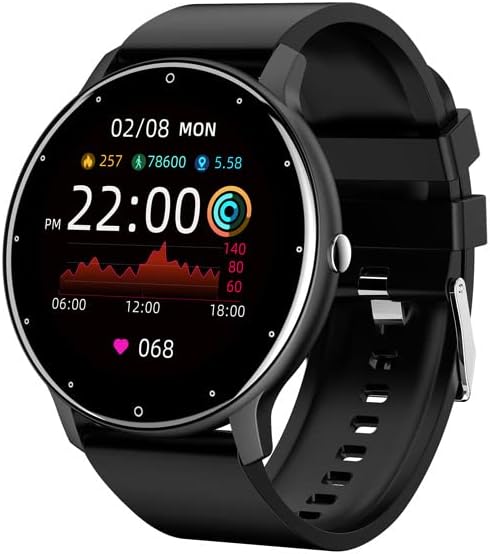
Figure 1.1: Dafit ZL02CPRO Smart Watch (Black Silicone Strap)
This image shows the main view of the Dafit ZL02CPRO Smart Watch in black with a silicone strap. The watch face displays the current time, date, step count, distance, and heart rate data, illustrating its primary functions.
2. Ki sa ki nan bwat la
Lè w ap ouvri anbalaj pwodwi a, tanpri verifye si tout bagay sa yo ladan l:
- Mont entelijan Dafit ZL02CPRO
- Manyèl itilizatè
- Wristbands (Silicone or Steel, depending on model)
- Chaje kab
3. Gid Enstalasyon
3.1 Chaje Aparèy la
Before initial use, fully charge your smart watch. Connect the provided charging cable to the charging port on the watch and a standard USB power adapter (not included). A full charge typically takes approximately 2 hours. The watch can operate for 5-7 days on a single charge, depending on usage.
3.2 Enstalasyon ak koneksyon aplikasyon an
To unlock the full functionality of your smart watch, you need to install the companion application on your smartphone. The watch supports Android 5.0 and above, and Apple iOS 9.0 or later.
- Telechaje App a: Chèche pou "Dafit" in your smartphone's app store (Google Play Store for Android or Apple App Store for iOS) and install the application.
- Pèmèt Bluetooth: Asire w ke Bluetooth aktive sou smartphone ou.
- Louvri aplikasyon an: Launch the Dafit application and follow the on-screen instructions to create an account or log in.
- Konekte mont lan: Within the app, navigate to the device pairing section. The app will search for nearby devices. Select "ZL02CPRO" or the corresponding device name when it appears. Confirm the pairing request on both your phone and the watch if prompted.
- Maintain Connection: For optimal performance and to receive notifications, keep the Bluetooth distance between your watch and smartphone within 10 meters.
4. Operasyon Enstriksyon
4.1 Navigasyon debaz
The ZL02CPRO Smart Watch features a full touch screen for intuitive navigation. Swipe across the screen to access different functions and menus. Press the side button to return to the main watch face or to power on/off the device.
4.2 Karakteristik siveyans sante
The watch is equipped with sensors to track various health and fitness metrics:
- Tracker aktivite: Monitors daily steps, calories burned, and distance traveled.
- Siveyans batman kè: Provides continuous or on-demand heart rate readings.
- Siveyans dòmi: Suivi modèl ak kalite dòmi.
- Mòd milti-espò: Supports various exercise modes to record specific workout data, including exercise time, heart rate tracking, and mileage. GPS movement track data is available when connected to your smartphone's GPS.
4.3 Karakteristik Asistan Entelijan
Your smart watch acts as a personal assistant, keeping you connected and organized:
- Notifikasyon: Receive alerts for incoming calls, SMS messages, and notifications from various applications directly on your wrist. You can reject calls from the watch.
- Kontwòl Remote: Control music playback and trigger your smartphone's camera remotely.
- Rapò meteyo: Jwenn dènye nouvèl sou metewolojik an tan reyèl.
- Rapèl: Set sedentary reminders and alarm clocks.
- Zouti: Access stopwatch functionality.
- Montre Anviwònman: Adjust screen brightness and activate power-saving mode.

Figure 4.1: Customizable Watch Faces and On-Wrist View
This image illustrates the variety of customizable watch faces available for the ZL02CPRO Smart Watch, allowing users to personalize their device. It also shows the watch being worn on a wrist, demonstrating its comfortable fit and display visibility during use.
4.4 Sipò pou lang
The watch supports multiple languages, including Chinese, English, German, Spanish, French, Russian, Arabic, Ukrainian, Italian, and Portuguese. Language settings can typically be adjusted within the companion app.
5. Water Resistance and Care
The ZL02CPRO Smart Watch is IP68 waterproof, meaning it is resistant to dust and can withstand immersion in water up to 1.5 meters for 30 minutes. It can be worn when washing hands or in the rain. However, it is important to note that the watch is pa suitable for use in showers, saunas, or during diving activities, as steam and high water pressure can damage the device.
To maintain the watch's condition, regularly clean the device and straps with a soft, dry cloth. Avoid exposing the watch to extreme temperatures or harsh chemicals.
6. Espesifikasyon
| Karakteristik | Detay |
|---|---|
| Montre Kalite ekran | TFT ekran |
| Gwosè ekran | 1.28 Inches (Round) |
| Ka Materyèl | PC plastik |
| Materyèl senti | Anti-static Silicone or Steel (depending on model) |
| Pwa atik | 80 gram (2.82 ons) |
| Kapasite batri | 230 Miliamp Orè |
| Tan pou chaje | Apeprè. 2 èdtan |
| Lavi batri | 5-7 jou (itilizasyon tipik) |
| Evalyasyon rezistans dlo | IP68 |
| Koneksyon Teknoloji | Bluetooth |
| Sistèm operasyon konpatibilite | Android 5.0+ / iOS 9.0+ |
| GPS | Via Smartphone |
| Nimewo Modèl | cn101 |
NAN. Depanaj
Si ou rankontre pwoblèm ak mont entelijan Dafit ZL02CPRO ou a, tanpri al gade solisyon komen sa yo:
- Mont lan pa limen: Asire w ke mont lan chaje nèt. Konekte l ak kab chaje a ak yon sous kouran pou omwen 30 minit.
- Pa ka konekte ak telefòn entelijan an:
- Asire w ke Bluetooth aktive sou telefòn entelijan ou ak sou mont lan.
- Make sure the watch is within 10 meters of your smartphone.
- Rekòmanse tou de mont lan ak smartphone ou.
- Try unpairing and re-pairing the device through the Dafit app.
- Check if the Dafit app is updated to the latest version.
- Notifikasyon ki pa resevwa:
- Verify that the watch is successfully paired and connected via Bluetooth.
- Check notification permissions for the Dafit app in your smartphone's settings.
- Ensure notifications are enabled within the Dafit app for specific applications.
- Disable any "Do Not Disturb" or "Power Saving" modes on your phone or watch that might block notifications.
- Done sou sante ki pa egzak:
- Asire w ke mont lan byen sere sou ponyèt ou, men pa twò sere.
- Netwaye detèktè ki sou dèyè mont lan.
- For best results, ensure your profile information (height, weight) is accurate in the Dafit app.
- Kout lavi batri:
- Diminye klète ekran an.
- Limit continuous heart rate monitoring.
- Dezaktive notifikasyon ki pa nesesè yo.
- Activate power-saving mode if available.
If issues persist, please contact customer support for further assistance.
8. Garanti ak sipò
This product comes with a standard manufacturer's warranty. For specific warranty terms and conditions, please refer to the documentation provided with your purchase or contact the seller directly. For technical support or any questions regarding the operation of your Dafit ZL02CPRO Smart Watch, please reach out to the customer service team via the contact information provided by your retailer or on the product packaging.