
Entwodiksyon
This manual provides essential instructions for the safe and efficient use of your Sencor SRV 1550WH Robot Vacuum Cleaner and Mop. Please read this manual thoroughly before operating the device and keep it for future reference.
Pwodwi souview
The Sencor SRV 1550WH is a robot vacuum cleaner and mop designed for autonomous cleaning. It vacuums dirt and simultaneously mops dust from hard floors. Equipped with two side brushes, it effectively cleans along walls and in corners. Its ultra-slim design allows it to navigate under furniture and around obstacles. The SENCOR Smart Room technology ensures efficient movement, and the device features intelligent impact and fall sensors for safe operation.
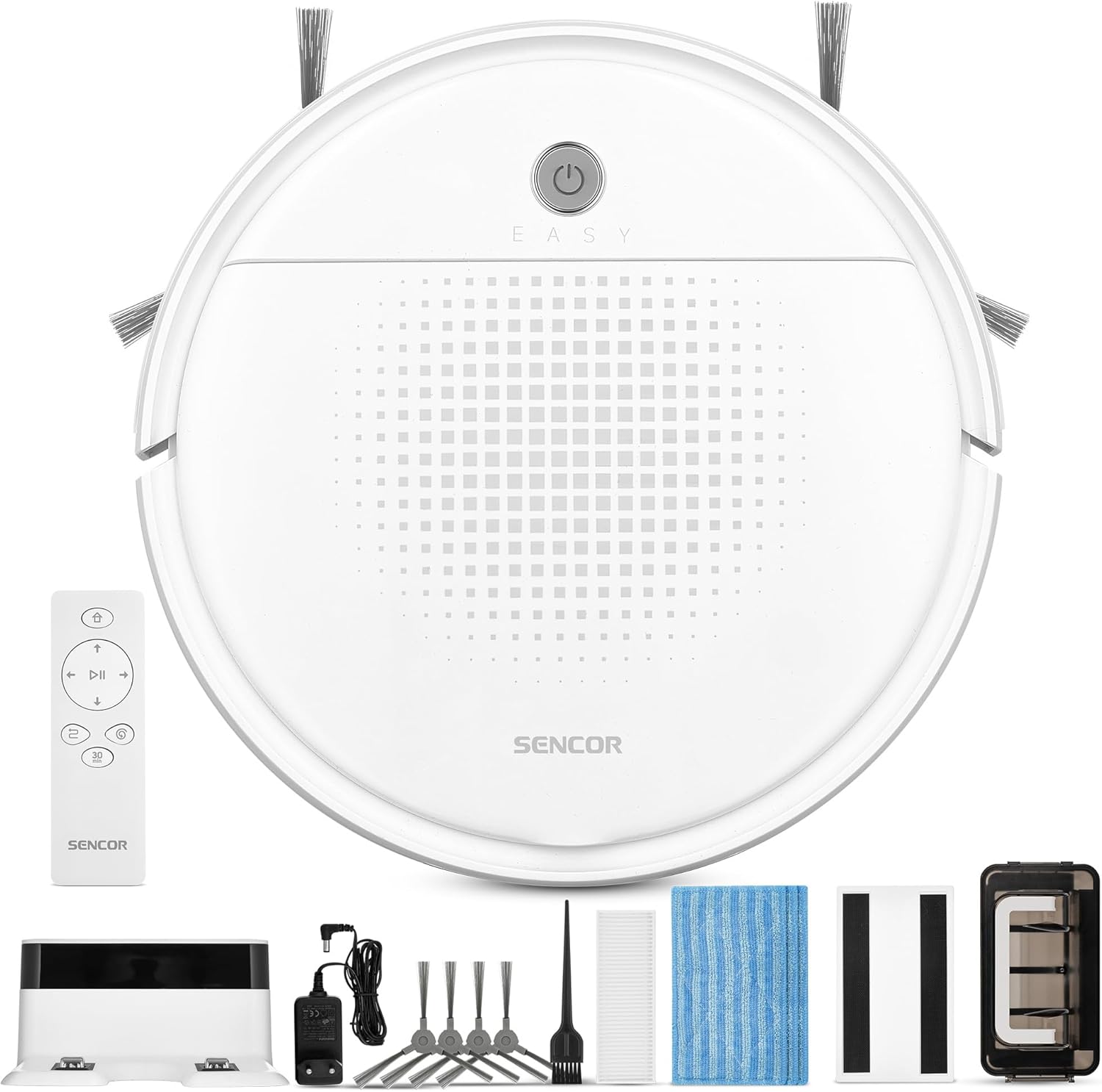
Imaj 1: Sencor SRV 1550WH Robot Vacuum Cleaner and Mop with its included accessories, including the charging station, remote control, side brushes, mop pads, and cleaning tools.
Kontni pake
- Robot vacuum cleaner (including two side brushes and filters)
- Estasyon chaje batri
- Netwayaj akseswar
- 3x textile mop sleeves
- Remote kontwòl
- 2 pil AAA (pou kontwòl remote)
- 2x spare rotating side brushes
- Adaptè pouvwa
- 1x spare HEPA filter
- Netwayaj bwòs
Enstriksyon Sekirite
Before using the appliance, please read all safety warnings and instructions. Failure to follow these instructions may result in electric shock, fire, or serious injury. Keep this manual in a safe place for future reference.
- Timoun ki gen laj 8 an ak pi wo a ak moun ki gen kapasite fizik, sansoryèl oswa mantal redwi oswa ki pa gen eksperyans ak konesans yo kapab itilize aparèy sa a si yo te ba yo sipèvizyon oswa enstriksyon konsènan itilizasyon aparèy la an sekirite epi yo konprann danje ki genyen ladan yo. .
- Timoun yo pa dwe jwe ak aparèy la. Netwayaj ak antretyen itilizatè pa dwe fèt pa timoun san sipèvizyon.
- Only use the original power adapter and charging station provided by the manufacturer.
- Pa sèvi ak aparèy la nan anviwònman mouye oswa toupre dlo.
- Asire w ke estasyon chaje a mete sou yon sifas plat, ki stab, kont yon miray, epi ki gen yon espas vid toutotou li.
- Remove any loose cables, small objects, or fragile items from the cleaning area before operation.
- Do not operate the robot over open flames or hot ashes.
- Do not allow the robot to pick up large objects, liquids, or burning/smoking materials.
- Netwaye bwòs yo ak filtè yo regilyèman pou kenbe pèfòmans optimal.
Enstalasyon
1. Debalaj ak premye enspeksyon
Carefully remove all components from the packaging. Check for any signs of damage. Retain the packaging for future transport or storage.
2. Plasman Estasyon Chaje
Place the charging station against a wall in an open area. Ensure there is at least 1 meter (3 feet) of clear space on both sides and 2 meters (6 feet) in front of the charging station for the robot to easily dock. Connect the power adapter to the charging station and plug it into a power outlet.
3. Enstale bwòs bò yo
Turn the robot upside down. Align the side brushes with the corresponding posts on the bottom of the robot and press them down until they click into place. Ensure they are securely attached.
4. Premye Chaj
Place the robot onto the charging station. Ensure the charging contacts on the robot align with those on the station. The indicator light on the robot will show its charging status. For first-time use, charge the robot for at least 5-6 hours to ensure the battery is fully conditioned.
Fonksyone aspiratè robo a
1. Powering On / Off
Press and hold the power button on the robot for a few seconds to turn it on or off. Alternatively, use the power button on the remote control.

Imaj 2: A hand holding the remote control for the Sencor robot vacuum, with the robot and charging station visible in the background, illustrating remote operation.
2. Kòmanse yon sik netwayaj
Peze a "Pwòp" button on the robot or the remote control to start a cleaning cycle. The robot will automatically select a cleaning path using SENCOR Smart Room technology.
3. Netwayaj mòd
- Netwayaj otomatik: The robot navigates and cleans the entire accessible area.
- Pwogram 30 minit: Ideal for smaller areas or a single room, the robot cleans for approximately 30 minutes before returning to the charging station. Activate this mode via the remote control.
4. Mop Function
To use the mop function, attach a clean textile mop sleeve to the bottom of the robot. The robot will vacuum and mop simultaneously. Ensure the water tank (if applicable, though not explicitly mentioned for this model, it's implied by "laveur") is filled if a wet mop is desired. For this model, it uses an antistatic mop for dust wiping.
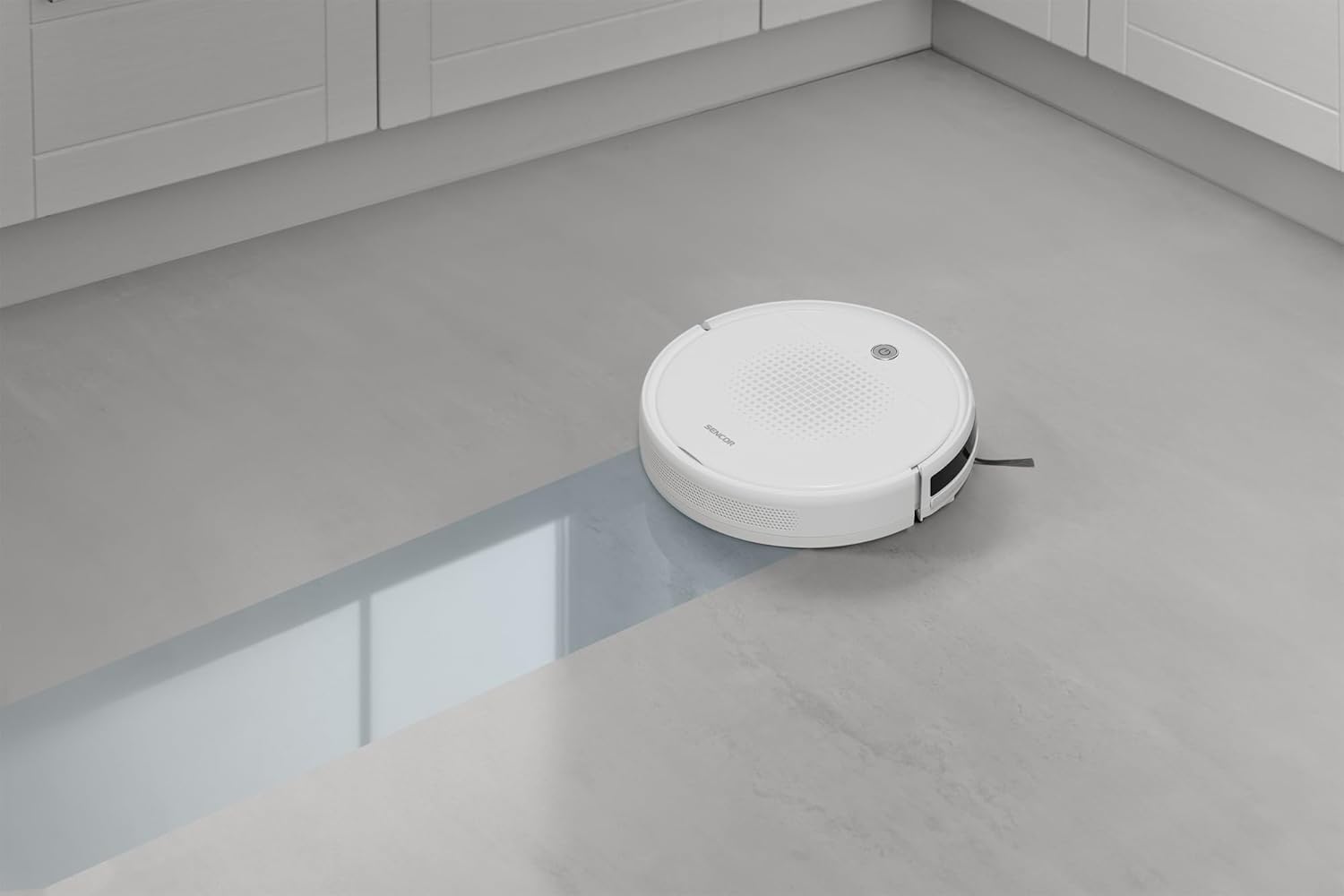
Imaj 3: The Sencor robot vacuum cleaner actively mopping a hard floor, leaving a clean path behind it.
5. Automatic Docking and Charging
When the battery is low or a cleaning cycle is complete, the robot will automatically return to its charging station. Ensure the charging station is accessible and powered on.

Imaj 4: The Sencor robot vacuum cleaner moving from a carpeted area to a hard floor, demonstrating its ability to clean different surfaces and pick up debris.

Imaj 5: The Sencor robot vacuum cleaner operating under a sofa, highlighting its ultra-slim 7 cm design for accessing hard-to-reach areas.
Antretyen
Antretyen regilye asire pèfòmans optimal epi pwolonje lavi aspiratè robo ou a.
1. Vide Bwat Pousyè a
Press the release button to remove the dust bin. Open the dust bin cover and empty its contents into a trash can. It is recommended to empty the dust bin after each cleaning cycle.
2. Netwayaj/Ranplasman Filtè yo
Remove the HEPA filter and primary filter from the dust bin. Tap the filters gently to remove dust. The HEPA filter is not washable; replace it every 3-6 months depending on usage. The primary filter can be rinsed with water and air-dried completely before reinstallation.
3. Netwayaj Bwòs Side
Periodically remove the side brushes by pulling them upwards. Use the provided cleaning brush or a pair of scissors to remove any tangled hair or debris. Reinstall them securely.
4. Netwaye kousinen mop yo
Remove the textile mop sleeve after each use. Rinse it thoroughly with water and allow it to air dry. Replace mop sleeves when they show signs of wear or reduced effectiveness.
5. Netwayaj Capteur ak Kontak Chaje
Wipe the anti-drop sensors, bumper sensors, and charging contacts on both the robot and the charging station with a clean, dry cloth to ensure proper function.
Depanaj
If your robot vacuum encounters an issue, refer to the following common problems and solutions:
| Pwoblèm | Kòz posib | Solisyon |
|---|---|---|
| Robo pa limen. | Batri a fèb; li pa chaje. | Place the robot on the charging station and ensure it is fully charged. |
| Robo a pa chaje. | Charging contacts are dirty; charging station not powered. | Clean charging contacts on both robot and station. Ensure charging station is plugged in and powered. |
| Robo a bloke souvan. | Obstak nan chemen netwayaj la; bwòs ki mele. | Clear the cleaning area of loose cables, small objects. Clean side brushes for tangled hair. |
| Pòv pèfòmans netwayaj. | Full dust bin; dirty filters; worn brushes. | Empty dust bin. Clean or replace filters. Clean or replace side brushes. |
| Robo a pa retounen nan estasyon chaj la. | Charging station is blocked or not powered; robot too far from station. | Ensure charging station is accessible and powered. Manually place robot near station to assist docking. |
Espesifikasyon
| Mak | SENCOR |
| Nimewo Modèl | SRV 1550WH |
| Koulè | Blan |
| Dimansyon (L x W x H) | 29 x 29 x 7 cm (11.4 x 11.4 x 2.7 pous) |
| Pwa | 1.9 kilogram (4.19 liv) |
| Pousyè Bin kapasite | 200 mililit |
| Voltage | 220 Volts |
| Materyèl | Plastik |
| Nivo bri | 60 Desibèl |
| Dire batri (tan fonksyone) | Up to 60 minutes (1 hour) |
| Karakteristik espesyal | Automatic docking, Anti-fall, Anti-collision, Automatic stop, Continuous suction, Simultaneous suction and cleaning, Dirt detection sensor, Logical navigation, Programmable, Pet hair pickup, Easy-to-empty dirt container, Cordless, Bagless, Low noise level, Washable primary filter, HEPA filter. |
| Kalite filtre | HEPA |
| Kalite kontwolè | Kontwòl Remote |
Garanti ak sipò
Sencor offers a satisfaction guarantee for this product. Please refer to your purchase documentation for specific warranty terms and conditions.
- Garanti Satisfaksyon: A 30-day satisfaction guarantee is offered.
- Pyès rezèv: Enfòmasyon konsènan disponiblite pyès rezèv yo pa disponib kounye a.
- For further assistance or technical support, please contact Sencor customer service through their official websit oswa enfòmasyon kontak yo bay ak acha w la.