
1. Entwodiksyon
This manual provides detailed instructions for the safe and efficient operation of your HANLIM Portable CD Player, Model HL-108. Please read this manual thoroughly before using the product and retain it for future reference.

Figi 1: Devan view of the HANLIM Portable CD Player HL-108. This image displays the main unit with its control panel, LCD screen, and integrated handle.
2. Enstriksyon Sekirite
- Pa ekspoze aparèy la anba lapli, imidite, oswa tanperati ekstrèm.
- Evite mete aparèy la toupre sous chalè oswa anba limyè solèy dirèk.
- Pa ouvri c laasing; konfye tout antretyen bay pèsonèl kalifye.
- Kenbe inite a lwen gwo chan mayetik.
- Sèvi ak sèlman kab pouvwa yo bay la.
- Asire bon vantilasyon pou anpeche surchof.
3. Pake kontni
Tanpri verifye ke tout atik yo prezan:
- HANLIM Portable CD Player HL-108
- Kab pouvwa (1.2m)
- Remote kontwòl (pil pa enkli)
- Manyèl itilizatè

Figi 2: The HANLIM Portable CD Player HL-108 shown with its included accessories: the power cable, remote control, and user manual.
4. Pwodwi souview
The HANLIM Portable CD Player HL-108 features a compact design with multiple playback options and connectivity ports.
4.1 Kontwòl Panel Front
- Ekspozisyon LCD: Shows current mode, track information, and FM frequency.
- Bouton MODE: Chanje ant mòd CD, FM, Bluetooth, USB, ak AUX.
- Bouton STANDBY: Limen oswa etenn inite a.
- Bouton Jwe/Pòz/Eskane: Plays/pauses media or scans FM radio stations.
- Previous/CH- Button: Skips to previous track/station.
- Next/CH+ Button: Skips to next track/station.
- Volim bouton: Ajiste volim odyo a.
- Pò USB: Pou lekti sou kle USB.
- Jack kas ekoutè (3.5mm): Pou koute prive.
4.2 Koneksyon Panèl Dèyè
- ANTRE AUXILIÈ (3.5mm): Konekte aparèy odyo ekstèn yo.
- Pò MIC: Connect a microphone for singing.
- AC pouvwa Antre: Connect the power cable for charging or continuous power.
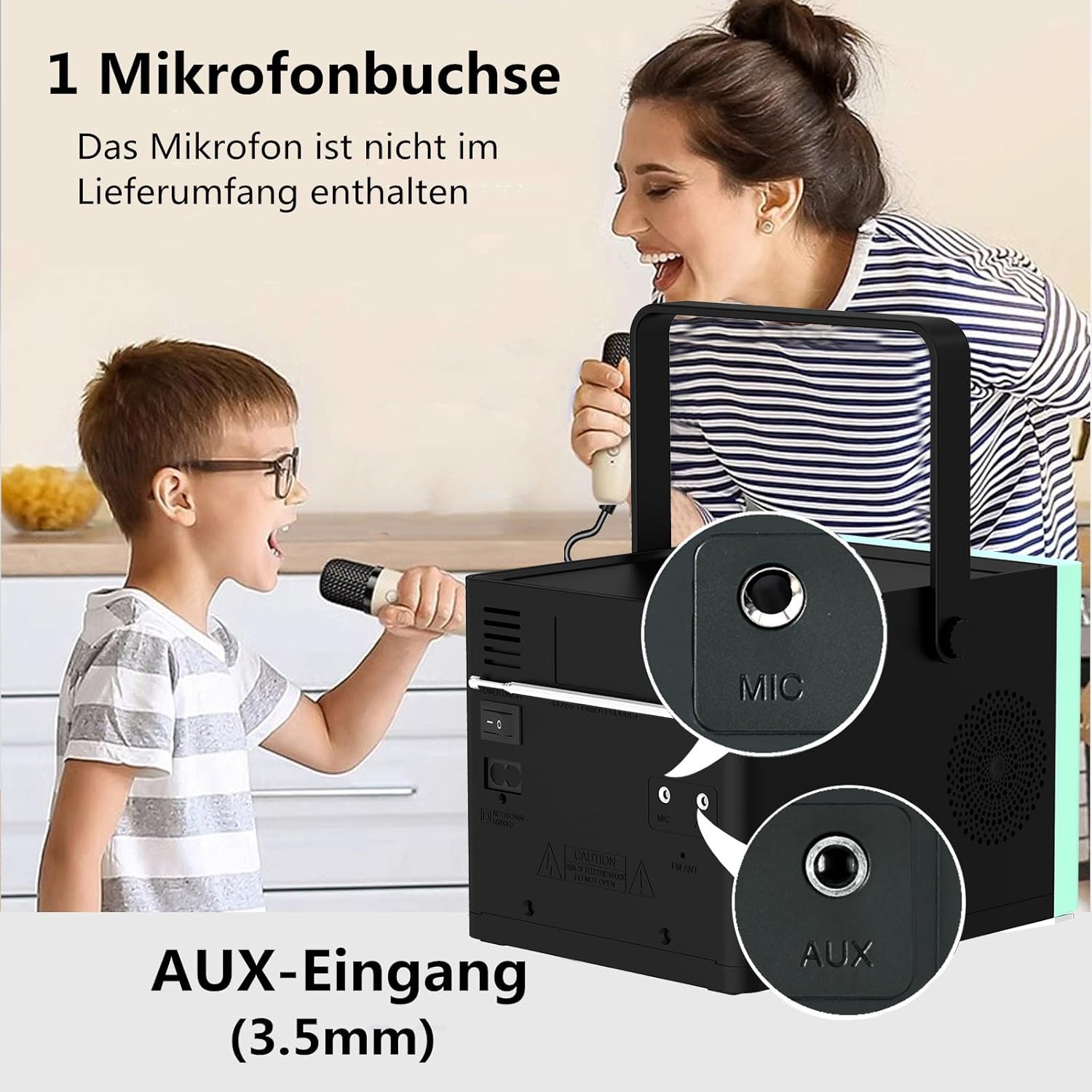
Figi 3: Dèyè view of the HANLIM Portable CD Player HL-108, highlighting the microphone input and AUX input ports.
5. Enstalasyon
5.1 Limen epi chaje
- Connect the provided power cable to the AC power input on the rear of the unit and plug it into a wall outlet.
- The built-in 2000mAh battery will begin charging automatically. A full charge provides approximately 4.5 to 5 hours of playback at maximum volume.
- Peze a atant bouton pou pouvwa sou inite a.
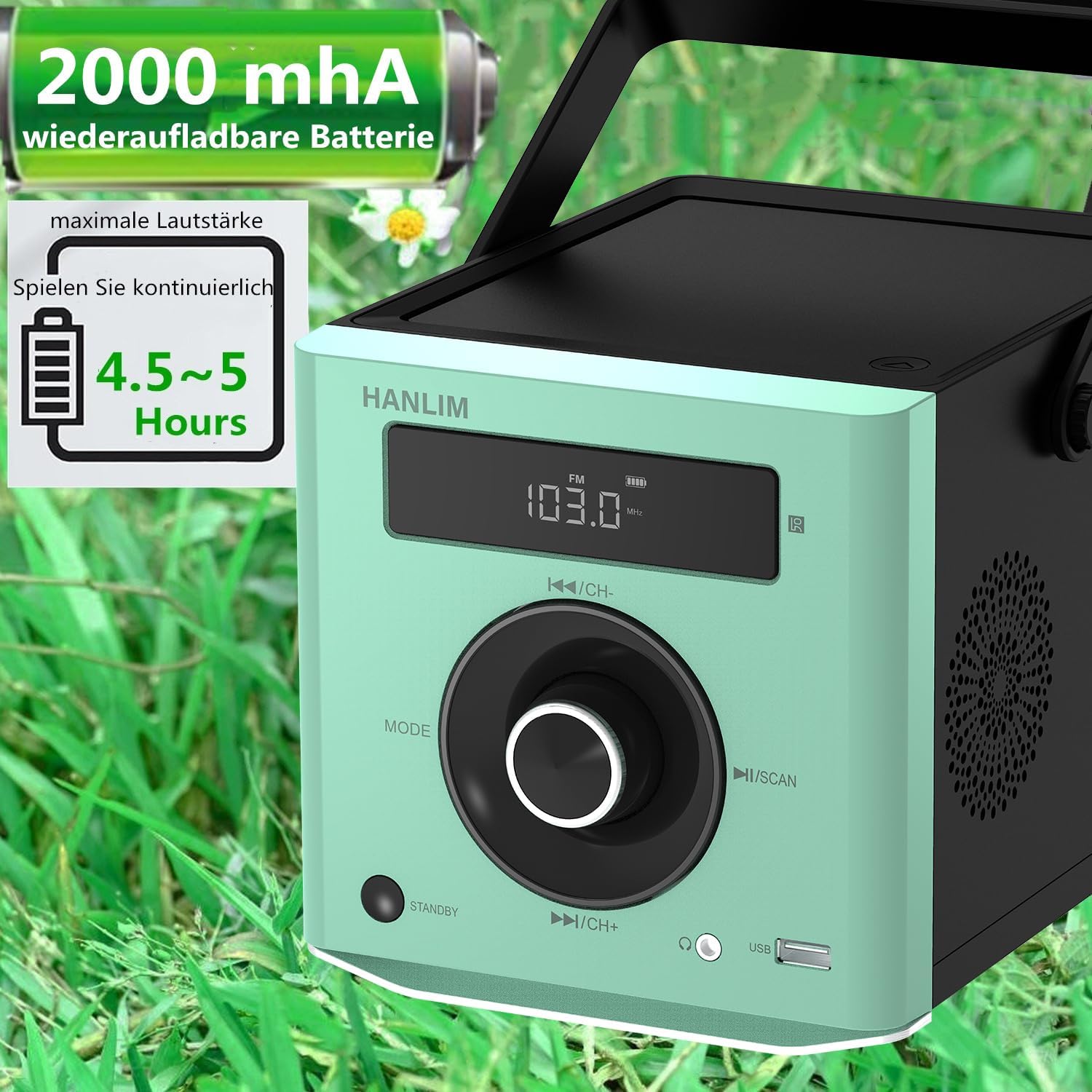
Figi 4: The HANLIM Portable CD Player HL-108 displaying battery charge status and indicating 4.5-5 hours of continuous playback.
6. Operasyon Enstriksyon
6.1 Lekti CD
- Louvri kouvèti konpatiman CD a.
- Place a CD (CD/CD-R/CD-RW/MP3 format) onto the spindle, label side up.
- Fèmen kouvèti lòj CD a.
- Peze a MÒD button until "CD" is displayed.
- Peze a Jwe/Poz bouton pou kòmanse lecture.
- Sèvi ak la Previous/Next bouton pou sote tras.
- Fonksyon repete: Press the repeat button on the remote control to cycle through repeat one, repeat all, or random play.
- Continue Playback: The unit will resume playback from where it was last stopped, useful for language learning.
6.2 FM Radyo
- Peze a MÒD bouton an jiskaske "FM" parèt.
- Peze epi kenbe la Eskane button to automatically scan and store available FM stations (87.5-108MHz). Up to 20 stations can be stored.
- Sèvi ak la CH- epi CH+ buttons to navigate through stored stations.

Figi 5: The HANLIM Portable CD Player HL-108 showing the FM radio frequency on its display.
6.3 Bluetooth Koneksyon
- Peze a MÒD button until "Bluetooth" is displayed. The unit will enter pairing mode.
- On your device (phone, tablet, computer), enable Bluetooth and search for "HANLIM HL-108".
- Chwazi aparèy ou vle konekte a. Yon fwa konekte, ou pral tande yon son konfimasyon.
- Note: Bluetooth headphones are not supported for connection to this CD player.

Figi 6: The HANLIM Portable CD Player HL-108 illustrating its Bluetooth connectivity, USB port, and headphone jack.
6.4 Lekti USB
- Insert a USB flash drive (up to 32GB, supporting MP3/WMA formats) into the USB port.
- Peze a MÒD button until "USB" is displayed.
- Playback will start automatically. Use the Previous/Next bouton pou navige sou tras.
6.5 Antre AUX
- Connect an external audio device (e.g., phone, computer) to the AUX IN port using a 3.5mm audio cable (not included).
- Peze a MÒD bouton an jiskaske "AUX" parèt sou ekran an.
- Kontwole lekti a depi aparèy konekte ou an.
6.6 Jack kas ekoutè
For private listening, connect 3.5mm headphones to the headphone jack on the front panel.
6.7 Microphone Port
Connect a microphone (not included) to the MIC port on the rear panel for singing along to music.
6.8 Anviwònman Son (Egalizè)
The unit offers 5 sound qualities: Pop, Jazz, Rock, Classical, and Flat. Use the EQ button on the remote control to cycle through these modes and adjust the audio output to your preference.
7. Antretyen
- Netwayaj: Siye aparèy la avèk yon twal mou epi sèk. Pa sèvi ak pwodui netwayaj abrazif oswa solvan.
- Swen CD: Manyen CD yo nan kwen yo. Netwaye CD sal yo ak yon twal mou ki pa gen pousyè, siye soti nan sant la pou ale deyò.
- Swen batri: Pou yon batri ki dire pi lontan, evite dechaje batri a nèt souvan. Si w ap sere l pou yon bon bout tan, chaje l a anviwon 50% chak kèk mwa.
NAN. Depanaj
| Pwoblèm | Kòz posib | Solisyon |
|---|---|---|
| Aparèy pa limen. | Battery is depleted or power cable is not connected. | Connect the power cable and allow the battery to charge, or operate directly from AC power. |
| Pa gen son. | Volume is too low, headphones connected, or incorrect mode selected. | Increase volume, disconnect headphones, or ensure the correct input mode (CD, FM, BT, USB, AUX) is selected. |
| CD a pa jwe oswa li sote. | CD a sal, grate, oswa li pa byen mete. | Clean the CD, try a different CD, or reinsert the CD correctly. Ensure the CD compartment is fully closed. |
| Bluetooth appariement echwe. | Device is too far, Bluetooth is off on the device, or unit is not in pairing mode. | Ensure the unit is in Bluetooth mode, your device's Bluetooth is on, and they are within range. Try restarting both devices. |
| Resepsyon radyo FM lan pa bon. | Siyal fèb oswa pozisyon antèn nan fèb. | Adjust the unit's position or extend the antenna for better reception. |
9. Espesifikasyon
| Karakteristik | Spesifikasyon |
|---|---|
| Mak | HANLIM |
| Modèl | HL-108 |
| Dimansyon pwodwi | 15.5 x 20.5 x 16 cm (6.1 x 8.1 x 6.3 pous) |
| Pwa atik | 1.7 kg (3.75 liv) |
| Sorti pouvwa | 20W |
| Batri | Built-in 2000mAh rechargeable Lithium Ion |
| Lavi batri | Jiska 5 èdtan (nan volim maksimòm) |
| Supported CD Formats | CD, CD-R, CD-RW, MP3 |
| Frekans Radyo FM | 87.5-108 MHz |
| Sipò USB | Up to 32GB, MP3/WMA formats |
| Koneksyon | Bluetooth, USB, AUX (3.5mm), Headphone Jack (3.5mm), Microphone Port |
| Kalite ekspozisyon | LCD |
| Karakteristik espesyal | Bluetooth, CD-R/RW Compatible, Equalizer, Portable, Rechargeable |
10. Garanti ak sipò
This HANLIM product comes with a yon ane garanti apati dat acha a. Garanti sa a kouvri domaj fabrikasyon ak atizan konn fè nan itilizasyon nòmal.
For technical support, warranty claims, or service inquiries, please contact your retailer or the HANLIM customer service department through the contact information provided at the point of purchase.