
BONTEC MDM001A
BONTEC Single Monitor Desk Mount MDM001A Instruction Manual
Model: MDM001A
Entwodiksyon
This manual provides detailed instructions for the safe and proper installation, operation, and maintenance of your BONTEC Single Monitor Desk Mount MDM001A. Please read this manual thoroughly before installation and retain it for future reference.
Enfòmasyon enpòtan sou sekirite
- Kapasite pwa: Do not exceed the maximum weight capacity of 22 lbs (10 kg). Overloading may result in property damage or personal injury.
- Gwosè ekran: Sipò sa a fèt pou monitè ant 13 ak 34 pous.
- VESA konpatibilite: Asire w ke monitè ou a gen modèl montaj VESA 75x75mm oswa 100x100mm.
- Estabilite Biwo: Verify that your desk surface is stable and strong enough to support the combined weight of the mount and your monitor.
- Enstalasyon: Follow all installation steps carefully. If you are unsure about any part of the installation, seek professional assistance.
- Pati k ap deplase: Be cautious when adjusting the mount to avoid pinching fingers or other body parts.
Kontni pake
Please verify that all components are present and undamaged before proceeding with installation. If any parts are missing or damaged, contact customer support.
- Asanble Bra Monitè a
- Biwo Clamp Eleman
- Grommet Base Component
- VESA Plak
- Twous pyès ki nan konpitè (vis, rondelles, espasè)
- Allen Keys
- Klip Jesyon Kab

Imaj: Plis paseview of the BONTEC Single Monitor Desk Mount MDM001A, illustrating the main components and both desk clamp and grommet base installation options.
Enstalasyon ak Enstalasyon
The BONTEC Single Monitor Desk Mount offers two installation methods: Desk Clamp and Grommet Base. Choose the method best suited for your desk.
Tcheke konpatibilite
- Gwosè monitè: 13-34 pous
- Siveye pwa: Jiska 22 liv (10 kg)
- Modèl VESA: 75x75mm oswa 100x100mm
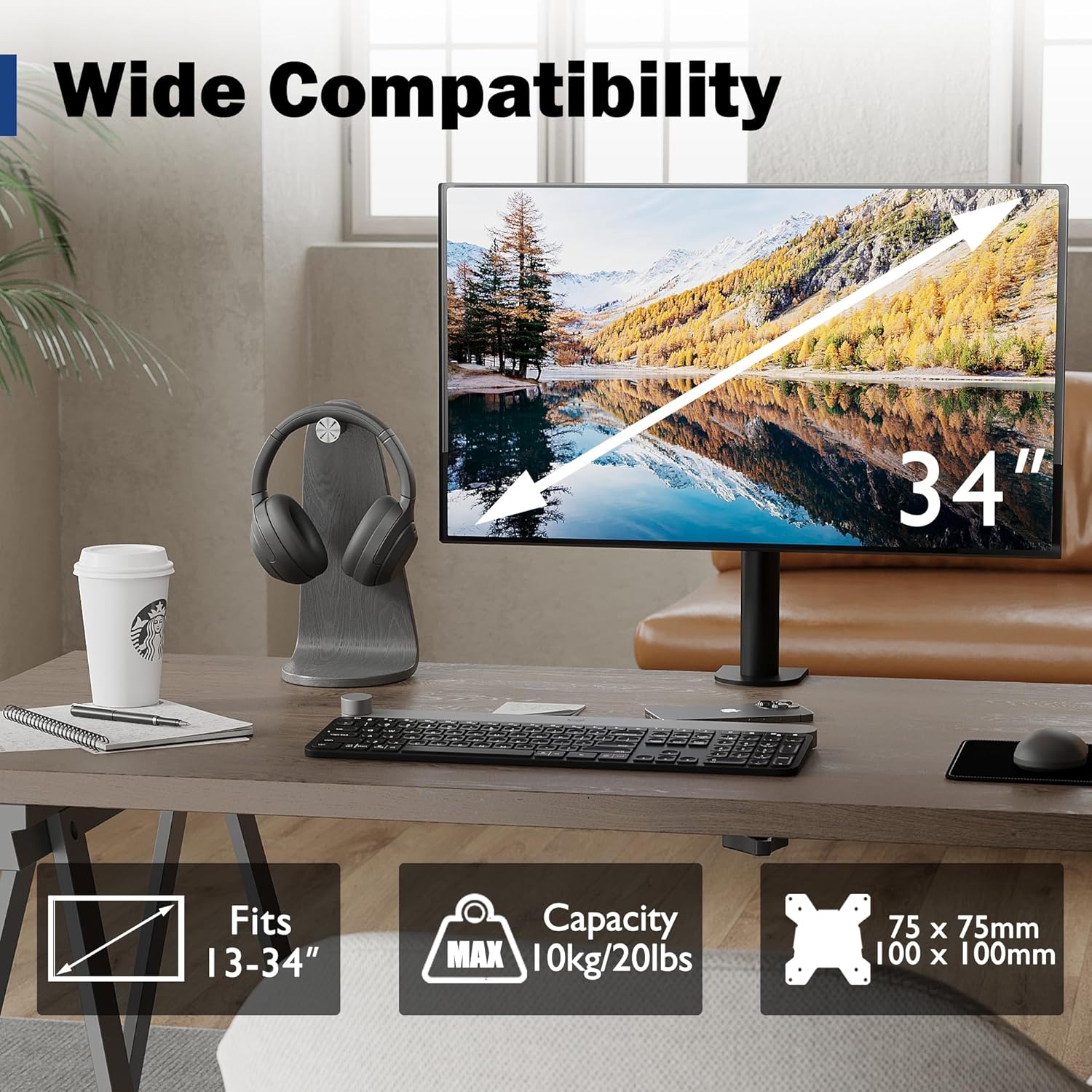
Image: Visual representation of monitor compatibility requirements, including screen size, weight, and VESA patterns.
Metòd enstalasyon yo
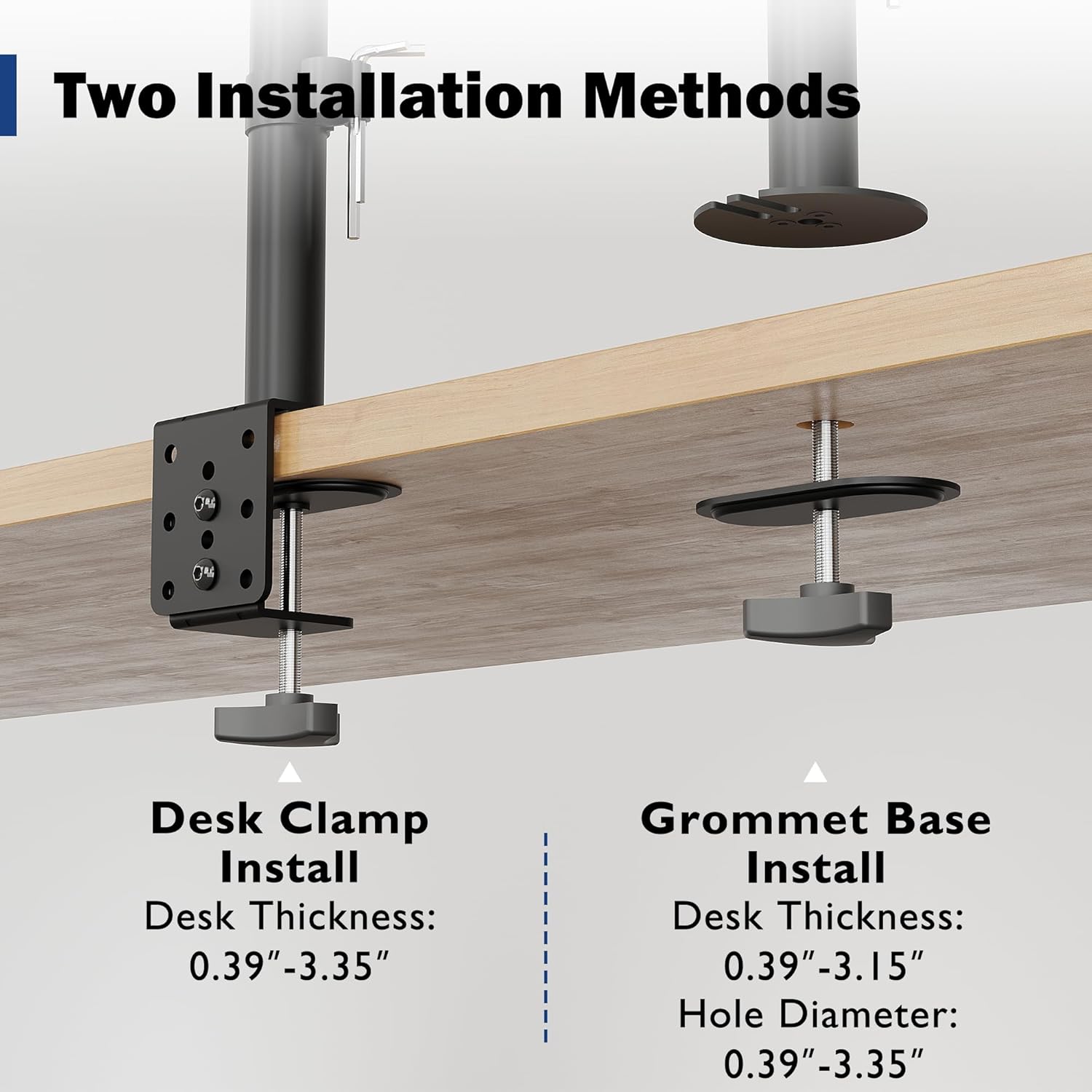
Image: Detailed illustration comparing the Desk Clamp and Grommet Base installation methods, including compatible desk thickness and hole diameter specifications.
Method 1: Desk Clamp Enstalasyon
- Tache biwo clamp component to the main pole.
- Pozisyon clamp on the edge of your desk. Ensure the desk thickness is between 0.39" and 3.35".
- Sere boulon clamp screw firmly until the mount is securely fixed to the desk.
Method 2: Grommet Base Installation
- If your desk has a bolt-through hole, ensure its diameter is between 0.39" and 3.35" and the desk thickness is between 0.39" and 3.15".
- Disassemble the desk clamp and use the grommet base plate and screw.
- Insert the grommet screw through the desk hole and secure it from underneath with the provided nut.
- Attach the main pole to the grommet base.
Tache monitè a
- Attach the VESA plate to the back of your monitor using the appropriate screws and spacers from the hardware kit. Ensure a secure fit.
- Carefully slide the monitor (with the attached VESA plate) onto the mounting head of the arm.
- Tighten any security screws on the mounting head to prevent accidental dislodging.
Operasyon ak Ajisteman
The BONTEC monitor mount offers various adjustments to optimize your viewing experience and ergonomic posture.
Ajisteman Wotè
The monitor can be raised or lowered along the 16.73-inch pole. Loosen the collar on the pole, adjust the monitor to the desired height, and then re-tighten the collar to secure its position.

Image: Illustration of the monitor mount's vertical height adjustment capability along the central pole.
Panche, Pivote, ak Wotasyon
The special swivel head design allows for flexible positioning:
- Enklinezon: Adjust the screen vertically by ±15° to reduce glare and find the optimal viewang ang.
- Swivel: Rotate the monitor horizontally up to 360° to share your screen or change viewing direksyon.
- Wotasyon: Rotate the screen 360° from landscape to portrait mode for different tasks.
After adjusting the angle, use the back screw lock on the VESA plate to provide extra security and maintain the desired position.

Image: Visual guide to the tilt, swivel, and rotation adjustments available on the monitor mount.
Jesyon kab
Utilize the integrated cable management clips along the pole to route and organize your monitor cables. This helps maintain a tidy workspace and prevents cable clutter.
An integrated storage slot for Allen keys is also provided on the pole for convenient access to adjustment tools.

Imaj: Gwo plan view of the cable management clips and the Allen key storage slot on the mount's pole.
Antretyen
- Netwayaj: Netwaye montaj la ak yon twal mou.amp twal. Evite pwodui netwayaj abrazif oswa solvan ki ka domaje fini an.
- Tèks Peryodik: Tcheke tout vis ak koneksyon yo detanzantan pou asire yo rete sere epi byen fèm. Sere yo ankò si sa nesesè.
- Lubrifikasyon: No lubrication is typically required for this product.
Depanaj
| Pwoblèm | Kòz posib | Solisyon |
|---|---|---|
| Siveyan an ap bese oswa li pa kenbe pozisyon an. | Mounting screws are loose; monitor weight exceeds capacity. | Ensure all screws, especially the back screw lock on the VESA plate, are tightened. Verify monitor weight is within 22 lbs (10 kg). |
| Mòn lan pa estab sou biwo a. | Desk clamp/grommet base is not tightened sufficiently. | Sere klou biwo a ankòamp or grommet base screw. Ensure desk thickness is within specified limits. |
| Difficulty adjusting monitor height. | Height adjustment collar is too tight. | Loosen the height adjustment collar on the pole before attempting to adjust height. Re-tighten once desired height is achieved. |
| Cables are messy. | Cable management not utilized. | Route cables through the integrated cable management clips on the pole. |
Espesifikasyon
- Mak: BONTEC
- Modèl: MDM001A
- Konpatibilite gwosè ekran: 13-34 pous
- Kapasite pwa: 22 liv (10 kg)
- VESA konpatibilite: 75x75mm, 100x100mm
- Panche Range: ± 15°
- Ranje Swivel: 360°
- Wotasyon: 360°
- Ajisteman wotè: Up to 16.73 inches (along pole)
- Biwo Clamp Epesè: 0.39" - 3.35"
- Grommet Base Desk Thickness: 0.39" - 3.15"
- Dyamèt twou Grommet: 0.39" - 3.35"
- Materyèl: Metal
- Koulè: Nwa
Garanti ak sipò
Specific warranty details are not provided within this manual. For warranty information, technical support, or to inquire about replacement parts, please visit the official BONTEC websit la oubyen kontakte sèvis kliyan yo dirèkteman.
Websit: BONTEC Store on Amazon
Ask a question about this manual
Ask about setup, troubleshooting, compatibility, parts, safety, or missing instructions. Manuals+ will review the question and use this page’s manual context to help answer it.