
Mibro XPEJ010WW
Manyèl Itilizatè Ekoutè San Fil Mibro Earbuds AC1 yo
Model: XPEJ010WW
1. Entwodiksyon
Thank you for choosing the Mibro Earbuds AC1 Wireless Earbuds. These earbuds combine an elegant design with exceptional audio performance, offering clear, immersive sound for your favorite music. With stable Bluetooth connectivity and a comfortable ergonomic fit, they are designed for convenience and quality audio on the go. This manual provides detailed instructions to help you get the most out of your new earbuds.
2. Enfòmasyon sou Sekirite
Please read all safety instructions before using this product.
- Pa ekspoze ekoutè yo oswa bwat chaje a nan tanperati, imidite, oswa likid ekstrèm.
- Evite lage l, frape l, oswa demonte aparèy la.
- Kenbe lwen timoun ak bèt kay.
- Sèvi sèlman ak kab chaje ki founi an oswa kab chaje ki sètifye a.
- Tande pwolonje nan nivo volim wo ka lakòz domaj nan tande.
3. Pake kontni
Asire w tout atik yo prezan nan pakè w la:
- Mibro Earbuds AC1 (Left and Right)
- Ka chaje
- Chaje kab
- Manyèl Itilizatè (dokiman sa a)
4. Pwodwi souview
Familiarize yourself with the components of your Mibro Earbuds AC1.

Figi 4.1: Mibro Earbuds AC1 removed from their open charging case, displaying the earbuds and the case.
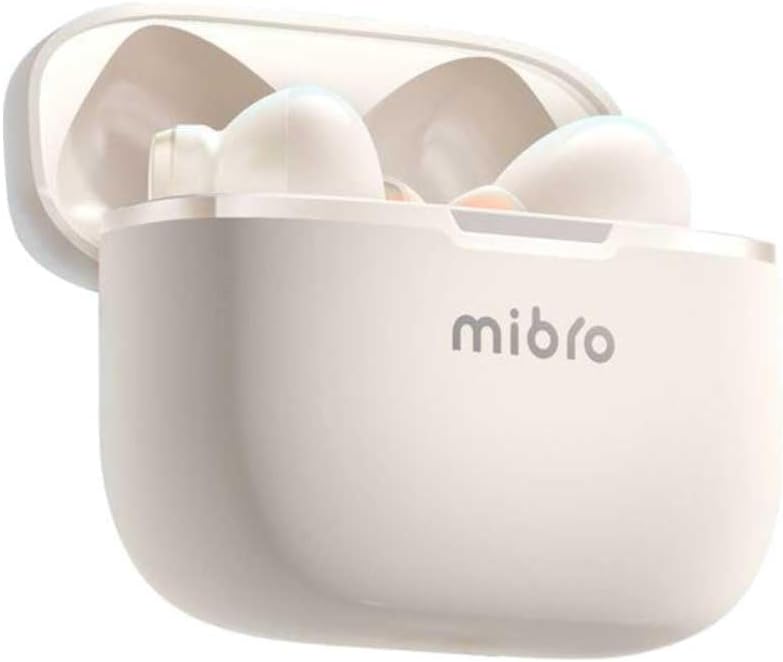
Figi 4.2: Mibro Earbuds AC1 placed inside their open charging case, showing the compact design.
The earbuds feature an ergonomic design for a secure and comfortable fit. The charging case protects the earbuds and recharges them on the go.
5. Enstalasyon
5.1 Chaje ekoutè yo ak bwat la
Anvan premye itilizasyon an, chaje ekoutè yo ak bwat chaje a nèt.
- Mete ekoutè yo nan ka chaje a.
- Konekte kab chaje a nan pò chaje ki sou bwat la epi nan yon sous kouran USB.
- The indicator light on the case will show charging status. A full charge may take up to 1 day (Note: This is an unusual specification, typically measured in hours. Please refer to product packaging for precise charging time).
- Yon fwa konplètman chaje, dekonekte kab la.
5.2 Konekte ak yon aparèy Bluetooth
To connect your Mibro Earbuds AC1 to your smartphone or other Bluetooth-enabled device:
- Asire w ke ekoutè yo chaje epi mete yo nan bwat chaje a.
- Louvri kouvèti bwat chaje a. Ekoutè yo ap antre otomatikman nan mòd koneksyon (limyè endikatè yo ap flache).
- Sou aparèy ou an, ale nan paramèt Bluetooth yo epi aktive Bluetooth la.
- Chèche pou available devices and select "Mibro AC1" from the list.
- Once connected, the indicator lights on the earbuds will stop flashing.
- Ekoutè yo ap konekte otomatikman ak dènye aparèy ki te konekte a lè yo retire yo nan bwat la, si Bluetooth aktive sou aparèy la.
6. Operasyon Enstriksyon
6.1 Power On/Off
- Pouvwa sou: Louvri kouvèti bwat chaje a, oubyen retire ekoutè yo nan bwat la. Y ap limen otomatikman.
- Pouvwa Off: Mete ekoutè yo tounen nan bwat chaje a epi fèmen kouvèti a. Y ap etenn otomatikman epi y ap kòmanse chaje.
6.2 Mizik lèktur
Sèvi ak kontwòl taktil yo sou ekoutè yo pou jere mizik la:
- Jwe/Poz: Tape yon sèl sou chak ekoutè.
- Pwochen Track: Tape de fwa sou ekoutè dwat la.
- Track Previous: Tape de fwa sou ekoutè gòch la.
6.3 Jesyon Apèl
Manage phone calls with the touch controls:
- Reponn/Fen Apèl: Tape yon sèl sou chak ekoutè.
- Rejte apèl: Peze epi kenbe swa ekoutè pou 2 segonn.
6.4 Anilasyon Bri
The Mibro AC1 Earbuds feature noise cancellation. Specific controls for activating or deactivating this feature are typically managed via a long press or a specific tap sequence. Refer to the quick start guide included in your package for precise instructions, as these can vary.
7. Antretyen
7.1 Netwayaj
- Siye ekoutè yo ak bwat chaje a ak yon twal mou, sèk, epi ki pa gen pousyè.
- Pa sèvi ak pwodui netwayaj abrazif, alkòl, oswa solvan chimik.
- Asire w ke kontak chaj yo pwòp epi sèk.
7.2 Depo
Lè w pa ap itilize ekoutè yo, mete yo nan bwat chaj yo pou pwoteje yo epi kenbe yo chaje. Sere yo nan yon kote ki fre epi sèk, lwen limyè solèy dirèk.
NAN. Depanaj
If you encounter issues with your Mibro Earbuds AC1, try the following solutions:
| Pwoblèm | Solisyon |
|---|---|
| Ekoutè pa asosye |
|
| Pa gen son nan ekoutè |
|
| Ekoutè pa chaje |
|
9. Espesifikasyon
| Karakteristik | Detay |
|---|---|
| Non modèl | XPEJ010WW (AC1) |
| Mak | Mibro |
| Koneksyon Teknoloji | San fil (Bluetooth) |
| Karakteristik espesyal | Anile bri |
| Koulè | Blan cho |
| Faktè fòm | Nan-zòrèy |
| Materyèl | Plastik |
| Nivo rezistans dlo | Pa enpèmeyab |
| Tan pou chaje | Up to 1 day (Note: This is an unusual specification, typically measured in hours. Please refer to product packaging for precise charging time.) |
10. Garanti ak sipò
Mibro products are designed and manufactured to the highest quality standards. For detailed warranty information, please refer to the warranty card included with your purchase or visit the official Mibro websit.
For further assistance, technical support, or to explore other Mibro products, please visit the Magazen Mibro sou Amazon.
Dokiman ki gen rapò - XPEJ010WW
 |
Mibro Earbuds AC1 User Manual - Wireless Bluetooth Headphones Comprehensive user manual for Mibro Earbuds AC1 (XPEJ010), covering setup, features, safety, troubleshooting, and specifications. Learn how to connect and use your wireless earbuds. |
Ask a question about this manual
Ask about setup, troubleshooting, compatibility, parts, safety, or missing instructions. Manuals+ will review the question and use this page’s manual context to help answer it.