
Entwodiksyon
The AOSHIDA SMSL B2 is a versatile HiFi Bluetooth Receiver and Digital-to-Analog Converter (DAC) designed to enhance your audio experience. It features a high-performance CS43131 decoding chip and QCC5125 Bluetooth 5.1 chip, offering multiple input and output options for seamless integration with various audio systems.
This manual provides detailed instructions on setting up, operating, and maintaining your SMSL B2 device, along with troubleshooting tips and product specifications.
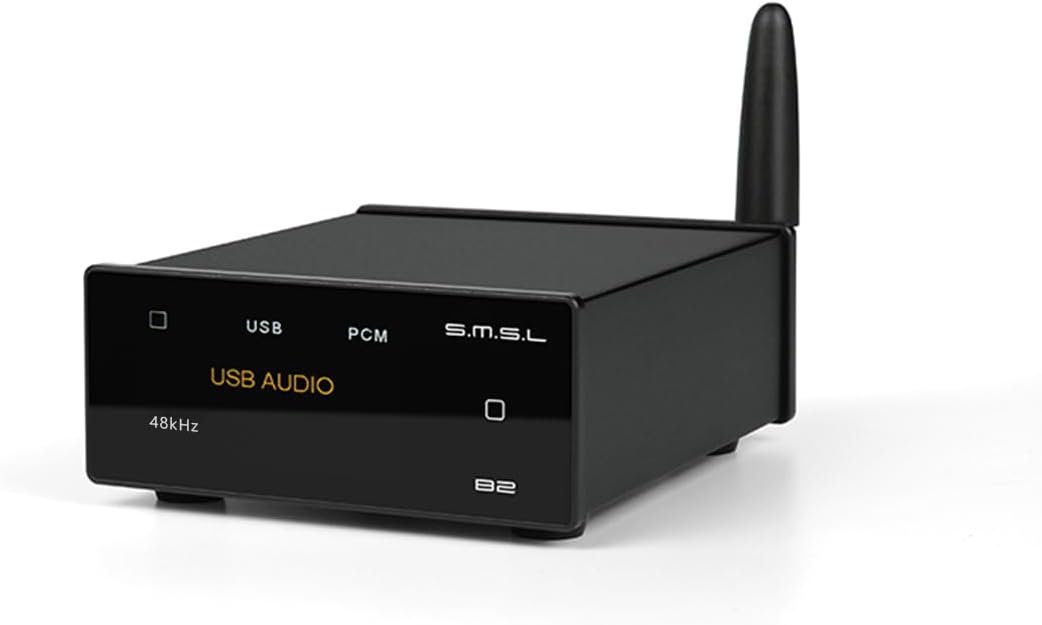
Imaj: Devan view of the AOSHIDA SMSL B2 HiFi Bluetooth Receiver, a compact black device with a display and an antenna.
Kontni pake
Anvan ou kòmanse, tanpri verifye si tout atik yo prezan nan pake a:
- SMSL B2 Unit
- Antèn Bluetooth
- Kalite-C USB kab
- Manyèl Itilizatè (dokiman sa a)
- Kat Garanti

Image: A visual representation of the SMSL B2 unit and its included accessories: Bluetooth antenna, Type-C cable, user manual, and warranty card.
Gid Enstalasyon
1. Koneksyon pouvwa
Connect the provided Type-C USB cable to the USB IN port on the back of the SMSL B2 unit. Connect the other end of the cable to a DC 5V 1A or higher power adapter (not included). Important: Do not use fast charging adapters to power the SMSL B2.
Screw the Bluetooth antenna into the designated antenna port on the back of the unit.

Image: Diagram showing the SMSL B2 unit with the USB-C power cable and Bluetooth antenna connected to its rear panel.
2. Audio Output Connection
The SMSL B2 offers multiple audio output options:
- RCA Sòti: Use RCA cables to connect the L (left) and R (right) RCA output jacks on the SMSL B2 to the corresponding analog input jacks on your amplifier oswa moun ki pale aktif.
- Sòti optik: Use an optical cable to connect the OPTICAL output port on the SMSL B2 to the optical input of your DAC or audio receiver.
- Sòti kowaksyal: Use a coaxial cable to connect the COAXIAL output port on the SMSL B2 to the coaxial input of your DAC or audio receiver.

Imaj: Dèyè view of the SMSL B2 showing its USB-C input, optical, coaxial, and RCA output ports, with examples of connected devices like amplifiers and active speakers.
Enstriksyon Operasyon
Power On/Off
To power on the SMSL B2, short press the square touch button on the right side of the front panel. To power off, press and hold the same button.
Chanje Sous Antre
The SMSL B2 supports both Bluetooth and USB input. To switch between input sources, short press the square touch button on the front panel. The 1.9-inch LCD color screen will display the current input mode (e.g., "Bluetooth" or "USB AUDIO").

Image: The SMSL B2 front panel displaying "Pairing" and indicating the touch button for switching input sources.
Bluetooth mòd
- Switch the SMSL B2 to Bluetooth mode. The screen will display "Bluetooth" and "Pairing".
- On your mobile phone, tablet, or laptop, enable Bluetooth and search for available devices.
- Select "SMSL B2" from the list of devices to pair. Once connected, the screen will show "Connected".
- Begin playing audio on your connected device. The SMSL B2's display will show the artist and title of the song, the encoding format (e.g., LDAC, aptX), and the sample to.

Image: A smartphone screen showing "SMSL B2" as a connected Bluetooth device, illustrating the pairing process.

Image: The SMSL B2's 1.9-inch LCD screen displaying song information (artist, title), Bluetooth codec (LDAC), and sample rate (96kHz) during playback.
USB DAC mòd
The SMSL B2 can function as a plug-and-play USB DAC for your computer, laptop, or tablet. No driver installation is required for most operating systems.
- Connect the SMSL B2 to your computer/laptop/tablet using the provided Type-C USB cable.
- Switch the SMSL B2 to USB AUDIO mode using the front panel button. The screen will display "USB AUDIO".
- On your computer, select "SMSL B2" as the default audio output device in your sound settings.
- Begin playing audio from your computer. The SMSL B2 will process the digital audio signal.

Image: The SMSL B2 connected via USB-C to a laptop, with the display showing "USB AUDIO" and "44.1kHz", demonstrating its plug-and-play USB DAC functionality.
Antretyen
- Kenbe aparèy la pwòp lè w siye l avèk yon twal mou epi sèk. Evite itilize pwodui chimik ki agresif oswa pwodui netwayaj abrazif.
- Asire bon vantilasyon alantou inite a pou anpeche surchof.
- Sere aparèy la nan yon kote ki fre epi sèk, lwen limyè solèy dirèk ak tanperati ekstrèm.
- Evite jete oswa sibi aparèy la nan gwo enpak.
Depanaj
| Pwoblèm | Kòz posib | Solisyon |
|---|---|---|
| Pa gen pouvwa | Power cable not connected or faulty adapter. | Ensure the Type-C USB cable is securely connected and the power adapter meets DC 5V 1A or higher specifications. Avoid fast charging adapters. |
| Pa gen pwodiksyon odyo | Incorrect input source selected, incorrect output connection, or volume too low. | Verify the correct input mode (Bluetooth/USB) is selected on the B2. Check all audio cable connections (RCA, Optical, Coaxial). Ensure the connected amplifier/speakers are powered on and volume is adequate. For USB, ensure "SMSL B2" is selected as the default audio device on your computer. |
| Pwoblèm appariement Bluetooth | Device not in pairing mode, or too many paired devices. | Ensure the B2 is in Bluetooth pairing mode (display shows "Pairing"). Turn off Bluetooth on other nearby devices to avoid interference. Try restarting both the B2 and your source device. |
| Display not showing song info in USB mode | Karakteristik sa a disponib sèlman nan mòd Bluetooth. | The display of song title and artist is a feature specific to Bluetooth input. This information is not displayed when using USB input. |
Espesifikasyon
| Karakteristik | Detay |
|---|---|
| Modèl | B2 |
| Dekodaj Chip | CS43131 |
| Chip Bluetooth | QCC5125 (Bluetooth 5.1) |
| Sipòte kodèk Bluetooth | LDAC, SBC, AAC, aptX_HD, aptX_LL, aptX |
| Antre | USB Kalite-C, Bluetooth |
| Sòti yo | Optical, Coaxial, RCA |
| USB Input Compatibility | PCM 24Bit/48kHz (Plug & Play for PC/Laptop/Tablet) |
| RCA Output Dynamic Range | Jiska 128dB |
| Ekspozisyon | 1.9-inch LCD Color Screen (Touchscreen) |
| Pwovizyon pou pouvwa | DC 5V 1A (via USB Type-C, fast charging adapters prohibited) |
| Dimansyon (L x W x H) | 3.54 x 3.03 x 1.38 pous (90 x 77 x 35 mm) |
| Pwa | 3.17 ons (90 gram) |
| Audio Sòti Mode | Stereo |
| Manifakti | SMSL |

Image: Diagram illustrating the compact dimensions of the SMSL B2 unit: 35mm height, 90mm depth, and 77mm width, with a weight of 150g.
Garanti ak sipò
The SMSL B2 comes with a warranty as detailed on the included Warranty Card. Please refer to the card for specific terms and conditions.
For technical support, troubleshooting assistance beyond this manual, or warranty claims, please contact AOSHIDA customer service through their official channels. You can often find support information on the AOSHIDA brand store page on Amazon or their official websit.
Visit the official AOSHIDA Store: AOSHIDA Store on Amazon