
1. Entwodiksyon
Thank you for choosing the Devoko L-Shaped Gaming Desk. This manual provides detailed instructions for the assembly, operation, and maintenance of your new desk. Please read this manual carefully before assembly and use to ensure proper function and safety. This desk features an L-shaped design, integrated LED lighting, two power outlets, and two USB charging ports, along with convenient storage solutions.
2. Enfòmasyon sou Sekirite
- Toujou swiv enstriksyon asanblaj yo ak anpil atansyon. Yon asanblaj ki pa kòrèk ka lakòz enstabilite ak potansyèl blesi.
- Do not overload the desk. Refer to the specifications section for weight limits.
- Keep all electrical components (LED strip, power outlets, USB ports) away from water and moisture.
- Asire w tout vis ak eleman fikse yo byen sere anvan w itilize yo. Tcheke yo detanzantan epi sere yo ankò jan sa nesesè.
- Do not allow children to climb on or play with the desk.
- Use only the provided power cord and ensure it is properly connected to a grounded outlet.
3. Pake kontni
Anvan ou kòmanse asanblaj la, tanpri verifye ke tout pyès ki nan lis anba a yo prezan epi yo pa domaje. Si gen nenpòt pyès ki manke oswa ki domaje, tanpri kontakte sèvis kliyan.
- Desk Panels (L-shaped sections)
- Konpozan ankadreman asye (pye, ba sipò)
- Bann Limyè LED ak Kontwòl Remote
- Integrated Power Strip with 2 Outlets and 2 USB Ports
- CPU kanpe
- Storage Shelves (upper and lower)
- Iron Hooks
- Fabric Storage Drawer
- Materyèl asanblaj (vis, boulon, nwa)
- Assembly Tools (Allen wrench, screwdriver)
- Manyèl Enstriksyon

Imaj 3.1: Plis paseview of desk components and dimensions. This diagram illustrates the various parts of the desk and their measurements, aiding in identification during assembly.
4. Enstriksyon pou enstalasyon ak asanblaj
Assembly typically requires one person and includes all necessary tools. Follow the numbered steps in the provided separate assembly guide for detailed instructions. The desk offers three possible installation configurations to adapt to different room layouts.
- Depake epi idantifye pyès yo: Lay out all components on a clean, soft surface to prevent scratches. Compare with the package contents list.
- Rasanble ankadreman asye a: Connect the main steel frame components using the provided screws and Allen wrench. Do not fully tighten screws until all parts are loosely connected.
- Tache Panno Biwo yo: Secure the engineered wood desk panels to the assembled steel frame. Ensure proper alignment for the L-shape configuration.
- Enstale etajè depo yo: Attach the upper and lower storage shelves to the designated frame sections.
- Mount CPU Stand and Fabric Drawer: Secure the CPU stand and attach the fabric storage drawer to its designated location.
- Enstale priz kouran an: Integrate the power strip with outlets and USB ports into the designated cutout on the desk surface.
- Tache bann LED la: Adhere the LED light strip to the underside of the upper shelf or desired location.
- Sere final la: Yon fwa tout konpozan yo an plas epi yo aliyen, sere tout vis ak eleman fikse yo nèt.
- Attach Iron Hooks: Secure the iron hooks to the side of the desk for headphone or accessory storage.
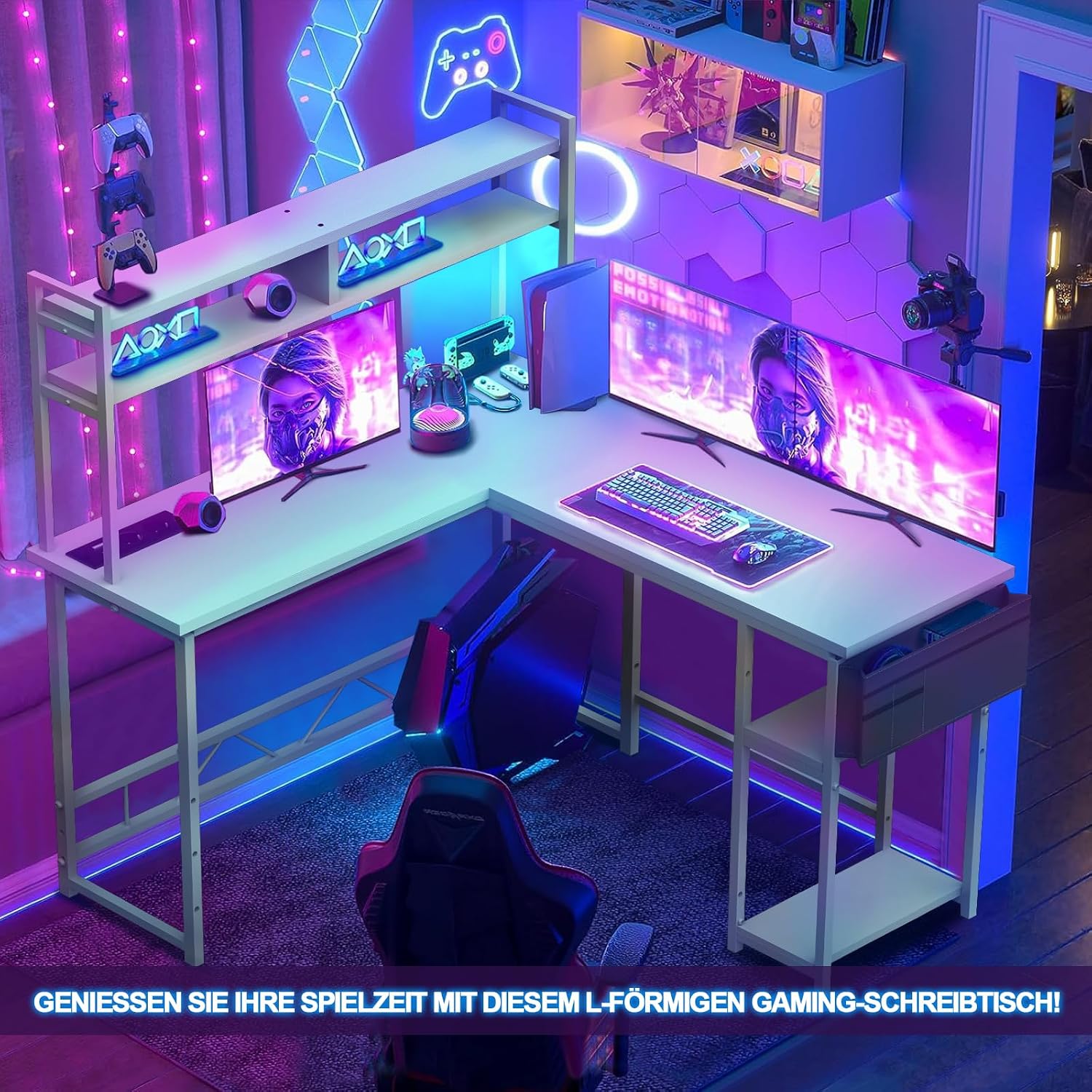
Image 4.1: The fully assembled Devoko L-Shaped Gaming Desk, showcasing its design and functionality in a typical use environment.
5. Operasyon Enstriksyon
5.1 dirije ekleraj
The desk includes an integrated LED light strip for ambient lighting. Connect the LED strip to a power source as indicated in the assembly guide. Use the provided remote control to turn the lights on/off, change colors, adjust brightness, and select lighting modes.

Image 5.1: The LED light strip and its remote control. The remote allows for customization of colors and lighting effects.
5.2 Priz kouran ak pò USB
The desk is equipped with a built-in power strip featuring two standard power outlets and two USB charging ports. This allows for convenient power access for your computer, monitors, and other electronic devices.
- Koneksyon pouvwa: Plug the desk's main power cord into a wall outlet.
- Itilizasyon Priz: Plug your devices (e.g., monitors, PC) into the standard power outlets.
- Sèvi ak pò USB: Connect your USB-powered devices (e.g., smartphone, tablet, gaming accessories) to the USB ports for charging.

Image 5.2: The integrated power strip with two outlets and two USB ports, designed for easy access to power and charging.
6. Antretyen
- Netwayaj: Siye sifas biwo yo ak yon twal mou,amp twal. Evite pwodui netwayaj abrazif oswa pwodui chimik piman bouk ki ka domaje fini an.
- Époussetage: Regularly dust the desk and its components to prevent accumulation.
- Tcheke Fastener: Tcheke tout vis ak boulon yo detanzantan pou asire yo rete sere. Sere yo ankò si sa nesesè pou kenbe estabilite.
- Jesyon kab: Organize cables to prevent tangles and reduce strain on connections.
NAN. Depanaj
- Desk is Unstable:
Solisyon: Ensure all screws are fully tightened. Check that the desk is on a level surface. Adjust leveling feet if present. - Limyè ki ap dirije pa travay:
Solisyon: Check if the LED strip is properly connected to its power source. Ensure the remote control has working batteries and is pointed at the receiver. Verify the main power cord is plugged in. - Priz kouran/pò USB yo pa fonksyone:
Solisyon: Ensure the desk's main power cord is securely plugged into a functional wall outlet. Check if the power strip's switch (if any) is turned on. Test with a different device. - Pyès ki manke pandan asanblaj la:
Solisyon: Double-check the packaging. If parts are genuinely missing, contact Devoko customer support with your purchase details.
8. Espesifikasyon
| Karakteristik | Detay |
|---|---|
| Nimewo Modèl | Wit |
| Dimansyon (L x W x H) | 140 x 120 x 142 cm (55.1 x 47.2 x 55.9 pous) |
| Desk Top Material | Enjenieri bwa |
| Materyèl ankadreman | Alloy Steel |
| Koulè | Blan |
| Plòg pouvwa | 2 (220-250V/15A) |
| Pò USB | 2 (5V/2A) |
| Karakteristik espesyal | L-Shape, LED Lighting, CPU Stand, Storage Shelves, Fabric Drawer, 3 Installation Options |
| Asanble obligatwa | Yes (Tools included, 1 person recommended) |

Image 8.1: Close-up of the desk's integrated storage solutions, including the CPU stand, two-tier shelves, and a fabric drawer for organization.
9. Garanti ak sipò
9.1 Enfòmasyon sou Garanti
This Devoko L-Shaped Gaming Desk comes with a limited warranty. Please refer to the warranty card included in your package for specific terms, conditions, and duration. The warranty typically covers manufacturing defects and material flaws under normal use.
9.2 Sipò pou Kliyan
For any questions, assistance with assembly, troubleshooting, or warranty claims, please contact Devoko customer support. Please have your purchase receipt and model number (Wit) ready when contacting support.
Enfòmasyon pou kontakte:
(Please refer to your product packaging or the retailer's website for the most current customer support contact details.)