
Entwodiksyon
Mèsi pou acha aasing the Targa TG260B Single Din Bluetooth MP3 Media Player. This manual provides essential information for the proper installation, operation, and maintenance of your new car audio system. Please read this manual thoroughly before using the product to ensure optimal performance and safety.
Pwodwi souview
The Targa TG260B is a versatile single DIN media player designed for in-car entertainment. It features Bluetooth connectivity for wireless audio streaming and hands-free calling, as well as MP3 playback from USB drives and TF (microSD) cards. The unit also includes an FM radio tuner.
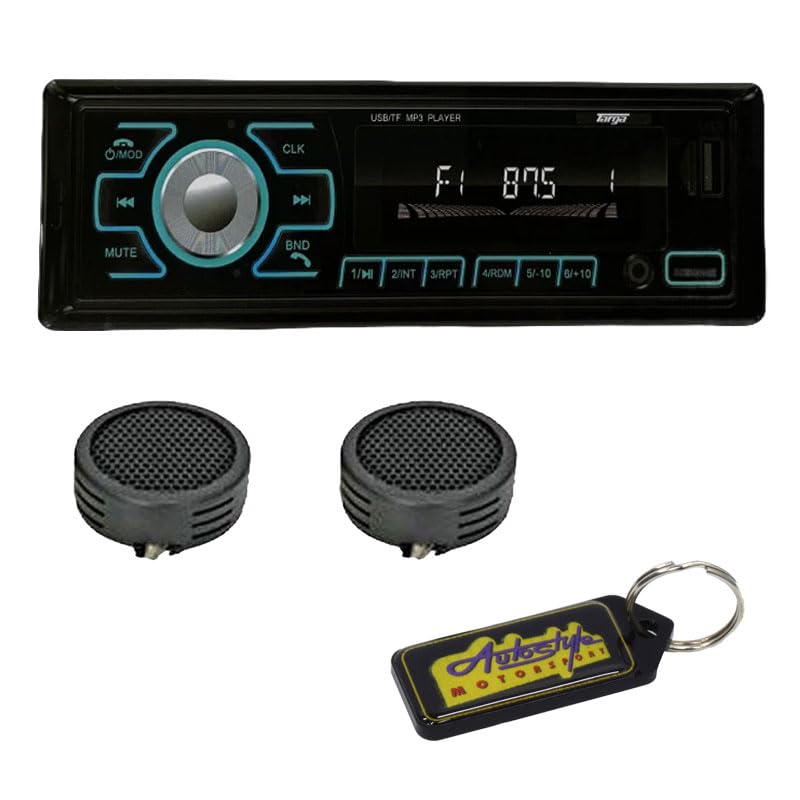
Figure 1: Front panel of the Targa TG260B Media Player.
Kontwòl panèl devan
- O/MOD Button: Power On/Off and Mode selection (Radio, USB, TF, Bluetooth).
- Bouton CLK: Displays and sets the clock.
- Bouton bèbè: Silenn oswa dekole pwodiksyon odyo a.
- BND Button: Selects radio bands (FM1, FM2, FM3) and answers/ends calls in Bluetooth mode.
- Volim bouton: Adjusts the audio volume. Pressing it may access audio settings.
- Previous/Next Track Buttons (◀◀ / ▶▶): Sote mizik oswa sintonize frekans radyo.
- 1/►II Button: Play/Pause for media playback, or preset 1 for radio.
- 2/INT bouton: Intro scan for media playback, or preset 2 for radio.
- 3/RPT bouton: Repeat playback mode, or preset 3 for radio.
- 4/RDM Button: Random playback mode, or preset 4 for radio.
- 5/-10 Button: Skips back 10 tracks, or preset 5 for radio.
- 6/+10 Button: Skips forward 10 tracks, or preset 6 for radio.
- Pò USB: Connects USB flash drives for MP3 playback.
- TF Kat plas: Inserts TF (microSD) cards for MP3 playback.
Enstalasyon ak Enstalasyon
Professional installation is recommended for this product. Incorrect wiring can cause damage to the unit or your vehicle's electrical system. Always disconnect the vehicle's battery negative terminal before starting installation.
Koneksyon fil elektrik
- Yellow Wire (Constant +12V): Connect to a constant +12V power source.
- Red Wire (Accessory +12V): Connect to a switched +12V power source (ignition).
- Fil Nwa (Tè): Konekte ak yon bon pwen tè chasi a.
- Fil Ble (Antèn/Amp Adistans): Konekte ak antèn pouvwa oswa amplifier aleka vire-sou plon.
- Oratè Fil: Connect to vehicle speakers, ensuring correct polarity (e.g., White/White-Black for Left Front, Grey/Grey-Black for Right Front, Green/Green-Black for Left Rear, Purple/Purple-Black for Right Rear).
After all connections are made, reconnect the vehicle's battery negative terminal and test the unit.
Enstriksyon Operasyon
Power On/Off
- Peze a O/MOD bouton pou limen inite a.
- Peze epi kenbe la O/MOD bouton pou fèmen inite a.
Seleksyon mòd
- Peze a O/MOD button repeatedly to cycle through available modes: FM Radio, USB, TF Card, Bluetooth, AUX (if available).
Operasyon radyo
- Seleksyon Band: Nan mòd FM, peze la BND bouton an pou chanje ant bann FM1, FM2, ak FM3 yo.
- Manyèl akor: Peze a ◀◀ or ▶▶ Peze bouton yo yon ti tan pou ajiste frekans lan avèk presizyon.
- Rechèch otomatik: Peze epi kenbe la ◀◀ or ▶▶ bouton yo pou chèche otomatikman pwochen estasyon ki gen bon son an.
- Estoke Prereglaj: Tune to a desired station, then press and hold one of the numeric preset buttons (1-6) until you hear a beep. The station is now stored.
- Rapèl Prereglaj: Briefly press one of the numeric preset buttons (1-6) pou raple yon estasyon ki estoke nan memwa.
Operasyon Bluetooth
- Peyaj:
- Switch the unit to Bluetooth mode. The display will show "BT" or similar, and it will be discoverable.
- Sou aparèy mobil ou, aktive Bluetooth epi chèche aparèy ki disponib.
- Select "TG260B" (or similar name) from the list. If prompted for a PIN, enter "0000".
- Once paired, the unit will confirm connection.
- Difizyon odyo: Play audio from your paired device. Use the ◀◀ epi ▶▶ buttons to skip tracks, and 1/►II jwe/poz.
- Apèl men lib:
- Reponn apèl: Peze a BND bouton.
- Fini apèl: Peze a BND bouton ankò.
- Rejte apèl: Peze epi kenbe la BND bouton.
Lektur kat USB/TF
- Insert a USB flash drive into the USB port or a TF card into the TF card slot. The unit will automatically switch to USB/TF mode and begin playback.
- Jwe/Poz: Peze a 1/►II bouton.
- Next / Previous Track: Peze a ▶▶ or ◀◀ bouton.
- Vit Avant/Remonte: Peze epi kenbe la ▶▶ or ◀◀ bouton.
- Repete: Peze a 3 / RPT button to cycle through repeat modes (e.g., Repeat One, Repeat All).
- Jwe o aza: Peze a 4 / RDM button to enable/disable random playback.
- Skip 10 Tracks: Sèvi ak la 5/-10 epi 6/+10 buttons to jump backward or forward by 10 tracks.
Anviwònman odyo
- Kontwòl Volim: Rotate the volume knob to increase or decrease the volume.
- Bèbè: Peze a BÈN bouton pou fèmen odyo a. Peze ankò pou retabli.
- Anviwònman revèy: Peze a CLK button to display the time. Press and hold CLK, then use the volume knob or track buttons to adjust hours and minutes. Press CLK ankò pou konfime.
Antretyen
To ensure the longevity and optimal performance of your Targa TG260B media player, follow these maintenance guidelines:
- Netwayaj: Sèvi ak yon twal mou epi sèk pou siye panèl devan an. Pa sèvi ak pwodui netwayaj abrazif, sir, oswa solvan.
- Evite likid: Kenbe aparèy la lwen dlo ak lòt likid.
- Tanperati: Evite ekspoze aparèy la nan tanperati ekstrèm oswa anba limyè solèy dirèk pou yon bon bout tan.
- Media Care: Ensure USB drives and TF cards are clean and free of debris before insertion.
Depanaj
If you encounter issues with your media player, refer to the following common problems and solutions:
| Pwoblèm | Kòz posib | Solisyon |
|---|---|---|
| Pa gen pouvwa | Fil elektrik ki pa kòrèk; Fuzib ki boule; Pwoblèm batri machin nan. | Check wiring connections; Replace fuse; Check vehicle battery. |
| Pa gen son | Volim twò ba; Silans aktive; Pwoblèm fil elektrik oratè a. | Ogmante volim nan; Dezaktive silans lan; Tcheke koneksyon oratè yo. |
| Bluetooth pa konekte | Unit not in pairing mode; Device not discoverable; Interference. | Ensure unit is in BT mode; Make device discoverable; Re-pair device; Move closer to unit. |
| Kat USB/TF la pa ap jwe | Pa sipòte file format; Corrupted media; Incorrect insertion. | Ensure MP3 format; Try another media; Reinsert correctly. |
Si pwoblèm nan pèsiste apre ou fin eseye solisyon sa yo, tanpri kontakte sèvis kliyan.
Espesifikasyon
- Modèl: TG-260B
- Kalite: Single Din Media Player
- Koneksyon: Bluetooth, USB, Kat TF
- Media lèktur: MP3
- Tuner: Radyo FM
- Pwovizyon pou pouvwa: DC 12V (batri machin)
Enfòmasyon sou Garanti
This Targa TG260B media player comes with a 6-mwa garanti from the date of purchase. This warranty covers manufacturing defects under normal use. It does not cover damage caused by improper installation, misuse, accidents, or unauthorized modifications. Please retain your proof of purchase for warranty claims.
Sipò pou Kliyan
For further assistance, technical support, or warranty inquiries, please refer to the contact information provided by your retailer or the product manufacturer. Always provide your product model number (TG260B) and proof of purchase when seeking support.