
XTUGA IEM1100
XTUGA IEM1100 In-Ear Monitor System User Manual
Model: IEM1100
Entwodiksyon
Thank you for choosing the XTUGA IEM1100 UHF Single Channel In-Ear Monitor System. This manual provides comprehensive instructions for setting up, operating, and maintaining your new in-ear monitor system. Please read this manual thoroughly before using the product to ensure proper function and to maximize its performance and longevity.
Prekosyon Sekirite
To ensure safe and optimal operation, please observe the following precautions:

Image: Text outlining important safety precautions for the in-ear monitor system.
- Please use in a ventilated environment, away from fire.
- Avoid contact with water when using the product.
- If the product is wireless, keep away from other interference sources.
- Please do not disassemble the equipment yourself. In case of problems, please contact us.
- Use the standard power supply if the device requires power supply. High voltage ka domaje aparèy la.
- Do not use sharp objects to scratch the shell and surface of the device.
Pwodwi souview
Konpozan sistèm

Image: The complete XTUGA IEM1100 In-Ear Monitor System, including the main transmitter unit, the portable belt-pack receiver, and in-ear headphones.
The XTUGA IEM1100 system includes the following main components:
- Inite transmetè: The main unit that sends the audio signal wirelessly.
- Belt-Pack Receiver: A portable receiver worn by the performer, which receives the audio signal.
- In-Ear Headphones: For monitoring the audio signal from the receiver.
- Adaptè pouvwa: For powering the transmitter unit.
- Antèn: Pou transmisyon ak resepsyon siyal san fil.
- Kab odyo: For connecting audio sources to the transmitter.
- Ka pote: For convenient storage and transport of the system.
Detailed Component Views

Imaj: Detaye view of the transmitter unit, showing the LCD display, earphone output, volume knob, setting keys, power switch, DC power supply input, left and right channel inputs, and antenna interface.
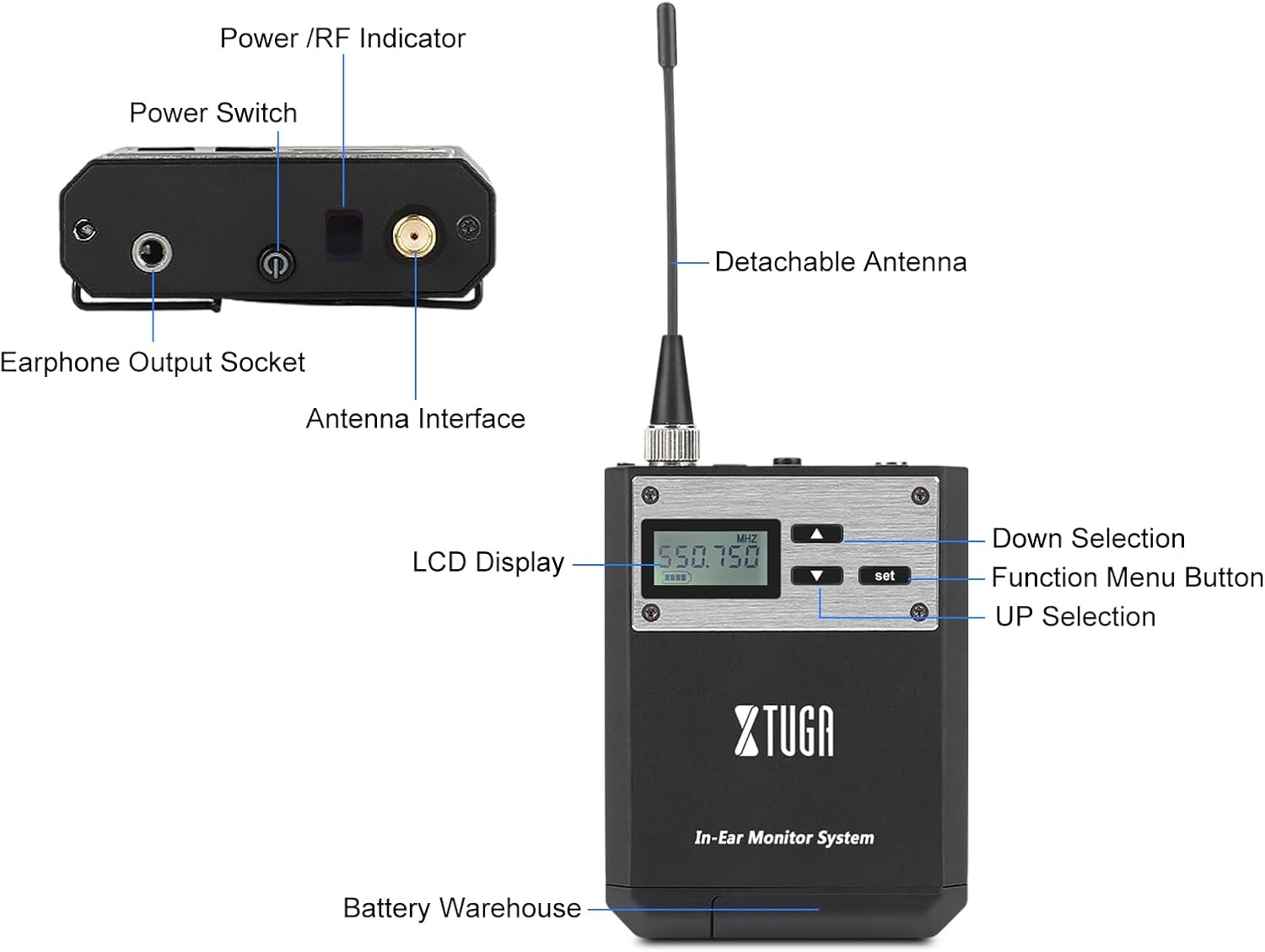
Imaj: Detaye view of the belt-pack receiver, highlighting the LCD display, power/RF indicator, power switch, earphone output socket, antenna interface, and battery compartment.
Karakteristik kle
- Whole Metal UHF Wireless System: Utilizes UHF band Phase Lock PLL technology with 40 selectable frequencies within a 32MHz band for flexible operation.
- Compact and Wireless Design: Offers tabletop stage monitoring with a wireless range of up to 250 feet (approx. 75 meters) and a frequency range of 550MHz-580Mhz. Designed to improve signal-to-noise ratio and dynamic range for optimal sound quality.
- Ekspozisyon itilizatè-zanmitay: Features a clear digital LCD front panel display on the receiver for easy monitoring, along with power and RF receiving indicator lamps.
- Pouvwa efikas: The belt-pack receiver uses two AA batteries with an efficient power circuit for long service time.
- Konpatibilite pwisan: One transmitter can connect to multiple receivers, making it suitable for group performances and various applications.
- Konstriksyon dirab: The housing is made from tough metal material, ensuring system strength and reliability.

Image: The brushed metal construction of the system, highlighting its durable and premium build quality.

Image: Illustration of the system's anti-interference capabilities, ensuring stable signal transmission even in challenging environments.

Image: A visual representation of the system's long-distance transmission capability, reaching up to 75 meters.

Image: Diagram illustrating the auto-choose frequency function, allowing users to freely select from 40 available frequencies for optimal signal clarity.
Gid Enstalasyon
Follow these steps to set up your XTUGA IEM1100 system:
- Connect Power and Antenna to Transmitter:
Connect the provided power adapter to the DC input on the rear of the transmitter unit. Screw the antenna securely into the antenna interface on the rear of the transmitter.
- Transmetè sou pouvwa:
Press the power button on the front panel of the transmitter to turn it on. The LCD display will illuminate.
- Enstale pil yo nan reseptè a:
Open the battery compartment on the belt-pack receiver and insert two AA batteries, ensuring correct polarity.
- Connect Antenna and Earphones to Receiver:
Screw the small antenna onto the antenna interface of the belt-pack receiver. Plug your in-ear headphones into the earphone output socket on the receiver.
- Mete klip senti a (Si ou vle):
For greater stability and convenience, attach the elastic back clip to the receiver.
Gid Enstalasyon Vizyèl
Video: A comprehensive guide demonstrating the setup and basic operation of the XTUGA IEM1100 In-Ear Monitor System, including power connection, antenna installation, battery insertion, and earphone connection.
Enstriksyon Operasyon
Yon fwa sistèm nan enstale, swiv etap sa yo pou operasyon an:
- Adjusting Frequencies:
Both the transmitter and receiver allow for frequency adjustment. Use the "UP" and "DOWN" selection buttons on the units to cycle through the 40 available frequencies. Ensure both the transmitter and receiver are set to the same frequency for proper communication.
- Ajiste Volim:
On the transmitter, use the earphone volume knob to adjust the monitoring level for connected headphones. On the belt-pack receiver, use the volume controls to set your desired listening level for the in-ear headphones. There are 20 adjustable capacity gears for precise volume control.
- Konekte Sous Odyo a:
Connect your audio source (e.g., mixing console, instrument) to the Left Channel Input and Right Channel Input (XLR/TRS combo jacks) on the rear of the transmitter unit using appropriate audio cables.
- Siveyans odyo:
With the audio source playing and both units powered on and tuned to the same frequency, you should hear the audio through your in-ear headphones connected to the receiver.
Depanaj
If you encounter issues with your XTUGA IEM1100 system, refer to the following common problems and solutions:
| Pwoblèm | Kòz posib | Solisyon |
|---|---|---|
| No sound from receiver. |
|
|
| Entèferans oswa elektrisite estatik. |
|
|
| Son ki gen ti volim oswa defòme. |
|
|
If the problem persists, please contact XTUGA customer support for assistance.
Espesifikasyon
| Karakteristik | Detay |
|---|---|
| Mak | XTUGA |
| Nimewo Modèl | IEM1100 |
| Teknoloji kominikasyon san fil | RF (UHF band) |
| Gamme frekans | 550MHz-580Mhz (approx.) |
| Chwazi frekans | 40 (within 32MHz band) |
| Wireless Range | Jiska 250 pye (apeprè 75 mèt) |
| Sous pouvwa reseptè | 2 x AA pil |
| Sous pouvwa transmetè | DC 12V-18V |
| Plasman Zòrèy | Nan Zòrèy |
| Faktè fòm | Nan Zòrèy |
| Dimansyon pake | 37 x 34 x 10 cm |
| Pwa atik | 2.2 kg |
Garanti ak sipò
XTUGA products are designed for reliability and performance. For information regarding warranty coverage, technical support, or service inquiries, please refer to the warranty card included with your product or visit the official XTUGA website. You can also contact XTUGA customer service directly for assistance.
Pou plis pwodwi ak enfòmasyon, vizite XTUGA Store on Amazon.
Ask a question about this manual
Ask about setup, troubleshooting, compatibility, parts, safety, or missing instructions. Manuals+ will review the question and use this page’s manual context to help answer it.