
Entwodiksyon
The JBL Soundgear Frames are innovative Bluetooth audio glasses designed to provide an immersive audio experience while allowing you to remain aware of your surroundings. Equipped with ultra-slim speakers, an integrated microphone, and touch controls, these frames offer seamless connectivity for music, calls, and video conferences. This manual provides essential information for setting up, operating, and maintaining your Soundgear Frames.
Ki sa ki nan bwat la
Carefully unpack your JBL Soundgear Frames and ensure all items are present:
- JBL Soundgear Frames (Onyx)
- Chaje kab
- Netwaye twal
- Ka pote
Note: Additional accessories may be sold separately.
Enstalasyon
1. Chaje Aparèy la
Before first use, fully charge your JBL Soundgear Frames. Connect the provided charging cable to the charging port on the frames and to a USB power source. The LED indicator will show charging status.

Imaj: Bò kote view of the JBL Soundgear Frames, highlighting the charging port and internal electronics within the temple arms.
- Tan pou chaje: Apeprè 2 èdtan pou yon chaj konplè.
- Lavi batri: Up to 8 hours of audio playback on a full charge.
2. Pè Bluetooth
To connect your Soundgear Frames to a Bluetooth-enabled device:
- Ensure the Soundgear Frames are charged and powered off.
- Press and hold the power button (usually located on one of the temple arms) until the LED indicator flashes blue, indicating pairing mode.
- Sou aparèy ou an (telefòn entelijan, tablèt, òdinatè), ale nan paramèt Bluetooth epi aktive Bluetooth.
- Select "JBL Soundgear Frames" from the list of available devices.
- Yon fwa konekte, endikatè ki ap dirije a ap vire solid ble.
The frames support Bluetooth 5.2 for stable and efficient wireless connectivity.
Enstriksyon Operasyon
Power On/Off
- Pouvwa sou: Peze epi kenbe bouton pouvwa a pandan 2 segonn. LED la ap limen.
- Pouvwa Off: Peze epi kenbe bouton pouvwa a pandan 3 segonn. LED la ap etenn.
Lèktur Klas Mizik
Use the touch controls located on the temple arms to manage your audio:
- Jwe/Poz: Single tap on either temple arm.
- Pwochen Track: Double tap on the right temple arm.
- Track Previous: Double tap on the left temple arm.
- Volim moute: Swipe forward on the right temple arm.
- Volim desann: Swipe backward on the right temple arm.
Jesyon Rele
The integrated microphone allows for clear hands-free calls:
- Reponn/Fen Apèl: Single tap on either temple arm.
- Rejte apèl: Press and hold either temple arm for 2 seconds.
Asistan vwa
Activate your device's voice assistant (e.g., Siri, Google Assistant) by triple-tapping on either temple arm.

Image: A person wearing the JBL Soundgear Frames outdoors, demonstrating their use in a real-world setting.
Antretyen
Netwayaj
To maintain the clarity of your lenses and the integrity of the frames:
- Use the provided cleaning cloth to gently wipe the lenses and frame.
- Pou tach ki difisil pou retire, sèvi ak yon espre pou netwaye lantiy ki fèt espesyalman pou linèt.
- Avoid using abrasive materials or harsh chemicals, as these can damage the lenses and frame finish.
Depo
When not in use, store your Soundgear Frames in the provided carrying case to protect them from scratches and impacts.
Swen batri
To prolong battery life, avoid exposing the frames to extreme temperatures. If storing for an extended period, charge the battery to approximately 50% before storage.
Depanaj
| Pwoblèm | Solisyon |
|---|---|
| Frames do not power on. | Asire w batri a chaje. Konekte l nan yon sous kouran epi eseye ankò. |
| Pa ka konekte via Bluetooth. | Make sure the frames are in pairing mode (flashing blue LED). Check your device's Bluetooth settings and forget previous connections if necessary. Restart both devices. |
| Pa gen son oswa volim nan ba. | Check the volume level on both the frames and your connected device. Ensure the frames are properly paired. |
| Kontwòl manyen yo pa reponn. | Ensure the touch surface is clean and dry. Restart the frames. |
Espesifikasyon
| Karakteristik | Detay |
|---|---|
| Nimewo Modèl | JBLSNDGEARFMSRONX |
| UPC | 050036399845 |
| Koulè | Oniks |
| Fòm atik | Round |
| Koulè lantiy | Nwa |
| Kalite lantiy | Ki pa polarize |
| Materyèl ankadreman | Tèrmoplastik |
| Kouvèti ankadreman | Full Frame |
| Koneksyon | Bluetooth 5.2 |
| Moun kap pale | Ultra-slim 25mm x 9mm |
| Mikwofòn | Entegre |
| Kontwòl | Manyen |
| Lavi batri | Jiska 8 èdtan |
| Tan pou chaje | Apeprè 2 èdtan |
| Rezistans dlo | IP54 (Rezistan a pousyè ak ekla) |
| Itilizasyon Rekòmande | Tande mizik |
| Ranje laj | Granmoun |
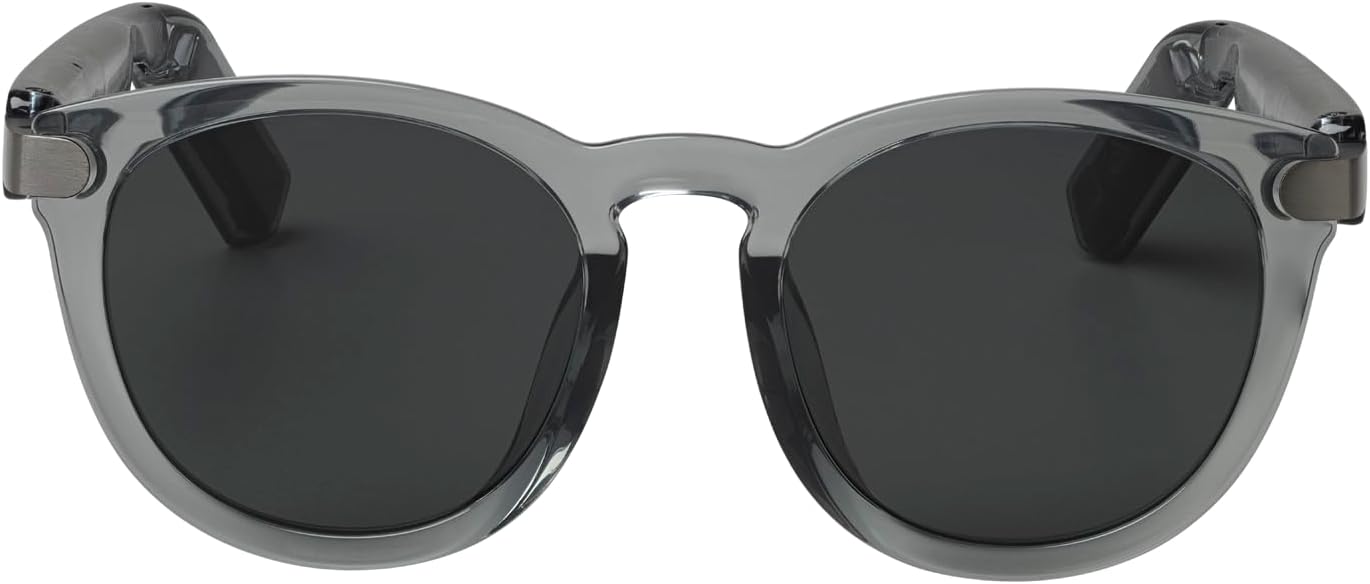
Imaj: Devan view of the JBL Soundgear Frames, showcasing the round, full-frame design and black non-polarized lenses.

Imaj: Dèyè view of the JBL Soundgear Frames, showing the overall structure from the rear.
Garanti ak sipò
JBL products are designed for reliability and performance. For warranty information and customer support, please refer to the warranty card included with your product or visit the official JBL website. You can also find FAQs and additional support resources online.
Sipò sou entènèt: www.jbl.com/support