
Spacekey QIG-D01
Spacekey QIG-D01 Dehumidifier User Manual
Model: QIG-D01
1. Entwodiksyon
Thank you for choosing the Spacekey QIG-D01 Dehumidifier. This manual provides essential information for the safe and efficient operation of your new appliance. Please read it thoroughly before use and retain it for future reference. This dehumidifier is designed to reduce excess moisture in areas up to 850 square feet, such as basements, bedrooms, bathrooms, RVs, and closets, improving air quality and comfort.

Figi 1: Devan view of the Spacekey QIG-D01 Dehumidifier, showing its white and black design with a digital display and visible water tank.

Figure 2: Visual representation of the dehumidifier's effectiveness in reducing room humidity.

Figure 3: Common issues resolved by maintaining optimal humidity levels with the dehumidifier.
2. Enstriksyon Sekirite Enpòtan
Pou diminye risk dife, chòk elektrik, oswa blesi, toujou swiv prekosyon debaz sa yo:
- Li tout enstriksyon yo anvan ou sèvi ak aparèy la.
- Pa sèvi ak dezimidifikatè a si kòd la oswa ploge a domaje.
- Asire w ke priz kouran an byen konekte ak tè a.
- Pa bloke antre oswa priz lè.
- Kenbe aparèy la lwen dlo ak lòt likid.
- Debranche dezumidifikatè a anvan ou netwaye li oswa fè nenpòt antretyen.
- Pa kite timoun yo opere aparèy la san sipèvizyon.
- This appliance is equipped with a 45° tip-over protection feature. If the unit is tilted beyond 45 degrees, it will automatically shut off to prevent damage or spills.

Figure 4: Illustration of the dehumidifier's 45° tip-over protection, demonstrating automatic shutdown for safety.
3. Pwodwi souview
3.1 Components and Design Features
- Main Inite ak Kontwòl Panel
- Water Tank (3.0L / 106 oz capacity)
- Filtè lè ou ka lave
- Kòd pouvwa
- Integrated Handles for portability
- Visual Water Tank for easy monitoring
- 45° Tip-over Protection
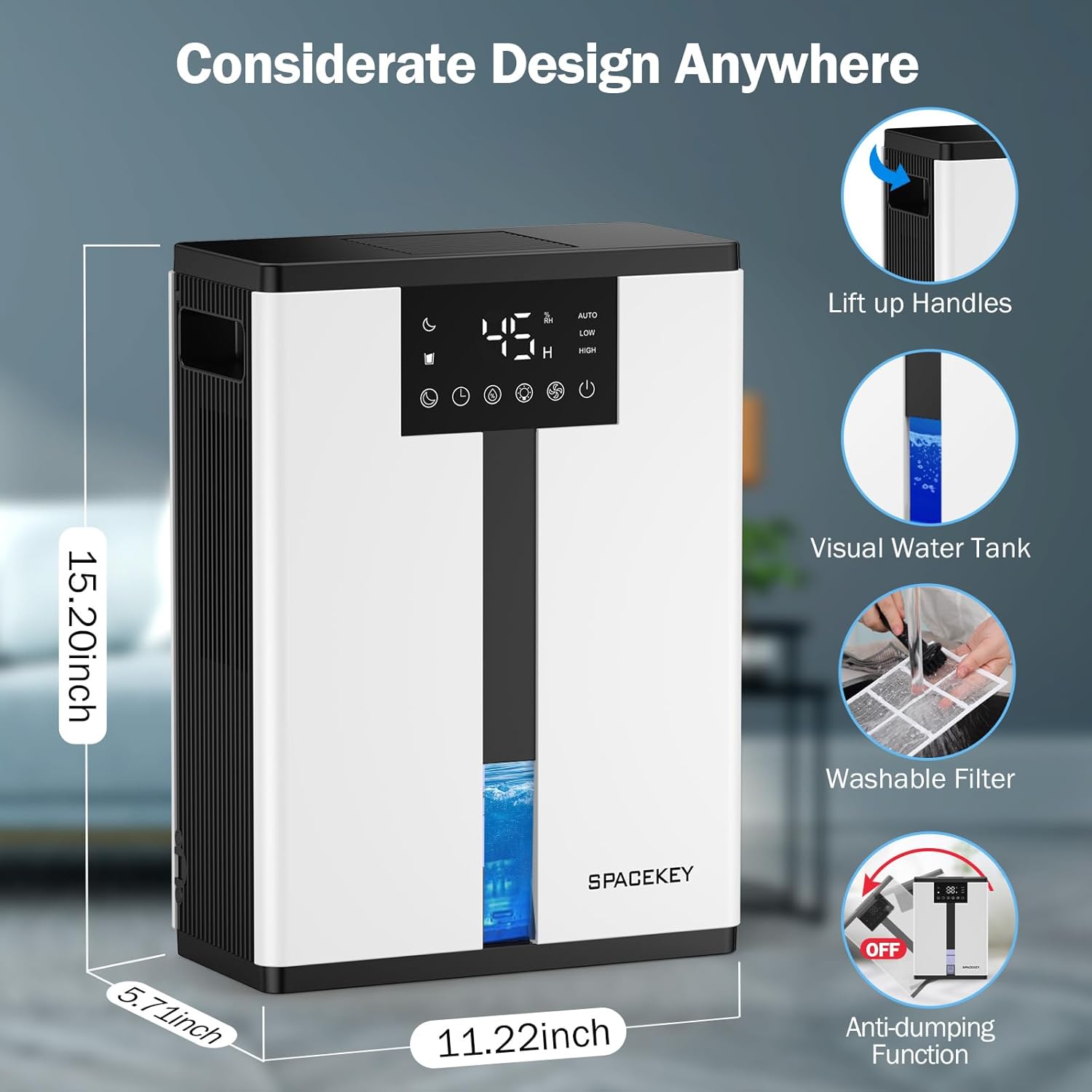
Figure 5: Key design elements and dimensions of the Spacekey QIG-D01 Dehumidifier.
3.2 Advanced Dehumidification Technology
The Spacekey QIG-D01 utilizes semiconductor condensation technology with dual fans and dual semiconductor condensers for enhanced efficiency in moisture removal.
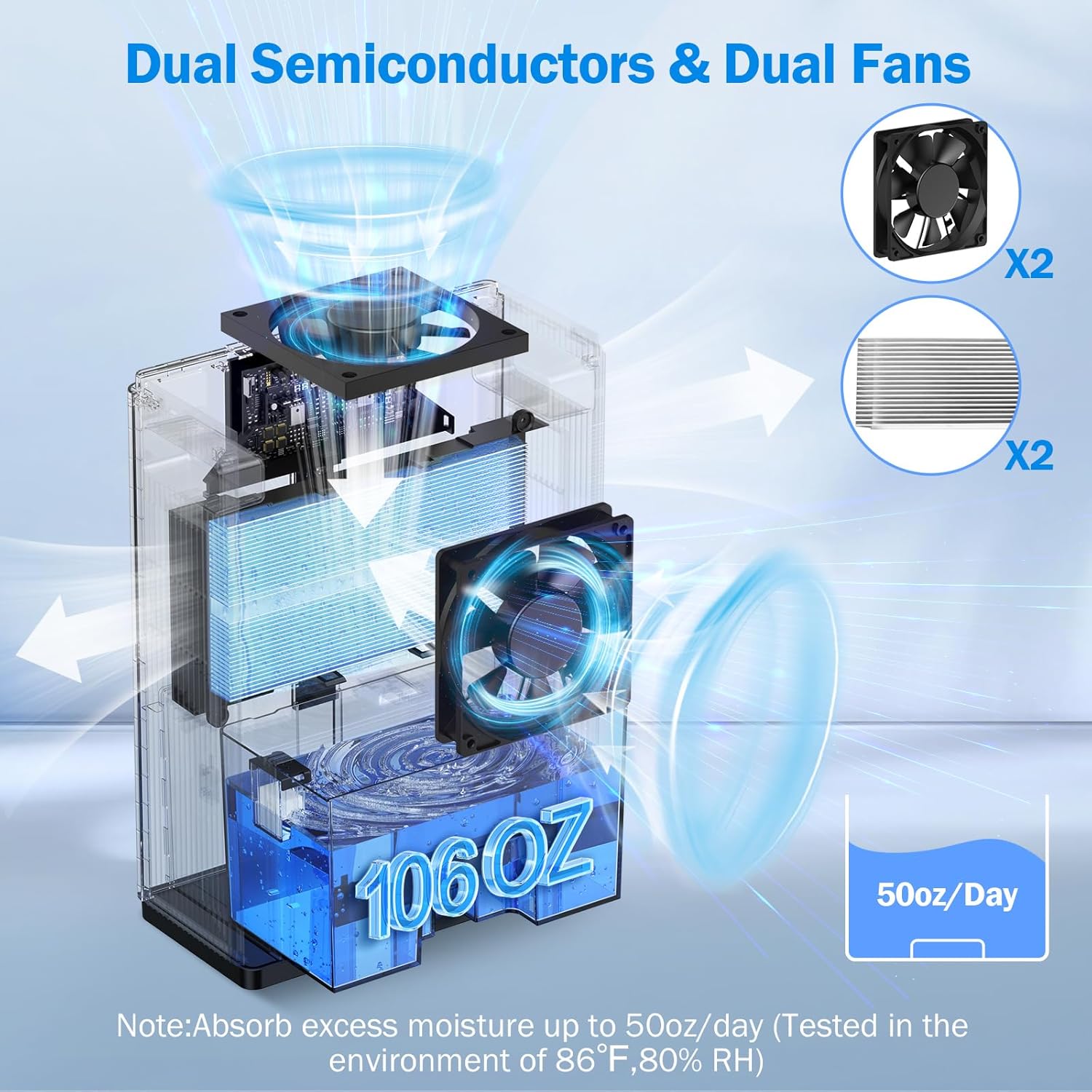
Figi 6: Entèn view of the dual semiconductor and dual fan system for efficient dehumidification.
3.3 Kontwòl Panel
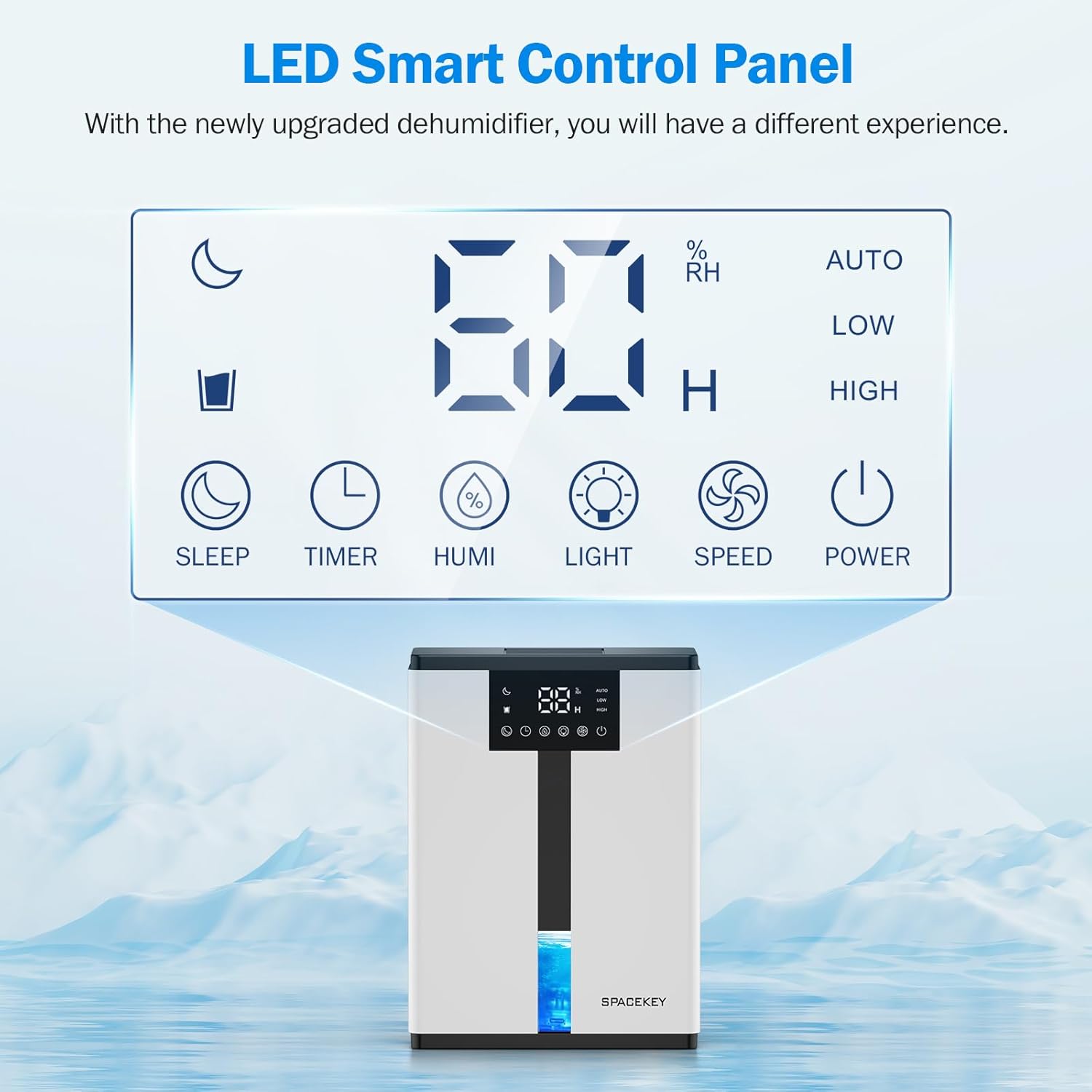
Figure 7: The LED Smart Control Panel, displaying current humidity and various function buttons.
The intuitive LED display shows real-time humidity. Buttons include:
- Mòd dòmi: Activates quiet operation and can be used with colorful lights.
- Revèy: Sets operating duration (2H, 4H, 6H, 8H, 12H).
- HUMI: Adjusts target humidity (45%, 55%, 65%, or continuous '00').
- LIMYÈ: Controls the 7-color ambient light.
- VITESSE: Selects fan speed (Auto, Low, High).
- POUVWA: Vire inite a sou / sou.
4. Enstriksyon Enstalasyon
- Dekonpoze: Retire dezumidifikatè a nan anbalaj li avèk prekosyon.
- Plasman: Place the unit on a flat, stable surface in the desired location. Ensure there is at least 8 inches (20 cm) of space around the air inlets and outlets for proper airflow.
- Koneksyon pouvwa: Ploge kòd elektrik la nan yon priz elektrik ki gen tè.
- Tcheke inisyal: Ensure the water tank is correctly inserted and empty before starting operation.

Figure 8: Recommended placement areas for the dehumidifier, highlighting its suitability for various indoor environments.
5. Operasyon Enstriksyon
5.1 Power On/Off
Peze a POUVWA bouton pou limen oswa etenn dezimidifikatè a.
5.2 Ajisteman Nivo Imidite
Peze a HUMI button to cycle through desired humidity levels: 45%, 55%, 65%. The unit will operate until the set humidity is reached, then pause. If set to '00', the unit will operate continuously.

Figure 9: Setting the target humidity level using the HUMI button.
5.3 Ajisteman vitès vantilatè
Peze a VITESSE button to select between Auto, Low, and High fan speeds. Auto mode adjusts fan speed based on current humidity.
5.4 Fonksyon revèy
Peze a TIMER button to set an operating duration of 2, 4, 6, 8, or 12 hours. The unit will automatically turn off after the set time.

Figure 10: Using the Timer function to set the operating duration.
5.5 Sleep Mode & Colorful Lights
Peze a DOMÒM button to activate sleep mode for ultra-quiet operation (approx. 30dB). Press the LIMYÈ button to cycle through 7 colorful ambient lights or select a static color. This feature can be used independently or in conjunction with sleep mode.
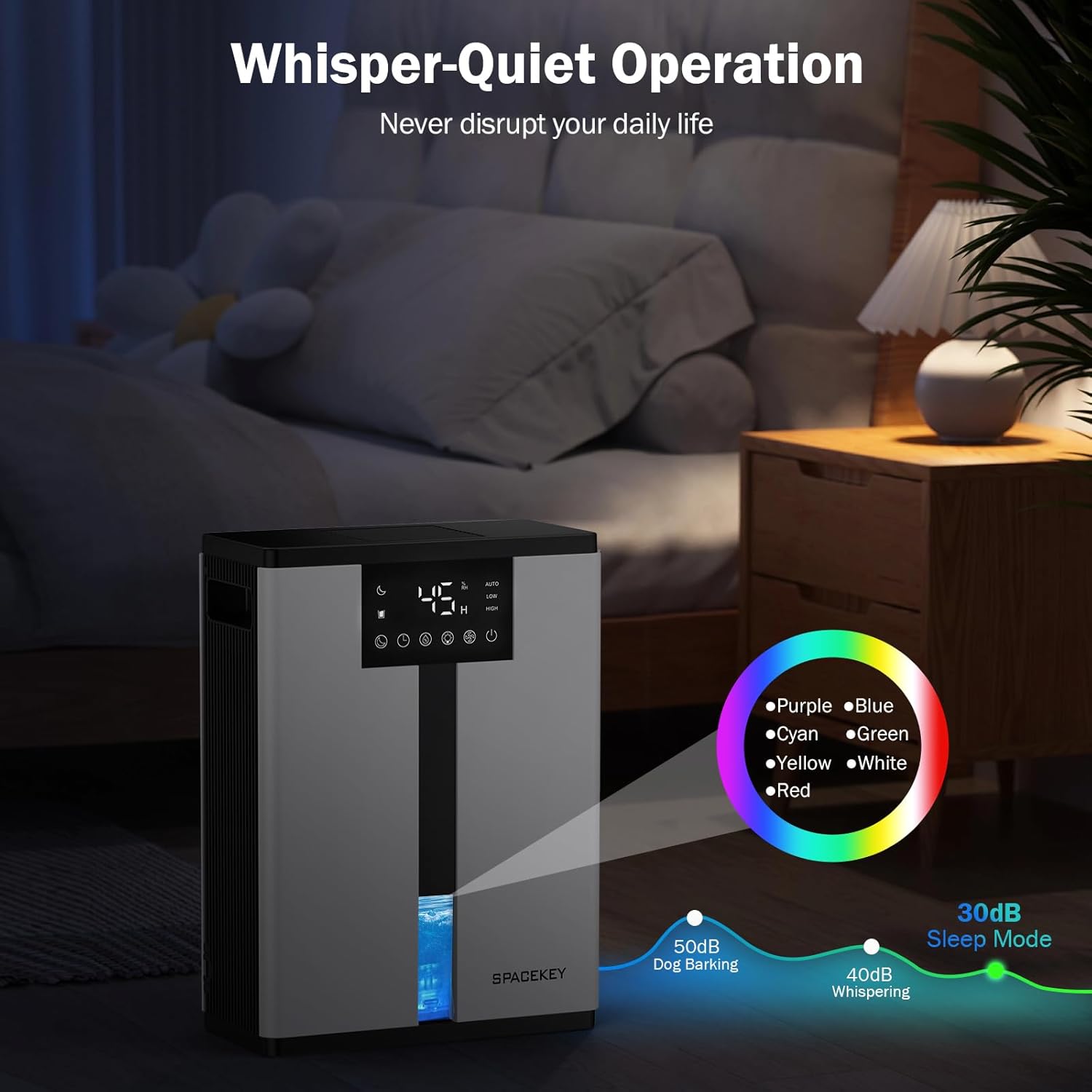
Figure 11: Dehumidifier in Sleep Mode with ambient lighting for a peaceful environment.
5.6 Fèmen Otomatik
The dehumidifier will automatically shut off and flash a red light with an audible beep when the water tank is full. Empty the water tank to resume operation.
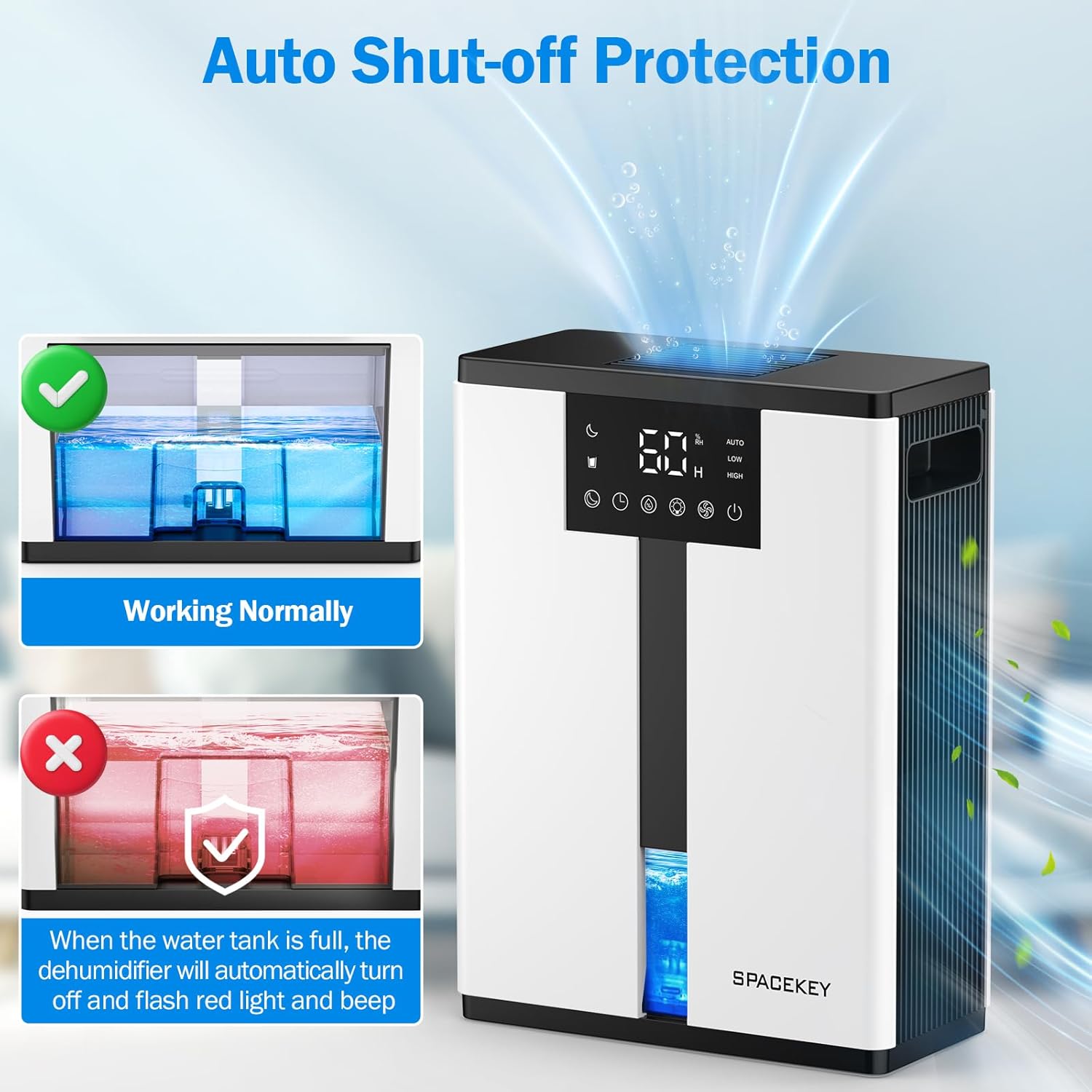
Figure 12: Automatic shut-off mechanism when the water tank is full.
6. Antretyen
6.1 Vide tank dlo a
- Rale tank dlo a dousman soti devan aparèy la.
- Retire kouvèti tank la.
- Vide dlo a kolekte.
- Replace the lid and reinsert the water tank firmly into the dehumidifier.

Figure 13: Step-by-step guide to emptying the water tank.
6.2 Netwaye filtè lè a
The washable filter should be cleaned regularly (every 2-4 weeks, depending on usage) to maintain optimal performance.
- Deploge dezimidifikatè a.
- Retire filtè a nan do inite a.
- Rense filtè a anba dlo k ap koule pou retire pousyè ak debri.
- Kite filtè a seche nèt nan lè a anvan ou mete l tounen.
- Pa sèvi ak dezumidifikatè a san filtè a.

Figure 14: Instructions for removing and washing the air filter.
6.3 Netwaye Eksteryè a
Siye eksteryè dezimidifikatè a ak yon mou, damp twal. Pa sèvi ak pwodui netwayaj abrazif oswa solvang.
NAN. Depanaj
| Pwoblèm | Kòz posib | Solisyon |
|---|---|---|
| Dezumidifikatè a pa limen. | Pa gen kouran; kòd kouran an pa branche; tank dlo a plen oswa li pa byen branche. | Tcheke koneksyon kouran an; vide epi mete tank dlo a tounen nan plas li kòrèkteman. |
| Pa gen dlo ki ranmase oswa dezumidifikasyon an fèb. | Room humidity is already low; air filter is clogged; ambient temperature is too low; unit size is too small for the space. | Ensure humidity is above target; clean air filter; operate in recommended temperature range; consider unit placement or additional units for larger spaces. |
| Inite a fè bwi. | Fan speed is set to High; unit is not on a flat surface. | Switch to Low or Sleep mode; ensure unit is on a stable, flat surface. |
| Red light flashing and beeping. | Tank dlo plen. | Vide tank dlo a epi mete l tounen. |
8. Espesifikasyon
| Karakteristik | Detay |
|---|---|
| Non modèl | QIG-D01 |
| Mak | Espas kle |
| Kapasite dezumidifikasyon | Up to 50 oz (approx. 3 pints) per 24 hours (at 86°F, 80% RH) |
| Kapasite tank dlo | 3.0 Lit (106 Ons Likid) |
| Zòn Kouvèti | Jiska 850 pye kare |
| Konsomasyon pouvwa | 70 Watts (not more than 1.68 kWh/Day) |
| Nivo bri | Approx. 30dB (in Sleep Mode) |
| Dimansyon (D x W x H) | 5.71"D x 11.22"W x 15.2"H |
| Pwa atik | 8.91 liv |
| Karakteristik espesyal | Automatic Shutoff, Intelligent Humidity Control, 4 Fan Speeds, Timer, 7 Colorful Lights, 45° Tip-over Protection, Washable Filter |
9. Garanti ak Sipò Kliyan
Spacekey offers the following support for your dehumidifier:
- Ranbousman 30 jou: For any dissatisfaction.
- Ranplasman pou 2 an: Pou domaj oswa fonksyònman ki pa kòrèk nan pwodwi a.
- Sèvis Kliyan pou tout lavi: Dedicated support for any questions or issues.
If you have any questions or require assistance, please do not hesitate to contact Spacekey customer support. We aim to reply within 24 hours.


Figi 15: Plis paseview of Spacekey's customer support and warranty policies.
Ask a question about this manual
Ask about setup, troubleshooting, compatibility, parts, safety, or missing instructions. Manuals+ will review the question and use this page’s manual context to help answer it.