
GRECELL T1 PRO
Manyèl Itilizatè Estasyon Kouran Pòtab GRECELL 2200W
Modèl: T1 PRO
Entwodiksyon
The GRECELL Portable Power Station 2200W is a high-capacity, high-power solar generator designed to provide reliable electricity for various applications, including home backup, outdoor camping, and emergency situations. With a substantial 1126Wh capacity and a rated output of 2200W (4800W peak), it can power a wide range of devices, from mobile phones and laptops to refrigerators and other household appliances. Its advanced LiFePO4 battery technology ensures durability and safety, while multiple charging options offer flexibility for continuous power supply.

Imaj: Devan view of the GRECELL Portable Power Station 2200W, showcasing ekspozisyon li yo ak divès pò pwodiksyon yo.
Enfòmasyon sou Sekirite
Please read all safety instructions carefully before operating the power station. Failure to follow these instructions may result in electric shock, fire, or serious injury.
- Pa demonte, repare, oswa modifye aparèy la. Si ou pa reyajiste li byen, sa ka lakòz dife oswa chòk elektrik.
- Do not place the unit near fire or expose it to excessive heat. Keep out of direct sunlight.
- Pa chaje, itilize, oswa sere aparèy la nan yon twalèt oswa nan yon zòn ki ekspoze a dlo oswa imidite.
- Use only the original or certified charging cables and adapters.
- Kenbe aparèy la lwen timoun ak bèt kay.
- Asire w ke aparèy la byen vantile pandan w ap itilize l epi pandan w ap chaje l pou anpeche l chofe twòp.
- Pa mete objè etranje nan pò yo oswa ouvèti yo.
- Si gen dife, sèvi ak yon ekstengtè ki gen poud sèk. Dlo ka lakòz chòk elektrik.
Kontni pake
Verifye ke tout atik yo enkli nan pakè ou a:
- 1x GRECELL Portable Power Station 2200W
- 1x AC Charger
- 1x Machin Charger
- 1x Anderson to MC4 Cable (for solar panel connection)
- 1x Cable Storage Bag
- 1x manyèl itilizatè
Pwodwi souview
Familyarize w ak divès konpozan ak pò estasyon elektrik ou a.

Imaj: Detaye view of the GRECELL Power Station's front panel, highlighting the various input and output ports including AC, USB-C, USB-A, DC, and Cigar Lighter ports.
Ports and Features:
- Sòti AC (x4): 2200W rated power, 4800W peak. For powering household appliances.
- USB-C PD100W (x2): For fast charging compatible laptops, tablets, and smartphones.
- USB-C QC3.0 18W (x2): For quick charging various USB-C devices.
- USB-A QC3.0 18W (x2): For quick charging various USB-A devices.
- Sòti DC (x2): Standard DC ports for compatible devices.
- Cigar Lighter Output (x1): 13.3V/10A, for car appliances.
- Antre AC: For fast charging the power station via wall outlet.
- DC Antre: Pou chaje atravè yon panèl solè oswa yon plato machin.
- Ekspozisyon LCD: Montre nivo batri, dlo antre/sotitage, ak tan ekzekisyon ki rete a.
Enstalasyon
Premye chaj:
Before first use, fully charge the power station. This ensures optimal battery performance and calibration.
- Connect the provided AC charger to the AC input port on the power station.
- Plug the AC charger into a standard wall outlet (110V).
- The LCD display will show the charging status. The unit can be fully charged in approximately 1.25 hours using the 1200W AC input.
- Yon fwa konplètman chaje, dekonekte plato a.

Image: The GRECELL Power Station being charged via an AC wall outlet, illustrating its fast charging capability.
Enstriksyon Operasyon
Limen/Etenyen:
- To turn on the power station, press and hold the main power button for a few seconds until the LCD display illuminates.
- Pou etenn estasyon kouran an, peze epi kenbe bouton prensipal kouran an ankò jiskaske ekran an etenn.
Sèvi ak Sòti AC yo:
- Asire w ke estasyon elektrik la limen.
- Peze bouton kouran AC a pou aktive priz AC yo. Endikatè AC a sou ekran an ap limen.
- Plug your AC devices into the available AC outlets. Ensure the total wattage of your devices does not exceed 2200W (or 4800W peak for short durations).
- When finished, press the AC power button again to turn off the AC outlets and conserve power.
Using USB and DC Outputs:
- Asire w ke estasyon elektrik la limen.
- For USB ports, simply plug in your USB devices. The USB ports are typically always active when the unit is on.
- For DC outputs (including the cigar lighter), press the DC power button to activate them. The DC indicator on the display will light up.
- Plug your DC devices into the appropriate ports.
- When finished, press the DC power button again to turn off the DC outputs.

Image: Two individuals using the GRECELL Power Station to power a laptop, mini-fridge, and other devices in an outdoor campanviwònman ing.
Emergency Power Supply (EPS) Function:
The EPS function allows the power station to act as an uninterruptible power supply for connected devices. When the power station is connected to an AC wall outlet and devices are plugged into its AC outputs, it will pass through power directly from the wall. In the event of a power outage, the power station will automatically switch to battery power within 20 milliseconds, ensuring continuous operation for your critical devices.
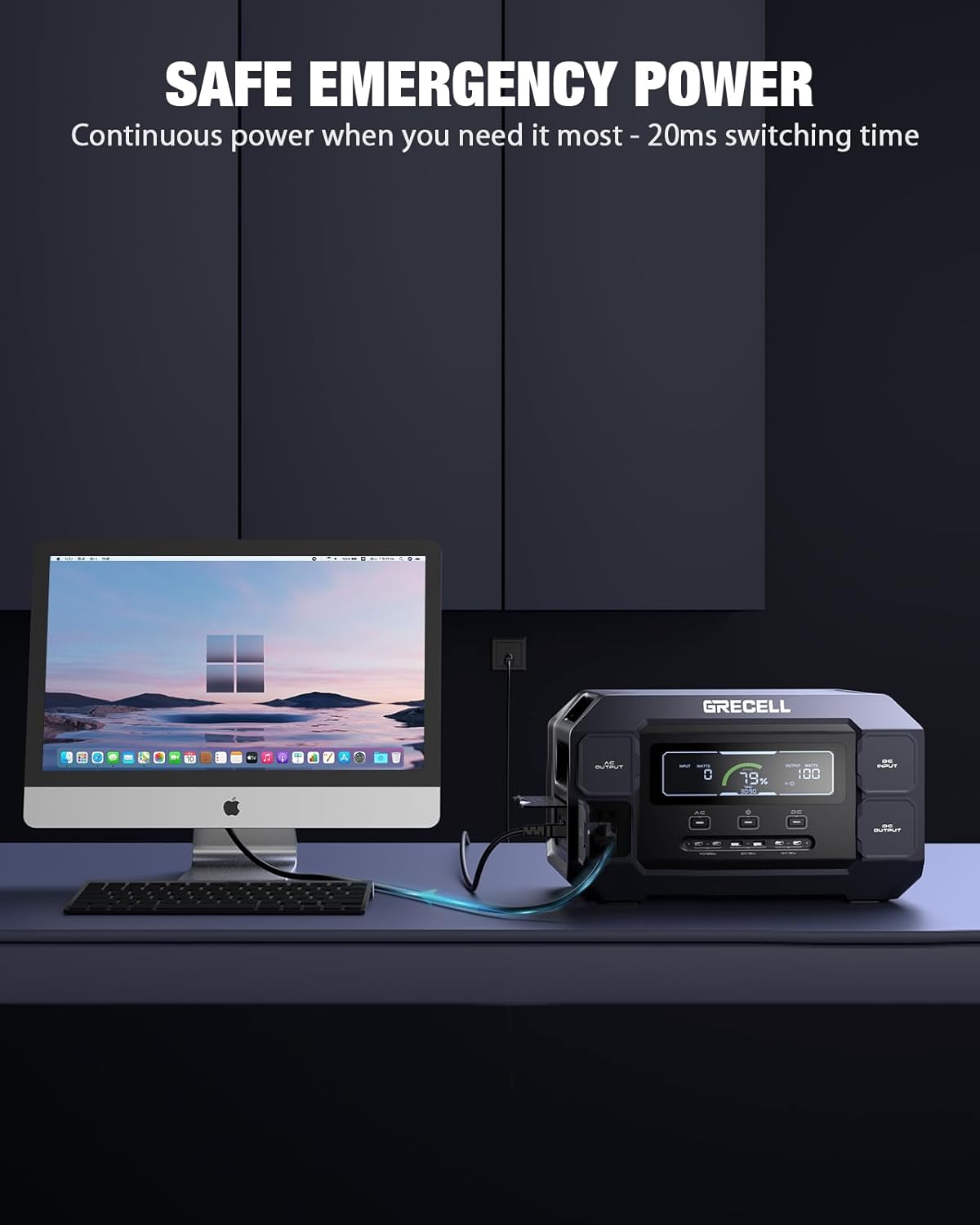
Image: The GRECELL Power Station connected to a desktop computer setup, demonstrating its role as a safe emergency power source with rapid switching time.
Chaje Metòd
The GRECELL Portable Power Station offers multiple ways to recharge, providing flexibility for various scenarios.

Image: A collage showing four different charging methods for the GRECELL Power Station: AC wall charging, solar charging with panels, car charging, and simultaneous AC + solar charging.
1. AC Wall Charging:
- Connect the provided AC charging cable to the AC input port and a standard wall outlet.
- The power station supports up to 1200W AC input, allowing for a full charge in approximately 1.25 hours.
2. Solar Charging:
- Connect compatible solar panels (up to 600W max input) to the DC input port using the Anderson to MC4 cable.
- Position the solar panels in direct sunlight for optimal charging efficiency.
- The built-in MPPT controller ensures efficient solar charging.

Image: The GRECELL Power Station being charged by two solar panels in an outdoor setting near a body of water, emphasizing its green power source capability.
3. Chaje machin:
- Connect the provided car charger to the DC input port and your vehicle's 12V/24V cigarette lighter socket.
- This method is ideal for charging while on the go.
4. AC + Solar Charging:
- For the fastest possible recharge, combine AC wall charging with solar panel charging simultaneously.
- This method can significantly reduce charging time.
Antretyen
Bon antretyen asire lonjevite ak pèfòmans optimal santral elektrik ou a.
- Netwayaj: Use a dry, soft cloth to wipe the surface of the unit. Do not use abrasive cleaners or solvents.
- Depo: Store the power station in a cool, dry place, away from direct sunlight and extreme temperatures. For long-term storage, charge the unit to 50-80% every 3-6 months to maintain battery health.
- Sante batri: The LiFePO4 battery is designed for over 3500 charge cycles. Avoid fully discharging the battery frequently to maximize its lifespan.
- Vantilasyon: Asire ouvèti vantilasyon yo pa bloke pandan w ap itilize pou anpeche surchof.

Imaj: Yon eksplozyon view of the GRECELL Power Station, illustrating its internal components and the LiFePO4 battery pack, highlighting the Battery Management System (BMS).
Depanaj
Si ou rankontre pwoblèm ak estasyon elektrik ou a, gade pwoblèm ak solisyon komen sa yo:
| Pwoblèm | Kòz posib | Solisyon |
|---|---|---|
| Inite pa limen. | Battery is completely discharged; Power button not pressed long enough. | Charge the unit using the AC charger. Press and hold the power button for 3-5 seconds. |
| Sòti AC a pa fonksyone. | AC output not activated; Overload protection triggered; Device wattage twò wo. | Press the AC power button. Reduce the total wattage of connected devices. Disconnect and reconnect devices. |
| Inite a pa ap chaje. | Charger not properly connected; Faulty charger/cable; Extreme temperature. | Ensure all connections are secure. Try a different outlet or charging method. Charge within recommended temperature range (0-40°C). |
| Ekran an montre yon kòd erè. | Fòt entèn; Twòp tanperati; Ti volimtage. | Gade kòd erè espesifik la nan manyèl itilizatè konplè a (si li disponib) oubyen kontakte sèvis kliyan. |
Espesifikasyon
| Karakteristik | Detay |
|---|---|
| Modèl | T1 PRO |
| Kapasite | 1126Wh |
| AC Sòti Pouvwa | 2200W (Nominal), 4800W (Pik) |
| Kalite batri | LiFePO4 |
| Sik lavi | Plis pase 3500 sik pou rive nan 80% kapasite |
| Chaje Antre AC | Max 1200W (Full charge in approx. 1.25 hours) |
| Solè Antre Chaje | Max 600W (MPPT supported) |
| USB-C Sòti | 2x PD 100W, 2x QC3.0 18W |
| USB-A Sòti | 2x QC3.0 18W |
| DC Sòti | 2x DC Output, 1x Cigar Lighter (13.3V/10A) |
| Dimansyon (L x W x H) | 15.6" x 6.13" x 9.19" |
| Tanperati Fonksyònman | -10 ° C a 40 ° C (14 ° F a 104 ° F) |

Image: The GRECELL Power Station with its dimensions (length, width, height) clearly marked.
Garanti ak sipò
The GRECELL Portable Power Station 2200W comes with a 2-ane garanti apati dat acha a. Garanti sa a kouvri domaj fabrikasyon ak atizan konn fè nan itilizasyon nòmal.
For technical support, warranty claims, or any questions regarding your product, please contact GRECELL customer service. Refer to the contact information provided in the included user manual or visit the official GRECELL websit.
Resous sou entènèt: For additional information, FAQs, and product updates, please visit the GRECELL Store on Amazon.
Ask a question about this manual
Ask about setup, troubleshooting, compatibility, parts, safety, or missing instructions. Manuals+ will review the question and use this page’s manual context to help answer it.