
1. Entwodiksyon
The Blackmagic Design DeckLink Duo 2 is a high-performance PCI Express capture and playback card designed for professional video workflows. It features four independent 3G-SDI connections, allowing for simultaneous capture or playback of multiple video streams in SD and HD formats up to 1080p60. This manual provides essential information for the setup, operation, and maintenance of your DeckLink Duo 2 card.
2. Ki sa ki nan bwat la
- DeckLink Duo 2 Capture Card
- Lyen kab

Image: The DeckLink Duo 2 card shown with the accompanying SolidSignal cable ties.
3. Karakteristik kle
- Four Independent 3G-SDI Connections: Simultaneously capture and playback up to four video streams at resolutions up to 1080p60.
- Entèfas PCIe: Utilizes a high-speed PCIe interface for reliable data transfer and low-latency performance. Requires PCI Express 4 lane generation 2, compatible with 4, 8, and 16 lane PCI Express slots.
- Sipò pou fòma laj: Compatible with a range of SD, HD, and 3G-SDI formats, including 720p, 1080i, and 1080p.
- Lojisyèl konpatibilite: Works seamlessly with a range of editing, visual effects, and streaming software applications.
- Antre referans: Features a reference input for synchronizing with external genlock (blackburst and tri-sync) signals, ensuring precise timing in multi-camera setups.
4. Enstalasyon
4.1 Enstalasyon Materyèl
To install the DeckLink Duo 2 card:
- Kouran òdinatè w lan epi dekonekte tout câbles.
- Louvri ka òdinatè w lan.
- Locate an available PCI Express slot (x4, x8, or x16).
- Carefully insert the DeckLink Duo 2 card into the slot, ensuring it is fully seated.
- Secure the card with the retaining bracket screw.
- Fèmen ka òdinatè w lan epi rekonekte tout câbles yo.

Imaj: Yon angilè view of the DeckLink Duo 2 card, illustrating its form factor and components.
4.2 Enstalasyon lojisyèl
After hardware installation, install the necessary drivers and software from the Blackmagic Design website. The DeckLink Duo 2 supports various operating systems, including Mac OS and Linux. For Windows users, drivers are also available.

Image: A selection of compatible software applications, including DaVinci Resolve, Fusion, Final Cut Pro X, Adobe Premiere Pro CC, Avid Media Composer, Adobe After Effects CC, Avid Pro Tools, Steinberg Cubase, Steinberg Nuendo, and Adobe Photoshop CC.
5. Opere
5.1 Connecting SDI Devices
The DeckLink Duo 2 features four independent 3G-SDI connections, which can be configured as inputs or outputs depending on your workflow. Additionally, a dedicated Reference In port is available for genlock synchronization.
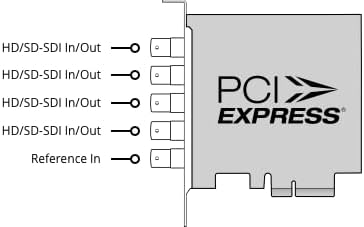
Image: A schematic diagram illustrating the four HD/SD-SDI In/Out ports and the single Reference In port on the DeckLink Duo 2 card's rear bracket.
5.2 Entegrasyon lojisyèl
Once installed, the DeckLink Duo 2 integrates with a wide range of professional video software. Configure the card settings within your chosen application (e.g., DaVinci Resolve, Adobe Premiere Pro) to select input/output formats, frame rates, and audio channels. Refer to your software's documentation for specific setup instructions.
6. Antretyen
The DeckLink Duo 2 is designed for reliable operation with minimal maintenance. To ensure optimal performance:
- Keep your computer's interior clean and free of dust to prevent overheating, especially around the card's fan and heatsink.
- Ensure proper airflow within your computer case.
- Regularly check the Blackmagic Design website for driver and firmware updates to ensure compatibility and access to the latest features.
NAN. Depanaj
If you encounter issues with your DeckLink Duo 2, consider the following:
- Kat pa detekte: Ensure the card is fully seated in the PCIe slot and that your computer's power supply is adequate. Check device manager (Windows) or system information (Mac/Linux) to confirm detection.
- Pa gen siyal videyo: Verify all SDI cables are securely connected and that the source device is outputting a compatible signal. Check your software's input settings.
- Pwoblèm pèfòmans: Ensure your computer meets the minimum system requirements for your workflow. Update drivers and close unnecessary background applications.
- Aksidan lojisyèl: Ensure your operating system and video software are up to date. Reinstall DeckLink drivers if necessary.
For persistent issues, consult the Blackmagic Design support resources online.
8. Espesifikasyon

Image: The DeckLink Duo 2 card with its approximate dimensions of 3.7 inches in height and a weight of 5.64 ounces indicated.
| Spesifikasyon | Detay |
|---|---|
| Mak | Blackmagic Design |
| Seri | DeckLink Duo 2 |
| Nimewo Modèl | BDLKDUO2 |
| Entèfas Materyèl | PCIe x4 (compatible with x4, x8, x16 slots) |
| Rezolisyon Capture Videyo | Jiska 1080p60 |
| Sistèm operasyon sipò | Linux, Mac OS (Windows also supported) |
| Pwa atik | 8.8 ons |
| Dimansyon pake | 6.5 x 5.79 x 1.69 pous |
| Itilizasyon Rekòmande | Video Recording, Media Play-out, Digital Signage, Multi-channel Capture |
9. Garanti ak sipò
For detailed warranty information, please refer to the documentation included with your purchase or visit the official Blackmagic Design website. Blackmagic Design provides comprehensive support resources, including product manuals, software downloads, and technical support forums.
Blackmagic Design Support: www.blackmagicdesign.com/support