
1. Entwodiksyon
This manual provides comprehensive instructions for the Blackmagic Design Pyxis 6K Cinema Camera, L-Mount. It covers essential information regarding setup, operation, maintenance, and troubleshooting to ensure optimal performance and longevity of your camera. Please read this manual thoroughly before using the camera.
2. Enfòmasyon sou Sekirite
- Pa ekspoze kamera a nan dlo oswa imidite twòp.
- Avoid operating the camera in extreme temperatures.
- Use only Blackmagic Design approved accessories and power supplies.
- Pa eseye demonte oswa modifye kamera a. Konfye tout antretyen bay pèsonèl kalifye.
- Kenbe kamera a lwen chan mayetik fò.
3. Pake kontni
Verifye ke tout atik yo prezan nan pakè a:
- Blackmagic Design Pyxis 6K Cinema Camera (L-Mount)
- Pwovizyon pou pouvwa
- Manyèl Itilizatè (dokiman sa a)
- DaVinci Resolve Studio activation key
4. Kamera souview
The Blackmagic Design Pyxis 6K Cinema Camera features a 36x24mm full-frame 6K sensor, offering exceptional image quality and flexibility for cinematic content creation. It supports various recording formats including Blackmagic RAW and H.264 proxies, with resolutions up to 6048 x 4032.

Figi 4.1: Devan view of the Blackmagic Design Pyxis 6K Cinema Camera with an L-Mount lens attached. This image highlights the camera's robust body, the lens mount, and the integrated top handle.
Key features include a built-in 4-inch HDR 1500 nit LCD screen for clear monitoring, and support for open gate 3:2, full height 6:5 anamorphic, and Super 35 recording modes. The camera records full resolution up to 36 frames per second (fps) or 120 fps in windowed mode.

Figi 4.2: Dèyè view of the Blackmagic Design Pyxis 6K Cinema Camera, showcasing the 4-inch HDR LCD touchscreen display, control buttons, and the attached lithium-ion battery pack. The screen displays recording settings and menu options.
The camera utilizes CFexpress for flash memory storage and offers HDMI connectivity for external monitoring. Audio is supported in AAC, MP3, and PCM formats.
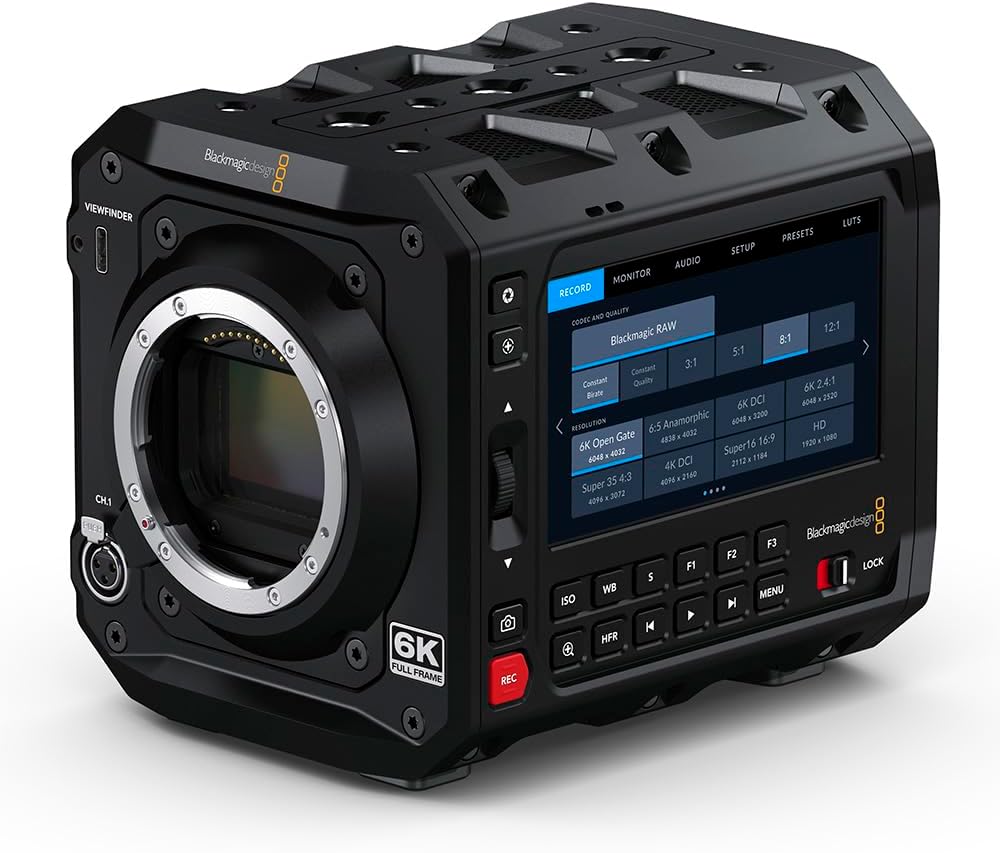
Figi 4.3: Devan view of the Blackmagic Design Pyxis 6K Cinema Camera without a lens, clearly showing the L-Mount for lens attachment and the '6K FULL FRAME' designation. This view highlights the camera's robust construction and lens interface.
5. Enstalasyon
5.1. Enstalasyon batri
- Asire w ke kamera a etenn.
- Jwenn konpatiman batri a sou dèyè kamera a.
- Insert a compatible lithium-ion battery pack, ensuring it clicks securely into place.
5.2. Lens Attachment (L-Mount)
- Remove the body cap from the camera and the rear cap from your L-Mount lens.
- Align the white index mark on the lens with the white index mark on the camera's lens mount.
- Insert the lens into the mount and rotate it clockwise until it locks into position.
5.3. Media Card Insertion
- Locate the CFexpress card slot.
- Insert a CFexpress card with the label facing the correct direction until it clicks into place.
- To remove, press the card gently to eject it.
5.4. Powering On / Off
- Pou limen, glise switch pouvwa a nan pozisyon 'ON'.
- Pou etenn li, glise switch pouvwa a nan pozisyon 'OFF'.
5.5. Premye Anviwònman
Upon first power-on, you may be prompted to set the language, date, and time. Follow the on-screen instructions using the touchscreen LCD.
6. Itilizasyon Kamera a
6.1. Navigasyon meni
The 4-inch HDR LCD screen is a touchscreen interface. Tap icons and swipe to navigate through menus and adjust settings. Physical buttons are also available for quick access to common functions like ISO, White Balance, and Frame Rate.
6.2. Anrejistreman
- Fòma anrejistreman: The camera supports Blackmagic RAW for maximum quality and H.264 proxies for efficient workflow. Select your desired format in the 'Record' menu.
- Rezolisyon ak pousantaj ankadreman: Adjust resolution (e.g., 6K Open Gate, 6K DCI, Super 35) and frame rate (up to 36 fps at full resolution, 120 fps windowed) via the 'Record' or 'Project' settings.
- Kòmanse/Sispann anrejistreman: Press the dedicated 'REC' button on the camera body to start and stop recording.
6.3. Anviwònman Audio
Access audio input levels, monitoring options, and format settings (AAC, MP3, PCM) through the 'Audio' menu. Ensure external microphones are properly connected to the camera's audio inputs.
6.4. Monitoring and Connectivity
Use the built-in LCD for on-camera monitoring. For external displays, connect an HDMI cable from the camera's HDMI output to your monitor. Adjust display settings in the 'Monitor' menu.
7. Antretyen
7.1. Netwayaj
- Sèvi ak yon twal mou epi sèk pou netwaye kò kamera a.
- Pou ekran LCD a, sèvi ak yon solisyon espesyal pou netwayaj ekran ak yon twal mikwofib.
- Keep the lens mount free of dust and debris. Use a blower brush for sensor cleaning if necessary, or consult a professional.
7.2. Depo
When not in use, store the camera in a cool, dry place, preferably in a padded camera bag or case to protect it from physical damage and environmental factors.
7.3. Mizajou Firmware
Periodically check the Blackmagic Design website for firmware updates. Updates can improve performance, add features, and resolve issues. Follow the instructions provided with the firmware update carefully.
NAN. Depanaj
- Kamera pa limen: Ensure the battery is fully charged and correctly inserted, or the external power supply is connected.
- No image on LCD: Check lens attachment, ensure the lens cap is removed, and verify monitor settings.
- Pwoblèm anrejistreman: Confirm a compatible CFexpress card is inserted and has sufficient free space. Check recording format and resolution settings.
- Pwoblèm odyo: Verify microphone connection, audio input levels, and selected audio format.
- For persistent issues, perform a factory reset (refer to the 'Settings' menu) or contact Blackmagic Design support.
9. Espesifikasyon
| Karakteristik | Spesifikasyon |
|---|---|
| Dimansyon pwodwi | 5.91 x 4.72 x 4.33 pous |
| Pwa atik | 4.62 liv |
| Nimewo Modèl Atik | CINECAMCPYXA60LFL |
| Teknoloji Capteur Foto | CMOS |
| Rezolisyon Capture Videyo | 6K (6048 x 4032), 1080p, 720p |
| Ouverture maksimòm | 2 Milimèt (Depann sou lantiy) |
| Kalite memwa flash | CFexpress |
| Fòma Capture Videyo | Blackmagic RAW, CinemaDNG, ProRes, DNxHR |
| Sipòte fòma odyo | AAC, MP3, PCM |
| Gwosè ekran | 4 Inches (HDR 1500 nit LCD) |
| Koneksyon Teknoloji | HDMI |
| Koulè | Nwa |
| Manifakti | Blackmagic Design |
10. Garanti ak sipò
10.1. Enfòmasyon sou Garanti
Blackmagic Design products typically come with a limited manufacturer's warranty. Please refer to the warranty card included with your product or visit the official Blackmagic Design websit la pou wè kondisyon garanti detaye ki espesifik pou rejyon ou an.
10.2. Sipò teknik
For technical assistance, product registration, or to download the latest software and drivers, please visit the official Blackmagic Design support page. You can find comprehensive FAQs, knowledge base articles, and contact information for customer support.
Official Blackmagic Design Store: Blackmagic Design on Amazon