
1. Entwodiksyon
Thank you for choosing the Vortex Powerhub30 Black 30000 mAh External Battery. This device is designed to provide reliable portable power for your electronic devices. Please read this manual carefully before use to ensure proper operation and to maximize the lifespan of your power bank.
2. Enfòmasyon sou Sekirite
- Do not expose the power bank to extreme temperatures (above 60°C / 140°F or below 0°C / 32°F), direct sunlight, or fire.
- Avoid dropping, disassembling, or attempting to repair the device yourself. This may cause damage and void the warranty.
- Keep the power bank away from water, moisture, and corrosive materials.
- Pa sèvi ak bank pouvwa a si li vizibman domaje, anfle, oswa si li gen flit.
- Kenbe soti nan atenn timoun yo.
- Sèvi ak sèlman kab ak adaptè chaje ki sètifye.
- Jete bank pouvwa a yon fason responsab dapre règleman lokal yo.
3. Pake kontni
- Vortex Powerhub30 Black 30000 mAh External Battery
- USB Charging Cable (Micro-USB/Type-C compatible)
- Manyèl itilizatè
4. Pwodwi souview
The Vortex Powerhub30 is equipped with multiple ports and an LED display for convenient charging and monitoring.

Imaj 1: Devan view of the Vortex Powerhub30 Black external battery, showing its compact design and the Vortex logo. The image also highlights its 30000 mAh capacity and illustrates its use with various devices like smartphones, tablets, and headphones.
Eleman:
- Pò Sòti USB-A (x2): Pou chaje aparèy ekstèn yo.
- USB Kalite-C Port: Bidirectional, used for both charging the power bank and charging external devices.
- Pò Antre Mikwo-USB: Pou chaje bank pouvwa a.
- Dirije ekspozisyon: Montre pousantaj batri ki rete atage.
- Bouton pouvwa: Aktive ekran LED la epi kòmanse chaje.
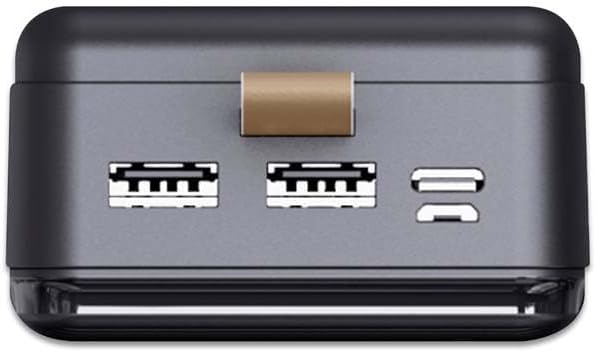
Imaj 2: Anlè view of the Vortex Powerhub30, clearly displaying the two USB-A output ports and the single bidirectional USB Type-C port. This view illustrates the multiple connectivity options available.

Image 3: Close-up top view of the Vortex Powerhub30, highlighting the integrated LED indicator which displays the current battery charge level. The power button is also visible next to the indicator.
5. Enstalasyon
Premye Chajman Bank Pouvwa a:
- Before first use, fully charge your Powerhub30.
- Connect the provided USB charging cable to either the Micro-USB input port or the USB Type-C port on the power bank.
- Konekte lòt bout kab la nan yon plato USB nan miray (pa enkli) oubyen nan pò USB yon òdinatè.
- The LED display will show the charging progress. Once 100% is displayed, the power bank is fully charged.
6. Operasyon Enstriksyon
Chaje Aparèy Ekstèn:
- Connect your device's charging cable to one of the USB-A output ports or the USB Type-C port on the Powerhub30.
- Connect the other end of the cable to your smartphone, tablet, or other compatible device.
- Press the power button on the Powerhub30 to initiate charging. The LED display will show the power bank's remaining charge.
- The Powerhub30 can charge up to three devices simultaneously.
- Once your device is fully charged, disconnect it from the power bank. The power bank will automatically turn off after a period of inactivity.
7. Antretyen
- Netwaye bank pouvwa a avèk yon twal mou epi sèk. Pa sèvi ak pwodui chimik ki agresif oswa pwodui netwayaj abrazif.
- Sere bank pouvwa a nan yon kote ki fre, sèk lè li pa itilize.
- To maintain battery health, fully charge the power bank at least once every three months, even if not in regular use.
- Avoid overcharging or completely draining the battery frequently.
NAN. Depanaj
Batri pouvwa a pa chaje:
- Asire w ke kab chaje a byen konekte ak bank pouvwa a ak sous kouran an.
- Eseye yon lòt kab chaje oswa adaptè miray.
- Verifye si sous kouran an aktif.
Aparèy la pa chaje ak bank pouvwa a:
- Ensure the power bank has sufficient charge (check the LED display).
- Press the power button on the power bank to activate output.
- Eseye yon lòt kab chaje pou aparèy ou an.
- Ensure your device is compatible with the power bank's output specifications.
Chaje dousman:
- Asire w ke w ap itilize yon kab chaje ki gen bon kalite.
- Some devices may charge slower if multiple devices are connected simultaneously.
- Check if your device supports fast charging and if the cable/port used supports it.
9. Espesifikasyon
| Modèl | Powerhub30 |
| Kapasite batri | 30000 mAh |
| Pò Antre | Mikwo USB, USB Kalite-C |
| Sòti pò | 2x USB-A, 1x USB Type-C (bidirectional) |
| Karakteristik espesyal | Compact design, LED battery display |
| Itilizasyon Rekòmande | Smartphones, Tablets, other USB-powered devices |
| Dimansyon | 14.8 × 7 × 2.8 cm (approx.) |
| Materyèl | ABS Casing |
10. Garanti ak sipò
For warranty information and customer support, please refer to the official Vortex website or contact your retailer. You can also visit the Vortex Brand Store pou plis detay.