
BSP D9
BSP D9 Game Controller User Manual
Modèl: D9
1. Entwodiksyon
The BSP D9 Game Controller is a versatile gaming accessory designed to enhance your mobile and PC gaming experience. It supports a wide range of devices including iPhones, iPads, Android phones and tablets, PCs, Nintendo Switch, and PlayStation consoles. Featuring advanced Hall Effect joysticks and triggers, programmable back buttons, and a stretchable design, the D9 controller provides precise control and comfortable gameplay across various platforms.
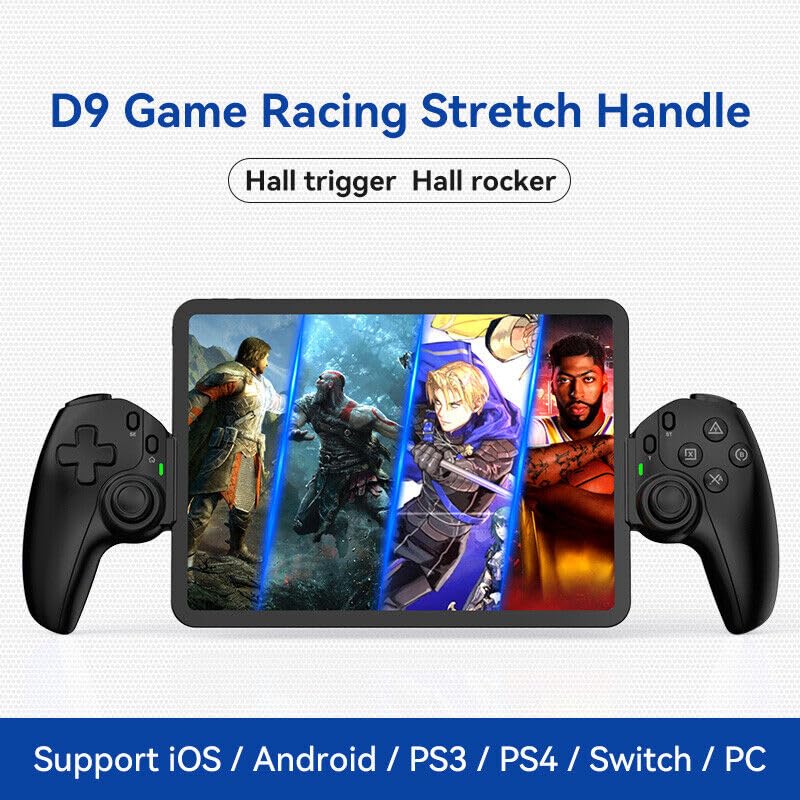
Figure 1.1: The BSP D9 Game Controller attached to a tablet, showcasing its design and compatibility with mobile gaming.
2. Pwodwi souview: Key Details
Familiarize yourself with the various buttons and components of your D9 Game Controller.

Figure 2.1: Detailed diagram of the D9 controller's button layout, including the Cross Key, SELECT, HOME, START, A/B/X/Y buttons, L1/R1, L2/R2 triggers, M1/M2 back buttons, Left/Right Sticks (L3/R3), Status Indicator, and Charging Indicator.
- Cross Key (D-Pad): Antre direksyonèl.
- Left Stick/L3: Left analog joystick, press down for L3.
- Bouton SELECT: Function button, typically for menu selection.
- Bouton HOME: Power on/off, mode switching, return to home screen.
- Endikatè estati: Shows connection status and mode.
- Endikatè chaje: Displays battery charging status.
- Right Stick/R3: Right analog joystick, press down for R3.
- Bouton A/B/X/Y: Bouton aksyon estanda.
- Bouton START: Function button, typically for pausing or starting games.
- Bouton TURBO: Aktive/dezaktive fonksyon turbo pou bouton ki asiyen yo.
- Bouton L1/R1: Bouton zepòl.
- Deklanchè L2/R2 yo: Deklanchè analòg.
- Bouton M1/M2: Bouton pou retounen nan plas ou ka pwograme.
3. Karakteristik
3.1 Deklanchè ak Joystick Efè Hall
The D9 controller is equipped with advanced Hall Effect technology for both its triggers and joysticks. This provides superior precision and durability compared to traditional potentiometers.

Figure 3.1: Explanation of Hall Effect Triggers and Joysticks, highlighting 0.1mm accuracy for triggers and benefits like no drift issues, no dead zone, long lifespan, and precise control for joysticks.
- Deklanchè Efè Hall: Provide 0.1mm accuracy for precise micro-operations in games.
- Joysticks efè Hall: Eliminate drift issues, maintain stable trajectory, offer precise positioning, and provide a smooth feel without stuttering.
3.2 Fonksyon Turbo
The Turbo function allows you to set automatic rapid firing for specific buttons, giving you an advantage nan jwèt rapid.

Figure 3.2: The Turbo function allows setting A/B/X/Y, L1/R1, L2/R2 buttons for rapid fire. Three adjustable turbo speeds are available: 8 shots/s, 15 shots/s, and 25 shots/s.
3.3 Macro Programming Function
The M1 and M2 back buttons can be programmed to execute complex key combinations with a single press, reducing repetitive actions and extending controller lifespan.

Figure 3.3: Instructions for setting and canceling macro programming on the M1 and M2 back buttons. Macros can be assigned to A/B/X/Y/L1/R1/L2/R2/Cross Key combinations.
3.4 Stretchable Design
The controller features a stretchable design to accommodate a wide range of smartphones and tablets, ensuring a secure fit and comfortable grip.

Figure 3.4: The controller supports device lengths from 130mm to 280mm (5-11 inches) and a maximum thickness of 13mm. It is perfectly compatible with iPhone 15 series and supports silicone & clear phone cases.
4. Konpatibilite
The BSP D9 Game Controller offers broad compatibility with various operating systems and gaming platforms, transforming your mobile device into a portable gaming console.

Figure 4.1: The controller supports streaming & cloud gaming (PS Remote Play, Xbox Game Pass, Steam Link, Rainway, NVIDIA GeForce NOW, Moonlight Game Streaming, Apple Arcade), direct play on iOS devices (Genshin Impact, Call of Duty Mobile, Diablo Immortal, Minecraft, Roblox), and direct play on Android devices (Call of Duty Mobile, Diablo Immortal, Minecraft, NBA 2K, Asphalt).
- Sistèm operasyon: iOS, Android, Windows (PC).
- Konsòl: Nintendo Switch, PlayStation (PS3, PS4, PS5 via remote play).
- Cloud Gaming: Supports services like Xbox Game Pass, PS Remote Play, Steam Link, NVIDIA GeForce NOW, and more.
- Jwe Dirèk: Compatible with popular mobile games on both iOS and Android.
5. Enstalasyon
5.1 Chaje Kontwolè a
- Connect the provided USB-C charging cable to the charging port on the controller.
- Konekte lòt bout kab la nan yon sous kouran USB (pa egzanp, yon pò USB òdinatè, yon adaptè miray).
- The Charging Indicator light will illuminate during charging and turn off when fully charged.
5.2 Inserting Your Device
- Gently pull the two sides of the controller apart to extend the stretchable mechanism.
- Carefully place your smartphone or tablet into the central slot, ensuring it is securely seated. The controller supports devices with lengths between 130mm and 280mm and a maximum thickness of 13mm.
- The controller is designed to accommodate devices with slim cases.
5.3 Connecting to Your Device (Bluetooth Pairing)
The connection method varies slightly depending on your device's operating system.
Pou Aparèy Android:
- Peze epi kenbe la LAKAY button until the Status Indicator light begins to flash rapidly, indicating pairing mode.
- Sou aparèy Android ou a, ale nan Anviwònman > Bluetooth epi aktive Bluetooth la.
- Chèche pou available devices and select "BSP-D9" or similar from the list.
- Once connected, the Status Indicator light on the controller will become solid.
Pou aparèy iOS:
- Peze epi kenbe la LAKAY button until the Status Indicator light begins to flash rapidly.
- Sou aparèy iOS ou a, ale nan Anviwònman > Bluetooth epi aktive Bluetooth la.
- Chèche pou available devices and select "Xbox Wireless Controller" or "DUALSHOCK 4 Wireless Controller" (depending on the mode the D9 emulates for iOS compatibility) from the list.
- Once connected, the Status Indicator light on the controller will become solid.
For PC/Switch/PS (Wired/Wireless):
Refer to the specific connection instructions provided with your controller for PC, Switch, or PS modes, as these may involve different button combinations or wired connections.
6. Operasyon Enstriksyon
6.1 Fonksyon bouton debaz yo
Gade Seksyon 2, "Pwodwi Plis Pase"view: Key Details," for the layout and basic functions of all buttons (Cross Key, A/B/X/Y, L1/R1, L2/R2, Joysticks, SELECT, START, HOME).
6.2 Using the Turbo Function
- Peze epi kenbe la TURBO bouton.
- Pandan w ap kenbe TURBO, press the button you wish to assign the turbo function to (e.g., A, B, X, Y, L1, R1, L2, R2). The button will now have turbo enabled.
- To adjust the turbo speed, press and hold TURBO and then press the Right Stick (R3) up or down to cycle through the 3 available speeds (8, 15, 25 shots/s).
- To cancel the turbo function for a specific button, press and hold TURBO and press the assigned button again.
- To clear all turbo settings, press and hold TURBO and then press the SELECT button.
6.3 Programming Macro Buttons (M1/M2)
The M1 and M2 back buttons can be programmed to store a sequence of button presses.
How to Set a Macro:
- Peze epi kenbe la CHWAZI bouton ak a M1 (or M2) key for 2 seconds. The LED indicator light will flash quickly.
- Press the key(s) you want to set for the macro programming function (e.g., A+B+X+Y).
- After setting the sequence, press the M1 (or M2) key again. The LED light will become solid, indicating that the setting is complete.
- Once set, pressing M1 (or M2) will automatically execute the programmed key combination.
How to Cancel a Macro:
- Peze epi kenbe la CHWAZI bouton ak a M1 (or M2) key for 2 seconds. The LED indicator light will flash quickly.
- Peze a M1 (or M2) key again to clear the macro programming. (Note: Do not press other buttons at this time). The LED light will remain solid to confirm the setting is cleared.
7. Antretyen
- Netwayaj: Sèvi ak yon twal mou epi sèk pou netwaye kontwolè a. Pa sèvi ak pwodui netwayaj abrazif oswa solvan.
- Depo: Sere kontwolè a nan yon kote ki fre epi sèk, lwen limyè solèy dirèk ak tanperati ekstrèm.
- Swen batri: Pou pwolonje lavi batri a, evite dechaje kontwolè a nèt souvan. Chaje l regilyèman, menm si w pa itilize l pandan yon bon bout tan.
- Evite gout: Pwoteje kontwolè a kont tonbe ak enpak, ki ka domaje konpozan entèn yo.
NAN. Depanaj
| Pwoblèm | Kòz posib | Solisyon |
|---|---|---|
| Kontwolè pa limen. | Batri ki ba. | Chaje kontwolè a pou omwen 30 minit. |
| Pa ka konekte atravè Bluetooth. | Controller not in pairing mode; Bluetooth interference; device Bluetooth off. | Ensure controller is in pairing mode (flashing LED). Turn off and on Bluetooth on your device. Move closer to the device. |
| Bouton yo oswa joystick yo pa reponn. | Connection issue; software glitch; physical damage. | Reconnect the controller. Restart your device. If problem persists, contact customer support. |
| Device does not fit in the controller. | Device dimensions exceed supported limits. | Ensure your device length is between 130-280mm and thickness is max 13mm. Remove bulky cases. |
9. Espesifikasyon
- Modèl: D9
- Mak: BSP
- Koneksyon: Bluetooth, Wired (for PC/Switch/PS, specific modes may vary)
- Longè Aparèy Sipòte: 130mm - 280mm (5 - 11 pous)
- Supported Device Thickness: Jiska 13mm
- Joystick/Trigger Technology: Efè Hall
- Bouton pwogramasyon: M1, M2 (back buttons)
- Turbo Fonksyon: Yes, with 3 adjustable speeds
- Manifakti: Shenzhen ShanWan Teknoloji Co., Ltd.
- Premye dat disponib: 30 mas 2024
10. Garanti ak sipò
For warranty information and technical support, please refer to the documentation included with your purchase or visit the official BSP product support websit la. Kenbe prèv acha ou pou reklamasyon garanti.
Remak: Tèm garanti espesifik yo ak detay pou kontakte sipò yo ka varye selon rejyon an.
Ask a question about this manual
Ask about setup, troubleshooting, compatibility, parts, safety, or missing instructions. Manuals+ will review the question and use this page’s manual context to help answer it.