
1. Entwodiksyon
The Cherub WMT-560 is a versatile, rechargeable clip-on device designed for musicians. It integrates a highly accurate tuner, a flexible metronome, and a practical tone generator into a single compact unit. Its fast response time and bright LCD display ensure clear visibility and efficient operation in various environments. The robust clamp design provides stable attachment to your instrument.
2. Pwodwi souview
2.1 Konpozan ak Kontwòl
Familiarize yourself with the main components and controls of your WMT-560 unit:
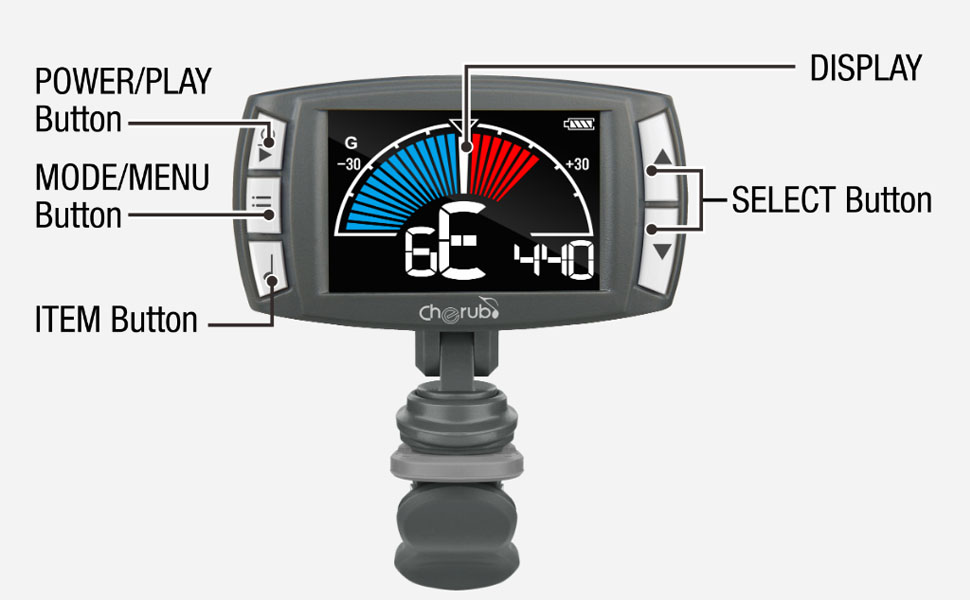
Image 2.1: Labeled diagram of the Cherub WMT-560, indicating the Power/Play button, Mode/Menu button, Item button, Select buttons (up/down), and the main display area.
- Power/Play Button: Used to turn the device on/off and to start/stop the metronome.
- Mode/Menu Button: Cycles through Tuner, Metronome, and Tone Generator modes. Also accesses menu settings within modes.
- Item Button: Used to select specific items or parameters within a menu.
- Chwazi bouton (Anwo/Anba): Adjusts values (e.g., pitch, tempo) or navigates menu options.
- Ekspozisyon: Shows tuning information, metronome settings, or tone generator pitch.
- Clip: Attaches the device securely to your instrument.
3. Enstalasyon
3.1 Chaje Aparèy la
The WMT-560 is equipped with an internal Li-Po battery. Before first use, or when the battery indicator shows low power, charge the device:
- Connect a standard USB-C cable to the charging port on the WMT-560.
- Connect the other end of the USB-C cable to a USB power source (e.g., computer, USB wall adapter).
- The display will indicate charging status. A full charge typically takes a few hours.
3.2 Konekte Accordeur la
The WMT-560 features a newly designed clamp for stable attachment:
- Open the clip by pressing the levers.
- Attach the clip securely to the headstock of your guitar or other stringed instrument. Ensure the display is facing you for easy viewing.
- Adjust the angle of the display for optimal visibility.

Image 3.1: The Cherub WMT-560 tuner securely attached to the headstock of a guitar, demonstrating proper placement for tuning.
4. Operasyon Modes
4.1 Power On/Off
Peze epi kenbe la Pouvwa/jwe bouton an pou apeprè 2 segonn pou limen oswa etenn aparèy la.
4.2 Mòd sentonizè
The WMT-560 offers fast and accurate tuning for various instruments.
Chwazi mòd sentonizè
Peze a Mòd/Meni button repeatedly until 'Tuner' mode is displayed. The default tuning mode is Chromatic (C), but you can select specific instrument modes (Guitar, Bass, Ukulele, Violin) by pressing the Atik bouton ak Lè sa a, lè l sèvi avèk la Chwazi buttons to choose.
Tuning an Instrument
- Ensure the WMT-560 is securely clipped to your instrument's headstock.
- Pluck a single string on your instrument. The tuner will detect the pitch.
- Ekran an ap montre non nòt la ak yon mèt ki endike si nòt la bemòl, di, oswa byen akòde.
- Adjust your instrument's tuning peg until the needle on the display is centered and the note name is correct. The display will typically turn green when in tune.

Image 4.1: The WMT-560 display in Tuner Mode, showing a note (G) and the tuning meter. A centered needle and green indication signify accurate tuning.
4.3 Mòd Metronòm
The built-in metronome helps you practice with precise timing.
Activating Metronome
Peze a Mòd/Meni button repeatedly until 'Metronome' mode is displayed. The display will show the current tempo (BPM) and beat pattern.
Adjusting Tempo and Beat
- Adjusting BPM: Sèvi ak la Chwazi buttons (Up/Down) to increase or decrease the Beats Per Minute (BPM) from 30 to 250.
- Tape Tempo: Peze a Atik button multiple times at your desired tempo. The WMT-560 will calculate and set the BPM automatically.
- Beat Pattern: Peze a Mòd/Meni button briefly to cycle through different beat patterns (e.g., 1/4, 2/4, 3/4, 4/4).
- Kòmanse/Stop: Peze a Pouvwa/jwe button to start or stop the metronome click.

Image 4.2: A hand demonstrating the use of the Item button, which is used for functions like Tap Tempo in Metronome mode.
4.4 Tone Generator Mode
The tone generator produces a reference pitch for ear training or manual tuning.
Using Tone Generator
- Peze a Mòd/Meni button repeatedly until 'Tone Generator' mode is displayed.
- Sèvi ak la Chwazi buttons (Up/Down) to choose the desired reference pitch (e.g., A4=440Hz).
- The WMT-560 will emit the selected tone.
5. Antretyen
5.1 Swen Batri
- Recharge the battery regularly to maintain optimal performance.
- Evite dechaje batri a nèt souvan, paske sa ka diminye dire lavi li.
- Sere aparèy la nan yon kote ki fre epi sèk lè w pa itilize li pou yon bon bout tan.
5.2 Netwayaj
Siye aparèy la avèk yon twal mou epi sèk. Pa sèvi ak pwodui netwayaj likid oswa materyèl abrazif.
NAN. Depanaj
| Pwoblèm | Kòz posib | Solisyon |
|---|---|---|
| Aparèy pa limen. | Batri ki fèb oswa ki vid. | Chaje aparèy la lè l sèvi avèk yon kab USB-C. |
| Tuner not detecting pitch accurately. | Improper attachment; noisy environment; incorrect mode. | Ensure the tuner is securely clipped to the headstock. Move to a quieter area. Verify the correct instrument mode is selected. |
| Metronome click is not audible. | Volim nan twò ba oswa twò ba. | Check metronome settings for volume control. |
| Ekran an fèb oswa li pa reponn. | Batri fèb; aparèy la pa fonksyone byen. | Charge the device. If the issue persists, contact customer support. |
7. Espesifikasyon
- Akor Range: A0 (27.5Hz) - C8 (4186Hz)
- Mòd akor: Kwomatik, gita, bas, ukulele, Vyolon
- A4 frekans: 430-450Hz (adjustable)
- Metronome Tempo Range: 30-250 BPM
- Bat: 0, 1, 2, 3, 4, 5, 6, 7, 8, 9
- Ritm: ♩, ♪, ♫, ♬ (various subdivisions)
- Tone Generator Range: C4-B4
- Pouvwa: Built-in Rechargeable Li-Po Battery
- Pò chaje: USB-C
- Dimansyon: Apeprè 2.52 x 1.38 x 1.7 pous
- Pwa: Apeprè 1.3 ons
8. Garanti ak sipò
Cherub products are designed for reliability and performance. For warranty information, technical support, or service inquiries, please refer to the official Cherub websit la oubyen kontakte konsesyonè otorize ou a. Kenbe resi acha ou kòm prèv acha pou reklamasyon garanti.