
1. Enstalasyon
This section guides you through the initial setup of your DOOGEE U10 tablet.
1.1 Kontni pake a
Asire w tout bagay yo prezan nan bwat la:
- Tablèt DOOGEE U10
- USB Kalite-C kab
- Adaptè pouvwa
- SIM Eject Tool (if applicable)
- Gid Quick Start
- Kat Garanti
1.2 Layout Aparèy
Familiarize yourself with the physical features of your tablet.
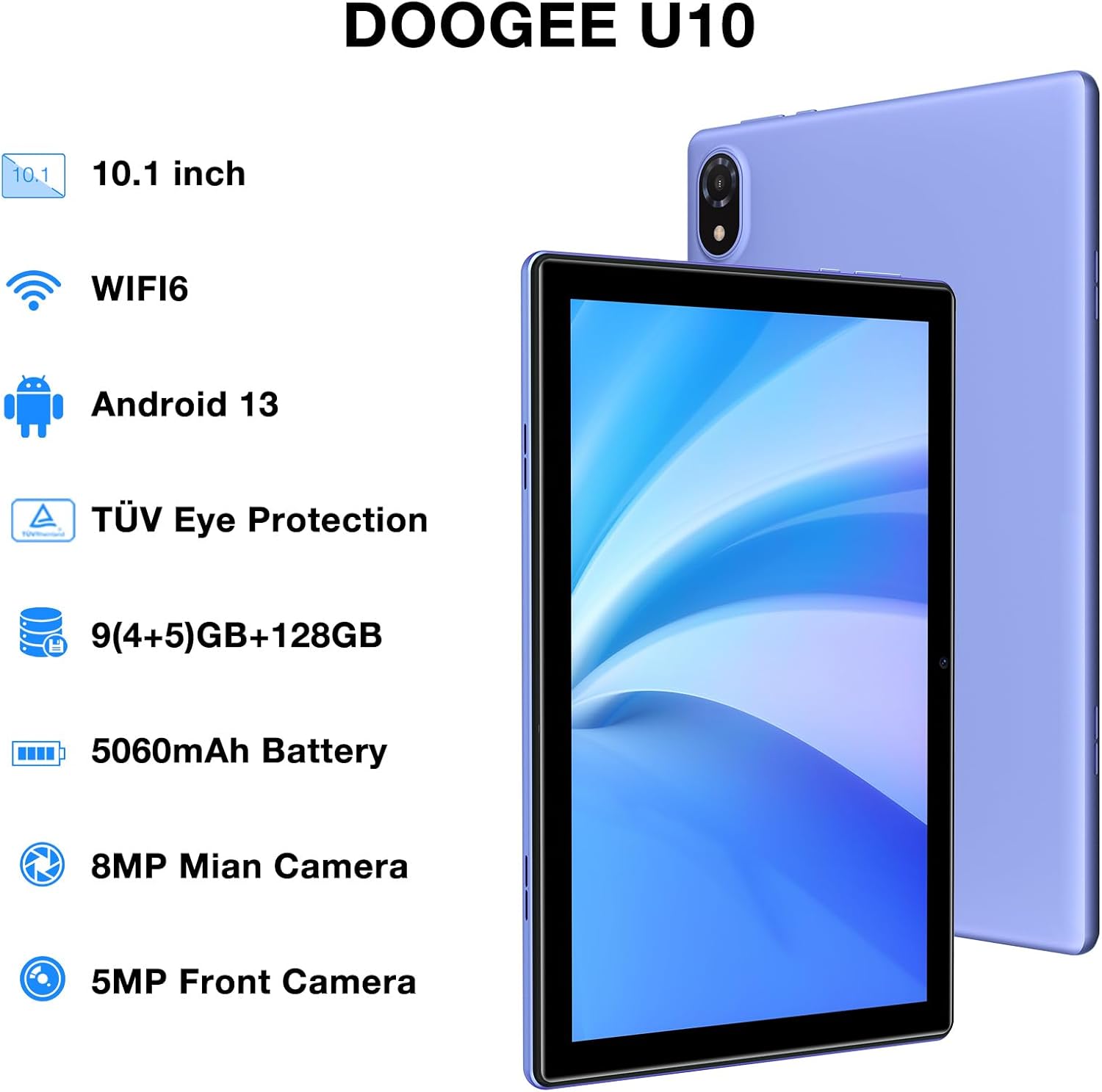
Figure 1: DOOGEE U10 Tablet Overview. This image highlights the tablet's 10.1-inch display, WiFi 6 capability, Android 13 operating system, TÜV Eye Protection, 9GB RAM, 128GB ROM, 5060mAh battery, 8MP main camera, and 5MP front camera.
- Bouton pouvwa: Located on the side, press and hold to power on/off or restart.
- Bouton Volim: Adjust media volume and notification sounds.
- USB Kalite-C Port: Pou chaje ak transfè done.
- Jack ekoutè 3.5mm: Konekte kas ekoutè filaire yo.
- Kamera devan: Pou apèl videyo ak selfie.
- Kamera dèyè: Pou pran foto ak videyo.
- Oratè: Dual stereo speakers for audio output.
1.3 Premye Limen ak Chaje
Before first use, fully charge your tablet. Connect the USB Type-C cable to the tablet and the power adapter to a wall outlet. The battery indicator will show charging status.
- Press and hold the Power Button until the DOOGEE logo appears.
- Swiv enstriksyon ki sou ekran an pou chwazi lang ou, konekte ak Wi-Fi a, epi konfigire kont Google ou.
2. Itilizasyon Tablèt ou a
Learn how to navigate and use the core features of your DOOGEE U10 tablet.
2.1 Ekspozisyon ak Navigasyon
The DOOGEE U10 features a 10.1-inch IPS HD display with a resolution of 1280x800 pixels, providing clear visuals for various tasks.

Figure 2: Vivid IPS HD Display. This image illustrates the tablet's 10.1-inch screen with 800x1280 HD+ resolution, ideal for media consumption.
- Jès manyen: Tape pou chwazi, glise pou defile, pense pou agrandi.
- Ekran Kay: Pèsonalize ak widjèt ak rakoursi aplikasyon yo.
- Notifikasyon: Glise anba soti anwo pou jwenn aksè a notifikasyon yo ak paramèt rapid yo.
- Rekonesans figi: Unlock your tablet using facial recognition for convenience.
2.2 Pèfòmans ak Depo
The tablet is powered by a Quad-Core RK3562 processor clocked at up to 2.0GHz, ensuring smooth performance. It comes with 9GB RAM (5GB physical + 4GB expansion) and 128GB internal storage, expandable up to 1TB via a microSD card.

Figure 3: Powerful Processor and Memory. This image details the tablet's Rockchip RK3562 Quad-Core processor, 9GB RAM, 128GB ROM, and support for 1TB TF card expansion.
2.3 Koneksyon
- Wi-Fi 6: Connect to high-speed Wi-Fi networks for faster browsing and streaming. Go to Settings > Network & internet > Wi-Fi.
- Bluetooth 5.0: Pair with wireless headphones, speakers, or other Bluetooth devices. Go to Settings > Connected devices > Bluetooth.
- OTG (Sou wout la): Connect USB peripherals like flash drives or keyboards using an OTG adapter (sold separately).
2.4 Fonksyon Kamera
The tablet is equipped with an 8MP main camera and a 5MP front camera for photos and video calls.

Figure 4: Dual Camera System. This image showcases the tablet's 8MP main camera and 5MP front camera, suitable for capturing moments and video conferencing.
- Louvri aplikasyon Kamera a nan ekran prensipal la oswa nan tiwa aplikasyon an.
- Tape bouton deklanchè a pou pran yon foto.
- Chanje ant kamera devan ak dèyè a avèk ikòn kamera a.
2.5 Jesyon batri
The 5060mAh battery provides extended usage. To optimize battery life, adjust screen brightness, close unused apps, and enable power-saving modes.

Figure 5: Large Capacity Battery. This image highlights the 5060mAh battery, Type-C charging, 5V2A fast charging, and 3.5mm headphone jack, along with estimated usage times for gaming, movies, and music.
2.6 Multimedia Experience
Enjoy an immersive audio experience with dual stereo speakers. The tablet supports Widevine L1, allowing for high-quality streaming from various video platforms.

Figure 6: Immersive Audio and DRM L1. This image illustrates the tablet's support for WiFi 6, Bluetooth 5.0, dual speakers, and DRM L1 for enhanced multimedia playback.
2.7 Mòd Pwoteksyon Je
The DOOGEE U10 is TÜV SÜD blue light certified, reducing harmful blue light emissions to protect your eyes during prolonged use.

Figure 7: TÜV Certified Eye Protection. This image shows the TÜV Rheinland certification, indicating the tablet's low blue light feature for eye comfort.
2.8 Videyo pwodwi ofisyèl yo
DOOGEE U10 Tablet Showcase
Videyo sa a bay yon apèsi jeneral souview and showcase of the DOOGEE U10 tablet's features and design.
DOOGEE U10 Fantastic Experience for Kids
This video demonstrates how the DOOGEE U10 tablet can be used by children, highlighting its suitability for educational and entertainment purposes for younger users.
3. Antretyen
Bon swen asire lonjevite ak pèfòmans optimal tablèt ou a.
3.1 Netwaye Tablèt ou a
- Sèvi ak yon twal mou ki pa gen pousyè pou netwaye ekran an ak kò a.
- Evite itilize pwodui chimik ki agresif, pwodui netwayaj abrazif, oswa espre ayewosòl.
- Pou tach ki difisil pou retire, yon ti kras dampRense twal la avèk dlo oswa yon pwodui netwayaj ekran ki fèt pou aparèy elektwonik.
3.2 Mizajou lojisyèl
Regularly check for and install software updates to enhance performance, security, and add new features.
- Ale nan Anviwònman> Sistèm> Sistèm aktyalizasyon.
- Konekte sou yon rezo Wi-Fi ki estab anvan ou telechaje mizajou yo.
NAN. Depanaj
This section addresses common issues you might encounter with your DOOGEE U10 tablet.
4.1 Aparèy la pa limen
- Asire w batri a chaje. Konekte tablèt la nan plato a pou omwen 30 minit.
- Peze epi kenbe bouton pouvwa a pandan 10-15 segonn pou fòse yon rekòmanse.
4.2 Pwoblèm koneksyon (Wi-Fi/Bluetooth)
- Toggle Wi-Fi or Bluetooth off and on in Quick Settings or Settings menu.
- Restart your tablet and the router/Bluetooth device.
- Bliye rezo a/aparèy la epi rekonekte l.
4.3 Aplikasyon ki kraze oswa bloke
- Fèmen aplikasyon ki gen pwoblèm nan epi ouvri li ankò.
- Clear the app's cache: Settings > Apps > [App Name] > Storage & cache > Clear cache.
- Asire w ke aplikasyon an mete ajou nan dènye vèsyon li.
- Si pwoblèm nan pèsiste, konsidere dezinstale epi reenstale aplikasyon an.
5. Espesifikasyon teknik
Key technical details of the DOOGEE U10 tablet.
| Karakteristik | Spesifikasyon |
|---|---|
| Non modèl | U10 |
| Sistèm operasyon | Android 13 |
| Gwosè ekran | 10.1 pous |
| Rezolisyon ekran | 1280 x 800 piksèl (HD+) |
| Processeur | Quad-Core (Rockchip RK3562, up to 2.0GHz) |
| RAM | 9GB (5GB fizik + 4GB ekspansyon) |
| Depo Entèn | 128GB |
| Depo dilatabl | Up to 1TB (microSD/TF card) |
| Kamera prensipal | 8MP |
| Kamera devan | 5MP |
| Kapasite batri | 5060mAh |
| Koneksyon | Wi-Fi 6, Bluetooth 5.0, OTG |
| Dimansyon (LxWxH) | 9.6 x 6.4 x 0.4 pous |
| Pwa | Apeprè 1.13 liv (427g) |
| Pwoteksyon Je | TÜV SÜD Low Bluelight Certified |
| Sipò DRM | Widevine L1 |
6. Garanti ak sipò
Information regarding your product's warranty and how to obtain support.
6.1 Garanti limite
The DOOGEE U10 tablet typically comes with a 2-year limited warranty. This warranty covers manufacturing defects and workmanship under normal use. Please refer to the warranty card included in your package for specific terms and conditions, including coverage details and exclusions.
Kenbe prèv ou achte pou reklamasyon garanti.
6.2 Sipò pou Kliyan
If you encounter any issues not covered in the troubleshooting section or require further assistance, please contact DOOGEE customer support.
- Sipò sou entènèt: Visit the official DOOGEE websit la pou FAQ, resous sipò, ak opsyon pou kontakte yo.
- Sipò Imèl: Refer to your warranty card or quick start guide for specific email addresses.
- Sant sèvis: Information on authorized service centers may be available on the DOOGEE websit.
When contacting support, please have your tablet's model number (U10) and purchase information ready.