
Entwodiksyon
Welcome to the Cinnado D1 5MP Indoor Security Camera user manual. This guide provides detailed instructions for setting up, operating, and maintaining your security camera. Please read this manual thoroughly before use to ensure proper functionality and to maximize your product experience.
Pwodwi souview
Kontni pake
Lè w ap ouvri pake a, tanpri verifye si tout bagay sa yo ladan l:
- 1x Cinnado D1 5MP Indoor Security Camera
- 1x Mounting Support
- 1x pake Vis
- 1x Kalite-C Kab
- 1x pouvwa adaptè
- 1x Installation Guide (this manual)
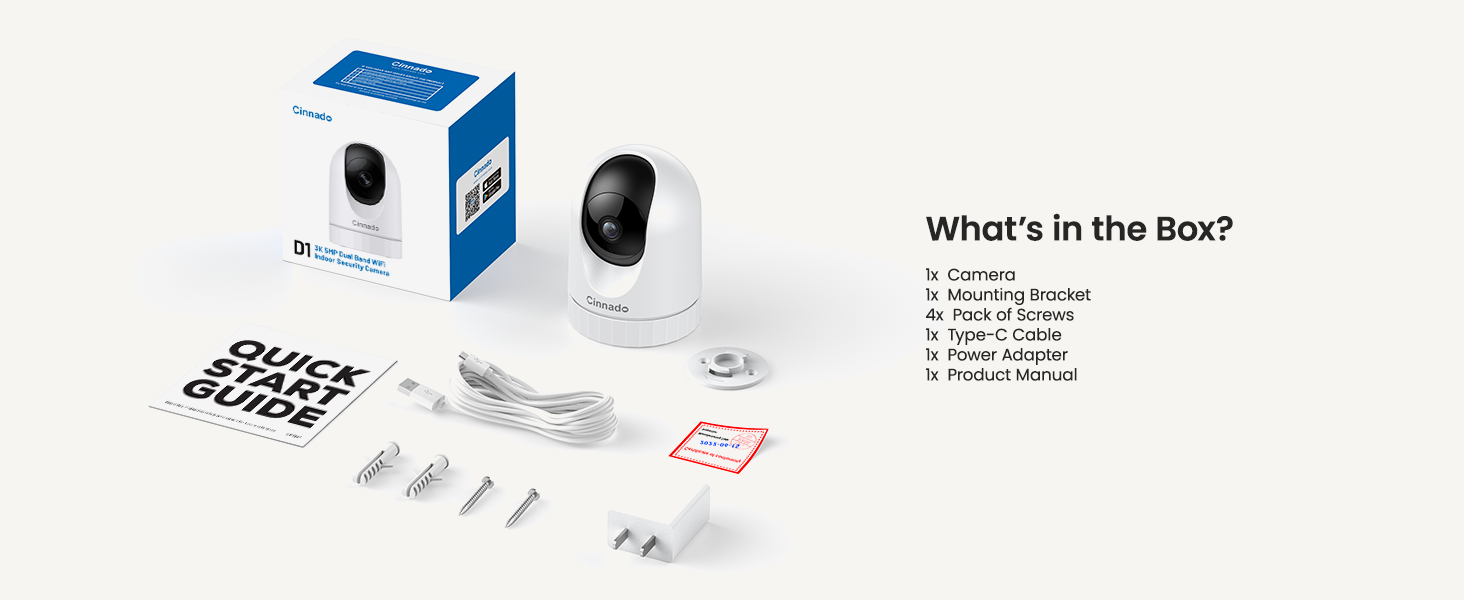
Image: Contents of the Cinnado D1 Security Camera package.
Karakteristik kle
- Rezolisyon 5MP Super HD: Bay videyo klè ak detaye footage.
- Dual-Band WiFi (2.4Ghz/5Ghz): Offers flexible and stable network connectivity.
- Ekselan Vizyon Lannwit: Equipped with 4x 940nm invisible IR lights for clear viewnan kondisyon limyè ki ba.
- 360° Auto Tracking: Swiv otomatikman mouvman detekte nan chan li an view.
- Smooth Two-Way Audio: Mikwofòn ak oratè entegre pou kominikasyon an tan reyèl.
- Opsyon Depo fleksib: Supports local SD card storage (up to 128GB, not included) and optional cloud storage.
- Aksè pou plizyè itilizatè: Allows sharing camera access with family and friends.
- Konpatibilite lakay entelijan: Li fonksyone avèk Amazon Alexa ak Google Home.
- Alèt Deteksyon Mouvman: Sends instant notifications upon detecting movement.

Image: Cinnado D1 5MP Indoor Security Camera.
Gid Enstalasyon
Etap 1: Prepare pou enstalasyon
Before beginning the installation, ensure you have a stable 2.4Ghz or 5Ghz Wi-Fi network available. The camera requires a corded electric power source and is designed for indoor use only.
Etap 2: Telechaje ak Enstale App a
- Chèche pou the 'Wansview Cloud' app on the Apple App Store (for iOS devices) or Google Play Store (for Android devices).
- Download ak enstale app a sou smartphone ou oswa grenn.
- Louvri app a epi kreye yon nouvo kont oswa konekte si ou deja genyen youn.

Image: Download the companion app from your device's app store.
Etap 3: Konekte Kamera a
- Plug the Type-C cable into the camera and connect the power adapter to an electrical outlet. The camera will power on and initiate its startup sequence.
- Once the camera is ready (indicated by a specific LED status or voice prompt), open the Wansview Aplikasyon Cloud.
- In the app, tap the '+' icon to add a new device.
- Follow the on-screen instructions to scan the QR code located on the camera or its packaging.
- Select your 2.4Ghz or 5Ghz Wi-Fi network and enter the password. Ensure your phone is connected to the same Wi-Fi network during this process.
- The camera will attempt to connect to your Wi-Fi network. Once connected, you will hear a confirmation sound or see a steady LED indicator.

Image: The Cinnado D1 camera supports both 2.4Ghz and 5Ghz Wi-Fi bands for flexible connectivity.
Etap 4: Monte Kamera a
The Cinnado D1 camera can be placed on a flat surface or mounted to a ceiling using the included mounting bracket and screws.
- Choose a suitable indoor location with a clear view and within Wi-Fi range.
- If mounting, use the bracket as a template to mark screw positions on the ceiling.
- Drill pilot holes and secure the mounting bracket with the provided screws.
- Attach the camera to the mounting bracket, ensuring it is securely fastened.
- Adjust the camera's angle as needed within the app after installation.
Enstriksyon Operasyon
Viv View ak Siveyans
Louvri Wans yoview Cloud app and select your camera from the device list to access the live video feed. You can use the on-screen controls to pan (horizontal) and tilt (vertical) the camera to adjust its viewang ang.

Image: The camera offers 360-degree coverage with pan and tilt functionality.
De-fason odyo
Kamera a gen yon mikwofòn ak yon oratè entegre. Pou itilize odyo bidireksyonèl:
- Pandan w ap viv la view, tape ikòn mikwofòn nan nan aplikasyon an.
- Pale nan mikwofòn telefòn ou an pou pase vwa ou nan oratè kamera a.
- Tap the speaker icon to hear audio from the camera's environment.

Image: Smooth two-way audio allows communication through the camera.
Deteksyon Mouvman ak Alèt
The Cinnado D1 camera can detect motion and send alerts to your phone:
- Ale nan paramèt kamera yo nan aplikasyon an.
- Enable motion detection and adjust sensitivity levels as desired.
- Configure alert notifications to receive instant messages on your device when motion is detected.
- La 360° Auto Tracking feature, when enabled, will automatically pan and tilt the camera to follow detected movement.
Video Playback and Storage
The camera supports two storage methods for recorded footage:
- Depo kat mikwo SD: Insert a Micro SD card (up to 128GB, not included) into the camera's designated slot for 24/7 continuous recording.
- Depo nwaj: An optional cloud storage service is available, often with a 30-day free trial. This allows for secure, off-site storage of your recordings.
Pou view anrejistre footage, access the playback feature within the Wansview Cloud app. You can browse recordings by date and time.

Image: Flexible storage options including SD card and cloud storage.
Aksè pataje
You can share access to your camera's live feed with family members or trusted individuals:
- In the Wansview Cloud app, go to the camera settings.
- Locate the 'Share Device' or similar option.
- Follow the prompts to invite other users, who will need their own Wansview Cloud accounts.
Entegrasyon Kay Entelijan
The Cinnado D1 camera supports integration with Amazon Alexa and Google Home. Refer to the respective smart home assistant's app or documentation for specific instructions on connecting your camera and using voice commands.
Antretyen
To ensure optimal performance and longevity of your Cinnado D1 camera:
- Netwayaj: Siye lantiy kamera a ak kò a dousman avèk yon twal mou epi sèk. Evite itilize pwodui chimik ki agresif oswa materyèl abrazif.
- Mizajou mikrolojisyèl: Tcheke WAN yo regilyèmanview Cloud app for available firmware updates. Keeping your camera's firmware up-to-date ensures access to the latest features and security enhancements.
- Plasman: Ensure the camera is placed in a stable indoor environment, away from direct sunlight, extreme temperatures, and moisture.
Depanaj
If you encounter issues with your Cinnado D1 camera, please refer to the following common solutions:
| Pwoblèm | Solisyon posib |
|---|---|
| Camera fails to connect to Wi-Fi | Ensure your Wi-Fi network is 2.4Ghz or 5Ghz. Verify the Wi-Fi password is correct. Move the camera closer to the router. Restart the camera and your router. |
| Move kalite videyo | Check your internet connection speed. Ensure the camera lens is clean. Adjust camera placement to avoid glare or insufficient lighting. |
| Deteksyon mouvman pa travay | Verify motion detection is enabled in the app settings. Adjust sensitivity levels. Ensure there are no obstructions in the camera's field of view. |
| Pwoblèm odyo bidireksyonèl | Check volume settings on your phone and in the app. Ensure microphone and speaker permissions are granted to the app. |
| Camera offline frequently | Improve Wi-Fi signal strength by moving the camera closer to the router or using a Wi-Fi extender. Ensure the power supply is stable. |
If these solutions do not resolve your issue, please contact Cinnado customer support for further assistance.
Espesifikasyon
| Karakteristik | Detay |
|---|---|
| Non modèl | D1 |
| Rezolisyon | 5MP (3K) |
| Koneksyon | Dual-Band Wi-Fi (2.4Ghz/5Ghz) |
| Jaden nan View | 110 Degrees (Lens), 360 Degrees (Pan/Tilt Coverage) |
| Vizyon lannwit | 4x 940nm Invisible IR Lights |
| Opsyon Depo | Micro SD Card (up to 128GB), Cloud Storage (optional) |
| Sous pouvwa | Fil elektrik |
| Aparèy konpatib | iOS, andwad |
| Dimansyon (L x W x H) | 2.89 x 2.89 x 4.01 pous |
| Pwa atik | 10.2 ons |
| Kalite aliye | Ceiling Mount, Tabletop |
| Kalite Alèt | Mouvman sèlman |
Garanti ak sipò
Cinnado is committed to providing high-quality products and customer satisfaction. Your Cinnado D1 5MP Indoor Security Camera comes with lifelong technical support and after-sales service.
For any questions, technical assistance, or support needs, please do not hesitate to contact Cinnado customer service. Our team is available to provide professional guidance and resolve any issues you may encounter.
Please refer to the contact information provided with your product packaging or visit the official Cinnado websit pou detay sipò.