
Enfòmasyon enpòtan sou sekirite
Tanpri li tout enstriksyon yo ak anpil atansyon anvan ou itilize pwodui sa a. Kenbe manyèl sa a pou referans pita.
- Do not use with damaged or broken teeth, bridges, or dental implants.
- Kenbe soti nan atenn timoun yo.
- Do not submerge the charging port in water.
- Always unplug and allow the device to cool before cleaning.
- If you experience any discomfort or pain, discontinue use and consult a dental professional.
Pwodwi souview
The DADA-TECH W2 Cordless Water Flosser is designed to provide effective oral cleaning, reaching areas that traditional brushing and flossing may miss. It utilizes advanced pulse technology to deliver a precise water stream for optimal plaque and debris removal.

Image: DADA-TECH W2 Cordless Water Flosser with its packaging and included nozzles.
Karakteristik kle:
- A+ grade pulse technology: 1400-1800 pulses per minute at 30-120 PSI.
- Four cleaning modes: Soft, Normal, Shoot, and Custom with 8 adjustable pressure levels.
- Seven multifunctional nozzles: 3 Dense Hydro, 1 U-shaped, 1 Orthodontic, 1 Periodontal, 1 Tongue Scraper.
- Large 300ML water tank with detachable base for easy cleaning.
- Evalyasyon ki enpèmeyab IPX7.
- Long-lasting battery: Up to 60 days of use on a 4-hour charge.
Enstalasyon
1. Chaje Aparèy la
Before first use, fully charge the water flosser. A full charge takes approximately 4 hours and provides up to 60 days of use. The LED display will indicate battery status.

Image: The water flosser's compact design and travel clip, highlighting its portability and battery life.
2. Attaching a Nozzle
- Select the desired nozzle (e.g., Dense Hydro for daily cleaning, U-shaped for back teeth).
- Insert the nozzle into the hole at the top of the flosser handle until it clicks into place. Ensure it is securely fastened.
3. Konble tank dlo a
- Open the water fill hole cover located on the back of the device.
- Fill the 300ML tank with lukewarm water. Distilled water is recommended to prevent mineral buildup.
- Close the water fill hole cover securely to prevent leakage.
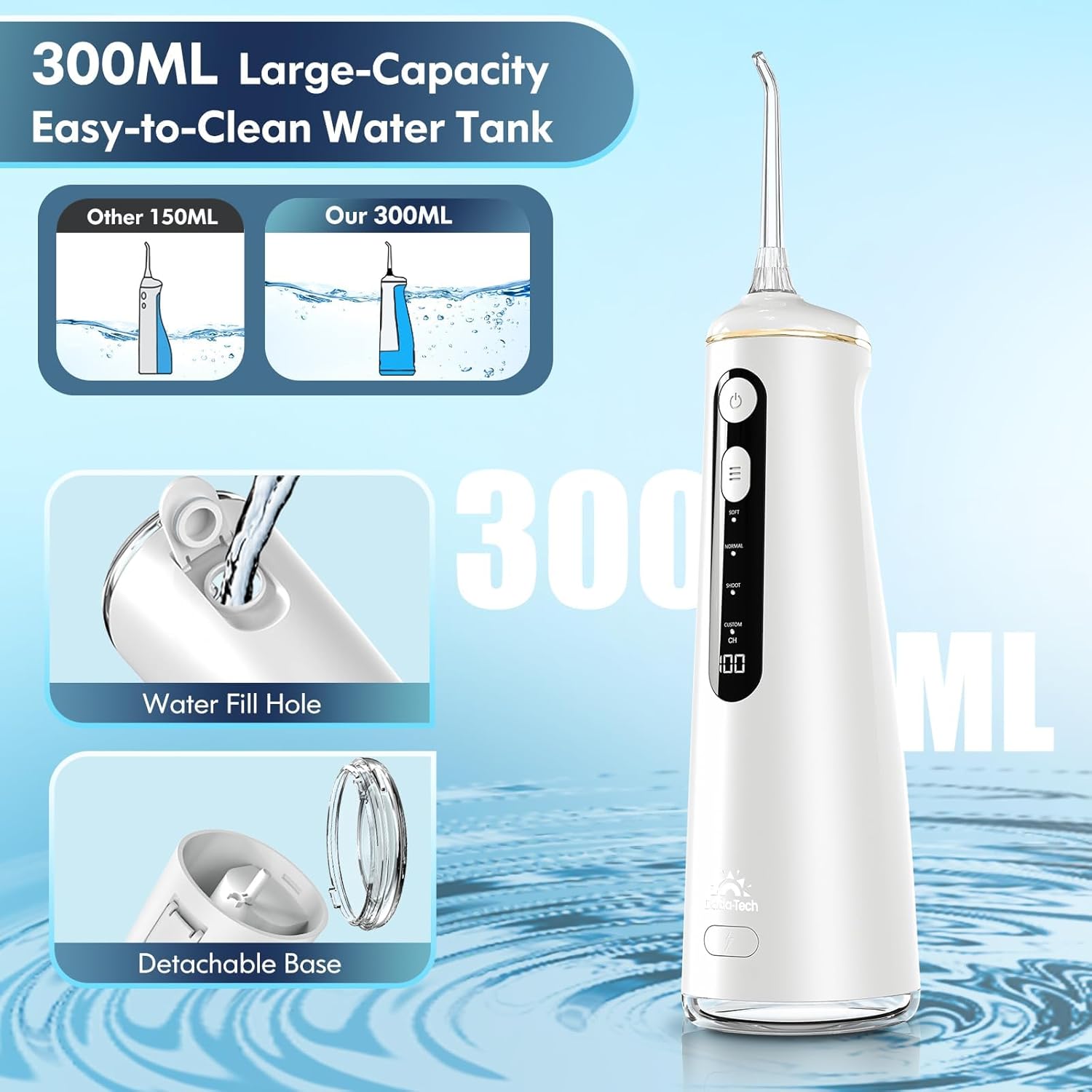
Image: Illustration of the 300ML water tank, showing the water fill hole and detachable base for easy cleaning.
Enstriksyon Operasyon
1. Chwazi yon mòd
The DADA-TECH W2 offers four cleaning modes:
- Mòd mou: Ideal for sensitive gums or new users.
- Mòd nòmal: A balanced mix of power and comfort, suitable for most users.
- Shoot Mode: For precise, targeted cleaning of specific stains. Press to spray, release to halt.
- Mòd Custom: Allows personalization with eight adjustable pressure levels (30-120 PSI).
Press the 'MODE' button to cycle through the available modes. The LED display will indicate the selected mode.

Image: Visual representation of the four cleaning modes and the LED display for battery and custom mode settings.
2. Using Custom Mode
- Press the 'MODE' button until 'CUSTOM' mode is selected.
- Hold the 'MODE' button for 3 seconds to activate pressure level adjustment.
- Press the 'MODE' button repeatedly to cycle through pressure levels 1 to 8.
- Once your desired pressure level is displayed, press the 'POWER' button to start flossing.
3. Itilizasyon jeneral
- Add water to the tank and insert the desired tip.
- Chwazi mòd ou pi pito.
- Place the nozzle tip into your mouth, directing it at a 90-degree angle to your gumline.
- Press the 'POWER' button to turn on the device.
- Guide the water stream along your gumline and between your teeth. Ensure the water flows into the sink.
- Move systematically around your mouth, cleaning all surfaces of your teeth and gums.

Image: Step-by-step instructions for novice users on how to operate the water flosser.
Gid bouch
The DADA-TECH W2 comes with seven specialized nozzles to address various oral care needs:
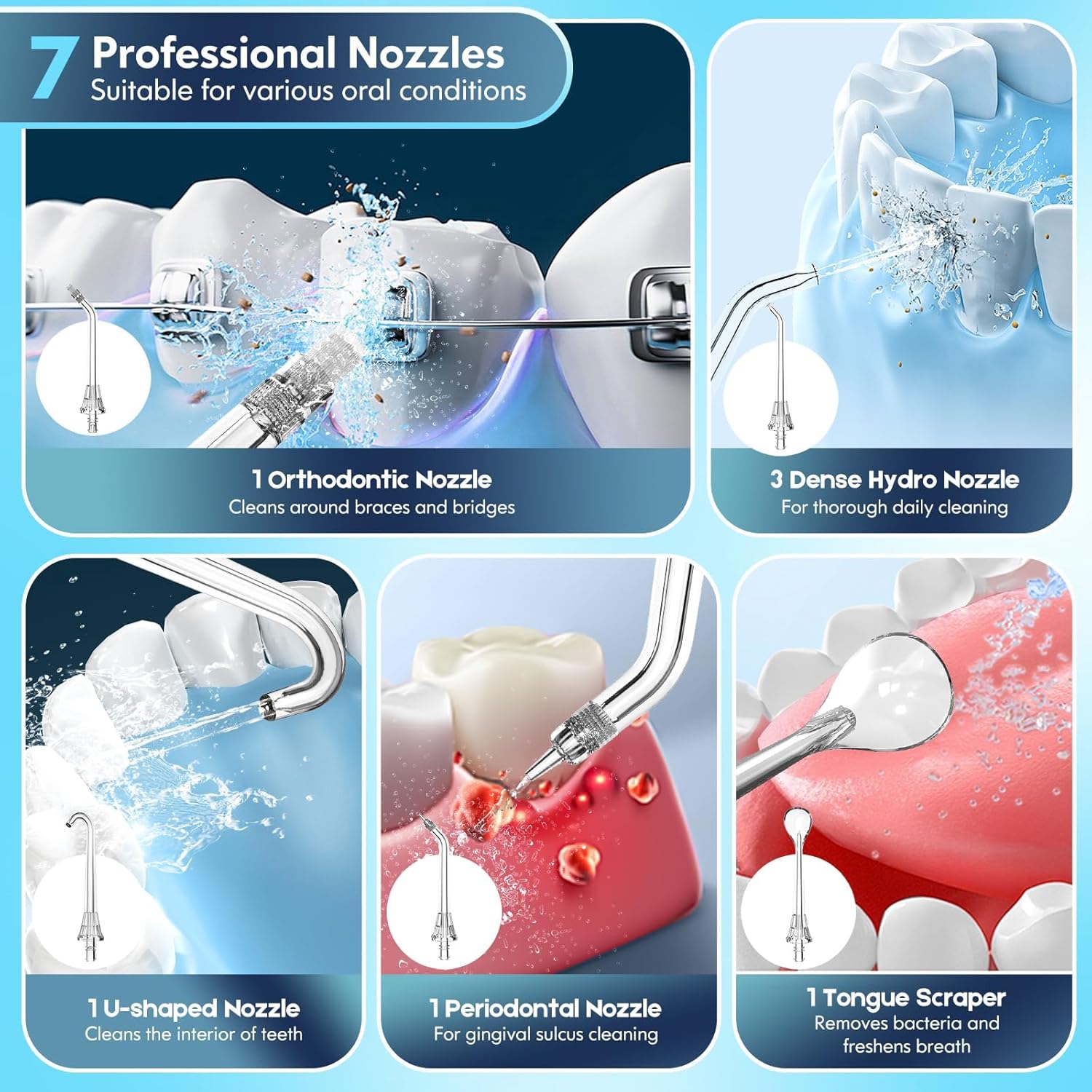
Imaj: Detaye view of the seven professional nozzles and their specific uses.
- Dense Hydro Nozzles (3 included): For thorough daily cleaning with 360-degree rotation.
- U-shaped Nozzle (1 included): Specifically designed for cleaning the backs of teeth and hard-to-reach areas.
- Orthodontic Nozzle (1 included): For effective cleaning around braces and dental bridges.
- Periodontal Nozzle (1 included): Gentle cleaning for gingival sulcus and alleviating periodontitis.
- Tongue Scraper Nozzle (1 included): Helps remove bacteria and food particles from the tongue for fresher breath.
Antretyen
1. Netwaye tank dlo a
The water tank features a detachable base for easy and thorough cleaning. Regularly remove the base and rinse the tank to prevent microbial growth. Allow it to air dry completely before reassembling.
2. Netwayaj bouch yo
After each use, remove the nozzle and rinse it under running water. Periodically, soak nozzles in a solution of 2 parts water to 1 part white vinegar for 5-10 minutes to remove mineral deposits, then rinse thoroughly.
3. Device Exterior
Wipe the exterior of the flosser with a soft, damp cloth. Do not use abrasive cleaners or immerse the main unit in water (except for the IPX7 rated usage, ensure charging port is covered).
Depanaj
If you encounter issues with your DADA-TECH W2 Water Flosser, please refer to the following common solutions:
- Pa gen dlo koule: Ensure the water tank is filled and the nozzle is securely attached. Check if the device is charged.
- Presyon dlo fèb: Recharge the device if the battery is low. Clean the nozzle and internal components for any blockages. If using Custom mode, ensure the pressure level is set appropriately.
- Aparèy pa limen: Asire w aparèy la byen chaje. Si pwoblèm nan pèsiste, kontakte sèvis kliyan.
Espesifikasyon
| Nimewo Modèl | W2 |
| To batman kè | 1400-1800 pulses/minute |
| Ranje presyon | 30-120 PSI |
| Kapasite tank dlo | 300 ML (10 ounces) |
| Lavi batri | Jiska 60 jou sou yon sèl chaj |
| Tan pou chaje | Apeprè. 4 èdtan |
| Evalyasyon ki enpèmeyab | IPX7 |
| Sous pouvwa | Batri Powered (1 batri ityòm Ion enkli) |
| Dimansyon pake | 9.49 x 4.06 x 3.43 pous |
| Pwa atik | 1.06 liv |
Garanti ak sipò
DADA-TECH offers a two-year warranty for this product. For any assistance or inquiries, please contact customer support.
Ki jan yo kontakte sipò:
- Konekte nan kont Amazon ou.
- Ale nan "Kòmand ou yo".
- Find the order ID for your DADA-TECH W2 Water Flosser.
- Klike sou "Kontakte vandè a".
Our team is dedicated to providing prompt and helpful service to ensure your satisfaction.