
Entwodiksyon
This manual provides detailed instructions for the safe and effective use of your Andoer Portable Digital Camera. Please read this manual thoroughly before operating the device and retain it for future reference.
Kontni pake
Verifye ke tout atik ki nan lis anba a yo enkli nan pakè ou a:
- 1 x Andoer Digital Camera
- 1 x 32GB kat memwa
- 1 x Kab USB (Kalite-C)
- 1 x netwayaj twal
- 1 x Lanyard
- 1 x depo sak
- 1 x manyèl itilizatè
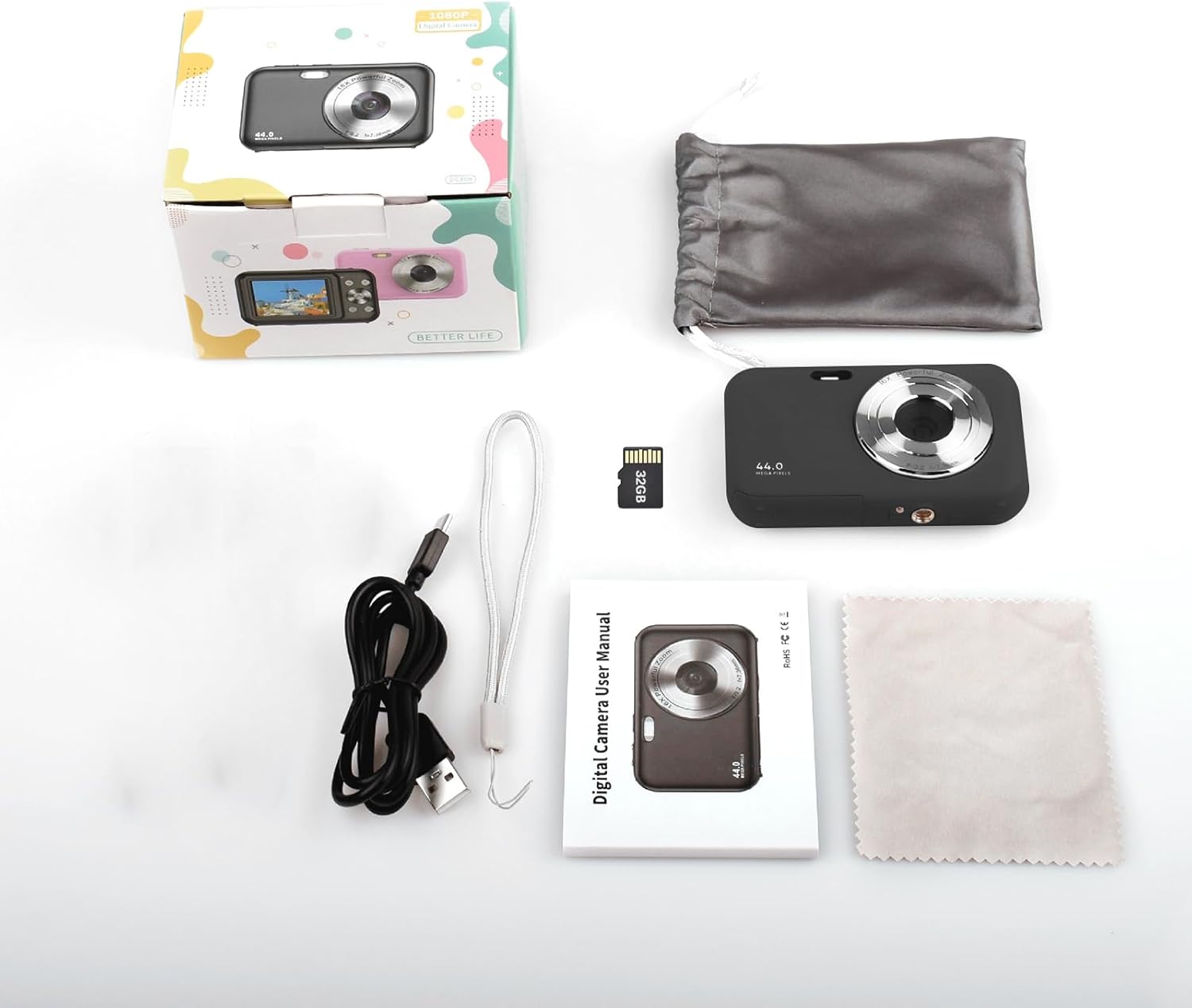
Image: Contents of the Andoer Digital Camera package.
Kamera souview
Familiarize yourself with the various parts of your camera.

Image: Multi-angle view of the Andoer Digital Camera, highlighting its compact design and button layout.
- Devan: Lens, Flash, Microphone.
- Top: Power Button, Shutter Button.
- Retounen: 2.4-inch IPS Screen, Navigation Buttons (Up, Down, Left, Right, OK), Menu Button, Mode Button, Zoom (W/T).
- Bò: USB Type-C Port.
- Anba: Battery/Memory Card Compartment.
Enstalasyon
1. Chaje batri a
The camera is equipped with a built-in 700mAh rechargeable lithium battery. Before first use, fully charge the battery.
- Connect the included USB Type-C cable to the camera's USB port.
- Konekte lòt bout kab USB a nan yon adaptè kouran USB (pa enkli) oubyen nan yon pò USB òdinatè.
- Limyè endikatè chaj la ap limen. Li pral etenn oswa chanje koulè yon fwa chaj la fini.
Nòt: The camera can be used while charging. A full charge provides approximately 150 minutes of continuous shooting or 90 minutes of video recording.

Image: Battery life information for the 700mAh battery.
2. Mete kat memwa a
The camera supports a 32GB memory card (included). Ensure the camera is powered off before inserting or removing the memory card.
- Locate the battery/memory card compartment cover on the bottom of the camera.
- Louvri kouvèti a.
- Insert the 32GB memory card into the designated slot with the metal contacts facing the correct direction (refer to the diagram inside the compartment if available) until it clicks into place.
- Fèmen kouvèti lòj la byen.
Enpòtan: Format the memory card in the camera's settings menu before first use to ensure optimal performance.
Enstriksyon Operasyon
1. Powering On / Off
- Pou pouvwa sou, peze epi kenbe la Bouton pouvwa on the top of the camera.
- Pou koupe pouvwa a, peze epi kenbe Bouton pouvwa again. The camera also features an auto power-off function (configurable in settings).
2. Pran foto
The camera captures photos up to 44MP resolution.
- Limen kamera a.
- Ensure the camera is in photo mode (indicated on the 2.4-inch IPS screen). If not, press the Bouton Mode pou chanje.
- Frame your shot using the IPS screen.
- Peze a Bouton Panno halfway down to focus, then press it fully to take the picture.

Imaj: Egzample of a high-resolution photo taken with the 44MP camera.
3. Anrejistreman videyo
The camera records videos in 1080P resolution.
- Limen kamera a.
- Peze a Bouton Mode to switch to video recording mode.
- Peze a Bouton Panno to start recording. A red indicator will typically appear on the screen.
- Peze a Bouton Panno ankò pou sispann anrejistreman.

Imaj: Ekran view during 1080P video recording.
4. Sèvi ak Zoom Dijital
The camera features 16X digital zoom.
- In photo or video mode, press the T (Telephoto) button pou rale.
- Peze a W (Wide-angle) button pou rale soti.

Image: Comparison of 1x and 16x digital zoom effects.
5. Lòt Fonksyon
- Oto-revèy: Set a delay (e.g., 2s, 5s, 10s) before a photo is taken. Access this option in the camera's menu.
- Fiziyad kontinyèl: Take multiple photos in quick succession. This setting is also found in the menu.
- Anti-souke: Digital image stabilization helps reduce blur from camera movement. This feature is typically enabled by default or can be toggled in settings.
- Lektur: Peze a Bouton lèktur (often indicated by a triangle icon) to view photos and videos. Use the navigation buttons to browse.
- Anviwònman meni: Peze a Bouton meni to access various camera settings, including resolution, white balance, exposure, date/time, and formatting the memory card.
Transfere Files to a Computer or Phone
You can transfer photos and videos from the camera to a computer or a mobile phone.
1. Via USB Cable (to Computer)
- Connect the camera to your computer using the provided USB Type-C cable.
- Pouvwa sou kamera a.
- The camera should appear as a removable disk or media device on your computer.
- Open the camera's folder and copy the desired files nan òdinatè w lan.
2. Via Memory Card Reader (to Computer/Phone)
For direct transfer from the memory card, you can use a card reader.
- Remove the memory card from the camera.
- Insert the memory card into a compatible card reader.
- Connect the card reader to your computer or mobile phone (via an OTG adapter if necessary).
- Aksede a files on the memory card and transfer them.

Image: OTG usage diagram for transferring files from memory card to phone.
Antretyen
- Netwayaj kò kamera a: Sèvi ak yon twal mou epi sèk pou siye kò kamera a. Pou pousyè tè ki difisil pou retire, siye l yon ti kras.ampRense twal la avèk dlo. Evite pwodui chimik ki agresif.
- Netwaye lantiy la: Use the included cleaning cloth or a specialized lens cleaning cloth. Gently wipe the lens in a circular motion. Do not use abrasive materials.
- Swen ekran: The 2.4-inch IPS screen can be cleaned with a soft, lint-free cloth. Avoid pressing too hard.
- Depo: When not in use for extended periods, store the camera in the provided storage bag in a cool, dry place, away from direct sunlight and extreme temperatures.
- Swen batri: Recharge the battery regularly, even if the camera is not used frequently, to maintain battery health. Avoid fully discharging the battery for long periods.
Depanaj
| Pwoblèm | Kòz posib | Solisyon |
|---|---|---|
| Kamera a pa limen. | Batri a fin itilize oswa li pa byen mete nan plas li. | Chaje batri a nèt. Asire w ke batri a byen mete. |
| Pa ka pran foto/anrejistre videyo. | Kat memwa a plen, li pa mete nan plas li, oswa li pèvèti. | Check memory card insertion. Delete unnecessary files or replace the card. Format the card (this will erase all data). |
| Imaj yo flou. | Lens is dirty, insufficient light, or camera shake. | Clean the lens. Ensure adequate lighting. Hold the camera steady or enable anti-shaking. |
| Kamera a bloke oswa li pa reponn. | Glitch lojisyèl oswa batri ki ba. | Remove and reinsert the battery (if possible) or press and hold the power button for 10 seconds to force a shutdown. Recharge the battery. |
| Pa ka transfere files nan òdinatè. | Koneksyon USB ki pa kòrèk oswa pwoblèm chofè. | Ensure the USB cable is securely connected. Try a different USB port or computer. Check if the camera is recognized as a device. |
Espesifikasyon
| Karakteristik | Detay |
|---|---|
| Ekspozisyon | 2.4 pous ekran IPS |
| Rezolisyon videyo | 1080P/720P/480P |
| Rezolisyon imaj | 44MP/42MP/36MP/24MP (Effective Still Resolution: 44 MP) |
| File Fòma | JPG (Image), AVI (Video) |
| Elektwonik Zoom | 16X |
| Port USB | Kalite-C |
| Batri | 3.7V/ 700mAh Rechargeable Lithium Battery |
| Longè Fokal | f = 7.36mm |
| Ouverture | F/3.2 |
| Pouvwa sove | Auto power off in 1Min/2Mins/3Mins/4Mins/5Mins/10Mins |
| Sistèm Sipòte | Windows XP, Vista, 7, 8, 10, Mac 10.2 and above |
| Kapasite Depo memwa | 32 GB (enkli) |
| Teknoloji Konsantre Auto | Deteksyon kontras |
| Estabilizasyon Imaj | Digital |
| Deskripsyon ranje laj | Kid |
Garanti ak sipò
For warranty information and technical support, please refer to the contact details provided with your purchase documentation or visit the official Andoer websit la. Kenbe prèv acha ou pou reklamasyon garanti.