
1. Pwodwi souview
The Buff AlienBees B400 is a powerful, versatile, and accurate self-contained studio flash unit designed for various photographic applications. It features easy-to-use analog controls and is suitable for students, hobbyists, and professional photographers.
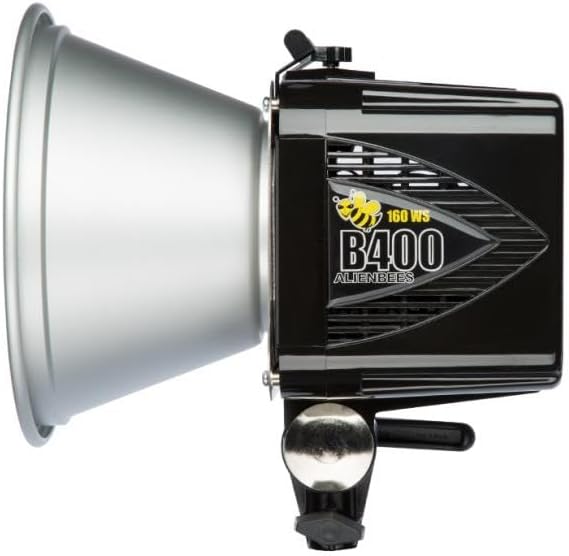
Imaj 1.1: Side view of the AlienBees B400 Monolight with a 7-inch silver field reflector attached.
Karakteristik kle:
- 6 f-stop power variability (5 Ws to 160 Ws)
- Continuous slider adjustment from full to 1/32 power
- Internal cooling fan for heavy-duty use
- WYSIWYG (What You See Is What You Get) modeling previews
- Standard 120 VAC, 50-60 Hz power requirements
2. Pake kontni
Verifye ke tout atik ki nan lis anba a yo enkli nan pakè ou a:
- AlienBees B400 Monolight Unit
- 7-inch Silver Field Reflector
- Protective Shipping Cover
- 150W Modelizasyon Lamp
- Flashtube
- Down-Angle 15 ft. Power Cord
- Standard 15 ft. Sync Cord (1/8" to PC)
- Light Stand Mounting Block
- AlienBees Product Manual (this document)
3. Enfòmasyon sou Sekirite
Read all instructions before using the AlienBees B400 Monolight. Failure to follow these safety guidelines may result in electric shock, fire, or serious injury.
- Sekirite elektrik: Always connect the unit to a grounded outlet. Do not operate with wet hands or in damp environments. Disconnect power before cleaning or servicing.
- Chalè: The flashtube and modeling lamp can become very hot during operation. Allow adequate cooling time before handling. Do not cover the ventilation openings.
- Pwoteksyon je: Avoid looking directly into the flash when it fires, as it can cause temporary vision impairment.
- Plasman: Ensure the unit is securely mounted on a stable light stand to prevent tipping. Keep away from flammable materials.
- Timoun ak bèt kay: Kenbe inite a deyò pou timoun ak bèt kay.
4. Enstalasyon
4.1. Monte inite a
Attach the AlienBees B400 Monolight to a compatible light stand using the integrated light stand mounting block. Ensure the unit is securely tightened to prevent accidental detachment.
4.2. Konekte pouvwa
Connect the provided 15 ft. power cord to the power inlet on the rear of the unit and then to a standard 120 VAC, 50-60 Hz grounded electrical outlet. The unit requires 105-125VAC, 50-60Hz, connecting only to a grounded outlet.
4.3. Connecting Sync Cord
For wired synchronization with your camera, connect the 15 ft. sync cord (1/8" to PC) to the sync port on the rear of the monolight and to your camera's PC sync terminal. If your camera lacks a PC sync terminal, a hot shoe adapter may be required (sold separately). Alternatively, wireless remotes can be used for triggering.
4.4. Attaching Reflector and Modeling Lamp
Carefully insert the 150W modeling lamp into its socket. Attach the 7-inch silver field reflector to the front of the unit by aligning the tabs and twisting to lock it into place. Ensure the protective shipping cover is removed before operation.

Imaj 4.1: Devan view of the AlienBees B400, illustrating the flash tube and modeling lamp asanble.
5. Operasyon Enstriksyon
5.1. Kontwòl Panel Overview
The rear panel of the AlienBees B400 features all necessary controls for operation. Familiarize yourself with the layout:
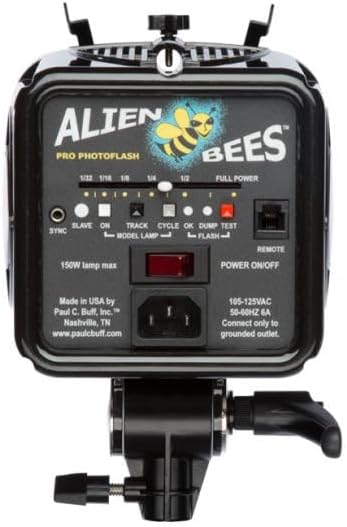
Imaj 5.1: Rear control panel of the AlienBees B400, showing power adjustment slider, sync, slave, and modeling lamp kontwòl.
5.2. Ajisteman pouvwa
Use the continuous slider control on the rear panel to adjust the flash output from full power (160 Ws) down to 1/32 power (5 Ws), offering 6 f-stops of variability. The indicator lights above the slider show approximate power levels.
5.3. Modeling Lamp Operasyon
L modèl 150W laamp provides continuous light for previewing lighting effects. Use the dedicated switch on the control panel to turn the modeling lamp ON or OFF. The modeling lamp can also be set to track the flash power or operate independently.
5.4. Mòd senkronizasyon
- Kòd senkronize: Connect a sync cord from the unit to your camera's PC sync terminal.
- Mòd esklav: Activate the SLAVE function on the control panel. The AlienBees B400 will then fire automatically when it detects another flash firing.
- Wireless Remote: If using an optional wireless remote system, follow the remote's instructions for pairing and triggering.
6. Antretyen
6.1. Netwayaj
Ensure the unit is unplugged and cooled before cleaning. Use a soft, dry cloth to wipe the exterior. For the flashtube and modeling lamp, use a clean, lint-free cloth, avoiding abrasive cleaners that could damage the surfaces.
6.2. Flashtube and Modeling Lamp Ranplasman
The flashtube and modeling lamp are user-replaceable. Always ensure the unit is unplugged and completely cooled before attempting replacement. Refer to the detailed instructions provided with replacement parts for proper installation. Handle flashtubes by their base to avoid touching the glass.
NAN. Depanaj
If you encounter issues with your AlienBees B400, consult the following table for common problems and solutions:
| Pwoblèm | Kòz posib | Solisyon |
|---|---|---|
| Aparèy pa limen | Power cord not connected; Outlet not active; Unit switch off | Check power cord connection; Test outlet; Ensure POWER ON/OFF switch is ON |
| Flash pa tire | Sync cord loose/faulty; Slave mode not activated; Camera settings incorrect; Flashtube faulty | Check sync cord connection; Activate SLAVE mode; Verify camera flash settings; Replace flashtube |
| Modélisation lamp pa travay | Modélisation lamp etenn; Lamp boule nèt | Turn MODEL LAMP Chanje l; Ranplase modèl laamp |
| Sòti flash ki pa konsistan | Power setting unstable; Unit overheating | Ensure power slider is set firmly; Allow unit to cool down (internal fan should prevent this under normal use) |
8. Espesifikasyon
| Karakteristik | Spesifikasyon |
|---|---|
| Nimewo Modèl | B400 |
| Mak | Buff (Paul C. Buff, Inc.) |
| Flash Sòti | 160 Ws (Watt-seconds) |
| Power Variability | 6 f-stops (5 Ws to 160 Ws), continuous slider adjustment |
| Modeling Lamp | 150W |
| Kondisyon pou pouvwa | 120 VAC, 50-60 Hz (105-125VAC) |
| Flash senkronize vitès | Up to 1/250 second |
| Montaj konpatib | Hot Shoe Mount (via sync cord/adapter) |
| Refwadisman | Fanatik refwadisman entèn |
9. Garanti ak sipò
9.1. Enfòmasyon sou Garanti
The Buff AlienBees B400 Monolight comes with a 2-ane garanti faktoriGaranti sa a kouvri domaj nan materyèl ak nan fabrikasyon anba itilizasyon nòmal. Tanpri konsève prèv acha ou pou reklamasyon garanti.
9.2. Sipò pou Kliyan
For technical assistance, service, or warranty inquiries, please contact Paul C. Buff, Inc. customer support directly. Visit their official websit la pou jwenn enfòmasyon kontak ak resous sipò ki pi resan yo.
Manifakti: Paul C. Buff, Inc.
Websit: www.paulcbuff.com (Tanpri sonje: Lyen sa a se yon ansyenample and may not be the exact current support URL. Refer to product packaging or official brand information for precise details.)