
Entwodiksyon
Mèsi pou acha aasing the WIITHINK WCD-9949 Portable CD Player Boombox. This device offers versatile audio playback options including CD, FM radio, Bluetooth, USB, and AUX input. Designed for ease of use and portability, it provides a rich audio experience for various settings. Please read this manual carefully to ensure proper operation and maintenance of your new boombox.
Enfòmasyon sou Sekirite
- Pa ekspoze aparèy la a lapli oswa imidite pou anpeche dife oswa danje chòk.
- Pa bloke ouvèti vantilasyon yo. Asire w ke gen ase espas ozalantou aparèy la pou yon bon sikilasyon lè.
- Sèvi ak sèlman atachman/akseswa manifakti a espesifye.
- Deploge inite a pandan tanpèt zèklè oswa lè li pa itilize pou yon tan long.
- Pa louvri aparèy la casing. Konfere tout antretyen bay pèsonèl sèvis kalifye.
- Dispose of batteries properly. Do not expose batteries to excessive heat.
Kontni pake
Verifye ke tout atik yo prezan nan pakè a:
- 1 x WIITHINK WTB791 Portable CD Radio Boombox (Batteries Not Included)
- 1 x Remote Control (Batteries Not Included)
- 1 x pouvwa kab
- 1 x AUX liy
- 1 x manyèl itilizatè
- 1 x bwat anbalaj
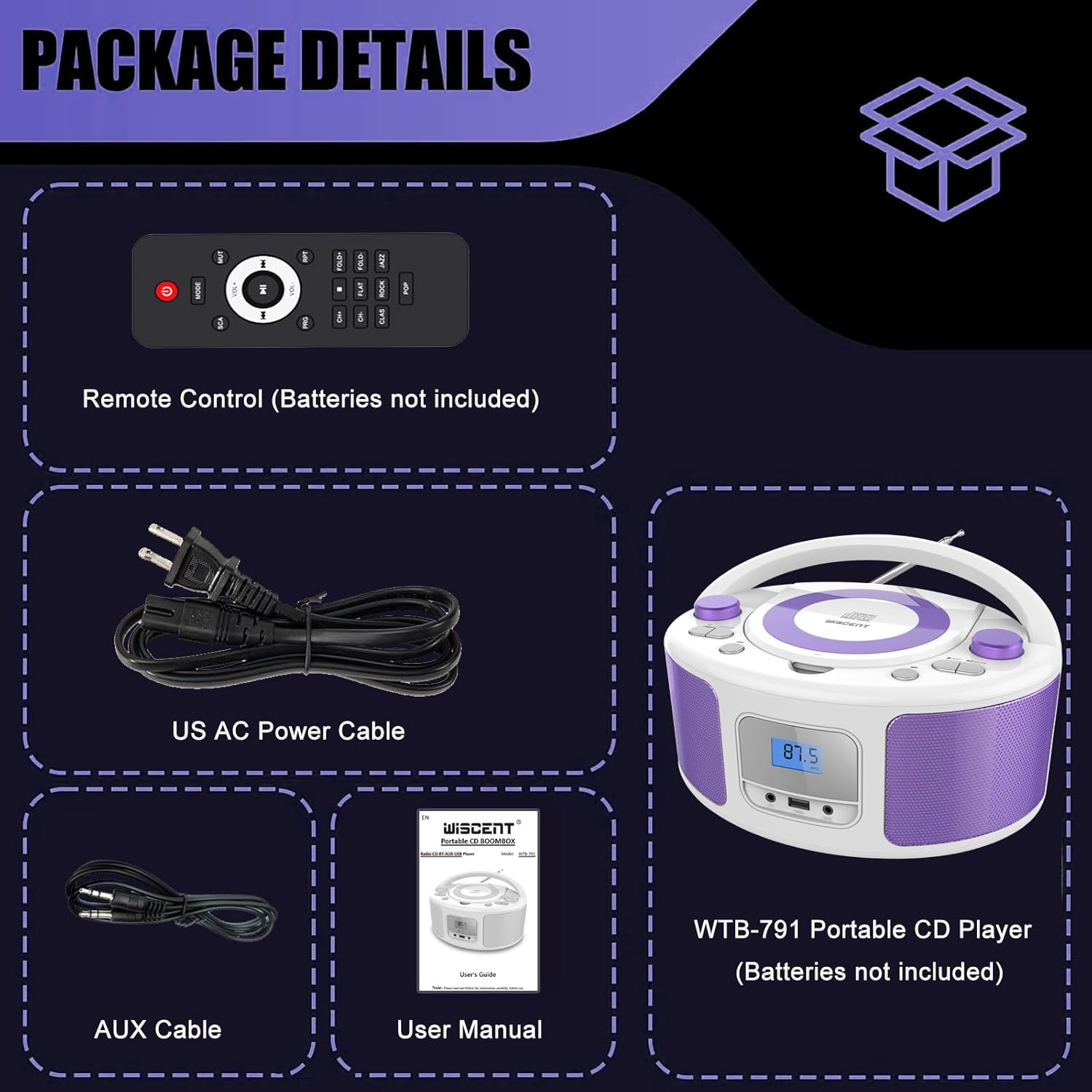
Image: Contents of the WIITHINK WCD-9949 Boombox package, showing the boombox, remote control, power cable, AUX cable, and user manual.
Pwodwi souview
Familiarize yourself with the main components of your boombox.

Imaj: Devan view of the WIITHINK WCD-9949 Boombox, highlighting key features such as CD player, Bluetooth, USB port, AUX input, headphone jack, LCD display, FM radio, and power options.
- Lektè CD ki chaje anlè: For playing CDs, CD-R/RW, MP3 CDs, and audiobook CDs.
- Sentonizè radyo FM: For listening to FM radio stations.
- Bluetooth: Pou difizyon odyo san fil soti nan aparèy konpatib.
- USB Antre: For playing MP3/WMA music files from USB flash drives (FAT32 format, up to 128GB).
- Antre AUX (3.5mm): Pou konekte aparèy odyo ekstèn.
- Jack kas ekoutè (3.5mm): Pou koute prive.
- Ekspozisyon LCD: Shows current mode, track number, and radio frequency.
- Bouton kontwòl: Power, Mode, Play/Pause, Skip/Search, Repeat, Scan, EQ/Function.
- Bouton Volim: Ajiste nivo pwodiksyon odyo a.
- Bouton akor: Adjusts FM radio frequency.
- Antèn teleskopik: Pou amelyore resepsyon radyo FM.
- Manch pou pote: Pou portabilite fasil.
Enstalasyon
Alimante Boombox la
Your boombox can be powered by AC power or batteries.
AC Power (Wall Outlet)
- Ensure the boombox is turned off.
- Insert one end of the provided AC power cable into the AC IN jack on the back of the boombox.
- Plug the other end of the AC power cable into a standard wall outlet.

Imaj: Dèyè view of the boombox, indicating the AC IN jack for power connection and the battery compartment.
Battery Power (Portable Use)
- Ensure the boombox is turned off and disconnected from AC power.
- Jwenn konpatiman batri a anba aparèy la.
- Louvri kouvèti lòj batri a.
- Insert 4 x UM2-C 1.5V batteries (not included), ensuring correct polarity (+/-).
- Fèmen kouvèti lòj batri a byen.
Nòt: Retire pil yo si ou pa pral itilize aparèy la pou yon peryòd tan pwolonje pou evite flit ak domaj.
Enstriksyon Operasyon
Operasyon Jeneral
- Limen/Etenyen: Peze a POUVWA bouton pou limen oswa etenn inite a.
- Chwazi mòd: Peze a MÒD button repeatedly to cycle through available modes: CD, FM, Bluetooth (BT), USB, AUX. The selected mode will be displayed on the LCD screen.
- Ajiste Volim: Vire a VOLIM knob clockwise to increase volume and counter-clockwise to decrease volume.
- Mòd EQ: Peze a EQ/FUN button to select different equalizer presets: ROCK / POP / FLAT / CLASS / JAZZ.

Imaj: Plis paseview of the boombox's multiple playback modes and features.
Lektur CD
- Peze a MÒD button to select CD mode. "CD" will appear on the display.
- Louvri kouvèti konpatiman CD a lè w leve l dousman.
- Place a CD (CD, CD-R/RW, MP3 CD, audiobook CD) onto the spindle with the label side facing up.
- Fèmen kouvèti konpatiman CD a. CD a ap kòmanse jwe otomatikman.
- Jwe/Poz: Peze a JWE/POZ bouton pou fè yon poz oswa rezime lekti.
- Sote Tracks: Peze a PASE ANVAN or SOTE ARYE bouton pou sote nan pwochen oswa anvan tras la.
- Repete: Peze a RPT button to repeat the current track (Repeat 1) or all tracks (Repeat All).
- Pwogram Jwe: Refer to the detailed user manual for programming specific track orders.

Image: Close-up of the top-loading CD player with a disc inside, ready for playback.
Operasyon radyo FM
- Peze a MÒD button to select FM radio mode. The FM frequency will appear on the display.
- Lonje antèn teleskopik la pou yon resepsyon optimal.
- Oto Scan: Peze epi kenbe la ESKANYE button to automatically scan and save available FM stations (up to 30 presets).
- Manyèl akor: Vire a REGLAGE bouton an pou ajiste frekans lan manyèlman.
- Chwazi Prereglaj: Sèvi ak la PREREGIME +/- buttons on the remote control to navigate through saved stations.

Image: Visual representation of the FM radio feature, showing the frequency range and preset capabilities.
Pè Bluetooth
- Peze a MÒD button to select Bluetooth mode. "BT" will flash on the display, indicating it's ready for pairing.
- Sou aparèy ou ki gen Bluetooth la (telefòn entelijan, tablèt, elatriye), aktive Bluetooth epi chèche aparèy ki disponib yo.
- Select "WTB-791" from the list of devices.
- Once paired, "BT" will stop flashing and remain solid. You can now stream audio wirelessly.
- Control playback (Play/Pause, Skip) using the boombox buttons or your connected device.

Image: The boombox displaying "BT" for Bluetooth mode, connected to a smartphone for wireless music streaming.
Lektur USB
- Insert a USB flash drive (FAT32 format, up to 128GB) containing MP3/WMA audio files into the USB port on the front of the boombox.
- Peze a MÒD button to select USB mode. "USB" will appear on the display.
- Playback will start automatically. Use the Play/Pause and Skip buttons to control playback.
AUX Antre
- Connect an external audio device (e.g., MP3 player, laptop) to the AUX IN jack on the front of the boombox using the provided 3.5mm AUX cable.
- Peze a MÒD button to select AUX mode. "AUX" will appear on the display.
- Control playback from your external device. Adjust volume using the boombox's volume knob.

Image: The boombox connected to multiple external devices via AUX input, demonstrating its versatility.
Itilizasyon ekoutè
For private listening, plug 3.5mm headphones (not included) into the HEADPHONE jack on the front of the boombox. The speakers will automatically mute.
Kontwòl Remote
The included remote control allows you to operate the boombox from a distance. Ensure batteries are inserted correctly (2 x AAA, not included). Functions include Power, Mode selection, Volume, Mute, Play/Pause, Skip/Search, Repeat, Scan, and EQ modes.

Image: The boombox and its remote control, highlighting the convenience of remote operation.
Antretyen
- Netwaye aparèy la avèk yon twal mou epi sèk. Pa sèvi ak pwodui netwayaj abrazif oswa solvan.
- Keep the CD compartment clean and free of dust. Use a CD lens cleaner if necessary.
- Sere aparèy la nan yon kote ki fre epi sèk, lwen limyè solèy dirèk ak tanperati ekstrèm.
Depanaj
| Pwoblèm | Solisyon |
|---|---|
| Pa gen pouvwa | Check if the AC power cable is securely connected. If using batteries, ensure they are inserted correctly and not depleted. |
| CD a pa ap jwe | Ensure the CD is clean and free of scratches. Verify the CD is inserted correctly with the label side up. Close the CD compartment completely. Ensure CD mode is selected. |
| Move resepsyon radyo FM | Extend and adjust the telescopic antenna. Try repositioning the unit. |
| Bluetooth pa asosye | Ensure the boombox is in Bluetooth mode and "BT" is flashing. Make sure your device's Bluetooth is enabled and within range. Forget previous pairings on your device and try again. |
| Pwoblèm lekti USB | Ensure the USB drive is formatted to FAT32 and contains compatible MP3/WMA files. The maximum capacity supported is 128GB. |
Espesifikasyon
| Karakteristik | Detay |
|---|---|
| Nimewo Modèl | WCD-9949 |
| Dimansyon pwodwi (L x W x H) | 7 x 10 x 5 pous |
| Pwa atik | 3.91 liv |
| Koneksyon Teknoloji | Oksilyè, Bluetooth, USB |
| Kalite Oratè | Bati-an |
| Sorti pouvwa | 2x2W RMS |
| Frekans Radyo FM | 87.5-108Mhz |
| Sous pouvwa | AC 100-240V~ / 4 x C batteries (not included) |
| USB kapasite | Up to 128GB (FAT32 format only) |
Garanti ak sipò
WIITHINK is committed to customer satisfaction. Your product comes with:
- Ranplasman 18 mwa: For missing parts or defective products.
- Sipò teknik pou tout lavi: Assistance with any product inquiries.
- Amazon Buyer-Seller Messaging: Available 7/24 for support.
For any inquiries, please go to Your Orders, find your order in the list, and click on "WIITHINK" to contact us.

Image: Details on WIITHINK's customer support, including replacement policy and technical assistance.
Videyo pwodwi ofisyèl yo
WIITHINK Direct - CD Radio Portable CD Player Boombox with Bluetooth
Video: An official product video from WIITHINK Direct showcasing the features and functionality of the CD Radio Portable CD Player Boombox with Bluetooth.