
Entwodiksyon
This manual provides comprehensive instructions for the ASWEE P4 Smart Watch, a versatile fitness tracker with call capabilities, a 1.85" TFT display, and various health monitoring features. Please read this manual thoroughly before using your device.
Ki sa ki nan bwat la
- ASWEE P4 Smart Watch
- Chaje kab
- Manyèl itilizatè
Pwodwi souview
The ASWEE P4 Smart Watch features a rectangular 1.85-inch TFT-LCD display with a 240x280 resolution. It includes a physical button on the side for navigation and interaction. The watch is designed for comfortable wear and easy access to its functions.
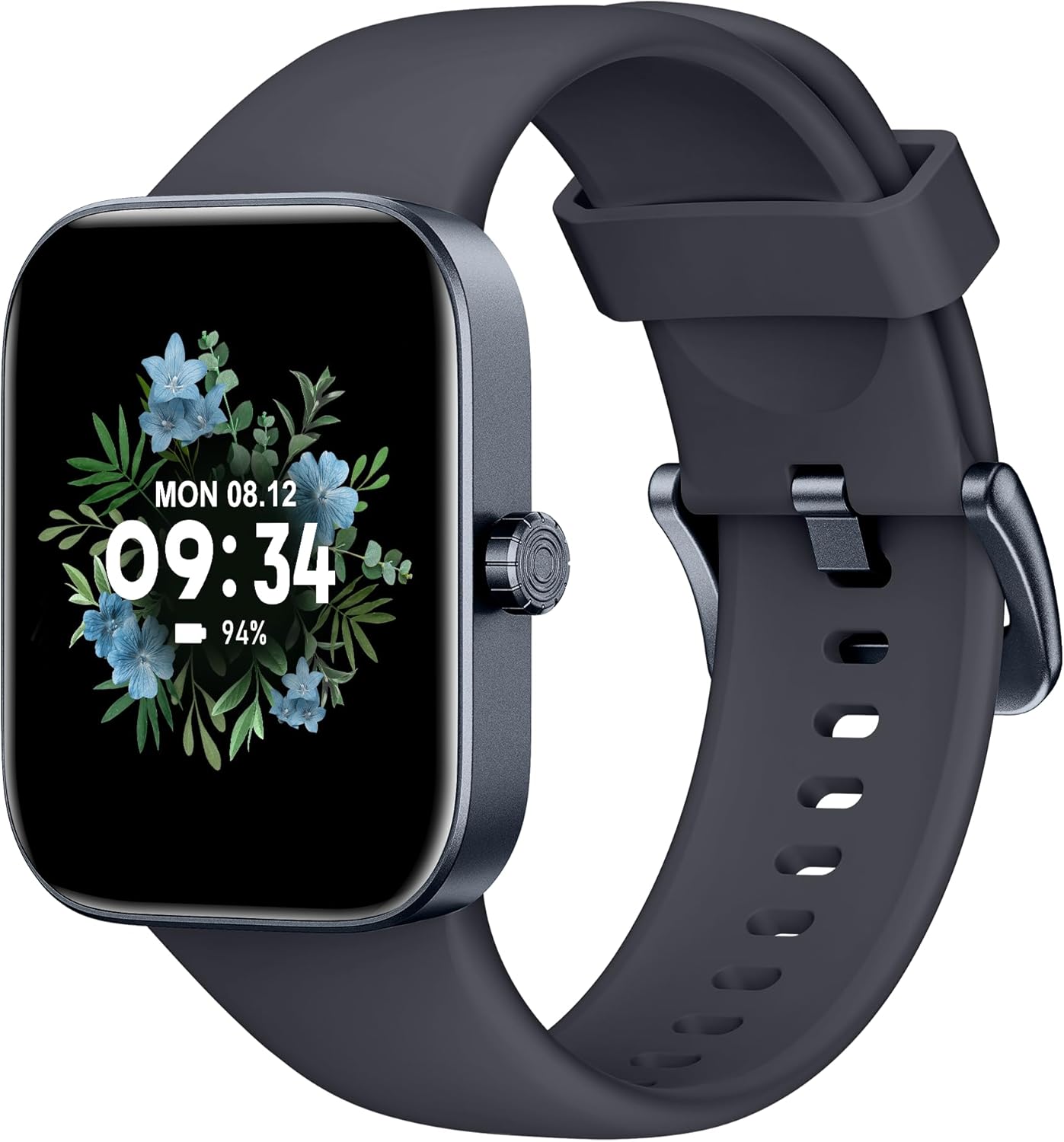
Devan view of the ASWEE P4 Smart Watch, displaying time and date with a floral background.
Enstalasyon
Chaje Aparèy la
The ASWEE P4 Smart Watch comes with a magnetic charging cable. Align the magnetic end of the cable with the charging contacts on the back of the watch. The watch will indicate when it is charging. A full charge typically takes approximately 2 hours and provides up to 7 days of active use or 15 days on standby.

Illustration showing the magnetic charging cable connected to the back of the ASWEE P4 Smart Watch, highlighting battery life indicators.
Enstalasyon aplikasyon ak appariement
To utilize all features of your ASWEE P4 Smart Watch, you need to download and install the "FitPro" application on your smartphone. Scan the QR code provided in the watch's packaging or search for "FitPro" in your device's app store.
Pairing ak iPhone
Follow these steps to pair your watch with an iPhone:
- Asire w ke Bluetooth aktive sou iPhone ou.
- Open the "FitPro" app.
- Navigate to "Setting" and then "Bind device".
- Select your watch (e.g., KM13Pro) from the scan results.
- Confirm the pairing request by clicking "Pair" and then "Allow" for notifications.
- Go to your iPhone's Bluetooth settings and connect to "KM13Pro Audio" for call functionality.
Video tutorial demonstrating how to bind the ASWEE P4 Smart Watch to an iPhone and how to unbind it.
Pairing with Android Phone
Follow these steps to pair your watch with an Android phone:
- Ensure Bluetooth is enabled on your Android phone.
- Open the "FitPro" app.
- Navigate to "Set" and then "Bind device".
- Select your watch (e.g., KM13Pro) from the scan results.
- Confirm the pairing request by clicking "Pair".
Video tutorial demonstrating how to bind the ASWEE P4 Smart Watch to an Android phone and how to unbind it.
Enstriksyon Operasyon
Navigasyon debaz
The watch features a touch-sensitive screen for navigation. Swipe left/right or up/down to access different functions and menus. The side button typically serves as a home or back button.
Call and Text Functionality
With its built-in speaker and microphone, the ASWEE P4 allows you to answer/dial calls directly from your wrist when connected via Bluetooth. You can also receive SMS text and SNS messages (Facebook, Twitter, WhatsApp, etc.) with vibration alerts.

Image showing the ASWEE P4 Smart Watch on a wrist, with notification icons for various messaging apps, indicating Bluetooth 5.0 connectivity for calls and texts.
Tracking Sante
The watch provides comprehensive health monitoring:
- Batman kè: 24-hour tracking with a high-precision PPG sensor. Stores 7 days of resting heart rate data.
- Oksijèn san: Measures SpO2 levels using a reflective-light based sensor.
- Siveyans dòmi: Tracks sleep quality through Awake, Light, and Deep sleep stages, helping to improve sleep duration and quality.
- Siveyans estrès: Bay enfòmasyon sou nivo estrès.

Image illustrating the ASWEE P4 Smart Watch's 24-hour data tracking capabilities, including heart rate, stress level, and blood oxygen monitoring.

Image depicting the ASWEE P4 Smart Watch's sleep health assistant feature, showing sleep duration and patterns.
Mòd Fòm
The ASWEE P4 supports multiple workout modes, including running, bike riding, basketball, and tennis. It accurately monitors data points like heart rate, time, and calories burned to enhance workout efficiency.

Montre imajasing the ASWEE P4 Smart Watch's various sports modes, including running, bike riding, basketball, and jumping jack, with activity data like steps, distance, and calories.
Personnalisation
Choose from over 100 stylish watch faces or create your own using photos from your phone gallery.
Antretyen
Netwayaj
Netwaye mont ou ak braslè ou regilyèman avèk yon twal mou.amp twal. Evite itilize pwodwi chimik piman bouk oswa materyèl abrazif.
Depo
Sere mont lan nan yon kote ki fre epi sèk lè w pa ap itilize li.
Depanaj
Gade a pa limen
- Asire w ke mont lan chaje nèt. Konekte l ak kab chaje a ak yon sous kouran pou omwen 30 minit.
Pwoblèm Pairing
- Asire w ke Bluetooth aktive sou telefòn ou epi mont lan nan zòn nan.
- Rekòmanse telefòn ou ak mont lan.
- If previously paired, try "forgetting" the device in your phone's Bluetooth settings and re-pairing through the FitPro app.
- Ensure the FitPro app has necessary permissions (Bluetooth, location).
Done Sante ki pa egzak
- Asire w ke mont lan byen sere sou ponyèt ou, ni twò sere ni twò lach.
- Netwaye detèktè ki sou dèyè mont lan.
- Faktè anviwònman ak fizyoloji endividyèl ka afekte lekti yo.
Notifikasyon ki pa parèt
- Check app permissions for FitPro to ensure it can access notifications.
- Verify that notification push settings are enabled within the FitPro app for desired applications.
- Asire w ke mont lan konekte ak telefòn ou atravè Bluetooth.
Espesifikasyon
| Karakteristik | Detay |
|---|---|
| Non modèl | P4 |
| Mak | ASWEE |
| Gwosè ekran | 1.85 pous |
| Teknoloji ekspozisyon | TFT-LCD |
| Rezolisyon | 240 x 280 PPI |
| Sistèm operasyon | Mete OS |
| Koneksyon | Bluetooth 5.3 |
| Rezistans dlo | IP68, 5 ATM |
| Lavi batri (itilizasyon tipik) | Jiska 7 jou |
| Tan sibstiti | Jiska 15 jou |
| Tan pou chaje | Apeprè. 2 èdtan |
| Karakteristik espesyal | Fitness Tracker, Sleep Monitor, Reminders, Multimedia control, Answer/Dial Call, Heart Rate Monitor, Blood Oxygen Monitor, Stress Monitor |
| Pwa atik | 2.89 ons |
Remak: Espesifikasyon yo sijè a chanje san avètisman davans.
Garanti ak sipò
For warranty information and technical support, please refer to the official ASWEE websit la oubyen kontakte sèvis kliyan yo. Kenbe resi acha w la kòm prèv acha.