
1. Entwodiksyon
Thank you for choosing the BESTEK 200W Power Inverter. This device converts 12V DC power from your vehicle's battery into 240V AC household power, along with multiple USB charging ports. It is designed for charging electronic devices, camping, and mobile office use. Please read this manual thoroughly before use to ensure safe and optimal operation.
2. Enstriksyon Sekirite
Adhering to these safety guidelines is crucial to prevent injury and damage to the inverter or connected devices.
- Limit pouvwa: Ensure that the total power consumption of all connected devices does not exceed 200W. Overloading the inverter can cause damage and trigger protection mechanisms.
- Vantilasyon: Always ensure adequate ventilation around the inverter. Do not block the cooling fan or air vents. Overheating can lead to automatic shutdown.
- Anviwònman: Use the inverter in a dry, well-ventilated area, away from direct sunlight, heat sources, flammable materials, and moisture.
- Koneksyon: Connect the inverter only to a 12V DC power source (e.g., a car cigarette lighter socket). Do not connect to 24V DC systems.
- Timoun: Kenbe envèstisè a lwen timoun yo.
- Demonte: Do not attempt to disassemble, modify, or repair the inverter. Refer all servicing to qualified personnel.
- Karakteristik pwoteksyon: The inverter includes built-in protections against overvoltage, undervoltage, overload, short circuit, and overheating. If a protection is triggered, the inverter may shut down automatically.

3. Pwodwi souview
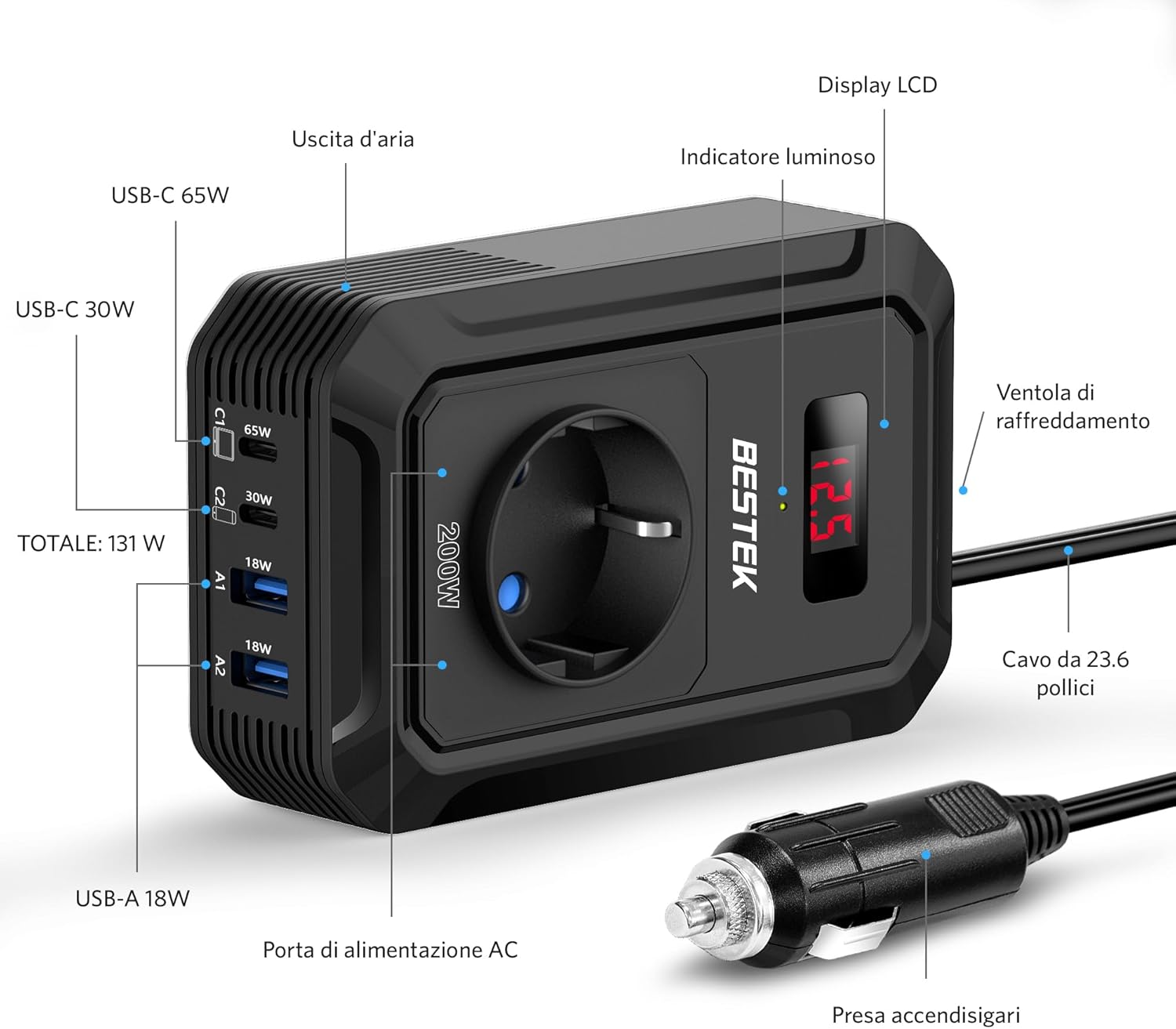
The BESTEK 200W Power Inverter is equipped with various ports and features for versatile power delivery.
Eleman:
- AC Outlet: Universal EU socket for 240V AC devices.
- Pò USB-C: One 65W PD (Power Delivery) and one 30W QC3.0 (Quick Charge) port for fast charging compatible devices.
- Pò USB-A: Two 18W QC3.0 ports for quick charging.
- Ekspozisyon LCD: Montre opinyon voltage from the vehicle battery.
- Refwadisman fanatik: Li aktive otomatikman pou retire chalè.
- Ploge pou alume sigarèt: For connecting to the vehicle's 12V DC power socket.
Karakteristik kle:
- 200W Pouvwa Kontini: Provides stable power for various electronics.
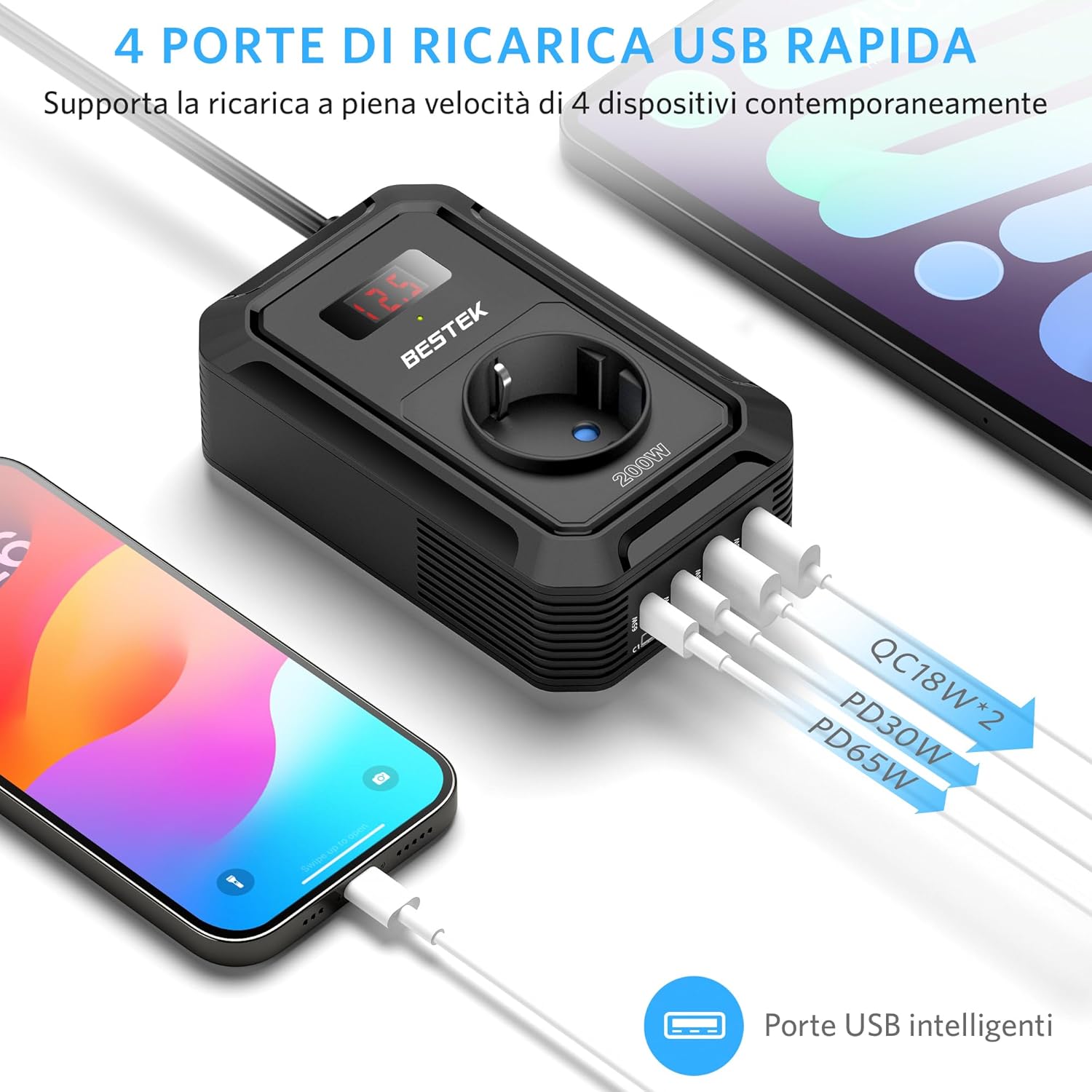
- Chaje USB gwo vitès: Total USB output of 131W, including PD 65W and QC 18W ports for rapid charging of smartphones, tablets, and laptops.
- Ekran LCD dijital: Displays real-time input voltage pou siveyans.
- Konsepsyon kontra enfòmèl ant ak pòtab: Measures approximately 8L x 3.3W x 12.5H cm, making it easy to store and transport.
- Smart Cooling System: The fan adjusts speed based on load and temperature, reducing noise and preventing overheating.
4. Enstalasyon
Follow these steps to set up your BESTEK Power Inverter:
- Preparasyon machin: Ensure your vehicle's engine is running to provide a stable 12V power supply and prevent draining the car battery, especially when using high-power devices.
- Connect to Cigarette Lighter: Insert the inverter's cigarette lighter plug firmly into your vehicle's 12V cigarette lighter socket. The LCD display should illuminate, showing the current input voltage.
- Plasman: Place the inverter on a stable surface, ensuring that the air vents are not obstructed. Maintain sufficient space around the unit for proper airflow.
5. Operasyon Enstriksyon
Once the inverter is properly set up, you can begin powering and charging your devices.
- Tcheke konpatibilite aparèy: Before connecting, verify that your device's power requirement (in Watts) is within the inverter's 200W limit.
- Konekte Aparèy:
- For AC-powered devices, plug them into the universal AC outlet.
- For USB-powered devices, connect them to the appropriate USB-C (65W PD, 30W QC3.0) or USB-A (18W QC3.0) ports.
- Ekspozisyon ki monitè kè bebe: The LCD screen will show the input voltage. Si voltage drops too low (e.g., below 10.5V), the inverter may shut down to protect your car battery.
- Dekonekte apre itilizasyon: When you are finished, disconnect all devices and then unplug the inverter from the cigarette lighter socket.

Inivèsèl konpatibilite:
The inverter supports a wide range of devices, including:
- Laptops (e.g., MacBook Pro)
- Smartphones ak tablèt
- Gaming Devices (e.g., Nintendo Switch, PS5)
- Small Medical Machines (e.g., CPAP machine, Nebulizer)
- Car Accessories (e.g., Air Compressor, Small Fan, Bluetooth Speaker, Wireless Earbuds)

6. Antretyen
Proper maintenance ensures the longevity and reliable performance of your inverter.
- Netwayaj: Periodically clean the exterior of the inverter with a soft, dry cloth. Do not use liquid cleaners or solvents.
- Vantilasyon: Regularly check that the cooling fan and air vents are free from dust and debris. Blocked vents can lead to overheating.
- Depo: Store the inverter in a cool, dry place when not in use, away from extreme temperatures and direct sunlight.
- Enspeksyon kab: Inspect the power cable and plug for any signs of damage before each use. Do not use if damaged.

NAN. Depanaj
Si ou rankontre pwoblèm ak envèstisè ou a, gade pwoblèm ak solisyon komen sa yo:
| Pwoblèm | Kòz posib | Solisyon |
|---|---|---|
| Inverter not powering on / No output |
|
|
| Inverter shuts down automatically (Protection mode) |
|
|
| Connected device not charging or working |
|
|
If the problem persists after attempting these solutions, please contact BESTEK customer support.
8. Espesifikasyon
| Karakteristik | Spesifikasyon |
|---|---|
| Mak | BESTEK |
| Non modèl | MRI2013EU |
| Pouvwa an Watts | 200 Watts |
| Pik pouvwa | 200 Watts |
| Antre Voltage | 12 Vòlt (DC) |
| Sòti Voltage | 240 Vòlt (AC) |
| Sòti Ond | Onn sinis modifye |
| Frekans | 50 Hz |
| AC plòg | 1 (Universal EU) |
| Pò USB-C | 2 (65W PD, 30W QC3.0) |
| Pò USB-A | 2 (18W QC3.0) |
| Total USB Power | 131W |
| Sous pouvwa | Socket alum sigarèt |
| Kalite ekspozisyon | LCD |
| Dimansyon (L x W x H) | 8L x 3.3W x 12.5H cm |
| Pwa | 300 gram |
| Sètifikasyon sekirite | CE, ETL Listed |
| Itilizasyon Rekòmande | Charging electronic devices, camping, mobile office use |
9. Garanti ak sipò
BESTEK stands behind the quality of its products.
- Garanti: This product comes with an 18-month product replacement warranty.
- Règleman retounen: BESTEK offers a 60-day refund policy for your purchase.
- Sipò Kliyan: Friendly technical support and customer service are available 24/7. For assistance, please visit the official BESTEK store or contact their support channels.
Pou plis enfòmasyon oswa pou kontakte sipò a, tanpri vizite BESTEK Official Store.