
1. Entwodiksyon
Welcome to the YQSAVIOR Kids Tablet user manual. This guide provides essential information to help you set up, operate, and maintain your new tablet. Designed specifically for children, this tablet offers a safe and engaging platform for learning and entertainment, featuring robust parental controls and a durable design.
Tanpri li manyèl sa a avèk atansyon anvan ou itilize aparèy la pou asire bon fonksyonalite ak sekirite.
2. Ki sa ki nan bwat la
- YQSAVIOR Kids Tablet (Model YQQ1K)
- Chaje kab
3. Pwodwi souview
The YQSAVIOR Kids Tablet is equipped with features designed for young users, including a durable shockproof case and an adjustable stand for comfortable viewing.
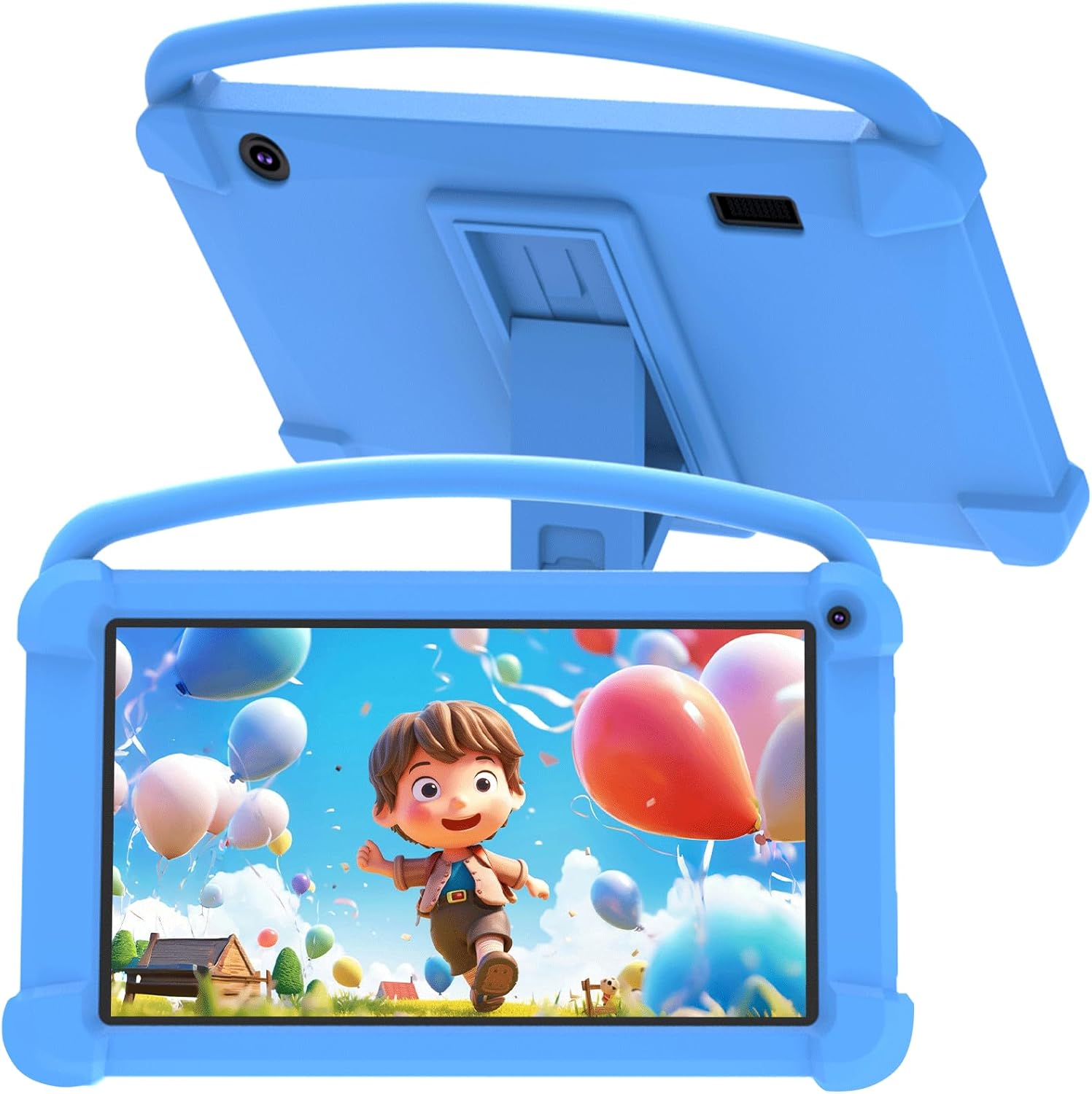
Figi 3.1: Devan view of the YQSAVIOR Kids Tablet with its protective case.

Figure 3.2: The tablet's adjustable stand for hands-free viewing.
Konpozan kle:
- Ekran IPS HD 7 pous: Provides clear and bright visuals (1024x600 resolution).
- Protective Silicone Case: Designed to absorb shocks and prevent damage from drops.
- Kanpe reglabl: Integrated into the case for convenient viewang ing.
- Kamera doub: Front 2.0MP and Rear 5.0MP for photos and video calls.
- Jack ekoutè 3.5mm: Pou koute prive.
- Mikwo SD kat plas: Expandable storage up to 512GB.
4. Enstalasyon
4.1 Premye chaj
Before first use, fully charge the tablet using the provided charging cable and a compatible power adapter (not included). The charging indicator will show progress.
4.2 Limen/Etenyen
- Pou limen: Peze epi kenbe bouton pouvwa a jiskaske ekran an limen.
- Pou etenn: Peze epi kenbe bouton Pouvwa a, answit chwazi 'Etenn' nan opsyon ki parèt sou ekran an.
4.3 Asistan Enstalasyon Inisyal
Upon first power-on, the tablet will guide you through an initial setup process. This includes selecting your language, connecting to a Wi-Fi network, and setting up a Google account. A Google account is required to access the Google Play Store and other Google services.
4.4 Mete yon kat Micro SD
To expand storage, locate the Micro SD card slot on the side of the tablet. Gently insert a Micro SD card (up to 512GB) until it clicks into place. The tablet will recognize the new storage.
5. Operasyon Enstriksyon
5.1 Kontwòl paran yo
The YQSAVIOR Kids Tablet features robust parental control options to ensure a safe digital environment for children. These controls allow you to manage screen time, filter content, and control app access.

Figi 5.1: Plis paseview of parental control features.
Access the parental control settings through the dedicated app or system settings to:
- Fikse limit tan chak jou pou itilizasyon tablèt la.
- Approve or block specific applications.
- Filtre websit ak kontni sou entènèt.
- Monitor activity logs.
5.2 Jesyon Aplikasyon
The tablet comes with pre-installed educational and entertainment apps. You can download additional applications from the Google Play Store, thanks to its GMS certification.

Figure 5.2: The tablet's 'All Apps' screen.
5.3 Lekti Medya
The tablet supports various media formats and is compatible with streaming services like Netflix due to Widevine L1 support. The 1024x600 IPS HD display ensures a clear visual experience for videos and games.
Video 5.3: An animated video showcasing the YQSAVIOR Kids Tablet's design, features like the protective case, adjustable stand, and dual cameras, along with its quad-core processor and various color options.
6. Antretyen
6.1 Netwayaj
Use a soft, lint-free cloth to clean the screen and the tablet's body. For stubborn smudges, slightly dampRense twal la avèk dlo. Evite itilize pwodui chimik ki agresif oswa materyèl abrazif.
6.2 Swen Batri
- Evite ekspoze tablèt la nan tanperati ekstrèm (cho oswa frèt).
- Pa kite tablèt la ap chaje pou yon bon bout tan apre li fin chaje nèt.
- Pou depo alontèm, chaje batri a apeprè 50% epi etenn aparèy la.
6.3 Mizajou lojisyèl
Periodically check for system updates in the tablet's settings to ensure optimal performance and access to the latest features and security patches.
NAN. Depanaj
Pwoblèm komen ak solisyon:
- Tablèt la pa limen: Ensure the tablet is charged. Connect it to a power source and try again.
- Pèfòmans ralanti: Close unused applications, clear app caches, or restart the tablet.
- Pwoblèm koneksyon Wi-Fi: Check if Wi-Fi is enabled, restart your router, or forget and reconnect to the network.
- Aplikasyon k ap kraze: Ensure apps are updated. Try clearing the app's cache or reinstalling it.
- Batri a ap dechaje byen vit: Reduce screen brightness, close background apps, or disable unnecessary features like Bluetooth/GPS when not in use.
If issues persist, consider performing a factory reset (this will erase all data, so back up important files first) or contact customer support.
8. Espesifikasyon
| Karakteristik | Spesifikasyon |
|---|---|
| Non modèl | YQQ1K |
| Sistèm operasyon | Android 12 |
| Gwosè ekran | 7 pous |
| Rezolisyon ekran | 1024x600 Pixels (IPS HD) |
| RAM | 4GB (2GB+2GB) |
| Depo Entèn (ROM) | 32GB |
| Depo dilatabl | Mikwo SD jiska 512GB |
| Kamera dèyè | 5 MP |
| Kamera devan | 2 MP |
| Kalite san fil | 802.11n (Wi-Fi) |
| Koneksyon | Bluetooth |
| Batri | 1 Lityòm Ion (enkli) |
| Pwa atik | 1.21 liv |
| Dimansyon pwodwi | 7 x 0.3 x 3 pous |
9. Garanti ak sipò
For warranty information and customer support, please refer to the documentation included with your purchase or visit the official YQSAVIOR store on Amazon. You can find more information and contact details at: YQSAVIOR Amazon Store.