
1. Entwodiksyon
Thank you for choosing the Sharp 50FQ5EG 50-inch QLED 4K Google TV. This manual provides essential information for setting up, operating, maintaining, and troubleshooting your new television. Please read it thoroughly before use and keep it for future reference.
Karakteristik kle:
- 50-inch QLED 4K Ultra HD Display with 144 Hz Refresh Rate
- Google TV Operating System with Google Assistant and Chromecast built-in
- Harman/Kardon Hybrid Speaker System with Dolby Atmos
- Dolby Vision IQ, HDR10, HLG Support
- Multiple Connectivity Options: 4 x HDMI 2.1, 2 x USB, Bluetooth 5.3, Wi-Fi, Ethernet
- Frameless Aluminum Design
Eleman ki enkli:
- Sharp 50FQ5EG Television
- Pedestal kanpe
- Kontwòl remote (li bezwen 2 pil AAA, enkli)
- Manyèl Enstriksyon
- Pouvwa kab
2. Enfòmasyon sou Sekirite
Pou asire yon operasyon an sekirite epi pou anpeche domaj, tanpri obsève prekosyon sekirite sa yo:
- Pwovizyon pou pouvwa: Connect the TV only to an AC 220V, 50Hz power outlet. Do not overload power outlets.
- Vantilasyon: Asire w ke gen ase vantilasyon toutotou televizyon an. Pa bloke ouvèti vantilasyon yo.
- Likid ak imidite: Do not expose the TV to rain, moisture, or dripping/splashing liquids. Do not place objects filled with liquids on the TV.
- Sous Chalè: Kenbe televizyon an lwen sous chalè tankou radyatè, recho, oswa lòt aparèy ki pwodui chalè.
- Netwayaj: Debranche televizyon an nan priz miray la anvan ou netwaye li. Sèvi ak yon twal mou epi sèk. Pa sèvi ak pwodui netwayaj likid oswa pwodui netwayaj an ayewosòl.
- Sèvis: Pa eseye fè sèvis pwodui sa a tèt ou. Refere tout sèvis yo bay pèsonèl sèvis kalifye.
- Timoun: Supervise children to ensure they do not play with the TV or remote control.
3. Enstalasyon
3.1 Debake
Carefully remove the TV and all accessories from the packaging. Retain the packaging materials for future transport or servicing.
3.2 Attaching the Pedestal Stand
If you are not wall-mounting the TV, attach the included pedestal stand:
- Mete televizyon an fas anba sou yon sifas ki plat e mou pou evite domaje ekran an.
- Aliyen konpozan sipò yo ak twou montaj yo anba televizyon an.
- Fikse sipò a byen sere avèk vis yo bay yo. Asire w sipò a byen tache anvan ou mete televizyon an dwat.

Imaj: Gwo plan view of the TV's pedestal stand and integrated Harman/Kardon speakers.
3.3 Montaj sou miray (opsyonèl)
The Sharp 50FQ5EG supports VESA wall mounts with a standard of 200 x 200 mm. Use M6 screws (not included) with a length appropriate for your wall mount bracket. Consult a professional for wall mounting to ensure safety and proper installation.
3.4 Konekte periferik
Connect your external devices to the TV's ports. The TV features 4 HDMI 2.1 ports, 2 USB ports, Ethernet, and an optical audio output.
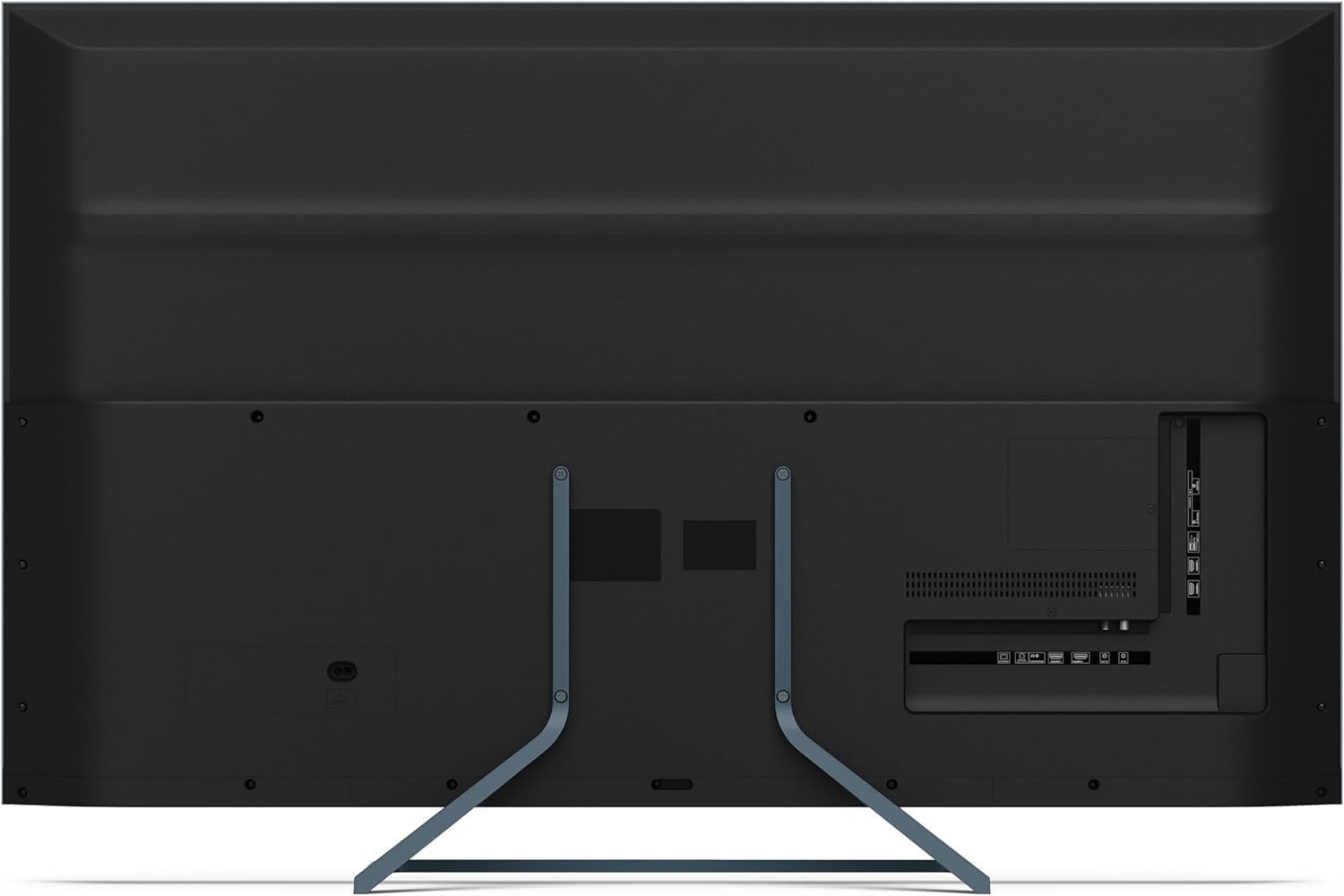
Imaj: Dèyè view of the television displaying the arrangement of HDMI, USB, and other connectivity ports.
- HDMI: Connect Blu-ray players, game consoles, or set-top boxes. HDMI 2.1 supports eARC and ALLM for enhanced audio and gaming.
- USB: Konekte aparèy depo USB pou lekti medya.
- Ethernet: Pou yon koneksyon entènèt filaire.
- Pouvwa: Konekte kab kouran an nan televizyon an epi answit nan yon priz miray.
3.5 Premye Limen ak Konfigirasyon Google TV a
- Branche televizyon an nan yon priz kouran.
- Peze bouton pouvwa a sou kontwòl remote la oswa televizyon an.
- The TV will guide you through the initial setup process, including language selection, network connection (Wi-Fi or Ethernet), and Google account sign-in.
- Remote Control Pairing: During initial setup, you may need to pair the Bluetooth remote control. Follow the on-screen instructions, typically involving pressing specific buttons on the remote simultaneously.
4. Itilizasyon televizyon an
4.1 Kontwòl Remote
The included remote control uses Bluetooth for enhanced functionality. It allows navigation, voice control via Google Assistant, and quick access to various features.
4.2 Entèfas Google TV
The Google TV interface organizes your content from various streaming services and apps. Use the remote's directional pad to navigate through menus, select apps, and browse content.

Image: The television screen showing the Google TV home interface with recommended content and installed applications.
4.3 Anviwònman Foto
Your Sharp 50FQ5EG TV features advanced picture technologies:
- QLED Q-Colour: Provides vibrant and accurate color reproduction.
- 4K Ultra HD: Delivers sharp and detailed images.
- Pousantaj rafrechisman 144 Hz: Ensures smooth motion, especially beneficial for gaming and fast-paced content.
- Dolby Vision IQ, HDR10, HLG: Supports various High Dynamic Range formats for enhanced contrast and brightness.
- AQUOS Motion: Improves motion clarity by reducing blur.
- Eco Sensor: Otomatikman ajiste klète ki baze sou kondisyon limyè anbyen.
Access picture settings through the TV's menu to customize brightness, contrast, color, and other display options.
4.4 Anviwònman son
The TV is equipped with a Harman/Kardon Hybrid Speaker System and supports Dolby Atmos for immersive audio.
- Harman/Kardon Speakers: Delivers clear sound with powerful bass.
- Dolby Atmos: Bay yon eksperyans odyo twa dimansyon.
Adjust sound modes, equalizer settings, and volume levels via the TV's audio menu.
4.5 Koneksyon
- Wi-Fi/Ethernet: Konekte ak rezo lakay ou pou jwenn aksè entènèt ak difizyon.
- Bluetooth 5.3: Konekte kas ekoutè san fil, ba son, oswa lòt aparèy ki gen Bluetooth.
- Google Cast: Cast content from your mobile devices or computer directly to the TV.
4.6 Itilizasyon Aplikasyon yo
The Google TV platform provides access to a wide range of applications from the Google Play Store, including:
- Netflix, Amazon Prime Video, HBO, Disney+, Movistar+, DAZN, Atresmedia
- KODI, IPTV, Steamlink, Twitch, VLC, YouTube
- Puffin TV Browser, Spotify, Deezer, TuneIn Radio
Navigate to the 'Apps' section on the Google TV home screen to browse, download, and manage your applications.
5. Antretyen
5.1 Netwaye televizyon an
- Ekran: Siye ekran an dousman avèk yon twal mou ki pa gen pousyè. Pou mak ki difisil pou retire, siye l yon ti kras.ampRense twal la avèk dlo oswa yon pwodui netwayaj ekran espesyalize (aplike l sou twal la, pa dirèkteman sou ekran an).
- Kò: Siye ankadreman ak sipò televizyon an avèk yon twal mou epi sèk.
- Pa Sèvi ak: Abrasive cleaners, alcohol, benzene, or thinners, as these can damage the TV's surface.
5.2 Mizajou lojisyèl
Your TV may receive software updates to improve performance and add new features. Ensure your TV is connected to the internet to receive these updates automatically or check for them manually in the settings menu.
NAN. Depanaj
Si w rankontre pwoblèm ak televizyon w lan, gade pwoblèm ak solisyon komen sa yo:
| Pwoblèm | Solisyon posib |
|---|---|
| Pa gen pouvwa | Tcheke si kab kouran an byen konekte ak televizyon an ak priz miray la. Asire w ke priz la gen kouran. Eseye yon lòt priz. |
| Pa gen imaj, men gen son | Tcheke sous opinyon an. Asire w ke aparèy ekstèn yo limen epi yo konekte kòrèkteman. Eseye yon lòt kab HDMI. |
| Pa gen son, men imaj la prezan | Check the volume level. Ensure mute is not activated. Check audio output settings (e.g., internal speakers, external soundbar). |
| Remote Control pa reponn | Replace the batteries. Ensure there are no obstructions between the remote and the TV. Re-pair the Bluetooth remote if necessary (refer to initial setup). |
| Pa ka konekte ak Wi-Fi | Tcheke routeur ak modèm ou. Asire w ke modpas Wi-Fi a kòrèk. Eseye rekòmanse televizyon an ak routeur ou. |
| Apps Not Working/Freezing | Ensure the TV has a stable internet connection. Try clearing the app's cache or reinstalling the app. Restart the TV. |
Si pwoblèm nan pèsiste apre ou fin eseye solisyon sa yo, tanpri kontakte sèvis kliyan.
7. Espesifikasyon

Image: Technical drawing illustrating the width, height, and depth of the television with and without its stand.
| Karakteristik | Spesifikasyon |
|---|---|
| Nimewo Modèl | 50FQ5EG |
| Gwosè ekran | 50 pous |
| Teknoloji ekspozisyon | QLED, LED |
| Rezolisyon | 4K Ultra HD (3840 x 2160) |
| Rafrechisman pousantaj | 144 Hz |
| Sipò HDR | Dolby Vision IQ, HDR10, HLG |
| Sistèm operasyon | Google TV |
| Sòti odyo | 2.1 Channel Harman/Kardon Speakers, 15W Max Power, Dolby Atmos |
| Koneksyon | 4 x HDMI 2.1, 2 x USB 2.0, Bluetooth 5.3, Wi-Fi, Ethernet |
| VESA Mounting Standard | 200 x 200 mm |
| Dimansyon ak kanpe (W x H x P) | 113.22 x 73.89 x 23.2 cm |
| Dimansyon san kanpe (W x H x P) | 113.22 x 66.87 x 6.0 cm |
| Pwa (san kanpe) | 11.5 kg |
| Konsomasyon pouvwa (fonksyone) | 84 Watts |
| Konsomasyon enèji chak ane | 64 kWh/ane |
| Metòd kontwòl | Voice (Google Assistant), Remote Control |
| Koulè | Anthracite Grey Aluminum |
8. Garanti ak sipò
8.1 Enfòmasyon sou Garanti
This Sharp 50FQ5EG television comes with a Garanti limite. Please refer to the warranty card included with your product or visit the official Sharp websit la pou wè kondisyon detaye konsènan pwoteksyon, dire, ak pwosedi sèvis yo.
8.2 Sipò pou Kliyan
For technical assistance, troubleshooting beyond this manual, or warranty claims, please contact Sharp customer support. Contact details can typically be found on the Sharp official websit la oubyen nan dokimantasyon ki vini ak televizyon ou an.