
1. Entwodiksyon
The Aubess Mini Smart Wi-Fi Switch 16A (Model WSM02) is designed to integrate seamlessly into your smart home ecosystem. This device enables remote control of connected appliances via your smartphone or tablet, offering convenience and enhanced energy management. It features an integrated energy monitor that provides real-time consumption data, helping you make informed decisions about your energy usage.
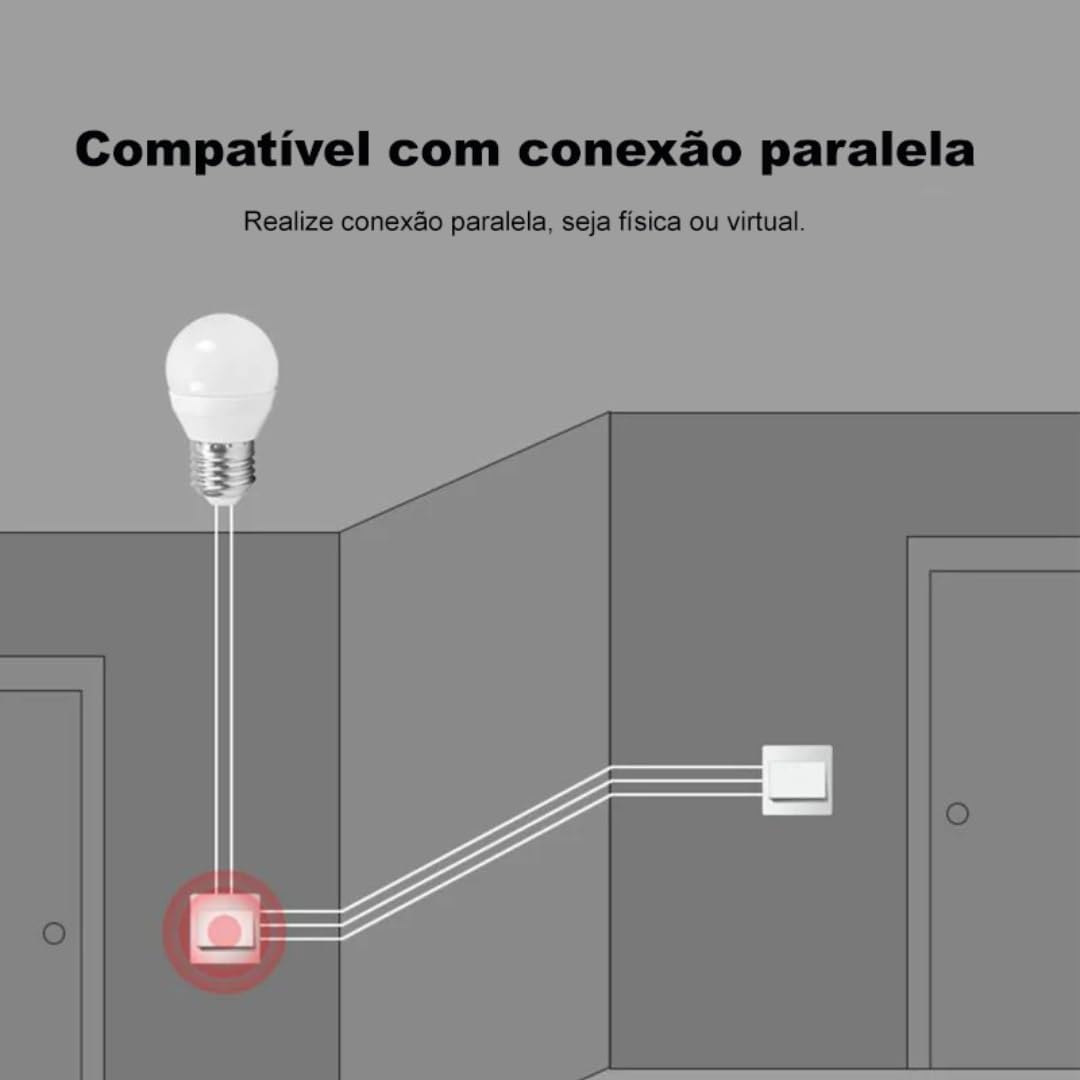
The switch is compatible with popular voice assistants such as Amazon Alexa and Google Home, and works with smart home platforms like Tuya Smart, Smart Life, and Home Assistant. Its compact design allows for simple and quick installation, including parallel installation with existing switches.
2. Enfòmasyon sou Sekirite
AVÈTISMAN: Electrical installation should only be performed by a qualified electrician to ensure safety and compliance with local electrical codes. Incorrect installation can lead to electric shock, fire, or device damage.
- Toujou dekonekte kouran an nan disjonktè a anvan enstalasyon oswa antretyen.
- Asire w ke aparèy la ap itilize nan volim espesifye li a.tage and current ratings (110V, 16A, 1600W).
- Pa ekspoze aparèy la nan imidite oswa tanperati ekstrèm.
- Aparèy sa a fèt pou itilize andedan kay la sèlman.
3. Pake kontni
- 1 x Aubess Mini Smart Wi-Fi Switch
- 1 x manyèl itilizatè
4. Pwodwi Features
- Koneksyon Wi-Fi: Operates on 2.4GHz Wi-Fi networks for remote control.
- Siveyans enèji: Provides real-time and historical energy consumption data.
- Kontwòl vwa: Konpatib ak Amazon Alexa ak Google Home pou operasyon men lib.
- Kontwòl aplikasyon: Works with Tuya Smart and Smart Life applications for comprehensive management.
- Segondè Pouvwa Evalyasyon: Sipòte jiska 16 Amperes and 1600 Watts.
- Enstalasyon paralèl: Designed to facilitate parallel wiring with existing traditional switches.
- Konsepsyon kontra enfòmèl ant: Small form factor for easy integration into electrical boxes.


5. Espesifikasyon
| Spesifikasyon | Valè |
|---|---|
| Mòd operasyon | On-Off |
| Rating aktyèl | 16 Amperes |
| Opere Voltage | 110 Volts |
| Kalite kontak | Nòmalman fèmen |
| Kalite Connector | Clamp |
| Chanje Kalite | Slide |
| Tèminal | Vis |
| Kalite Awondisman | 1-fason |
| Kalite aliye | Mi mòn |
| Kantite Pozisyon | 2 |
| Evalyasyon Tanperati Maksimòm | 55 Degre Sèlsiyis |
| Kalite kontwòl | Amazon Alexa, Push Button, Google Assistant |
| Metòd kontwòl | Application, Remote, Touch, Voice |
| Kalite koneksyon | Wi-Fi (2.4GHz) |
| Pouvwa | 1600 Watts |
| Koulè | Blan |
| Dimansyon atik | 41 x 20 x 41 milimèt |
| Konte inite | 1 inite |
| Kantite Atik yo | 1 |
| Materyèl | Plastik |
| Kontakte Materyèl | Metal |
| Rating Pwoteksyon Entènasyonal | IP00 |
| Compliant Specification | CE, RoHS |
| Manifakti | Aubess |
| Nimewo Pati | WSM02 |
6. Enstalasyon ak Enstalasyon
6.1 Enstriksyon fil elektrik
Enpòtan: Ensure power is disconnected at the circuit breaker before proceeding with any wiring. Professional installation is highly recommended.
- Idantifye fil yo: Locate the Live (L), Neutral (N), and Load (L1, L2, etc.) wires in your electrical box. The Aubess switch requires a Neutral wire for operation.
- Konekte fil yo: Connect the Live wire from your power source to the 'L' terminal on the switch. Connect the Neutral wire to the 'N' terminal. Connect the Load wire(s) (to your light fixture or appliance) to the 'L1' (and 'L2' if applicable) terminal(s).
- Koneksyon an sekirite: Asire w tout koneksyon fil yo byen fèm epi byen izole.
- Chanjman Monte: Carefully place the switch into the electrical box and secure it.
- Retabli pouvwa: Yon fwa enstalasyon an fini epi li verifye, retabli kouran an nan disjonktè a.
6.2 Aparisyon App
To control your Aubess Mini Smart Wi-Fi Switch, you need to pair it with the Tuya Smart or Smart Life application.
- Telechaje App: Telechaje aplikasyon 'Tuya Smart' la oubyen 'Smart Life' la nan magazen aplikasyon telefòn entelijan ou an (iOS oubyen Android).
- Enskri/Konekte: Louvri aplikasyon an epi kreye yon nouvo kont oubyen konekte si ou deja genyen youn.
- Ajoute Aparèy: Tape ikòn '+' ki nan kwen anwo dwat aplikasyon an pou ajoute yon nouvo aparèy.
- Chwazi Kalite Aparèy: Choose 'Electrical Switch' or 'Switch (Wi-Fi)'.
- Antre detay Wi-Fi yo: Asire w telefòn ou konekte ak yon rezo Wi-Fi 2.4GHz. Antre modpas Wi-Fi ou nan aplikasyon an.
- Mete aparèy la nan mòd koneksyon: Power on the switch. If the indicator light is not blinking rapidly, press and hold the reset button on the switch for 5-10 seconds until it blinks rapidly.
- Konfime flache a: In the app, confirm that the indicator light is blinking rapidly.
- Konekte: The app will begin searching for the device. Once found, you can rename it and complete the setup.
7. Operasyon Enstriksyon
7.1 Kontwòl App
Once paired, you can control the switch from anywhere using the Tuya Smart or Smart Life app:
- On/Off: Tap the switch icon in the app to turn the connected appliance on or off.
- Orè: Set schedules or timers for automatic operation.
- Sèn: Kreye sèn pèsonalize pou kontwole plizyè aparèy an menm tan.
7.2 Kontwòl Vwa (Alexa/Google Home)
To enable voice control, link your Tuya Smart/Smart Life account with Amazon Alexa or Google Home:
- Louvri aplikasyon Alexa a oswa Google Home la.
- Ale nan 'Konpetans ak Jwèt' (Alexa) oubyen 'Fonksyone avèk Google' (Google Home).
- Chèche pou 'Tuya Smart' or 'Smart Life'.
- Enable the skill/service and link your account using your app credentials.
- Discover devices. You can now control your switch using voice commands like: "Alexa, turn on the living room light" or "Hey Google, turn off the fan."
7.3 Siveyans Enèji
The integrated energy monitor allows you to track power consumption:
- In the Tuya Smart/Smart Life app, select your Aubess switch.
- Look for the 'Energy Monitoring' or 'Power Statistics' section.
- View real-time power usage (Watts), current (Amperes), and voltage (Volts).
- Access historical data, including daily, weekly, or monthly consumption graphs.

8. Antretyen
- Netwayaj: Sèvi ak yon twal mou epi sèk pou netwaye aparèy la. Pa sèvi ak pwodui chimik ki agresif oswa pwodui netwayaj abrazif.
- Mizajou mikrolojisyèl: Tcheke aplikasyon Tuya Smart/Smart Life la detanzantan pou wè si gen mizajou firmwèr ki disponib pou asire pèfòmans ak sekirite optimal.
- Kondisyon anviwònman: Ensure the device is kept within its operating temperature range (max 55°C) and away from excessive humidity.
NAN. Depanaj
- Aparèy pa reponn:
- Tcheke si aparèy la gen kouran.
- Verify your Wi-Fi network is active and stable (2.4GHz).
- Ensure your smartphone has an internet connection.
- Try restarting the switch by cycling its power at the circuit breaker.
- Pa kapab konekte:
- Make sure the switch's indicator light is blinking rapidly (pairing mode). If not, reset it by holding the button for 5-10 seconds.
- Konfime rezo Wi-Fi ou a se 2.4GHz. Rezo 5GHz yo pa sipòte.
- Ensure your Wi-Fi password is entered correctly.
- Move the switch closer to your Wi-Fi router during pairing.
- Kontwòl Vwa a pa fonksyone:
- Verify that the Tuya Smart/Smart Life skill/service is enabled and linked correctly in your Alexa/Google Home app.
- Ensure the device name in the smart home app matches the name you are using in voice commands.
- Try rediscovering devices in your Alexa/Google Home app.
10. Garanti ak sipò
For warranty information, technical support, or service inquiries, please contact Aubess customer support through their official website or the contact information provided at the point of purchase. Please have your product model (WSM02) and purchase details ready when contacting support.