
1. Entwodiksyon
Mèsi pou acha aasing the ulafbwur 8082T Digital Desk Clock. This device combines a digital clock with a weather forecast station, perpetual calendar, and displays humidity and temperature. Its LED color screen provides clear readability. This manual provides detailed instructions for setup, operation, and maintenance to ensure optimal performance and longevity of your device.
2. Enfòmasyon sou Sekirite
- Pa ekspoze aparèy la nan tanperati ekstrèm, limyè solèy dirèk, oswa imidite ki wo.
- Evite jete oswa sibi aparèy la nan gwo enpak.
- Pa eseye demonte oswa repare aparèy la tèt ou. Konfye tout antretyen bay pèsonèl kalifye.
- Use only the specified power source (USB cable or AA batteries).
- Kenbe soti nan atenn timoun yo.
- Jete pil yo selon règleman lokal yo.
3. Pake kontni
Tanpri verifye sa ki nan pake a lè w ap ouvri l:
- 1 x ulafbwur 8082T Digital Desk Clock
- 1 x USB kab
- 1 x Manyèl Itilizatè (dokiman sa a)
Note: AA batteries are not included and must be purchased separately.
4. Pwodwi souview
The ulafbwur 8082T Digital Desk Clock features a comprehensive display and intuitive controls.
4.1 Ekspozisyon devan
The LED color screen displays time, date, day of the week, weather forecast icon, indoor temperature, and humidity.
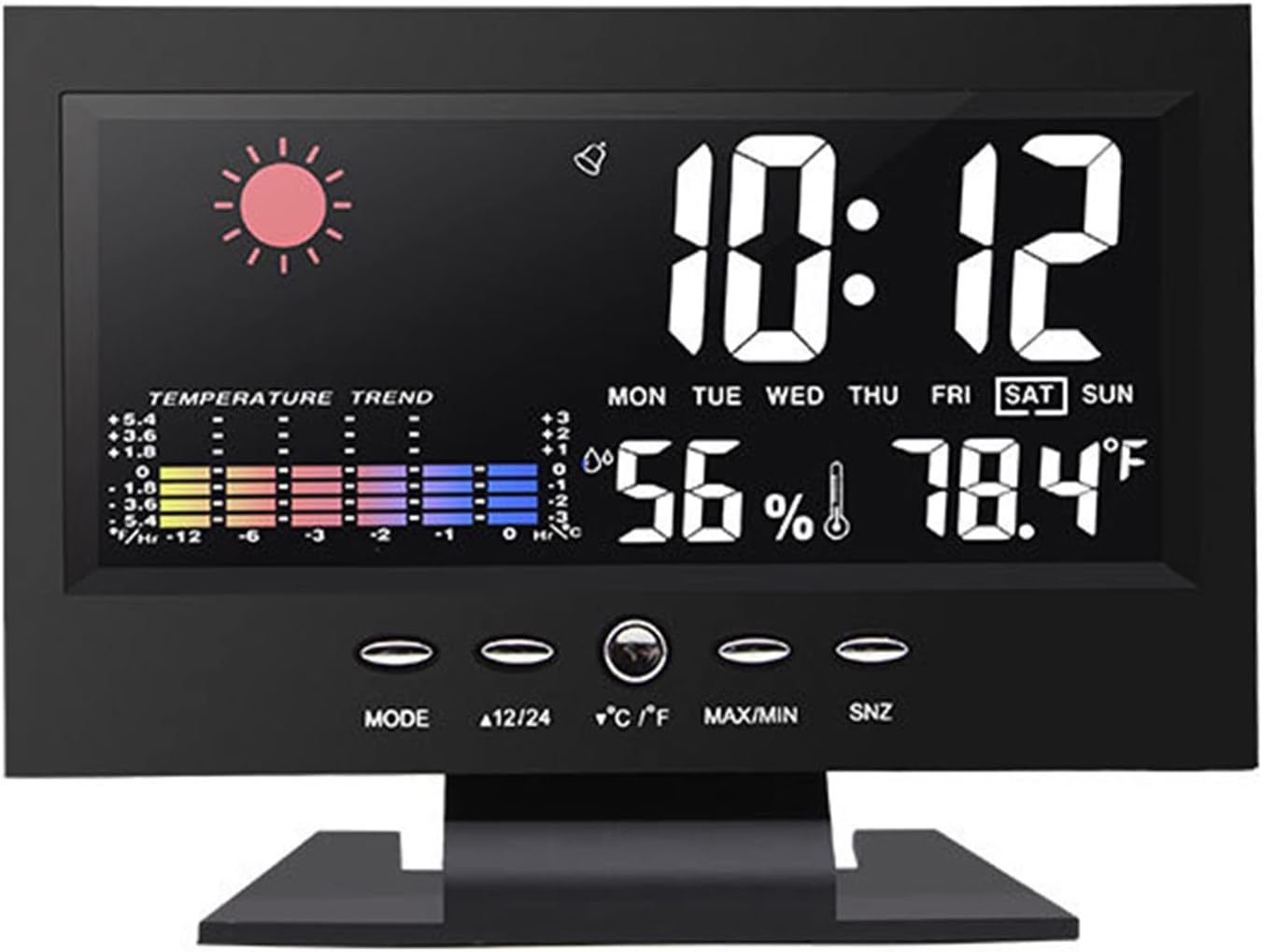
Figi 1: Devan view of the ulafbwur 8082T Digital Desk Clock, showing time, date, weather, temperature, and humidity.
4.2 Bouton Kontwòl
The clock features several control buttons located below the display for easy adjustment:
- MOD: Used to switch between display modes and enter setting modes.
- 12/24: Chanje ant fòma lè 12 èdtan ak 24 èdtan.
- °C/°F: Switches temperature display between Celsius and Fahrenheit.
- MAX / MIN: Displays maximum and minimum temperature/humidity records.
- SNZ (Repoze): Activates the snooze function during an alarm.
4.3 Panèl dèyè
The rear panel houses the battery compartment and power input.

Figi 2: Dèyè view of the clock, illustrating the battery compartment for two AA batteries and the DC 4.5V power input.
5. Enstalasyon
5.1 Alimente Aparèy la
The clock can be powered by either the included USB cable or two AA batteries (not included).
- Using USB Power: Connect the provided USB cable to the DC 4.5V port on the back of the clock and plug the other end into a compatible USB power adapter (not included) or a USB port. The backlight will remain on when powered by USB.
- Sèvi ak pil: Open the battery compartment on the back of the clock. Insert two AA batteries, ensuring correct polarity (+/-). Close the compartment. Note: When powered by batteries, the backlight will not remain continuously on to conserve power. It will illuminate briefly when a button is pressed.
5.2 Anviwònman Inisyal
Upon first power-up, the clock may display default settings. Follow the operating instructions to set the correct time, date, and other preferences.
6. Operasyon Enstriksyon
6.1 Mete Lè ak Dat
- Peze epi kenbe la MÒD button for approximately 3 seconds to enter time setting mode. The year display will start flashing.
- Sèvi ak la 12/24 or ° C / ° F. buttons to adjust the flashing value (e.g., year).
- Peze MÒD again to confirm the setting and move to the next item (month, day, hour, minute).
- Repeat steps 2 and 3 until all time and date settings are complete.
- Peze MÒD one last time or wait for 15 seconds for the clock to exit setting mode automatically.
6.2 Mete alam la
- Nan ekspozisyon tan nòmal la, peze bouton an MÒD bouton an yon fwa pou montre lè alam lan.
- Peze epi kenbe la MÒD button for approximately 3 seconds. The alarm hour will start flashing.
- Sèvi ak la 12/24 or ° C / ° F. bouton pou ajiste lè alam la.
- Peze MÒD again to confirm and move to the alarm minute. Adjust using 12/24 or ° C / ° F..
- Peze MÒD again to confirm and exit alarm setting mode.
- Pou aktive/dezaktive alam lan, peze bouton an 12/24 bouton an pandan lè alam lan ap parèt. Yon ikòn alam ap parèt/disparèt sou ekran an.
6.3 Repete Fonksyon
Lè alam la son, peze la SNZ button to activate the snooze function. The alarm will temporarily stop and sound again after a few minutes (default snooze duration is typically 5 minutes, but may vary). To turn off the alarm completely, press any other button.
6.4 Seleksyon fòma 12/24 èdtan
Nan mòd ekspozisyon tan nòmal, peze la 12/24 button to toggle between 12-hour (with AM/PM indicator) and 24-hour time formats.
Seleksyon 6.5 Celsius/Fahrenheit
Nan mòd ekspozisyon nòmal, peze la ° C / ° F. button to switch the temperature display between Celsius and Fahrenheit.
6.6 MAX/MIN Temperature and Humidity Records
Peze a MAX/MIN bouton pou view the maximum recorded temperature and humidity. Press it again to view the minimum recorded temperature and humidity. Press a third time to return to the current display. The records are typically reset daily or when the device is reset.

Figi 3: Detaye view of the color screen display, highlighting temperature and humidity readings.
7. Antretyen
- Netwayaj: Wipe the clock's surface with a soft, dry cloth. Do not use abrasive cleaners or solvents.
- Ranplasman batri: If using batteries, replace them when the display dims or functions become erratic. Ensure correct polarity.
- Depo: Si w ap sere revèy la pou yon peryòd tan pwolonje, retire pil yo pou anpeche likid koule.
NAN. Depanaj
| Pwoblèm | Kòz posib | Solisyon |
|---|---|---|
| Ekran an vid oswa li fèb. | No power, low batteries, or USB cable not connected. | Ensure USB cable is securely connected or replace AA batteries. Note: Backlight is not continuous on battery power. |
| Lè/Dat la pa kòrèk. | Not set correctly after power-up or power interruption. | Follow "Setting Time and Date" instructions in Section 6.1. |
| Alam lan pa sonnen. | Alarm is not activated or volume is too low (if adjustable). | Ensure the alarm icon is displayed. Re-check alarm time settings. |
| Tanperati/imidite ki pa egzak. | Device placed near heat sources, vents, or in direct sunlight. | Relocate the clock to a stable environment away from extreme conditions. Allow time for readings to stabilize. |
9. Espesifikasyon
- Modèl: 8082T
- Materyèl: ABS
- Kalite ekspozisyon: LED Color Screen
- Fòma tan: 12/24 Hour Switchable
- Dat seri: 2002-2099 (Perpetual Calendar)
- Ranje Tanperati: 0°C a 50°C (32°F a 122°F)
- Sous pouvwa: 2 x AA Batteries (not included) or USB Cable (DC 4.5V)
- Dimansyon pwodwi: Approximately 14.5cm x 11cm x 5.5cm (5.71" x 4.33" x 2.17")

Figure 4: Product dimensions of the ulafbwur 8082T Digital Desk Clock.
10. Garanti ak sipò
This product comes with a standard manufacturer's warranty. For specific warranty details, please refer to the documentation provided at the time of purchase or contact your retailer. For technical support or inquiries, please reach out to the ulafbwur customer service department through your purchase platform.