
1. Entwodiksyon
Mèsi pou acha aasing the Sharp GX-BT390 Crystal Clear Series Bluetooth Speaker. This portable speaker is designed to deliver high-quality audio with enhanced bass, featuring IP67 waterproof and dustproof capabilities, LED light modes, and True Wireless Stereo (TWS) pairing. This manual provides essential information for setup, operation, and maintenance to ensure optimal performance and longevity of your device.
2. Pake kontni
Tanpri verifye ke tout atik yo prezan:
- Sharp GX-BT390 Bluetooth Speaker
- Kab chaje (USB-C)
- Manyèl itilizatè
3. Pwodwi souview
Familiarize yourself with the various parts of your Sharp GX-BT390 speaker.
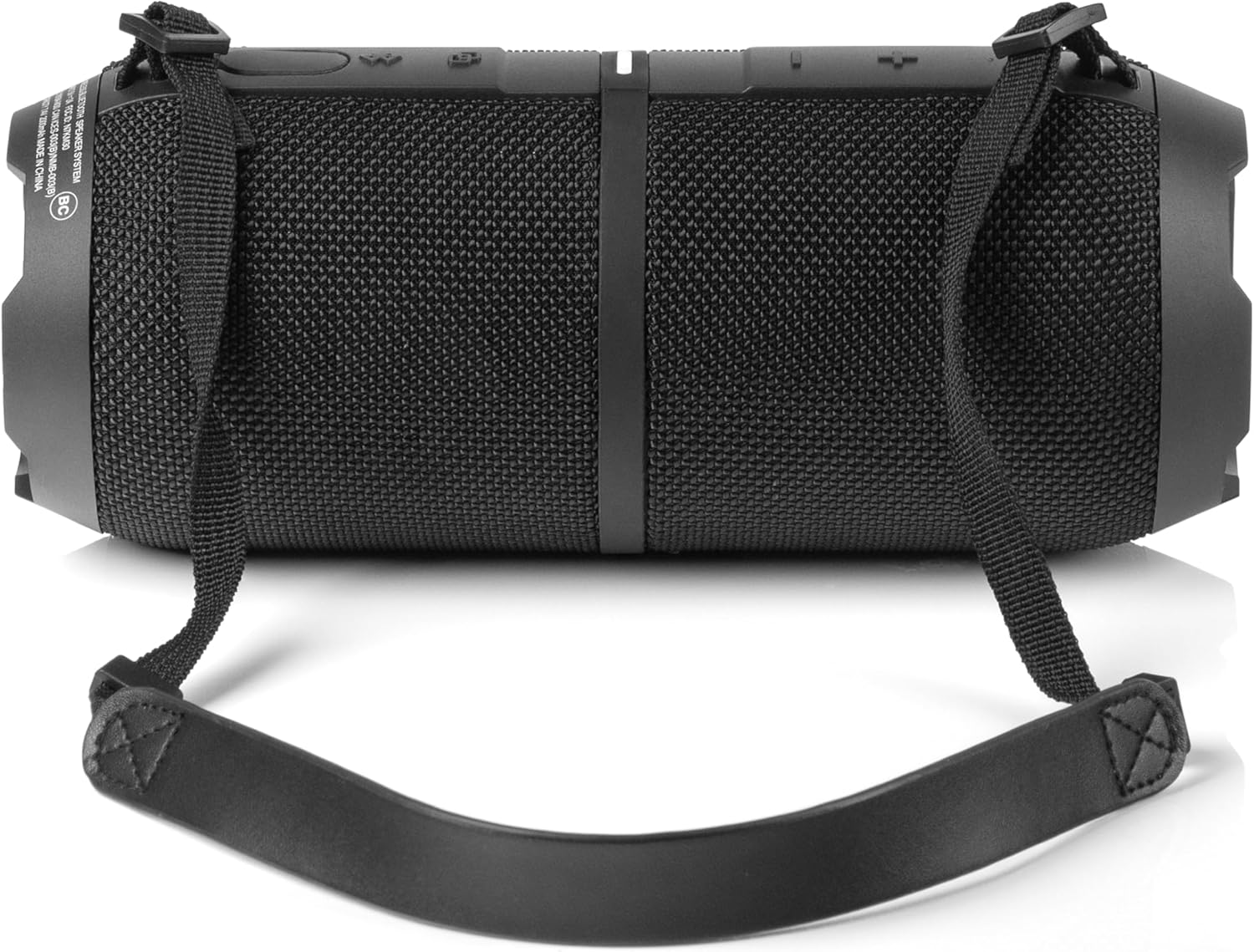
Figi 3.1: Devan view of the Sharp GX-BT390 speaker, highlighting the control panel with volume buttons, play/pause, and power indicator.

Figi 3.2: Retounen view of the Sharp GX-BT390 speaker, illustrating the sealed charging port and attachment points for the carrying strap.

Figi 3.3: Side view of the Sharp GX-BT390 speaker, showing the textured surface and the adjustable carrying strap.

Figure 3.4: The Sharp GX-BT390 speaker with its end cap illuminated, displaying the Sharp logo and an active LED light mode.
Kontwòl ak Endikatè:
- Bouton pouvwa: Peze epi kenbe pou limen/ete.
- Volim moute (+): Ogmante volim.
- Volim desann (-): Diminye volim.
- Bouton jwe/poz: Play or pause music, answer/end calls.
- Bouton appariement Bluetooth: Lanse mòd koneksyon Bluetooth la.
- Endikatè ki ap dirije: Shows power status, charging status, and Bluetooth connection status.
- Limyè Mode bouton: Cycle through LED light modes.
4. Enstalasyon
4.1 Chaje Oratè a
- Open the protective cover on the back of the speaker to access the USB-C charging port.
- Konekte kab USB-C ki vini ak aparèy la nan pò chaje oratè a.
- Konekte lòt bout kab USB-C a nan yon adaptè kouran USB konpatib (pa enkli).
- Endikatè LED la ap montre eta chaj la. Yon chaj konplè anjeneral pran apeprè 3-4 èdtan.
- Once fully charged, disconnect the cable and securely close the protective cover to maintain IP67 water and dust resistance.
4.2 Limen/Etenyen
- Pou limen: Press and hold the Power button for approximately 2 seconds until you hear an audible tone and the LED indicator illuminates.
- Pou etenn: Press and hold the Power button for approximately 2 seconds until you hear an audible tone and the LED indicator turns off.
4.3 Bluetooth Pairing
- Asire w ke oratè a limen epi li nan yon distans 1 mèt de aparèy Bluetooth ou a.
- The speaker will automatically enter Bluetooth pairing mode when first powered on, or if no device is connected. The LED indicator will flash rapidly.
- Sou aparèy Bluetooth ou a (telefòn entelijan, tablèt, elatriye), aktive Bluetooth epi chèche aparèy ki disponib yo.
- Select "Sharp GX-BT390" from the list of devices.
- Once paired, you will hear a confirmation tone, and the LED indicator will glow solid blue.
- If pairing fails, turn off the speaker and your device, then repeat the steps.
5. Operasyon Enstriksyon
5.1 Mizik lèktur
- Jwe/Poz: Peze bouton Jwe/Paz la yon fwa.
- Volim moute: Peze bouton '+' la.
- Volim desann: Peze bouton '-' la.
- Pwochen Track: Peze epi kenbe bouton '+' la.
- Track Previous: Peze epi kenbe bouton '-' la.
5.2 Apèl men lib
The Sharp GX-BT390 features a built-in microphone for hands-free calls when connected to your smartphone.
- Reponn apèl: Peze bouton Jwe/Paz la yon fwa.
- Fini apèl: Peze bouton Jwe/Pòz la yon fwa pandan yon apèl.
- Rejte apèl: Peze epi kenbe bouton Jwe/Paz la pou 2 segonn.
5.3 Vrèman san fil stereo (TWS) koneksyon
You can pair two Sharp GX-BT390 speakers together for a stereo sound experience.
- Ensure both GX-BT390 speakers are powered on and not connected to any Bluetooth device.
- On one speaker (this will be the primary speaker), press and hold the Bluetooth pairing button for 3 seconds. You will hear a tone.
- De oratè yo pral otomatikman chèche epi konekte youn ak lòt. Yon fwa konekte, ou pral tande yon son konfimasyon.
- Kounye a, konekte aparèy Bluetooth ou a ak oratè prensipal la jan sa dekri nan seksyon 4.3.
5.4 mòd limyè ki ap dirije
The speaker features two LED mood lighting effects that synchronize with the music.
- Press the Light Mode button to cycle through the available light modes.
- Press the Light Mode button again to select the next mode or turn off the lights.

Figi 5.1: Plis paseview of key features including hands-free calling, LED light effects, IP67 rating, 10-hour playtime, 30W power output, and Bluetooth connectivity.
6. Antretyen
To ensure the longevity and performance of your Sharp GX-BT390 speaker, follow these maintenance guidelines:
- Netwayaj: Siye oratè a ak yon mou, damp twal. Pa sèvi ak pwodui netwayaj abrazif oswa solvang.
- Rezistans dlo ak pousyè (IP67): The speaker is rated IP67, meaning it is protected from dust ingress and can withstand immersion in water up to 1 meter for 30 minutes. Ensure the charging port cover is securely closed to maintain this rating. Avoid prolonged exposure to water or extreme conditions.
- Depo: Sere oratè a nan yon kote ki fre epi sèk, lwen limyè solèy dirèk ak tanperati ekstrèm.
- Swen batri: To preserve battery life, charge the speaker regularly, even if not in use for extended periods. Avoid fully discharging the battery frequently.

Figure 6.1: Visual representation of the speaker's IP67 waterproof and dustproof capabilities.
NAN. Depanaj
Si ou rankontre pwoblèm ak oratè ou a, gade pwoblèm ak solisyon komen sa yo:
| Pwoblèm | Kòz posib | Solisyon |
|---|---|---|
| Oratè a pa limen | Batri fèb; Bouton pouvwa a pa peze ase lontan | Chaje oratè a; Peze epi kenbe bouton pouvwa a pandan 2 segonn |
| Pa gen son | Volume too low; Device not paired; Speaker muted | Increase volume on speaker and device; Re-pair Bluetooth; Check device mute settings |
| Aparèy Bluetooth echwe | Speaker too far from device; Device Bluetooth off; Interference | Ensure speaker is within 1 meter; Turn device Bluetooth on/off; Move away from other wireless devices |
| Move son kalite | Low battery; Device too far; Obstructions | Charge speaker; Move device closer; Remove obstructions between speaker and device |
| TWS appariement echwe | Speakers not in pairing mode; Already connected to another device | Ensure both speakers are disconnected from other devices; Follow TWS pairing steps carefully |
8. Espesifikasyon
Detailed technical specifications for the Sharp GX-BT390 Bluetooth Speaker:
| Karakteristik | Spesifikasyon |
|---|---|
| Non modèl | GX-BT390(K) |
| Kalite Oratè | Oratè Bluetooth pòtab pou deyò |
| Koneksyon Teknoloji | Bluetooth |
| Teknoloji kominikasyon san fil | Bluetooth |
| Oratè maksimòm pwodiksyon pouvwa | 60 Watts (30W RMS) |
| Audio Sòti Mode | Stereo (ak koneksyon TWS) |
| Karakteristik espesyal | Bass Boost, Built-in Microphone, Dustproof, LED Light, Lightweight |
| Nivo rezistans dlo | IP67 (ki enpèmeyab ak pousyè) |
| Sous pouvwa | Batri Powered (1 batri ityòm Ion enkli) |
| Lavi batri | Jiska 10 èdtan |
| Maksimòm Range | 33 pye (10 mèt) |
| Metòd kontwòl | Touche bouton |
| Dimansyon pwodwi | 4"P x 8.5"L x 4"H (10.16 cm P x 21.59 cm L x 10.16 cm H) |
| Pwa atik | 1.75 liv (28 ons) |

Figure 8.1: Internal component diagram illustrating the speaker drivers responsible for 30-watt rich bass and powerful sound.
9. Garanti ak sipò
The Sharp GX-BT390 Bluetooth Speaker comes with a Limited Warranty. Please refer to the warranty card included in your package for specific terms and conditions. For technical support or service inquiries, please contact Sharp customer service through their official websit la oswa enfòmasyon kontak yo bay ak dokimantasyon pwodwi ou a.