
Tecmate TM631
OptiMate 4 Quad Program User Manual
Modèl: TM631
Entwodiksyon
The OptiMate 4 Quad Program is an advanced battery charger and maintainer designed for 12V and 12.8V batteries. It features four distinct charging programs to accommodate various battery types and connection methods, including direct battery connection and CAN-bus compatible sockets found on certain BMW motorcycles (2004 and later).
This manual provides essential information for the safe and effective operation, maintenance, and troubleshooting of your OptiMate 4 Quad Program charger.
Karakteristik kle
- Quad Program Functionality: Offers four distinct charging programs for versatility.
- Batri konpatibilite: Suitable for AGM, GEL, and STD 12V lead-acid batteries (4-60Ah) and Lithium (LiFePO4) 12.8/13.2V batteries (2-15Ah).
- Advanced Recovery: Capable of recovering 'dead-flat' lead-acid and lithium (LiFePO4) batteries from as low as 0.5 Volts.
- CAN-bus Compatibility: Programs 2 and 4 allow charging via compatible BMW CAN-bus controlled 12V sockets.
- Koneksyon dirèk: Programs 1 and 3 are for direct battery connection or compatible Triumph 12V live (hot) sockets.
- Pwodwi pou Telefòn enkli: Comes with a ring terminal harness and battery clip set for flexible connection options.
- Testing Capabilities: Performs tests before and after charging to assess battery health.
Pwodwi konpozan

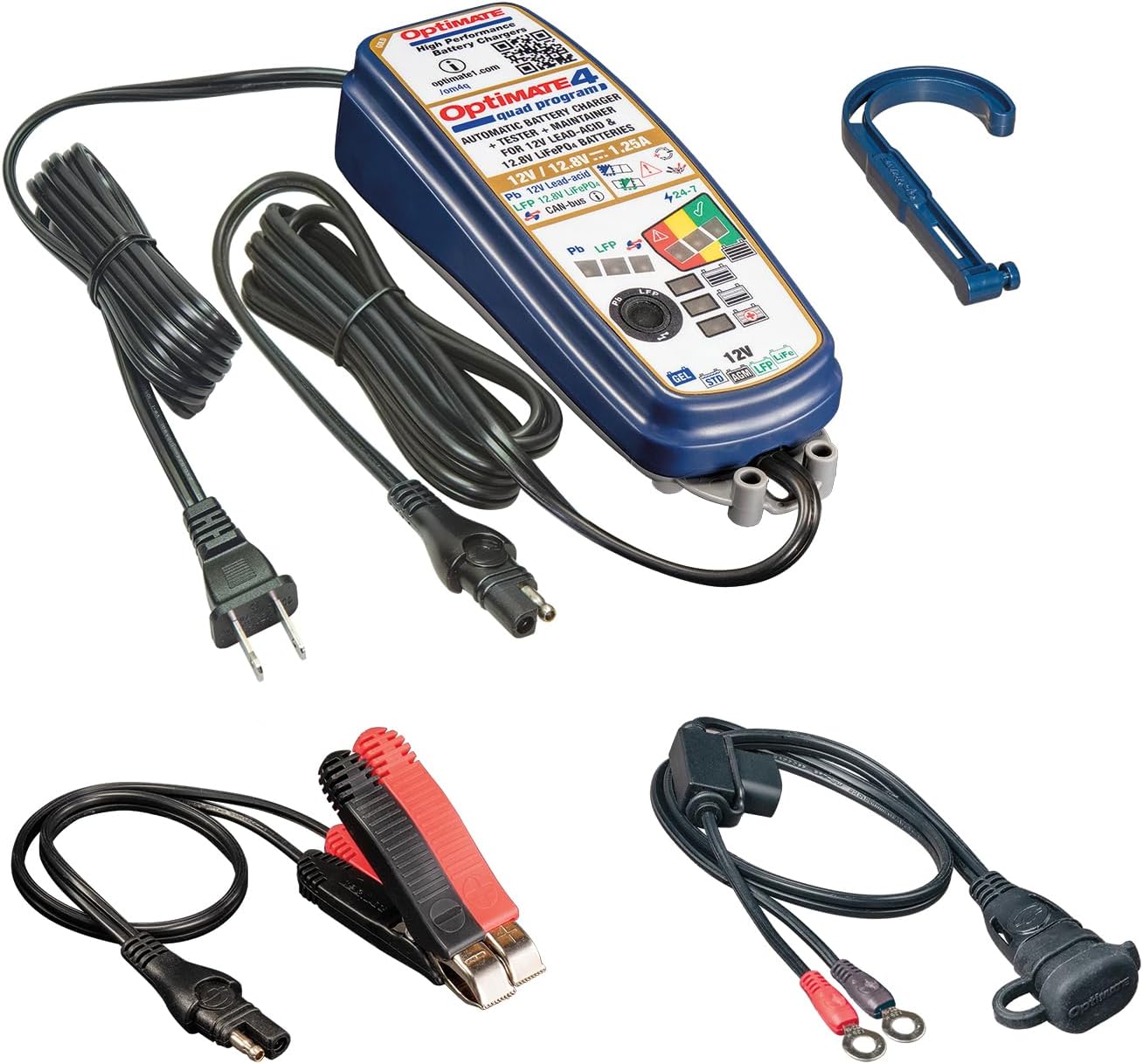
Figi 1: OptiMate 4 Quad Program charger with included battery clips and ring terminal harness. This image shows the main unit, the detachable battery clamp cable, and the detachable ring terminal cable, along with a wall mount hook.

Figi 2: Yon fèmen view of the OptiMate 4 Quad Program charger unit, highlighting the control panel with indicators for battery type (Pb, LFP), charging status, and program selection. The gold series branding is visible.
Figi 3: The OptiMate 4 Quad Program charger connected to its AC power cord, showing the compact design of the main unit and the power input cable. A QR code and weblyen sit la optimate1.com/om4q are visible on the label.

Figi 4: Yon anlè view of the OptiMate 4 Quad Program charger along with all its standard accessories: the main charger unit, AC power cord, battery clip set, ring terminal harness, and a wall mount hook. A QR code and weblyen sit la optimate1.com/om4q are visible on the label.
Enstalasyon
1. Debalaj ak Enspeksyon
Carefully remove all components from the packaging. Inspect the charger, cables, and connectors for any signs of damage. Do not use the product if any damage is observed.
2. Choosing a Connection Method
The OptiMate 4 Quad Program offers two primary connection methods:
- Battery Clip Set: For temporary connection directly to battery terminals. Ensure correct polarity (red clip to positive, black clip to negative).
- Ring Terminal Harness: For permanent or semi-permanent connection to battery terminals. This allows for quick connection/disconnection of the charger without accessing the battery terminals each time.
3. Selecting the Correct Program
The OptiMate 4 Quad Program features four distinct programs. Refer to the table below to select the appropriate program for your battery type and connection method. The program selection button is located on the charger unit.
| Pwogram | Kalite batri | Metòd Koneksyon | Deskripsyon |
|---|---|---|---|
| 1 | 12V Lead-Acid (AGM, GEL, STD) | Direct to Battery / Triumph 12V Live Socket | Standard charging and maintenance for lead-acid batteries. |
| 2 | 12V Lead-Acid (AGM, GEL, STD) | BMW CAN-bus 12V Socket | Charging and maintenance for lead-acid batteries via BMW CAN-bus system (models 2004 and later). |
| 3 | 12.8V / 13.2V Lithium (LiFePO4) | Direct to Battery / Triumph 12V Live Socket | Standard charging and maintenance for lithium batteries. |
| 4 | 12.8V / 13.2V Lithium (LiFePO4) | BMW CAN-bus 12V Socket | Charging and maintenance for lithium batteries via BMW CAN-bus system (models 2004 and later). |
Enstriksyon Operasyon
1. Konekte Charger la
- Ensure the OptiMate 4 Quad Program is disconnected from AC power.
- Connect the appropriate battery connection accessory (clips or ring terminals) to the battery or vehicle's 12V socket. Ensure secure connection and correct polarity.
- Connect the battery connection accessory to the OptiMate 4 Quad Program charger's output cable.
- Plug the OptiMate 4 Quad Program charger into a suitable AC power outlet.
2. Pwosesis chaje
Once connected and powered, the OptiMate 4 Quad Program will automatically initiate its 9-step charging and maintenance process. The charger will first perform a diagnostic test to assess battery condition. Indicators on the unit will display the current charging stage ak estati batri.
The 9-step process includes stages such as desulfation (for lead-acid), bulk charge, absorption, and long-term maintenance. The charger will automatically switch to maintenance mode once the battery is fully charged, preventing overcharge.
3. Dekonekte chajè a
- Unplug the OptiMate 4 Quad Program charger from the AC power outlet.
- Disconnect the charger's output cable from the battery connection accessory.
- Remove the battery connection accessory from the battery or vehicle's 12V socket.
Antretyen
- Netwayaj: Keep the charger unit and cables clean and free from dirt, dust, and moisture. Use a soft, dry cloth for cleaning. Do not use abrasive cleaners or solvents.
- Depo: Store the OptiMate 4 Quad Program in a cool, dry place when not in use. Ensure cables are not kinked or damaged during storage.
- Enspeksyon kab: Regularly inspect all cables and connectors for wear, cuts, or damage. Replace damaged components immediately.
- Long-Term Connection: The OptiMate 4 Quad Program is designed for long-term battery maintenance. It can be left connected to a battery indefinitely to keep it optimally charged.
Depanaj
| Pwoblèm | Kòz posib | Solisyon |
|---|---|---|
| Charger not turning on / No indicators lit | No AC power; Faulty connection; Internal fault. | Check AC outlet and power cord connection. Ensure battery is connected correctly. If problem persists, contact support. |
| Batri pa chaje | Incorrect program selected; Poor battery connection; Severely discharged battery; Battery fault. | Verify correct program for battery type and connection. Check all connections for security. The charger can recover batteries from 0.5V, but extremely damaged batteries may not respond. |
| Error indicator lit | Reverse polarity; Short circuit; Battery fault. | Disconnect immediately. Check battery connections for correct polarity. Inspect cables for damage or short circuits. If battery is faulty, it may need replacement. |
| Chargeur a chofe pandan l ap fonksyone | Operasyon nòmal pandan chaj. | This is normal. Ensure adequate ventilation around the charger. If it becomes excessively hot or emits smoke/odor, disconnect immediately. |
For further assistance, please refer to the official product website or contact Tecmate customer support.
Espesifikasyon
- Modèl: TM631
- Mak: Tecmate
- Sòti Voltage: 12 Volts
- Sòti aktyèl: 1.25A
- Battery Compatibility (Lead-Acid): AGM, GEL, STD 12V batteries from 4 – 60Ah
- Battery Compatibility (Lithium): LiFePO4 12.8/13.2V batteries from 2 – 15Ah
- Etap chaje: 9-step automatic program
- Recovery Voltage: Recovers from as low as 0.5 Volts
- Dimansyon: 1.97 x 2.36 x 7.87 pous (5 x 6 x 20 cm)
- Pwa: 2 liv (0.91 kg)
- Pwoteksyon Ingress: IP54 (Rainproof construction)
Garanti ak sipò
The OptiMate 4 Quad Program (Model TM631) typically comes with a manufacturer's warranty. Please refer to the warranty card included with your product or visit the official Tecmate websit la pou wè tèm ak kondisyon garanti detaye yo.
For technical support, product registration, or further information, please visit the official Tecmate websit: www.optimate1.com/om4q.
You can also visit the Tecmate Store on Amazon for more products and information: Tecmate Store.
Ask a question about this manual
Ask about setup, troubleshooting, compatibility, parts, safety, or missing instructions. Manuals+ will review the question and use this page’s manual context to help answer it.