
1. Entwodiksyon
The ZEBRONICS Riser Party DJ Speaker is designed to deliver a powerful audio experience with versatile connectivity and entertainment features. This manual provides detailed instructions for setting up, operating, and maintaining your speaker to ensure optimal performance.
2. Pake kontni
Tanpri tcheke kare a pou atik sa yo:
- 1 x ZEBRONICS Riser Party DJ Speaker
- 1 x kontwòl remote
- 2 x Mikwofòn UHF san fil
- 1 x pouvwa kab

Image: ZEBRONICS Riser Party DJ Speaker with included accessories.
3. Pwodwi souview
3.1 Kontwòl Panèl Anlè a
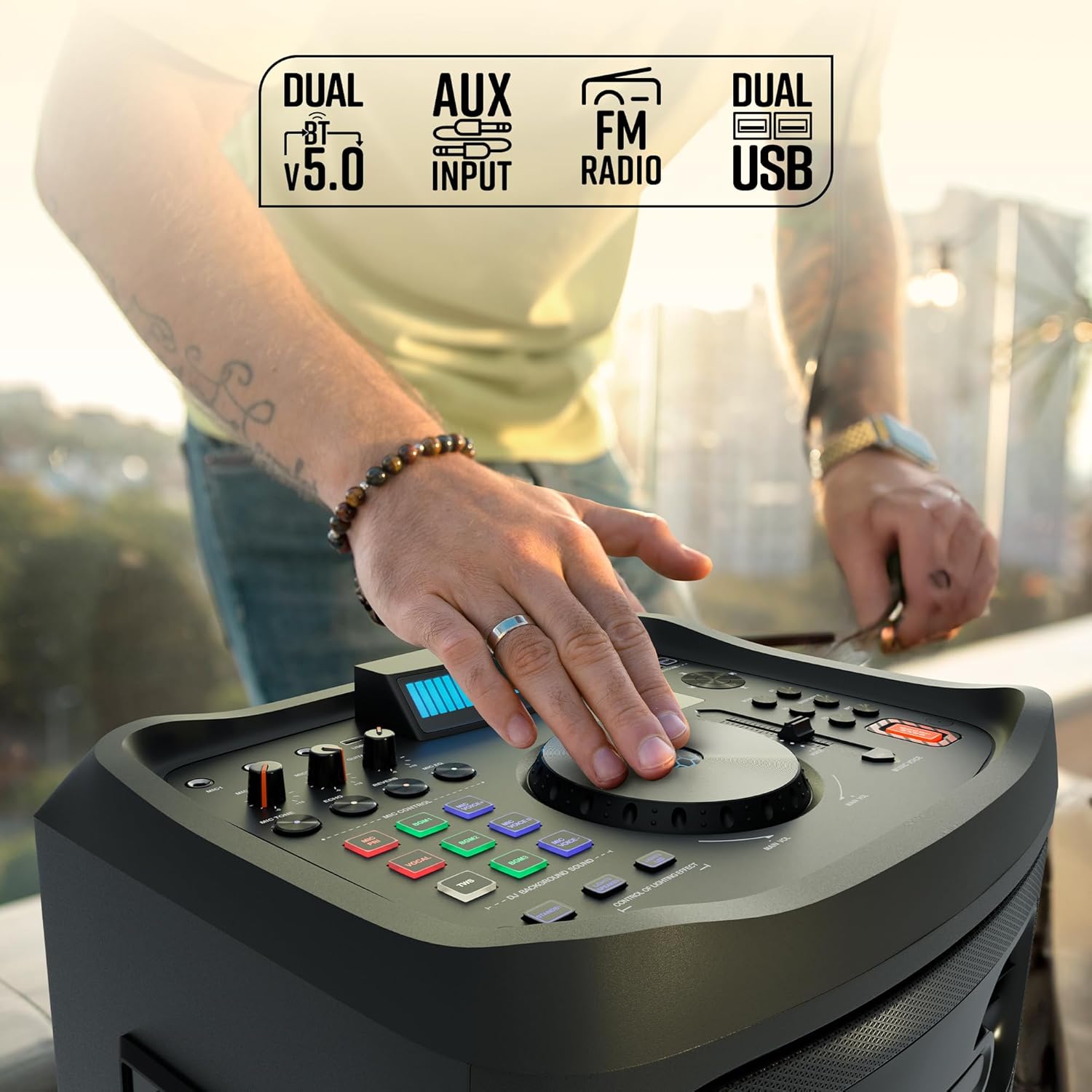
Imaj: Detaye view of the speaker's top control panel.
The top panel features various controls for audio adjustment, input selection, and special functions:
- Bouton Volim Prensipal: Ajiste volim jeneral oratè a.
- Microphone Volume Knobs (MIC1, MIC2): Controls the volume for each connected microphone.
- Guitar Volume Knob: Adjusts the volume for the connected guitar.
- Echo/Reverb/Mic Tone Knobs: Fine-tune microphone effects.
- bouton mòd: Cycles through input sources (Bluetooth, USB, AUX, FM, HDMI ARC).
- Kontwòl Bas/Treble: Adjusts low and high frequencies.
- EQ bouton: Selects preset equalizer modes.
- Bouton kontwòl medya yo: Play/Pause, Skip Track, Repeat.
- DJ BGM Effects: Buttons for activating various DJ background sound effects.
- Dirije ekspozisyon: Shows current mode, track information, and other settings.
- Kontwòl limyè: Buttons to manage the speaker's LED lighting effects.
- Bouton pou ranfòse bas: Enhances low-frequency output.
- Music Pitch Control: Adjusts the pitch of the music playback.
- Mic Pitch Control: Adjusts the pitch of the microphone input.
3.2 Koneksyon Panèl Dèyè

Image: Rear panel connections of the speaker.
The rear panel provides essential connection ports:
- Antre pouvwa: Connects the power cable to an electrical outlet.
- Pò USB (x2): For USB drive playback and charging.
- Antre AUX: Yon jack 3.5mm pou konekte aparèy odyo ekstèn.
- HDMI (ARC) Port: For connecting to compatible TVs or audio systems.
- Antre gita: Yon jack 6.3mm pou konekte yon gita.
- MIC Inputs (x2): 6.3mm jacks for wired microphones (in addition to wireless mics).
4. Enstalasyon
4.1 Koneksyon pouvwa
- Connect the provided power cable to the Power Input port on the rear of the speaker.
- Branche lòt bout kab kouran an nan yon priz elektrik estanda.
- Ensure the power switch on the speaker is in the 'OFF' position before connecting to power.
4.2 Plasman Inisyal
Place the speaker on a stable, flat surface. For optimal sound dispersion, position it in an open area, away from walls or corners that might obstruct audio. The speaker is designed for floor standing use.
5. Operasyon Enstriksyon
5.1 Power On/Off
To power on the speaker, flip the power switch located on the rear panel to the 'ON' position. The LED display will illuminate. To power off, flip the switch back to 'OFF'.
5.2 Koneksyon Bluetooth
- Turn on the speaker. The default mode is usually Bluetooth. If not, press the 'Mode' button until 'BT' appears on the LED display.
- Sou aparèy mobil ou, aktive Bluetooth epi chèche aparèy ki disponib.
- Select 'ZEBRONICS Riser' from the list of devices.
- Once paired, the speaker will indicate a successful connection, and you can play audio from your device.
5.3 Lekti USB
- Mete yon kle USB ki gen odyo MP3 ladan l files nan youn nan pò USB yo.
- Press the 'Mode' button until 'USB' appears on the LED display.
- Oratè a ap kòmanse jwe odyo otomatikman files from the USB drive. Use the media control buttons to navigate tracks.
5.4 Antre AUX
- Connect an external audio device (e.g., smartphone, MP3 player) to the AUX input port using a 3.5mm audio cable.
- Press the 'Mode' button until 'AUX' appears on the LED display.
- Jwe odyo soti nan aparèy konekte ou an.
5.5 FM Radyo
- Press the 'Mode' button until 'FM' appears on the LED display.
- Use the media control buttons to scan for and select FM radio stations.
Koneksyon HDMI ARC 5.6
- Connect an HDMI cable from the HDMI ARC port on the speaker to the HDMI ARC port on your television.
- Press the 'Mode' button until 'HDMI ARC' appears on the LED display.
- Ensure your TV's audio output settings are configured for HDMI ARC.
5.7 Antre Gita
- Connect your guitar to the 'Guitar Input' 6.3mm jack on the rear panel.
- Adjust the 'Guitar Vol' knob on the top panel to control the guitar's volume.
5.8 Microphone Input and Karaoke

Imaj: Plis paseview of microphone and karaoke features.
- Mikwofòn san fil: Insert batteries into the provided UHF wireless microphones. Turn them on. They will automatically connect to the speaker.
- Mikwofòn filaire: Connect wired microphones to the 'MIC1' or 'MIC2' 6.3mm jacks.
- Adjust the 'MIC1 Vol' and 'MIC2 Vol' knobs to control microphone volume.
- Use the 'Echo', 'Reverb', and 'Mic Tone' knobs to add effects to your vocals.
- The 'Instant Karaoke Maker' function allows you to sing along to music.
- Utilize the 'Mic Pitch Control' for vocal adjustments.
Fonksyon 5.9 TWS (Vrè Stereo san fil)

Image: Two speakers demonstrating the TWS function for stereo sound.
To connect two Zeb-Riser speakers for a true wireless stereo experience:
- Asire w ke tou de oratè yo limen epi yo an mòd Bluetooth, men yo poko konekte ak okenn aparèy.
- On one of the speakers (this will be the primary speaker), press and hold the 'TWS' button.
- The primary speaker will search for the secondary speaker and connect automatically.
- Once connected, the LED display will indicate TWS mode. You can now pair your mobile device to the primary speaker via Bluetooth, and audio will play in stereo through both units.
5.10 DJ Effects
The speaker includes 3 DJ BGM (Background Music) Effects. Press the corresponding buttons on the top panel to activate these effects during playback.
5.11 LED Light Controls

Image: LED display and light control section.
The speaker features dynamic LED lights. Use the 'Lights Speaker' and 'Lights LED' controls on the top panel to customize or turn off the lighting effects.
5.12 Ajisteman odyo
Use the 'Bass/Treble' knobs to adjust the low and high frequencies of the audio output. The 'EQ' button allows you to cycle through various preset equalizer modes to suit different music genres.
6. Antretyen
Pou asire lonjevite ak pèfòmans optimal oratè ou a:
- Clean the speaker's exterior with a soft, dry cloth. Avoid using abrasive cleaners or solvents.
- Keep the speaker away from direct sunlight, excessive heat, dust, and moisture.
- Do not block the ventilation openings on the speaker.
- Sere oratè a nan yon kote ki fre epi sèk lè w pa itilize li pou yon bon bout tan.
NAN. Depanaj
| Pwoblèm | Kòz posib | Solisyon |
|---|---|---|
| Pa gen pouvwa | Power cable not connected; Power switch off; Power outlet faulty. | Ensure power cable is securely connected; Turn power switch ON; Test power outlet with another device. |
| Pa gen son | Volume too low; Incorrect input mode; Device not playing audio; Cables loose. | Increase volume; Select correct input mode; Check audio playback on source device; Secure all audio cables. |
| Bluetooth pa konekte | Oratè a pa an mòd koneksyon; Bluetooth aparèy la etenn; Oratè a deja konekte ak yon lòt aparèy. | Ensure speaker is in BT mode; Turn device Bluetooth on/off; Disconnect from other devices and try again. |
| Mikwofòn pa mache | Mic volume low; Batteries dead (wireless mic); Mic not connected (wired mic); Faulty mic. | Increase mic volume; Replace batteries; Ensure wired mic is fully inserted; Test with another mic if possible. |
| Distorsion son | Volume too high; Source audio quality poor; Speaker placed too close to interference. | Reduce volume; Use high-quality audio source; Relocate speaker away from electronic devices. |
8. Espesifikasyon
| Karakteristik | Detay |
|---|---|
| Non modèl | Zeb-Riser |
| Pouvwa Sòti (RMS) | 210W |
| Gwosè Chofè | 25.4cm (Full-range), 7.62cm (Tweeter) |
| Koneksyon | Dual BT v5.0, USB x 2, FM, AUX, HDMI (ARC) |
| Antre | Guitar Input, Dual 6.3mm MIC Input |
| Mikwofòn | Dual Wireless UHF Mic |
| Karakteristik espesyal | Instant Karaoke Maker, TWS Function, 3x DJ BGM Effects, Colorful LED lights, Dynamic Visualizer, 3D EQ, 12x Music Pitch Control, 24x Mic Pitch Control, Bass Boost |
| Kalite aliye | Kanpe etaj |
| Sous pouvwa | Fil elektrik |
| Pwa atik | 12.5 kg |
| Dimansyon pwodwi (LxWxH) | 38.3 x 46 x 73 cm |
9. Garanti ak sipò
This product comes with a standard manufacturer's warranty. For detailed warranty information, service, or technical support, please refer to the warranty card included in your package or visit the official ZEBRONICS websit. Kenbe resi acha ou pou reklamasyon garanti.