
1. Entwodiksyon
This manual provides detailed instructions for the installation, operation, and maintenance of your XTRONS DX120L 10.1" QLED Android Car Stereo. Please read this manual thoroughly before using the product to ensure proper operation and to prevent damage.
Enfòmasyon sou Sekirite
- Always operate the vehicle safely. Do not operate the car stereo in a manner that distracts you from driving.
- Ensure all connections are secure and correctly made to prevent short circuits or damage.
- Konsilte yon pwofesyonèl pou enstalasyon an si ou pa sèten sou nenpòt etap.
- Pa ekspoze aparèy la nan tanperati ekstrèm, limyè solèy dirèk pou yon peryòd tan pwolonje, oswa imidite twòp.
2. Pake kontni
Verifye ke tout atik yo prezan nan pakè a:
- XTRONS DX120L Main Unit
- GPS antèn
- 4G SIM Card Reader
- Fil elektrik (pouvwa, oratè, elatriye)
- USB Câbles
- Manyèl Itilizatè (dokiman sa a)

This image shows the product packaging, including the XTRONS brand, product name 'Car Multimedia Player', manufacturer address in Shenzhen, China, and EU Representative details. A barcode with UPC 5055869158947 is visible.
3. Pwodwi souview
The XTRONS DX120L is a single DIN car stereo featuring a large 10.1-inch QLED display with a rotatable design, powered by Android 13. It offers advanced connectivity and entertainment options for your vehicle.
Karakteristik kle:
- 10.1-inch QLED Rotatable Display: High-definition (1280x720) capacitive touchscreen that can rotate for optimal viewing.
- Sistèm operasyon Android 13: Provides a modern, intuitive interface with access to a wide range of applications.
- Octa-core Processor: Ensures smooth performance and multitasking.
- 4GB RAM & 64GB ROM: Ample memory for applications and storage, expandable via USB (up to 128GB).
- GPS entegre: For precise navigation.
- Wi-Fi & 4G Connectivity: Built-in Wi-Fi and a 4G SIM card reader for internet access.
- Bluetooth 5.0: For hands-free calling and audio streaming.
- Apple CarPlay ak Android Auto: Seamless smartphone integration.
- Built-in DSP: Digital Sound Processor for enhanced audio customization.
- Supports External Devices: Compatible with external microphone, rear camera (optional), DVR (optional), DAB+ (optional), and TPMS (optional).

This image displays the XTRONS DX120L car stereo, highlighting its 10.1-inch QLED rotatable display and Android operating system. The screen shows a typical car dashboard interface with speed, music playback, and a visualizer.
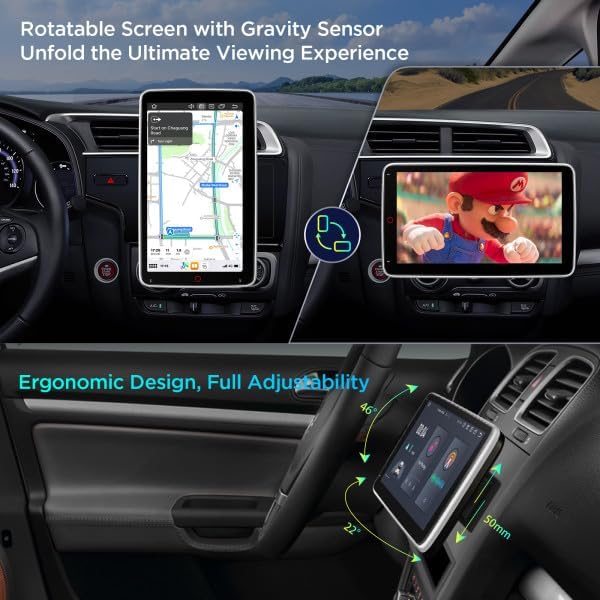
This image illustrates the rotatable screen feature of the DX120L, showing it in both vertical (portrait) mode for navigation and horizontal (landscape) mode for media viewing, emphasizing its ergonomic design and adjustability.
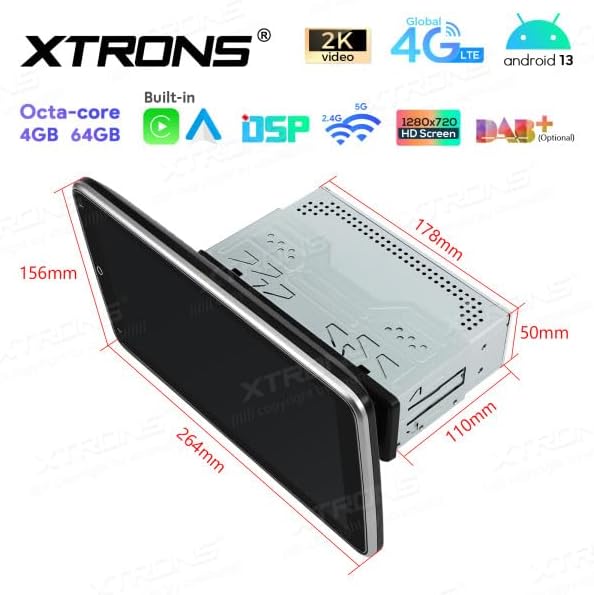
This image provides a detailed diagram of the XTRONS DX120L unit, showing its physical dimensions including screen size (264mm x 156mm), main unit depth (110mm), and height (178mm), crucial for installation planning.
4. Enstalasyon ak Enstalasyon
The XTRONS DX120L is designed for 1 DIN installation. Professional installation is recommended.
4.1 Chèk Pre-Enstalasyon
- Dekonekte tèminal negatif batri machin nan anvan ou kòmanse enstalasyon an.
- Ensure the mounting location is suitable for a 1 DIN unit and can accommodate the 10.1-inch screen.
- Verifye tout konpozan ki enkli yo prezan.
4.2 Koneksyon fil elektrik
- Koneksyon pouvwa: Connect the main power harness to the vehicle's power supply (constant 12V, accessory 12V, and ground).
- Koneksyon oratè: Connect the speaker wires from the unit to your vehicle's speakers, ensuring correct polarity.
- GPS Antèn: Monte antèn GPS la nan yon kote ki klè. view of the sky (e.g., dashboard, rear parcel shelf) and connect it to the unit.
- 4G SIM Card Reader: Insert your 4G SIM card into the provided reader and connect it to the unit.
- Koneksyon USB: Connect any USB devices (e.g., USB drive, external microphone) to the provided USB ports.
- Koneksyon opsyonèl: If using a rear camera, DVR, DAB+ box, or TPMS, connect them according to their respective manuals.
4.3 Monte inite a
- Slide the 1 DIN chassis into the vehicle's dashboard opening.
- Secure the chassis using the provided mounting brackets and screws.
- Attach the 10.1-inch display to the main unit, ensuring it is securely locked in place.
- Rekonekte tèminal negatif batri machin nan.
4.4 Premye pouvwa-sou
Apre enstalasyon an, limen machin nan. Aparèy la ta dwe limen otomatikman. Swiv nenpòt enstriksyon ki parèt sou ekran an pou premye konfigirasyon an, tankou seleksyon lang ak zòn tan.
5. Operasyon Enstriksyon
5.1 Operasyon debaz
- Limen/Etenyen: The unit typically powers on with the vehicle's ignition. Press and hold the power button (if available) to manually turn off or on.
- Kontwòl Volim: Adjust volume using the on-screen controls or steering wheel controls (if connected and configured).
- Wotasyon ekran: The 10.1-inch QLED screen can be manually rotated between portrait and landscape orientations. The system will automatically adjust the display.

This image shows the home screen of the XTRONS DX120L, featuring icons for Music, Navigation, Phone, Play Store, Radio, Settings, Torque, Video, and Voice Search, indicating the Android operating system's capabilities.

This image highlights the DX120L's screen in portrait orientation, specifically showing a navigation map, which can be beneficial for certain map views.
5.2 Navigasyon sistèm operasyon Android
- Ekran Kay: Tap the home icon to return to the main application screen.
- Tiwa aplikasyon: Swipe up or tap the app drawer icon to view tout aplikasyon enstale.
- Anviwònman: Access system settings for Wi-Fi, Bluetooth, display, sound, and more.
- Notifikasyon: Glise desann soti nan tèt ekran an pou view notifikasyon ak paramèt rapid.
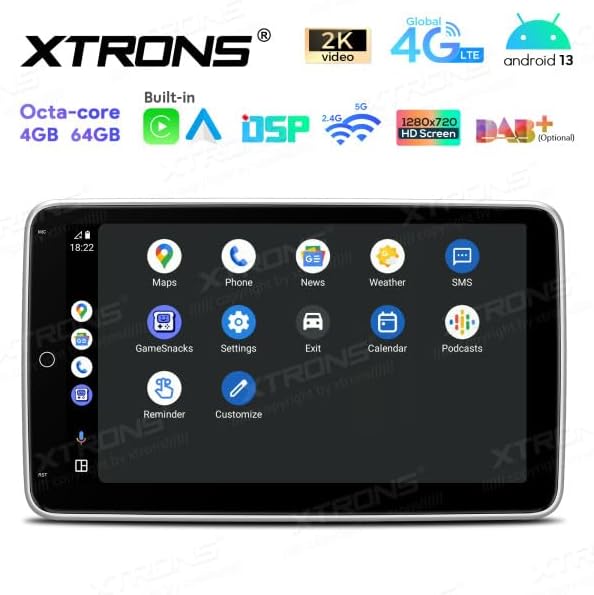
This image shows another view of the DX120L's Android interface, with icons for Maps, Phone, News, Weather, SMS, Gamesnacks, Settings, Exit, Calendar, Podcasts, and Reminders, demonstrating the breadth of available applications.
5.3 Navigasyon (GPS)
The unit comes with integrated GPS. Open the "Navigation" or "Maps" application to access mapping software. Ensure the GPS antenna has a clear view nan syèl la pou yon resepsyon siyal optimal.
5.4 Radyo
Access the "Radio" application to tune into AM/FM stations. Use the on-screen controls to scan for stations, save presets, and switch between bands.
Bluetooth 5.5
- Ale nan "Paramèt" > "Bluetooth".
- Enable Bluetooth on the unit and your mobile device.
- Chèche pou available devices on your mobile phone and select "XTRONS DX120L" to pair.
- Yon fwa yo konekte, ou ka fè apèl men lib epi difize odyo.
5.6 Apple CarPlay / Android Auto
Connect your compatible iPhone or Android smartphone via USB or wirelessly (if supported by your phone and the unit's software). Follow the on-screen prompts to activate CarPlay or Android Auto, allowing access to your phone's apps, navigation, and media directly on the car stereo display.

This image presents the Apple CarPlay interface on the DX120L screen, showing common apps like Phone, Music, Maps, Messages, and Calendar, indicating seamless smartphone integration.
5.7 Lekti Medya
The unit supports various media formats via USB. Insert a USB drive into the designated port and use the "Music" or "Video" application to browse and play your media files.
5.8 Internet Connectivity (Wi-Fi & 4G)
- Wi-Fi: Go to "Settings" > "Wi-Fi" to connect to available Wi-Fi networks (e.g., mobile hotspot).
- 4G: Ensure a valid 4G SIM card is inserted into the SIM card reader. The unit will automatically connect to the 4G network.
5.9 DSP (Digital Sound Processor)
Access the DSP settings through the "Sound" or "Equalizer" application. Adjust audio parameters such as equalizer presets, balance, fader, and subwoofer settings to customize your listening experience.
6. Antretyen
- Netwaye ekran an: Sèvi ak yon twal mou ki pa gen pousyè pou siye ekran an dousman. Pou tach ki difisil pou retire, siye l yon ti kras.ampen the cloth with water or a screen cleaner designed for electronics. Do not use harsh chemicals.
- Mizajou lojisyèl: Periodically check for software updates through the system settings or XTRONS official websit la pou asire pèfòmans optimal ak aksè a nouvo fonksyonalite yo.
- Swen Jeneral: Avoid exposing the unit to extreme temperatures, direct sunlight for extended periods, or excessive moisture.
NAN. Depanaj
| Pwoblèm | Kòz posib | Solisyon |
|---|---|---|
| Aparèy pa limen. | Fil elektrik ki pa kòrèk; Fuzib boule; Batri machin nan fèb. | Check power connections (constant 12V, accessory 12V, ground). Inspect vehicle fuses. Check vehicle battery voltage. |
| Pa gen son ki soti nan moun kap pale. | Speaker wires incorrectly connected; Volume too low; Mute function active. | Verify speaker wiring. Increase volume. Check if mute is enabled. |
| GPS signal is weak or lost. | Antèn GPS la mal plase oswa dekonekte. | Ensure GPS antenna is mounted in a location with a clear view nan syèl la epi li konekte byen fèm. |
| Pwoblèm koneksyon Bluetooth. | Bluetooth pa aktive; Aparèy la pa konekte; Entèferans. | Asire w ke Bluetooth la aktive sou tou de aparèy yo. Rekonekte aparèy la. Pwoche pi pre aparèy la. |
| Touchscreen pa reponn. | System freeze; Dirt on screen. | Restart the unit (if possible, by holding power button). Clean the screen. If issue persists, perform a factory reset (data will be lost). |
8. Espesifikasyon
| Karakteristik | Detay |
|---|---|
| Non modèl | DX120L |
| Mak | XTRONS |
| Sistèm operasyon | Android 13 |
| Processeur | Octa-nwayo |
| memwa (RAM) | 4 GB |
| Depo (ROM) | 64 GB |
| Gwosè ekran | 10.1 pous |
| Rezolisyon ekran | 1280 x 720 |
| Kalite tactile | Kapasitif |
| Koneksyon | Wi-Fi, 4G (SIM card reader included), Bluetooth 5.0 |
| Sistèm Navigasyon | GPS |
| Audio Sòti Mode | Stereo, Built-in DSP |
| Karakteristik espesyal | Rotatable Screen, Apple CarPlay, Android Auto, Global 4G LTE, Automotive-grade hardware |
| Kalite aliye | Dashboard Mount (1 DIN) |
| Aparèy konpatib | Smartphone (iOS/Android), Internet |
| Metòd kontwòl | Touchscreen, Voice |
| Konpozan ki enkli | GPS Antenna, 4G SIM Card Reader |
9. Garanti ak sipò
Specific warranty information for the XTRONS DX120L is not provided in this manual. Please refer to the warranty card included with your product or visit the official XTRONS websit la pou wè tèm ak kondisyon garanti detaye yo.
For technical support, product inquiries, or service, please contact XTRONS customer support through their official websit la oubyen enfòmasyon kontak ki sou anbalaj pwodwi a.
Manifakti: XTRONS
Adrès manifakti: 602, Greater Mansion, NO.1018 Cha Guang Road, Shenzhen, China.
Reprezantan Inyon Ewopeyen: eVatmaster Consulting GmbH, Bettinastr. 30, 60325 Frankfurt am Main, Germany
EU Representative Email: contact@evatmaster.com