
SGIN SGIN-M17S
SGIN 17 inch Laptop User Manual
Model: SGIN-M17S
1. Entwodiksyon
Welcome to the user manual for your new SGIN 17 inch Laptop. This guide provides essential information to help you set up, operate, maintain, and troubleshoot your device. Please read this manual carefully before using your laptop to ensure proper function and safety.
1.1 Enfòmasyon sou Sekirite
- Pa ekspoze laptop la nan tanperati ekstrèm, imidite, oswa limyè solèy dirèk.
- Evite mete objè lou sou laptop la.
- Kenbe likid lwen aparèy la pou evite chòk elektrik oswa domaj.
- Sèvi sèlman ak adaptè kouran orijinal ki vini ak laptop ou a.
- Pa eseye demonte oswa repare laptop la tèt ou. Konsilte pèsonèl sèvis ki kalifye.
- Asire bon vantilasyon pandan w ap itilize pou anpeche surchof.
2. Pwodwi souview
Familiarize yourself with the components and ports of your SGIN 17 inch Laptop.

Figi 2.1: Devan view of the SGIN 17 inch Laptop, showcasing its large 17.3-inch display, full-size keyboard, and touchpad.
2.1 Eleman ak pò
Your laptop is equipped with various ports for connectivity and expansion.
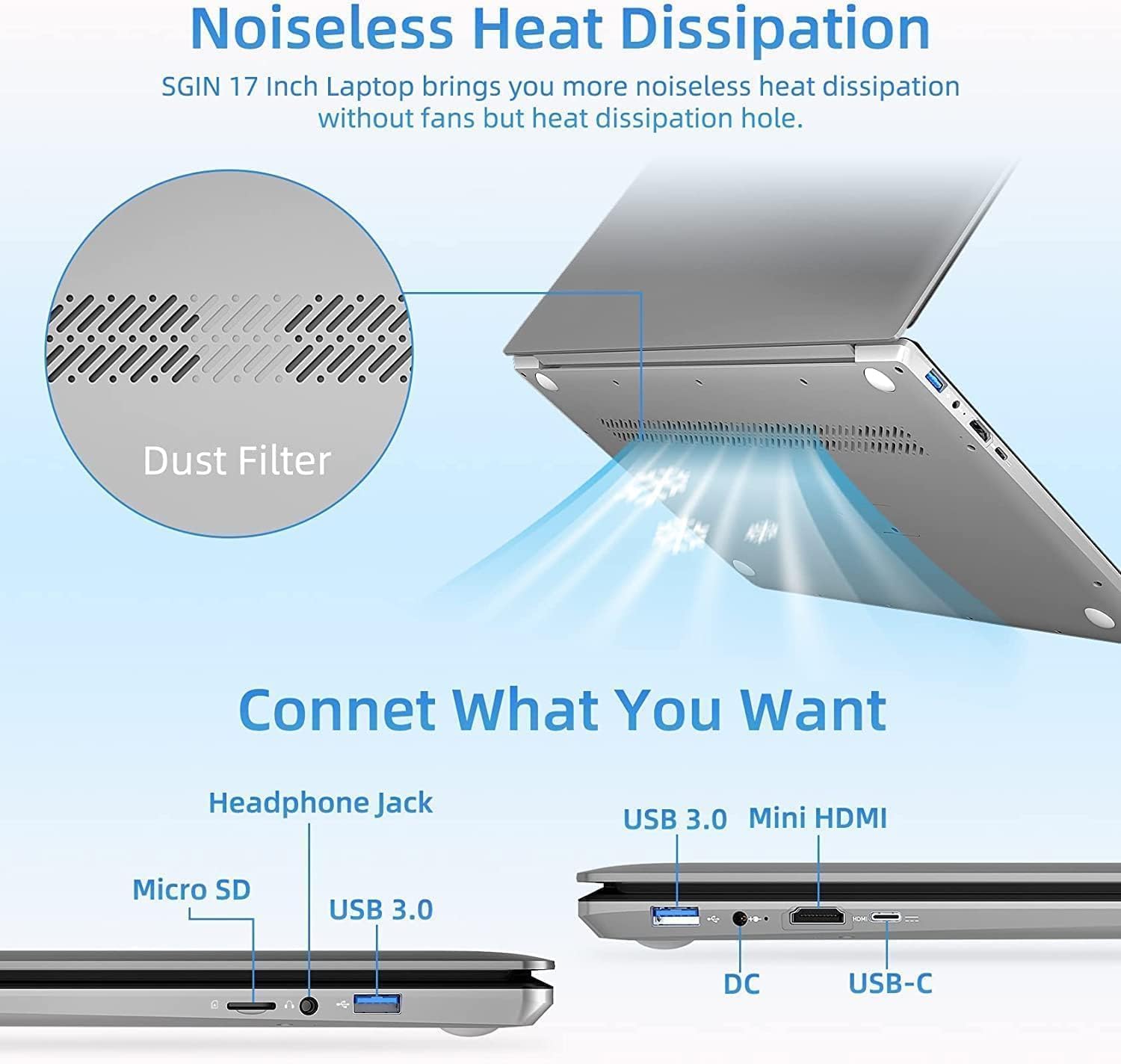
Figi 2.2: Side view of the SGIN 17 inch Laptop highlighting the various input/output ports including USB 3.0, USB-C, Mini HDMI, Headphone Jack, Micro SD card slot, and DC power input.
- Ekspozisyon: 17.3-inch Full HD (1920x1080) LED screen.
- WebCam: Entegre webCam pou apèl videyo ak konferans.
- Klavye: Full-size keyboard with numeric keypad for comfortable typing.
- Touchpad: Multi-touch enabled touchpad for precise navigation.
- Pò USB 3.2: Pou transfè done gwo vitès ak koneksyon periferik.
- Kalite-C Port: Versatile port for data, display, and power delivery.
- Mini HDMI Port: Pou konekte ak ekran ekstèn oswa pwojektè.
- Kas ekoutè Jack: Pou pwodiksyon odyo nan kas ekoutè oswa oratè ekstèn.
- Mikwo SD kat plas: For expanding storage or transferring data from memory cards.
- Pò DC-in: Pou konekte adaptè kouran an pou chaje laptop la.
3. Enstalasyon
3.1 Premye chaj
Before first use, it is recommended to fully charge your laptop's battery. Connect the provided power adapter to the DC-in port on the laptop and then plug it into a power outlet. The charging indicator light will illuminate.
3.2 Premye Demaraj ak Enstalasyon Sistèm Operasyon an
- Peze bouton pouvwa a pou limen laptop la.
- Follow the on-screen instructions to complete the initial setup of the Windows 8.1 operating system. This includes selecting your language, region, accepting terms, and setting up user accounts.
- Connect to a Wi-Fi network when prompted to enable internet access.
4. Kijan pou itilize òdinatè pòtab ou a
4.1 Jesyon pouvwa
- Limen: Peze bouton pouvwa a ki sitiye sou platfòm klavye a.
- Etenn: Klike sou bouton Kòmanse a, answit sou Pouvwa > Fèmen.
- Mòd dòmi: Click the Start button, then Power > Sleep, or close the laptop lid.
- Rekòmanse: Klike sou bouton Kòmanse a, answit sou Pouvwa > Rekòmanse.
4.2 Itilizasyon klavye a ak touchpad la

Figi 4.1: Close-up view of the SGIN 17 inch Laptop's full-size keyboard and integrated numeric keypad, designed for comfortable and efficient typing.
The laptop features a full-size keyboard for comfortable typing and a dedicated numeric keypad for data entry. The touchpad supports multi-touch gestures for intuitive navigation, including scrolling, zooming, and switching applications.
4.3 Konekte ak Rezo yo
Pou konekte ak yon rezo Wi-Fi:
- Klike sou ikòn Wi-Fi a nan plato sistèm lan (kwen anba dwat ekran an).
- Chwazi rezo ou vle a nan lis la.
- Enter the network security key (password) if prompted, then click Connect.
4.4 Ekstèn Ekspozisyon Koneksyon
Use the Mini HDMI port to connect your laptop to an external monitor or projector. Connect one end of a Mini HDMI cable to your laptop and the other end to the display device. You may need to adjust display settings in Windows to extend or duplicate your screen.
4.5 Transfè Done
Utilize the USB 3.2 ports for connecting external hard drives, USB flash drives, and other peripherals for fast data transfer. The Micro SD card slot allows for easy access to data on compatible memory cards.
5. Antretyen
5.1 Netwaye òdinatè pòtab la
- Sèvi ak yon ti moso twal mou, ki san pèl dampRense avèk dlo oswa yon pwodui netwayaj ekran pou netwaye ekran an.
- For the keyboard and chassis, use a soft, dry cloth. Avoid abrasive cleaners.
- Periodically use compressed air to clear dust from vents to maintain optimal cooling.
5.2 Swen Batri

Figure 5.1: Illustration of the SGIN 17 inch Laptop's battery capacity (7.6V 8000mAh, 38Wh) and estimated usage time (up to 8 hours of video playback).
- Pou pwolonje lavi batri a, evite dechaje batri a nèt souvan.
- Sere laptop la nan yon kote ki fre epi sèk si ou pa itilize li pou yon bon bout tan.
- It is normal for battery capacity to decrease over time with usage.
5.3 Depo ak manyen
When transporting your laptop, use a protective sleeve or bag to prevent scratches and impacts. Avoid exposing the laptop to strong magnetic fields.
NAN. Depanaj
This section addresses common issues you might encounter and provides basic solutions.
| Pwoblèm | Kòz posib | Solisyon |
|---|---|---|
| Laptop la pa limen. | Battery is drained or power adapter is not connected properly. | Connect the power adapter and ensure it's plugged into a working outlet. Allow it to charge for a few minutes before attempting to power on again. |
| Ekran an vid oswa li ap tranble. | Incorrect display settings, loose cable (if external monitor), or driver issue. | Press Fn + F7 (or similar function key) to cycle through display modes. Restart the laptop. Update graphics drivers if possible. |
| Pwoblèm koneksyon Wi-Fi. | Adaptè Wi-Fi a etenn, modpas la pa kòrèk, oubyen pwoblèm ak routeur la. | Ensure Wi-Fi is enabled (Fn + F5 or check settings). Re-enter Wi-Fi password. Restart your router and laptop. |
| Laptop la ap mache dousman. | Too many applications open, low storage space, or malware. | Close unnecessary applications. Free up disk space. Run a virus scan. |
Si pwoblèm nan pèsiste apre ou fin eseye solisyon sa yo, tanpri kontakte sèvis kliyan.
7. Espesifikasyon teknik
Detailed specifications for your SGIN 17 inch Laptop (SGIN-M17S).

Figure 7.1: Diagram illustrating the Intel Core i3-5005U Processor, which powers the SGIN 17 inch Laptop, providing efficient performance.
| Karakteristik | Spesifikasyon |
|---|---|
| Non modèl | SGIN-M17S |
| Gwosè ekran | 17.3 pous |
| Rezolisyon ekran | 1920 x 1080 piksèl (Full HD) |
| Processeur | Intel Core i3-5005U (2.4 GHz) |
| RAM | 4 GB DDR4 SDRAM |
| Disk Drive | 128 GB SSD (NVMe interface) |
| Koprosesè grafik | Intel HD Graphics 5500 |
| Sistèm operasyon | Windows 8.1 |
| Kalite san fil | 802.11b Wi-Fi |
| Batri | 1 Lithium Ion battery (8000Wh, 38Wh, up to 8 hours video play) |
| Pwa atik | 6.34 liv |
| Dimansyon pwodwi | 17.3 x 10 x 0.6 pous |
8. Garanti ak sipò
8.1 Enfòmasyon sou Garanti
Your SGIN 17 inch Laptop comes with a 1-ane garanti from the date of purchase. This warranty covers manufacturing defects and malfunctions under normal use. It does not cover damage caused by misuse, accidents, unauthorized repairs, or natural disasters.
Tanpri kenbe prèv ou achte pou reklamasyon garanti.
8.2 Sipò pou Kliyan
For technical assistance, warranty claims, or any other inquiries, please contact SGIN customer support through the official channels provided at the time of purchase or on the SGIN official website. When contacting support, please have your laptop's model number (SGIN-M17S) and purchase details ready.
Ask a question about this manual
Ask about setup, troubleshooting, compatibility, parts, safety, or missing instructions. Manuals+ will review the question and use this page’s manual context to help answer it.