
1. Entwodiksyon
The ZEBRONICS Pulse Wireless Mouse is designed for versatile and comfortable use across various devices. Featuring multi-connectivity options including dual Bluetooth and a 2.4GHz USB nano receiver, it offers seamless switching between systems. Its ergonomic design and 1200 DPI optical sensor ensure precise and smooth cursor control for enhanced productivity.

Imaj 1.1: Anlè view of the ZEBRONICS Pulse Wireless Mouse, showcasing konsepsyon nwa elegant li yo ak wou defile a.
2. Pake kontni
Tanpri verifye ke tout atik yo prezan nan pakè ou a:
- ZEBRONICS Pulse Wireless Mouse
- USB Nano Reseptè
- Manyèl itilizatè
3. Karakteristik kle
- Milti-koneksyon: Supports dual Bluetooth and 2.4GHz wireless connections.
- Segondè Precision: 1200 DPI optical sensor for accurate tracking.
- Konsepsyon ergonomique: Comfortable and lightweight for extended use.
- 3 Bouton: Standard left, right, and scroll wheel buttons.
- Removable USB Nano Receiver: Conveniently stored in the mouse's bottom panel.
- Lajè konpatibilite: Works with desktop PCs, laptops, Mac OS, tablets, and more.
- Ekonomize pouvwa: Features an auto-shutoff function to conserve battery life.

Image 3.1: A visual summary of the mouse's key features, including its comfortable design, power switch, plug-and-play functionality, and high precision.
4. Gid Enstalasyon
4.1. Enstalasyon batri
- Vire sourit la pou jwenn aksè nan panèl ki anba a.
- Locate the battery compartment cover and slide it open.
- Mete yon pil AA, asire w polarite a kòrèk (+/-).
- Fèmen kouvèti lòj batri a byen.
4.2. Connecting via 2.4GHz USB Nano Receiver
- Locate the USB nano receiver stored in the slot on the bottom of the mouse.
- Retire reseptè a nan plas depo li a.
- Plug the USB nano receiver into an available USB port on your computer or laptop.
- Glise bouton pouvwa ki anba sourit la nan pozisyon 'ON'.
- The mouse should automatically connect. If not, press the connection toggle button on the bottom of the mouse to select the 2.4GHz mode (indicated by '2.4G').

Image 4.1: The underside of the mouse, highlighting the battery slot, nano receiver storage, power switch, and connection toggle button.

Image 4.2: The USB nano receiver plugged into a laptop, demonstrating the 2.4GHz wireless connection.
4.3. Connecting via Bluetooth (BT1 / BT2)
- Ensure the mouse has a fresh battery and the power switch is in the 'ON' position.
- Press the connection toggle button on the bottom of the mouse to select either 'BT1' or 'BT2' mode. The corresponding LED indicator will blink.
- On your device (laptop, tablet, etc.), go to Bluetooth settings.
- Chèche pou new devices. The mouse should appear as 'ZEB-PULSE' or similar.
- Select the mouse to pair. Once paired, the LED indicator will stop blinking and remain solid for a few seconds before turning off.
- You can pair a second device using the other Bluetooth channel (BT2) by repeating steps 2-5.
5. Operasyon Enstriksyon
5.1. Fonksyon debaz yo
- Bouton Goch: Prensipal fonksyon klike sou.
- Dwa bouton: Fonksyon klike segondè (meni kontèks).
- wou woulo liv: Scroll up/down, and middle-click function.

Image 5.1: Illustration of the mouse's three buttons: left, right, and the scroll wheel/middle button.
5.2. Switching Connectivity Modes
To switch between the 2.4GHz wireless mode and Bluetooth modes (BT1, BT2), press the connection toggle button located on the bottom of the mouse. The mouse will cycle through the available modes, indicated by the corresponding LED.
5.3. Anviwònman DPI
The ZEBRONICS Pulse mouse operates at a fixed 1200 DPI (Dots Per Inch), providing a balance of speed and precision suitable for general use. This setting ensures smooth and responsive cursor movement.

Image 5.2: Visual representation of the mouse's 1200 DPI precision for accurate tracking.
6. Antretyen
- Netwayaj: Sèvi ak yon twal mou epi sèk pou netwaye sourit la. Evite itilize pwodui chimik ki agresif oswa materyèl abrazif.
- Ranplasman batri: Ranplase pil AA a lè pèfòmans sourit la diminye oswa li sispann reponn.
- Depo: When not in use for extended periods, turn off the mouse to conserve battery life. Store the USB nano receiver in its dedicated slot on the mouse's bottom.
- Anviwònman: Evite ekspoze sourit la nan tanperati ekstrèm, limyè solèy dirèk, oswa imidite twòp.
NAN. Depanaj
7.1. Sourit la pa reponn
- Ensure the mouse is turned 'ON'.
- Tcheke batri a. Ranplase li si sa nesesè.
- For 2.4GHz connection: Ensure the USB nano receiver is securely plugged into a working USB port and the mouse is in 2.4GHz mode.
- For Bluetooth connection: Ensure Bluetooth is enabled on your device and the mouse is in the correct BT1/BT2 mode. Try re-pairing the mouse.
- Try connecting the mouse to a different USB port or a different device to rule out port or device issues.
7.2. Mouvman Kurseur Iregilye
- Netwaye detèktè optik ki anba sourit la avèk yon twal mou epi sèk.
- Asire w ke w ap itilize sourit la sou yon sifas pwòp ki pa reflete limyè.
- Tcheke pou entèferans nan lòt aparèy san fil.
7.3. Difficulty Switching Modes
- Asire w ke batri a gen ase pouvwa.
- Press the connection toggle button firmly and observe the LED indicators to confirm mode changes.
8. Espesifikasyon
| Karakteristik | Detay |
|---|---|
| Mak | ZEBRONIK |
| Modèl | Zeb-Pulse |
| Koneksyon Teknoloji | Wireless (2.4GHz, Dual Bluetooth) |
| Teknoloji deteksyon mouvman | Optik |
| DPI | 1200 |
| Kantite bouton | 3 |
| Sous pouvwa | Mache ak pil (1x AA) |
| Pwa atik | 160 g |
| Dimansyon pwodwi | 16.6 x 9.5 x 0.1 cm |
| Sistèm operasyon konpatibilite | Windows, Mac OS, etc. |
| Peyi orijin | Lachin |
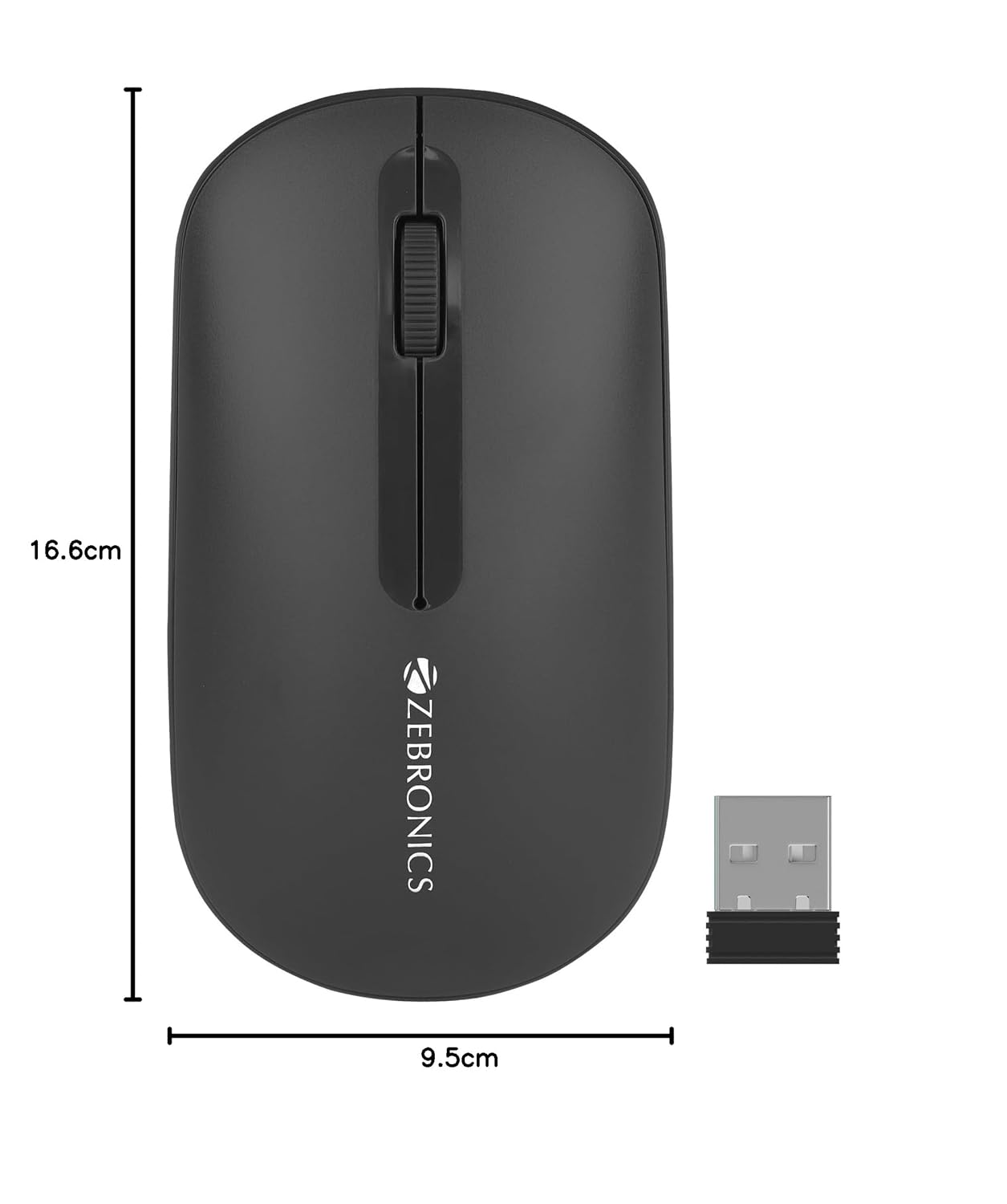
Image 8.1: Diagram showing the physical dimensions of the ZEBRONICS Pulse Wireless Mouse.
9. Garanti & Sipò
Pou enfòmasyon sou garanti a, sipò teknik, oswa kesyon sou sèvis, tanpri al gade kat garanti ki vini ak pwodwi ou a oswa vizite sit entènèt ofisyèl ZEBRONICS la. websit la. Kenbe resi acha ou kòm prèv acha pou reklamasyon garanti.
ZEBRONICS ofisyèl Websit: www.zebronics.com