
Entwodiksyon
This manual provides detailed instructions for the setup, operation, and maintenance of your Rapoo M300G Silent Wireless Mouse. Please read this guide thoroughly to ensure proper use and to maximize the performance of your device. The Rapoo M300G offers versatile connectivity options, silent clicking, and adjustable DPI settings for an optimized user experience.
Kontni pake
Verifye ke tout atik yo prezan nan pakè a:
- Rapoo M300G Wireless Mouse x 1
- Batri AA x 1
- USB Receiver x 1 (typically stored inside the mouse)
- Pwodwi Manyèl x 1
Pwodwi souview
Familiarize yourself with the components of your Rapoo M300G mouse:

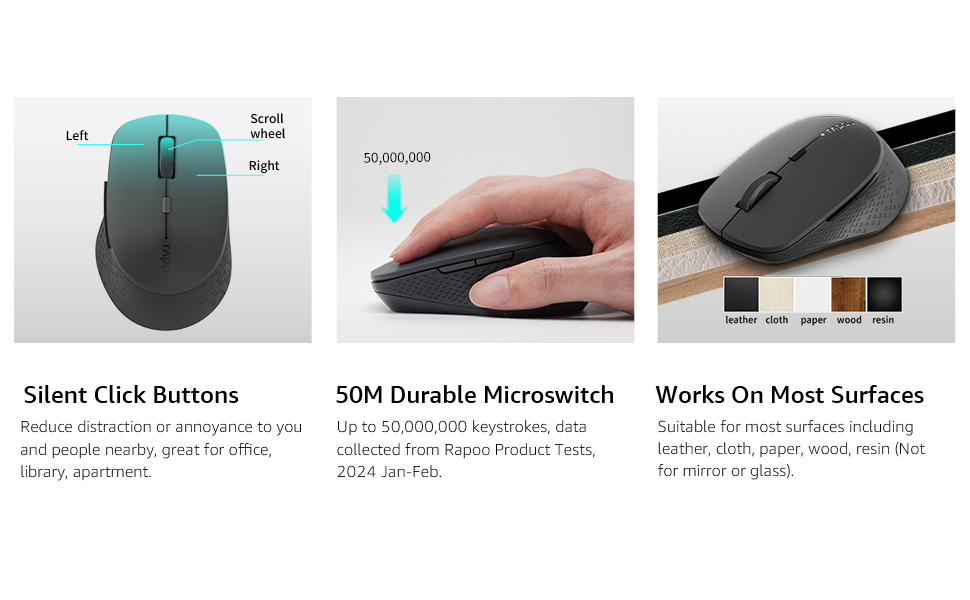
- Bouton Goch: Fonksyon klike estanda.
- Dwa bouton: Fonksyon estanda klike sou bò dwat la.
- wou woulo liv: Pou defile nan dokiman yo ak web paj yo. Ou kapab peze l tou pou fonksyonalite klike sou bouton mitan an.
- Bouton chanjman DPI: Ajiste sansiblite sourit la (DPI).
- Bouton Avant: Navige pi devan nan web navigatè oswa file eksploratè.
- Bouton dèyè: Navige bak nan web navigatè oswa file eksploratè.
- Multi-function Button Switch (Underside): Used to switch between 2.4GHz and Bluetooth modes, and for Bluetooth pairing.
Enstalasyon
1. Enstalasyon batri
The Rapoo M300G mouse requires one AA battery (included).
- Jwenn kouvèti konpatiman batri a anba sourit la.
- Glise kouvèti a louvri.
- Mete pil AA a nan plas li, epi asire w ke tèminal pozitif (+) ak negatif (-) yo byen aliyen ak mak ki anndan konpatiman an.
- Fèmen kouvèti lòj batri a byen.

2. Koneksyon san fil 2.4GHz
To connect via the 2.4GHz USB receiver:
- Remove the USB receiver from its storage slot inside the mouse's battery compartment.
- Ploge reseptè USB a nan yon pò USB ki disponib sou òdinatè w lan.
- Limen sourit la avèk bouton pouvwa ki anba a.
- Set the multi-function button switch on the underside of the mouse to the 2.4G mode (indicated by a small icon).
- Odinatè w la ta dwe detekte epi enstale chofè ki nesesè yo otomatikman. Sourit la pare pou itilize.
3. Bluetooth Koneksyon
The Rapoo M300G supports Bluetooth 5.0 and 4.0. To connect via Bluetooth:
- Limen sourit la avèk bouton pouvwa ki anba a.
- Set the multi-function button switch on the underside of the mouse to the Bluetooth mode (indicated by a Bluetooth icon).
- Press and hold the multi-function button switch for 3-5 seconds until the indicator light on the mouse starts blinking, indicating it is in pairing mode.
- Sou òdinatè w la oswa aparèy ou an, ouvri paramèt Bluetooth yo epi chèche nouvo aparèy.
- Select "Rapoo M300G" from the list of available devices to pair.
- Once paired, the indicator light on the mouse will stop blinking and remain solid for a few seconds, then turn off. The mouse is now connected.

Operasyon
1. Ajisteman DPI
The Rapoo M300G features 5 adjustable DPI levels: 800, 1000, 1200, 1600, and 2400. To change the DPI:
- Peze a DPI Bouton Bouton located behind the scroll wheel.
- Each press cycles through the available DPI settings. The mouse cursor speed will change accordingly.

2. Kommutasyon Plizyè Aparèy
The M300G supports connection to two devices simultaneously (one via 2.4GHz, one via Bluetooth). To switch between connected devices:
- Yon ti tan peze la Multi-function Button Switch on the underside of the mouse.
- The mouse will switch between the 2.4GHz connection and the Bluetooth connection.

3. Konpatibilite sifas
The advanced optical tracking technology allows the Rapoo M300G to operate effectively on various surfaces without a mouse pad, including leather, cloth, paper, wood, and resin. Performance may vary on glass or mirrored surfaces.

Antretyen
- Netwayaj: Sèvi ak yon twal mou epi sèk pou netwaye sourit la. Evite itilize pwodui chimik ki agresif oswa materyèl abrazif.
- Ranplasman batri: Replace the AA battery when the mouse performance degrades or the indicator light signals low power.
- Depo: When not in use for extended periods, turn off the mouse to conserve battery life. Store the USB receiver in its dedicated slot to prevent loss.

Depanaj
| Pwoblèm | Kòz posib | Solisyon |
|---|---|---|
| Sourit pa reponn | Low battery; Mouse turned off; Incorrect connection mode; USB receiver not connected (2.4GHz); Bluetooth not paired (Bluetooth). | Replace battery; Turn on mouse; Switch to correct mode (2.4G or BT); Plug in USB receiver; Re-pair Bluetooth. |
| Mouvman kurseur se iregilye | Capteur optik sal; Sifas ki pa apwopriye; Batri fèb. | Clean optical sensor; Use on a suitable surface or mouse pad; Replace battery. |
| Pa ka chanje ant aparèy yo | Incorrect button press; Device not properly paired. | Ensure a brief press of the multi-function button; Verify both devices are correctly paired/connected. |
| Side buttons not working (Mac OS) | Limited Mac OS compatibility for side buttons. | This is a known limitation. Side buttons may not function on Mac OS. |
Espesifikasyon
- Modèl: M300G
- Koneksyon: Bluetooth 5.0, Bluetooth 4.0, 2.4GHz Wireless
- Anviwònman DPI: 800, 1000, 1200, 1600, 2400 (Reglabl)
- Bouton: 6 (Agoch, Adwat, Moul, Chanjman DPI, Avanse, Aryè)
- Pouvwa: 1 x batri AA
- Lavi batri: Jiska 12 mwa (anba kondisyon nòmal)
- Dimansyon: 4.09 x 2.57 x 0.04 pous (103.91 x 65.43 x 37.29 mm)
- Pwa: 2.46 ons (apeprè 70g)
- Konpatibilite: Fenèt, Mac OS, Linux, iOS, Android, Chrome OS
Garanti ak sipò
Your Rapoo M300G Silent Wireless Mouse comes with a Yon ane garanti apati dat acha a. Anplis de sa, yon 30-day return and refund or replacement policy is offered. For technical support or warranty claims, please refer to the contact information provided on the Rapoo official websit entènèt la oswa chanèl sipò détayan ou an.