
1. Entwodiksyon
Thank you for choosing the Serounder 4K Dual Lens Solar Powered Outdoor Security Camera. This manual provides essential information for the proper installation, operation, and maintenance of your security camera. Please read it thoroughly before use to ensure optimal performance and safety.
This camera features 4K 8MP ultra-clear resolution, dual lenses for comprehensive coverage, 355° pan and 90° tilt capabilities, motion detection, full-color night vision, two-way audio, and an IP55 waterproof rating. Its integrated solar panel and 20000mAh battery ensure continuous operation.
2. Enfòmasyon sou Sekirite
- Sous pouvwa: Ensure the solar panel is exposed to direct sunlight for optimal charging. Do not attempt to open or replace the built-in battery.
- Enstalasyon: Install the camera securely on a stable surface. Avoid installing near flammable or explosive materials.
- Rezistans dlo: The camera is IP55 rated for dust and water resistance. However, avoid submerging it in water or exposing it to high-pressure water jets.
- Tanperati: Operate the camera within the specified temperature range (-10°C to 60°C).
- Netwayaj: Sèvi ak yon twal mou epi sèk pou netwaye. Pa sèvi ak pwodui chimik ki agresif oswa pwodui netwayaj abrazif.
- Demonte: Do not attempt to disassemble or repair the camera yourself. Contact customer support for assistance.
3. Pake kontni
Verifye ke tout atik yo prezan nan pakè a:
- 1 x Surveillance Camera
- XNX x panèl solè
- 4 x Tib Ekspansyon
- 4 x Vis
- 1 x tournevis
- 1 x Reyajiste PIN
- 2 x Ti Vis
- 1 x Manyèl Itilizatè (dokiman sa a)

4. Pwodwi souview
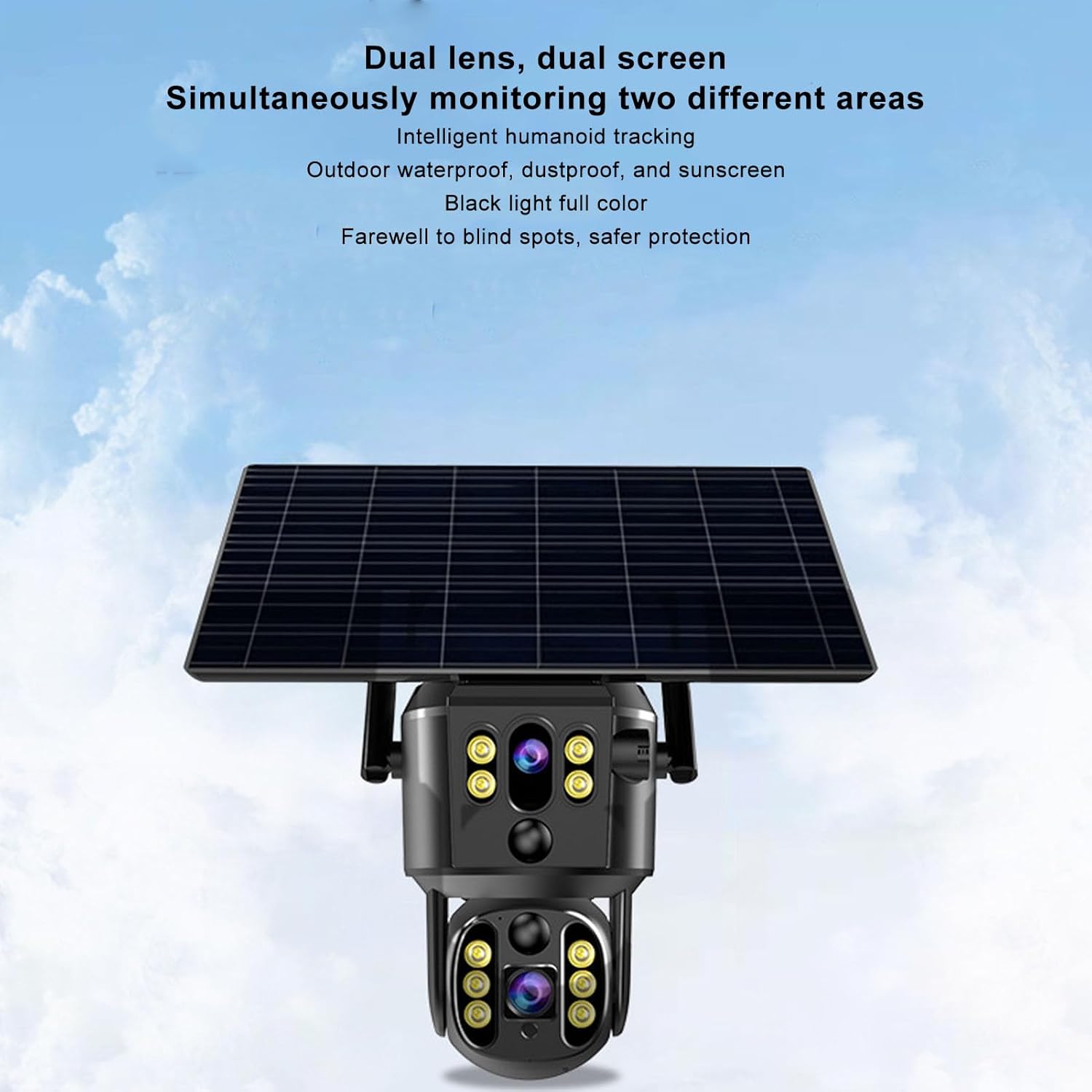
The Serounder 4K Dual Lens Solar Powered Outdoor Security Camera is designed for comprehensive outdoor surveillance. Key features include:
- Dual Lens and Dual Screen: 8MP ultra-clear pixels, 4K high-definition resolution, efficient H.265 technology. Supports horizontal rotation of 355 degrees and vertical rotation of 90 degrees. View monitoring video playback on two screens simultaneously.
- Solar Power Supply: Equipped with an 8W solar panel and a built-in 20000mAh rechargeable battery for continuous power.
- Remote Real-Time Monitoring: Aksè viv view and recordings from anywhere via the mobile application.
- Panoramic Preset Point: Set multiple preset points for automatic scanning and monitoring.
- Intelligent AI Humanoid Tracking: The camera rotates to track human movement and sends alarm messages to the mobile app.
- Bidirectional Voice Intercom: Two-way talk functionality with built-in speakers and microphones.
- IP55 Rezistan a move tan: Dustproof and waterproof design for stable operation in various outdoor environments.

5. Enstalasyon ak Enstalasyon
5.1 Telechaje Aplikasyon an ak Kreye yon Kont
- Scan the QR code provided in the user manual (physical copy) or on the product packaging to download the StarEye APP on your smartphone.
- Follow the on-screen instructions to create an account and log in.
5.2 Camera Connection and Power On
- Ensure the camera is fully charged or connected to the solar panel in direct sunlight.
- Pouvwa sou kamera a.
- Louvri a StarEye APP sou telefòn ou.
- Tap to add a new device and follow the in-app instructions to connect the camera to your Wi-Fi network.
5.3 Monte Kamera a
The camera is designed for wall mounting. Choose a location that provides the desired surveillance coverage and receives adequate sunlight for the solar panel.
- Mark the drilling points on the wall using the camera's mounting bracket as a template.
- Fè twou nan pozisyon ki make yo.
- Insert the expansion tubes into the drilled holes.
- Fikse sipò montaj la sou miray la avèk vis yo bay yo.
- Tache kamera a nan sipò montaj la.
- Ajiste ang panèl solè a pou maksimize ekspozisyon solèy la.

6. Operasyon Enstriksyon
6.1 Siveyans Remote
Once connected, open the StarEye APP pou view viv footage from your camera. You can access the camera feed from anywhere with an internet connection.
6.2 Kontwòl Panoramik ak Enklinasyon
Nan viv la view interface of the app, use the on-screen controls to remotely adjust the camera's horizontal (355°) and vertical (90°) viewing angles. This allows for dynamic monitoring of your property.
6.3 Deteksyon Mouvman ak Alam
The camera features intelligent AI humanoid tracking. When motion is detected in the monitored area, the camera will automatically track the movement and send an alarm notification to your mobile app. You can customize motion detection sensitivity and alarm settings within the app.


6.4 Pale Bidireksyonèl
Utilize the two-way talk feature to communicate with individuals near the camera. Tap the microphone icon in the app to speak, and listen through the camera's built-in speaker.

6.5 Anrejistreman ak Depo
The camera supports local storage via a memory card (up to 256GB, not included) and cloud storage options. Configure recording settings (continuous, motion-triggered) and storage preferences within the StarEye APP.
6.6 Vizyon lannwit
The camera provides full-color night vision, ensuring clear surveillance even in low-light conditions.
6.7 Videyo Plis paseview
7. Antretyen
- Netwayaj: Siye lantiy kamera a ak panèl solè a regilyèman avèk yon twal mou.amp cloth to remove dust and debris. Ensure the solar panel is clean for efficient charging.
- Mizajou mikrolojisyèl: Tcheke la StarEye APP periodically for available firmware updates. Keeping your camera's firmware up-to-date ensures optimal performance and security.
- Sante batri: The solar panel continuously charges the built-in battery. Ensure the solar panel is not obstructed to maintain battery health.
NAN. Depanaj
| Pwoblèm | Kòz posib | Solisyon |
|---|---|---|
| Kamera pa limen | Low battery; solar panel not charging | Ensure solar panel is in direct sunlight. Allow time for charging. |
| Pa ka konekte ak Wi-Fi | Modpas Wi-Fi ki pa kòrèk; kamera a twò lwen routeur la; pwoblèm rezo | Verify Wi-Fi password. Move camera closer to router. Restart router. Reset camera using the reset pin. |
| Pòv bon jan kalite imaj | Dirty lens; poor network connection | Clean the camera lens. Check network stability. |
| Deteksyon mouvman pa travay | Sensitivity settings too low; detection zone not configured | Adjust motion detection sensitivity and configure detection zones in the app. |
| De-fason odyo pa travay | Microphone/speaker muted; app permissions | Check audio settings in the app. Ensure app has microphone permissions on your phone. |
9. Espesifikasyon
| Karakteristik | Spesifikasyon |
|---|---|
| Non modèl | Serounderow4ik6cvqm |
| Piksèl | 8MP |
| Rezolisyon videyo | 1920x2160P (4K) |
| To Frame | 15FPS |
| Horizontal Pan Range | 355 Degre |
| Vertical Tilt Range | 90 Degre |
| Kodaj videyo | H.265 |
| Koneksyon rezo | Wi-Fi (4G mentioned in description, but specifications list Wi-Fi) |
| Depo | Supports up to 256GB Memory Card (not included) |
| Kamera Battery | 20000mAh Lithium Battery (included) |
| Panèl Solè Wattage | 8 wat |
| Evalyasyon ki enpèmeyab | IP55 |
| Tanperati Fonksyònman | -10 ° C a 60 ° C |
| Aparèy konpatib | Smartphone |
| Kalite Konsantre | Auto Focus, Manual Focus |
10. Garanti ak sipò
For warranty information, technical support, or service inquiries, please refer to the official Serounder websit la oubyen kontakte sèvis kliyan yo dirèkteman. Kenbe resi acha w la kòm prèv acha.