
Geek Smart L7
Geek Smart L7 Robot Vacuum and Mop User Manual
Modèl: L7
1. Entwodiksyon
Thank you for choosing the Geek Smart L7 Robot Vacuum and Mop. This device is designed to provide efficient and thorough cleaning for your home, combining powerful vacuuming with intelligent mopping capabilities. Featuring advanced LDS navigation, Wi-Fi connectivity, and smart app control, the L7 ensures a customized cleaning experience for various floor types, including carpets and hard floors.
This manual provides essential information for the safe operation, setup, maintenance, and troubleshooting of your robot vacuum. Please read it carefully before use and retain it for future reference.
2. Enstriksyon Sekirite
To reduce the risk of injury or damage, read and follow all safety precautions when setting up, using, and maintaining your robot vacuum.
- Timoun ki gen laj 8 an ak pi wo a ak moun ki gen kapasite fizik, sansoryèl oswa mantal redwi oswa ki pa gen eksperyans ak konesans yo kapab itilize aparèy sa a si yo te ba yo sipèvizyon oswa enstriksyon konsènan itilizasyon aparèy la an sekirite epi yo konprann danje ki genyen ladan yo. .
- Timoun yo ta dwe sipèvize pou asire yo pa jwe ak aparèy la.
- Netwayaj ak antretyen itilizatè pa dwe fèt pa timoun san sipèvizyon.
- Sèvi sèlman ak adaptè kouran orijinal manifakti a bay la.
- Pa sèvi ak robo a nan anviwònman ki gen flanm dife oswa materyèl ki ka pran dife.
- Kenbe cheve, rad ki lach, dwèt, ak tout pati nan kò a lwen ouvèti ak pati k ap deplase.
- Pa sèvi ak robo a nan chanm kote yon tibebe oswa yon timoun ap dòmi.
- Pa sèvi ak robo a pou ranmase gwo debri, likid, oswa objè k ap boule.
- Ensure the robot is placed on a stable surface and cannot fall from high places.
- Turn off the robot and unplug the charging dock before cleaning or maintenance.
3. Pake kontni
Verifye ke tout konpozan yo prezan epi yo an bon kondisyon lè w ap debalaje.
- Geek Smart L7 Robot Vacuum and Mop
- Chaje waf
- Adaptè pouvwa
- Bwòs bò (2 pè)
- Main bwòs
- Dust Bin (680ML)
- 2-in-1 Water Tank & Dust Bin (350ML water tank & 260ML dust bin)
- Mop twal (2)
- High-Efficiency Filter (pre-installed in dust bin)
- Zouti netwayaj
- Manyèl itilizatè
4. Pwodwi souview
Robot Vacuum Components

Image: The Geek Smart L7 Robot Vacuum, showcasing its top view with control buttons, LDS sensor, and accompanying accessories like the charging dock and replacement filters.
- LDS Navigation Sensor: Located on top, for precise mapping and navigation.
- Bouton kontwòl: Power/Clean, Home/Recharge.
- Eksepsyonèl devan: Detects obstacles.
- Bwòs bò yo: Bale debri yo nan chemen prensipal bwòs la.
- Bwòs prensipal: Li ranmase pousyè tè ak debri.
- Wou kondwi: Allow movement across various surfaces.
- Kontak chaje: Konekte ak waf chaj la.
- Dust Bin / Water Tank: Removable compartments for dust collection and water for mopping.
Chaje waf
The charging dock provides power to recharge the robot's battery. It should be placed in an open area with sufficient clearance.
5. Enstalasyon
5.1 Plasman Dock Chaje a
- Place the charging dock against a wall in an open area.
- Asire w ke gen omwen 0.5 mèt (1.6 pye) espas vid sou tou de bò waf la ak 1.5 mèt (4.9 pye) devan.
- Konekte adaptè kouran an nan dock chaje a epi branche li nan yon priz miray.
- Ensure the power indicator on the charging dock illuminates.
5.2 Premye chaj
- Mete robo a sou dock chaje a, epi asire w ke kontak chaje yo aliyen.
- The robot will automatically begin charging. Allow it to fully charge before its first use (approximately 4-5 hours).
5.3 Koneksyon ak Map Aplikasyon an

Image: The Geek Smart L7 Robot Vacuum actively scanning its environment using LDS navigation to create a detailed map, with digital map representations floating above it.
- Download the Geek Smart app from your mobile device's app store (available for iOS and Android).
- Anrejistre yon kont epi konekte.
- Follow the in-app instructions to add your L7 robot vacuum. This typically involves connecting to the robot's Wi-Fi hotspot and then connecting the robot to your home Wi-Fi network.
- Once connected, initiate a full cleaning cycle. The robot will use its LDS navigation to create an accurate map of your home. This map will be saved in the app for future use, allowing for features like selective room cleaning and setting no-go zones. The robot can save up to 5 different maps.
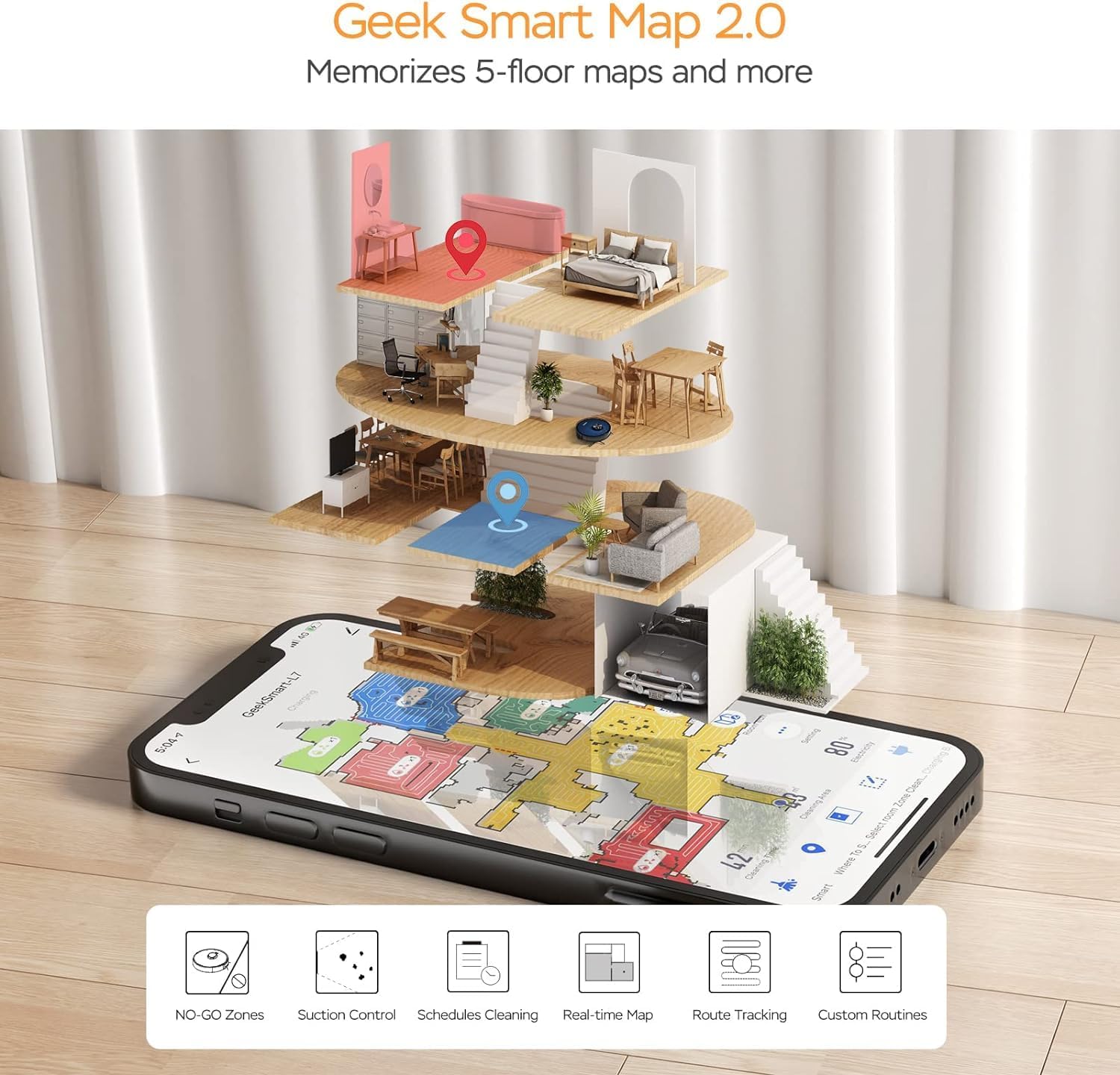
Image: A smartphone screen displaying the Geek Smart app interface, showing a color-coded floor plan map with various cleaning zones and controls.
6. Operasyon Enstriksyon
6.1 Kòmanse epi sispann netwayaj la
- Kòmanse netwayaj: Press the Power/Clean button on the robot or tap "Start Cleaning" in the app. The robot will begin a full cleaning cycle.
- Poze Netwayaj: Press the Power/Clean button during operation or tap "Pause" in the app.
- Rekòmanse Netwayaj la: Press the Power/Clean button again or tap "Resume" in the app.
- Retounen nan waf la: Press the Home/Recharge button on the robot or tap "Recharge" in the app. The robot will return to its charging dock.
6.2 netwayaj mòd
The L7 offers various cleaning modes to suit different needs.

Image: The Geek Smart L7 Robot Vacuum demonstrating its 2-in-1 sweeping and mopping capabilities on a hard floor, with debris being swept and a damp mop trail visible.
- Netwayaj oto: The robot intelligently plans its cleaning path using LDS navigation.
- Pase aspiratè: Utilizes up to 2700Pa suction power to clean dirt and debris from various surfaces.
- Mopping: Attach the mop cloth and fill the 2-in-1 water tank. The electronic water tank allows for adjustable water output.
- Vacuum & Mop (Simultaneous): The robot can vacuum and mop simultaneously when the 2-in-1 tank is installed.
- Mòd Ranfòsman Tapi: The robot automatically increases suction power when it detects carpeted areas for deeper cleaning.

Image: The Geek Smart L7 Robot Vacuum actively cleaning a hard floor, with a visual representation of its powerful 2700Pa suction lifting debris.

Image: The Geek Smart L7 Robot Vacuum transitioning from a hard floor to a carpet, illustrating its Carpet Boost Mode with enhanced suction indicated by glowing lines.

Image: The Geek Smart L7 Robot Vacuum positioned on a floor split between marble and wood, illustrating its integrated mopping system and adjustable water output for different surfaces.
6.3 Fonksyonalite Kontwòl Aplikasyon an
The Geek Smart app unlocks advanced cleaning customization.
- Netwayaj Chanm Selektif: Choose specific rooms or areas on the map for cleaning.
- No-Go Zones / No-Mop Zones: Draw virtual boundaries on the map to prevent the robot from entering certain areas or mopping carpets.
- Invisible Walls: Create virtual walls to restrict the robot's movement.
- Orè: Set cleaning schedules for automatic operation at desired times.
- Ajisteman pouvwa pou aspirasyon: Manually adjust the suction level.
- Water Output Adjustment: Control the water flow for mopping.

Image: The Geek Smart L7 Robot Vacuum operating quietly (65dB) in a living room, demonstrating its low noise level suitable for homes with sleeping individuals or pets.
7. Antretyen
Regular maintenance ensures optimal performance and extends the lifespan of your robot vacuum. Always turn off the robot and unplug the charging dock before performing any maintenance.
7.1 Vide bwat pousyè a
- Press the dust bin release button and pull out the dust bin.
- Open the dust bin cover and empty the contents into a trash can.
- Clean the filter and dust bin with the provided cleaning tool or a soft brush.
- Re-enstale bin pousyè tè a.
7.2 Cleaning the 2-in-1 Water Tank & Dust Bin
- Retire tank 2-an-1 an nan robo a.
- Empty any remaining water from the water tank compartment.
- Vide lòj pousyè a epi netwaye filtè an.
- Rinse the water tank compartment with clean water. Do not immerse the entire tank in water, especially the electronic components.
- Allow all parts to air dry completely before reassembling and reinstalling.
7.3 Netwaye bwòs prensipal la
- Flip the robot over and press the release tabs to remove the main brush cover.
- Retire bwòs prensipal la.
- Use the cleaning tool to remove hair and debris tangled around the brush and its bearings.
- Re-enstale bwòs prensipal la ak kouvèti.
7.4 Netwayaj bwòs bò yo
- Rale bwòs bò yo dousman anlè pou retire yo.
- Remove any hair or debris. If brushes are bent, soak them in warm water for a few minutes to reshape.
- Press the brushes back into place until they click.
7.5 Netwayaj Capteur ak Kontak Chaje
- Use a clean, dry cloth to wipe the cliff sensors (located on the bottom of the robot), wall sensors (on the side), and the charging contacts on both the robot and the charging dock.
- Ensure the LDS sensor on top is also clean and free of obstructions.
NAN. Depanaj
If you encounter issues with your robot vacuum, refer to the following table for common problems and solutions.
| Pwoblèm | Kòz posib | Solisyon |
|---|---|---|
| Robo pa limen | Batri fèb; Entèriptè a etenn | Place robot on charging dock; Ensure power switch is on. |
| Robo a pa ka chaje | Kontak chajman yo sal; Estasyon chajman an pa gen kouran. | Netwaye kontak chaj yo sou robo a ak sou do a; Asire w ke do a branche. |
| Robo a bloke souvan | Obstacles on floor; Cliff sensors dirty | Clear cables and small objects; Clean cliff sensors. |
| Pèfòmans netwayaj pòv | Bwat pousyè a plen; Bwòs yo mele; Filtè a bouche | Empty dust bin; Clean main and side brushes; Clean or replace filter. |
| Fonksyon mop la pa fonksyone | Water tank empty; Mop cloth dry; Water outlet clogged | Fill water tank; Moisten mop cloth; Clean water outlet. |
| Pwoblèm koneksyon aplikasyon an | Modpas Wi-Fi ki pa kòrèk; Routeur a twò lwen; Robo a pa konekte | Verifye kalifikasyon Wi-Fi yo; Pi pre robo a ak routeur la; Rekòmanse robo a ak routeur la. |
9. Espesifikasyon
| Karakteristik | Spesifikasyon |
|---|---|
| Mak | Pèr entelijan |
| Non modèl | L7 |
| Kalite Navigasyon | 360° LiDAR |
| Pouvwa pou aspirasyon maksimòm | 2700 Pa |
| Kapasite batri | 2600 mAh |
| Max Runtime | 130 minit |
| Pousyè Bin kapasite | 680 ML |
| Water Tank Capacity (2-in-1) | 350 ML |
| Nivo bri | Sub-65 dB |
| Dimansyon pwodwi | 12.59"L x 12.59"L x 3.74"H |
| Pwa atik | 13.39 liv |
| Aparèy konpatib | Amazon Echo |
| UPC | 764773837187 |
10. Garanti ak sipò
Geek Smart products are manufactured to the highest quality standards. For warranty information, technical support, or customer service inquiries, please refer to the contact information provided on the product packaging or visit the official Geek Smart websit.
Tanpri kenbe prèv ou achte pou reklamasyon garanti.
Ask a question about this manual
Ask about setup, troubleshooting, compatibility, parts, safety, or missing instructions. Manuals+ will review the question and use this page’s manual context to help answer it.