
Entwodiksyon
Welcome to the iRobot Roomba i1 (1152) Robot Vacuum user manual. This guide provides essential information for setting up, operating, maintaining, and troubleshooting your robot vacuum. The Roomba i1 is designed to efficiently clean hard floors and carpets, utilizing Wi-Fi connected mapping technology to navigate your home.
Enfòmasyon enpòtan sou sekirite
Before using your Roomba i1 robot vacuum, please read all safety instructions carefully. Failure to follow these instructions may result in electric shock, fire, or serious injury.
- Timoun ki gen laj 8 an ak pi wo a ak moun ki gen kapasite fizik, sansoryèl oswa mantal redwi oswa ki pa gen eksperyans ak konesans yo kapab itilize aparèy sa a si yo te ba yo sipèvizyon oswa enstriksyon konsènan itilizasyon aparèy la an sekirite epi yo konprann danje ki genyen ladan yo. .
- Children should not play with the appliance. Cleaning and user maintenance shall not be made by children without supervision.
- Itilize sèlman jan sa dekri nan manyèl sa a.
- Pa itilize deyò oswa sou sifas mouye.
- Pa pèmèt yo itilize kòm yon jwèt. Li nesesè anpil atansyon lè yo itilize pa oswa tou pre timoun yo.
- Pa sèvi ak li avèk yon kòd oswa yon ploge ki domaje. Si aparèy la pa fonksyone jan li ta dwe, si li tonbe atè, domaje, kite deyò, oswa tonbe nan dlo, retounen li nan yon sant sèvis.
- Pa rale oswa pote pa kòd, sèvi ak kòd kòm yon manch, fèmen yon pòt sou kòd, oswa rale kòd alantou kwen byen file oswa kwen. Pa pase aparèy la sou kòd. Kenbe kòd lwen sifas ki chofe.
- Pa deploge rale sou kòd. Pou deploge, atrab ploge a, pa kòd la.
- Pa okipe ploge oswa aparèy ak men mouye.
- Pa mete okenn objè nan ouvèti yo. Pa sèvi ak nenpòt ouvèti bloke; pa gen pousyè, pèl, cheve, ak nenpòt bagay ki ka diminye koule lè a.
- Kenbe cheve, rad ki lach, dwèt, ak tout pati nan kò a lwen ouvèti ak pati k ap deplase.
- Pa ranmase anyen k ap boule oswa fimen, tankou sigarèt, alimèt, oswa sann cho.
- Pa itilize pou ranmase likid ki ka pran dife oswa ki ka pran dife, tankou gazolin, oswa itilize nan zòn kote yo ka prezan.
- Pa itilize san sak pousyè tè ak/oswa filtè an plas.
- Anpeche kòmanse envolontè. Asire w ke switch la nan pozisyon koupe anvan ou konekte ak pake batri, ranmase oswa pote aparèy la.
- Rechaje sèlman ak plato a espesifye pa manifakti a. Yon plato ki apwopriye pou yon kalite pake batri ka kreye yon risk dife lè yo itilize ak yon lòt pake batri.
- Sèvi ak aparèy sèlman ak pake batri ki deziyen espesyalman. Sèvi ak nenpòt lòt pake batri ka kreye yon risk pou blese ak dife.
- Lè pake batri a pa itilize, kenbe li lwen lòt objè metal, tankou klip papye, pyès monnen, kle, klou, vis oswa lòt ti objè metal, ki ka fè yon koneksyon soti nan yon tèminal nan yon lòt. Kout tèminal batri yo ansanm ka lakòz boule oswa yon dife.
- Nan kondisyon abizif, likid ka soti nan batri a; evite kontak. Si kontak aksidan rive, lave dlo. Si likid an kontak ak je, anplis chèche èd medikal. Likid ki soti nan batri a ka lakòz iritasyon oswa boule.
- Pa sèvi ak yon batri oswa yon aparèy ki domaje oswa modifye. Batri ki domaje oswa modifye ka montre yon konpòtman enprevizib ki lakòz dife, eksplozyon oswa risk pou yo blese.
- Pa ekspoze yon pake batri oswa aparèy nan dife oswa tanperati twòp. Ekspozisyon nan dife oswa tanperati ki pi wo pase 130 ° C (265 ° F) ka lakòz eksplozyon.
- Swiv tout enstriksyon pou chaje epi pa chaje batri a oswa aparèy la deyò ranje tanperati ki espesifye nan enstriksyon yo. Chaje mal oswa nan tanperati ki andeyò ranje espesifye a ka domaje batri a ak ogmante risk pou dife.
- Fè sèvis yo fè pa yon moun ki kalifye reparasyon ki itilize sèlman pyès ranplasman ki idantik. Sa a pral asire ke sekirite a nan pwodwi a konsève.
- Pa modifye oswa eseye repare aparèy la oswa pake batri a (jan sa aplikab) eksepte jan sa endike nan enstriksyon yo pou itilize ak swen.
Kontni pake
Verify that all original components are included in your package:
- iRobot Roomba i1 Robot Vacuum
- Kay Baz Charging Station
- Liy kòd
- 1 Lithium Ion Battery (pre-installed)
- Bwòs Side
- Filter (Cloth Type)
- Dual Multi-Surface Rubber Brushes
Enstalasyon
Follow these steps to set up your Roomba i1 robot vacuum for first use:
- Choose a Location for the Home Base: Place the Home Base charging station against a wall in an open, uncluttered area. Ensure there is at least 1.5 feet (0.5 meters) of clear space on each side of the Home Base and 4 feet (1.2 meters) in front of it.
- Konekte kòd pouvwa a: Plug the line cord into the Home Base and then into a wall outlet. Ensure the Home Base is powered on.
- Chaje robo a: Place your Roomba i1 onto the Home Base. The robot will emit a tone to confirm it is properly docked and charging. Allow the robot to charge for at least 3 hours before its first cleaning mission. The light ring around the CLEAN button will pulse white while charging and turn solid white when fully charged.
- Telechaje aplikasyon iRobot Kay la: For full functionality, download the iRobot Home App on your smartphone or tablet. The app will guide you through connecting your robot to your Wi-Fi network and setting up cleaning schedules.
- Konekte ak Wi-Fi: Follow the in-app instructions to connect your Roomba i1 to your home Wi-Fi network. This enables smart features like mapping, scheduling, and integration with voice assistants.

Operating Your Roomba i1
Your Roomba i1 is designed for intelligent and efficient cleaning. Here's how to operate it:
Starting a Cleaning Job
- Using the CLEAN Button: Press the large CLEAN button on top of the robot once to wake it up, then press it again to start a cleaning cycle.
- Sèvi ak iRobot Home App a: Open the app and tap the "CLEAN" button to start a cleaning job from anywhere. You can also schedule cleaning times and customize cleaning preferences through the app.
- Kontwòl vwa: The Roomba i1 is compatible with Google Home. Once connected via the iRobot Home App, you can use voice commands like "Hey Google, ask Roomba to start cleaning."
Netwayaj Karakteristik
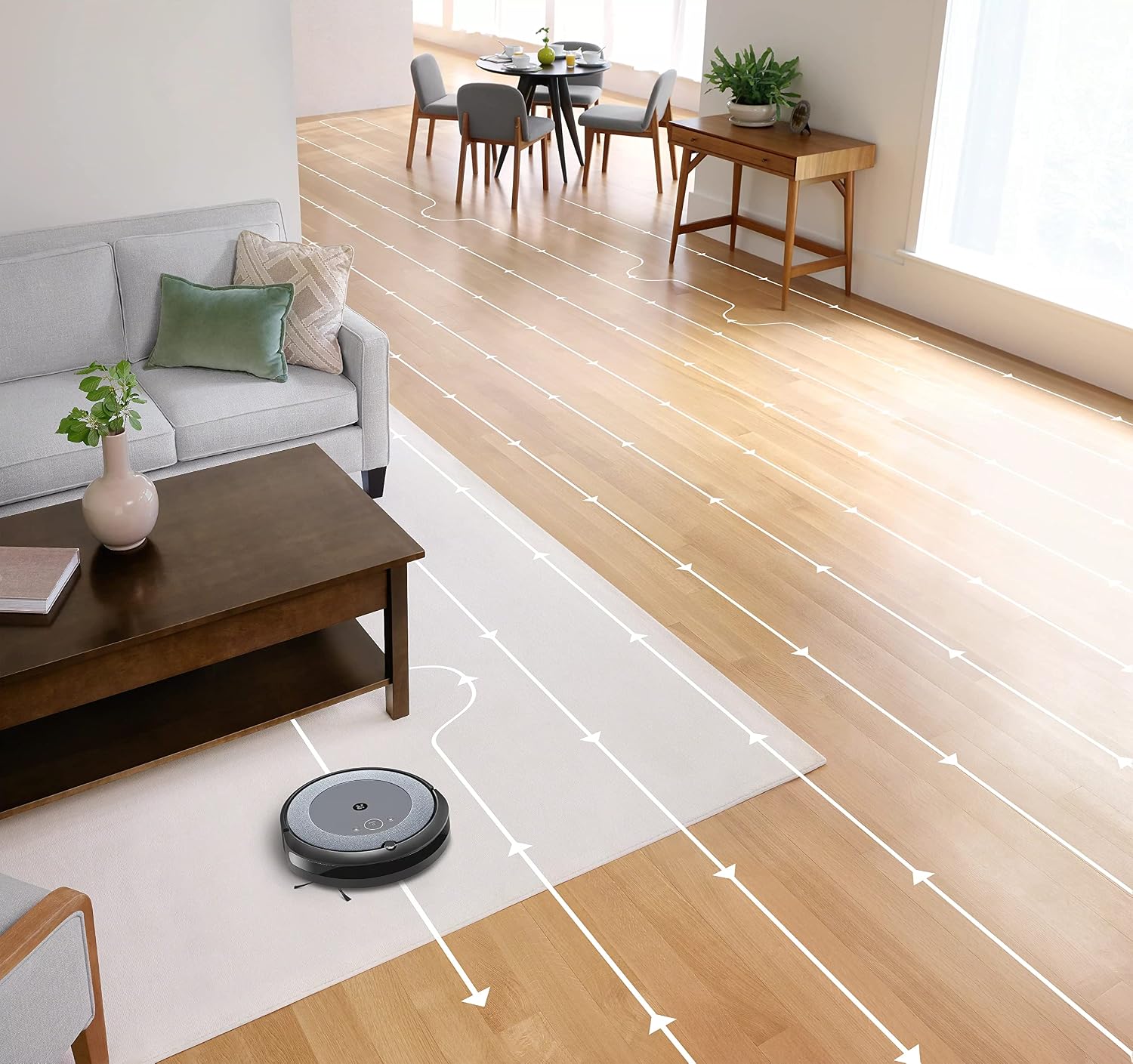
- Navigasyon Entelijan: The robot cleans in neat, efficient rows, adapting to different floor types including carpets and hard floors.
- Dual Multi-Surface Rubber Brushes: These brushes are designed to prevent tangles with pet hair and effectively pick up dirt and debris from various surfaces.
- Dirt Detect™ Technology: The robot uses acoustic and optical sensors to find dirtier areas and spends more time cleaning them.
- Automatic Dirt Disposal (with compatible Clean Base): If you have a compatible Clean Base (sold separately), the robot will automatically empty its dustbin into an enclosed bag, allowing for weeks of hands-free cleaning.


Antretyen
Regular maintenance ensures your Roomba i1 operates at peak performance. Always turn off the robot and disconnect it from the Home Base before performing any maintenance.
Vide Bin Pousyè a
- Press the bin release button and pull out the bin.
- Open the bin door and empty debris into a trash can.
- Tap the bin against the trash can to dislodge any trapped debris.
Cleaning the Filter (Cloth Type)
- Retire filtè a nan bwat pousyè tè a.
- Tap the filter against a trash can to remove debris. Do not wash the filter.
- Replace the filter every 2 months, or more frequently if you have pets.
Netwaye bwòs yo
- Pinch the yellow brush release tabs to lift the brush frame.
- Remove the brushes and remove any hair or debris wrapped around them or trapped beneath the yellow caps.
- Reinstall the brushes, ensuring they click into place.
Netwaye bwòs bò a
- Use a coin or small screwdriver to remove the screw holding the side brush.
- Remove the side brush and clean any hair or debris from the brush and its post.
- Réinstaller bwòs la bò ak sere boulon vis la.
Netwaye detèktè yo ak kontak chaje yo
- Wipe the charging contacts on the robot and Home Base with a clean, dry cloth.
- Wipe the cliff sensors (located on the bottom of the robot) and the front bumper sensor window with a clean, dry cloth.
Depanaj
If your Roomba i1 encounters an issue, the robot will play an audible alert and the light ring around the CLEAN button will flash. Consult the iRobot Home App for specific error messages and solutions.
Pwoblèm komen ak solisyon:
- Robo a pa chaje: Ensure the Home Base is plugged in and the robot is properly docked. Clean the charging contacts on both the robot and Home Base.
- Robot stuck or trapped: Clear obstacles from the robot's path. If it frequently gets stuck in the same area, consider using Virtual Wall Barriers (sold separately) or adjusting furniture.
- Pèfòmans netwayaj pòv: Empty the dust bin, clean or replace the filter, and clean the main brushes and side brush. Ensure the robot's sensors are clean.
- Robo a pa konekte ak Wi-Fi a: Ensure your Wi-Fi router is on and within range. Restart your router and the robot. Follow the Wi-Fi setup instructions in the iRobot Home App again.
- Robo k ap fè bri dwòl: Check the brushes and wheels for any trapped debris or hair. Clean them thoroughly.
For more detailed troubleshooting, refer to the iRobot Home App or the iRobot support websit.
Espesifikasyon
| Mak | iRobot |
| Non modèl | Roomba i1 (1152) |
| Karakteristik espesyal | Smart, Wi-Fi Connected Mapping |
| Koulè | Nwa/gri |
| Konpozan ki enkli | Robot Vacuum, Home Base, Line Cord, Battery, Side Brush, Filter, Dual Multi-Surface Rubber Brushes |
| Kalite filtre | Twal |
| Sous pouvwa | Batri Powered |
| Batri | 1 batri ityòm Ion (enkli) |
| Metòd kontwòl | App |
| Aparèy konpatib | Google Kay |
| Faktè fòm | Robotik |
| Dimansyon pwodwi | 13.5 x 3.6 x 13.4 pous |
| Pwa atik | 13.2 liv |
| Sifas Rekòmandasyon | Tapi, Planche Di |
| UPC | 657768820809 |
| ASIN | B0CPQ3RVDK |
Garanti ak sipò
This product is sold as a renewed item. Please refer to the specific warranty terms provided by the seller or Amazon Renewed at the time of purchase. For technical support, troubleshooting assistance, or to purchase replacement parts, please visit the official iRobot support website or contact iRobot customer service. You can also find helpful resources within the iRobot Home App.
Sipò sou entènèt: www.irobot.com/support