
1. Entwodiksyon
This manual provides essential information for the installation, operation, and maintenance of your SYLVOX 43-inch Outdoor Signage TV (Model SS43A0KAGD). Please read this manual thoroughly before using the product to ensure proper function and safety. This television is designed for commercial outdoor use, offering high brightness and robust weather protection.
2. Enfòmasyon sou Sekirite
Obsève prekosyon sekirite sa yo pou evite domaje pwodwi a epi asire sekirite itilizatè a:
- Pwovizyon pou pouvwa: Asire sous pouvwa a matche ak voltage kondisyon ki espesifye sou etikèt pwodwi a.
- Dlo ak imidite: While the TV is IP55 waterproof, avoid direct high-pressure water jets. Ensure all port covers are securely closed when not in use.
- Vantilasyon: Pa bloke ouvèti vantilasyon yo. Li nesesè pou gen ase sikilasyon lè pou anpeche li chofe twòp.
- Montaj: Use appropriate mounting hardware and follow VESA standards (400 x 200 mm) for secure installation. Professional installation is recommended for outdoor environments.
- Netwayaj: Dekonekte kouran an anvan ou netwaye. Sèvi ak yon twal mou.amp twal. Evite pwodwi chimik piman bouk yo.
- Tanperati: Operate the TV within the specified temperature range (-4°F to 113°F).
3. Pake kontni
Verifye ke tout atik yo prezan nan pakè a:
- SYLVOX 43-inch Outdoor Signage TV
- Kontwòl remote (2 pil AAA enkli)
- Kòd pouvwa
- Manyèl itilizatè a
- Kat Garanti
- Screws for mounting (BM8X14MM for full motion cantilever mount, BM8X28MM & Gasket for fixed wall mount)

Figure 3.1: Included accessories with the SYLVOX 43-inch Outdoor Signage TV.
4. Pwodwi souview
4.1 Karakteristik kle
- Ekspozisyon: 43-inch 4K UHD (3840x2160) LED display with 1000 nits brightness and 1.07 Billion Colors.
- Dirab: IP55 waterproof rating, corrosion-resistant and scratch-resistant metal casing. Designed for 7x24 hour operation with temperature protection.
- Sistèm operasyon: Linux-based system with pre-installed applications (Netflix, Pandora, Facebook, YouTube, Twitter). Note: Signage 1.0 series does not support downloading additional apps.
- Koneksyon: Built-in ATSC & NTSC tuners, Bluetooth, 2.4G WiFi.
- Odyo: Built-in speakers.

Figure 4.1: SYLVOX 43-inch Outdoor Signage TV in a commercial setting, showcasing its bright 4K display.

Figure 4.2: The TV's IP55 waterproof and wide temperature range capabilities.

Figure 4.3: Visual representation of 4K UHD picture quality and color depth.

Figi 4.4: Plis paseview of the Linux system and integrated features.
4.2 Pò ak Koneksyon
The TV offers a variety of input and output ports for versatile connectivity:
- RS232
- USB Input x 2 (USB 1.0, USB 2.0, USB 3.0 compatible)
- RJ45 (Ethernet)
- HDMIx3
- Soti optik
- Audio L/R In
- YPbPr In
- Antenna In (ATSC/NTSC Tuner)
- Ekoutè soti
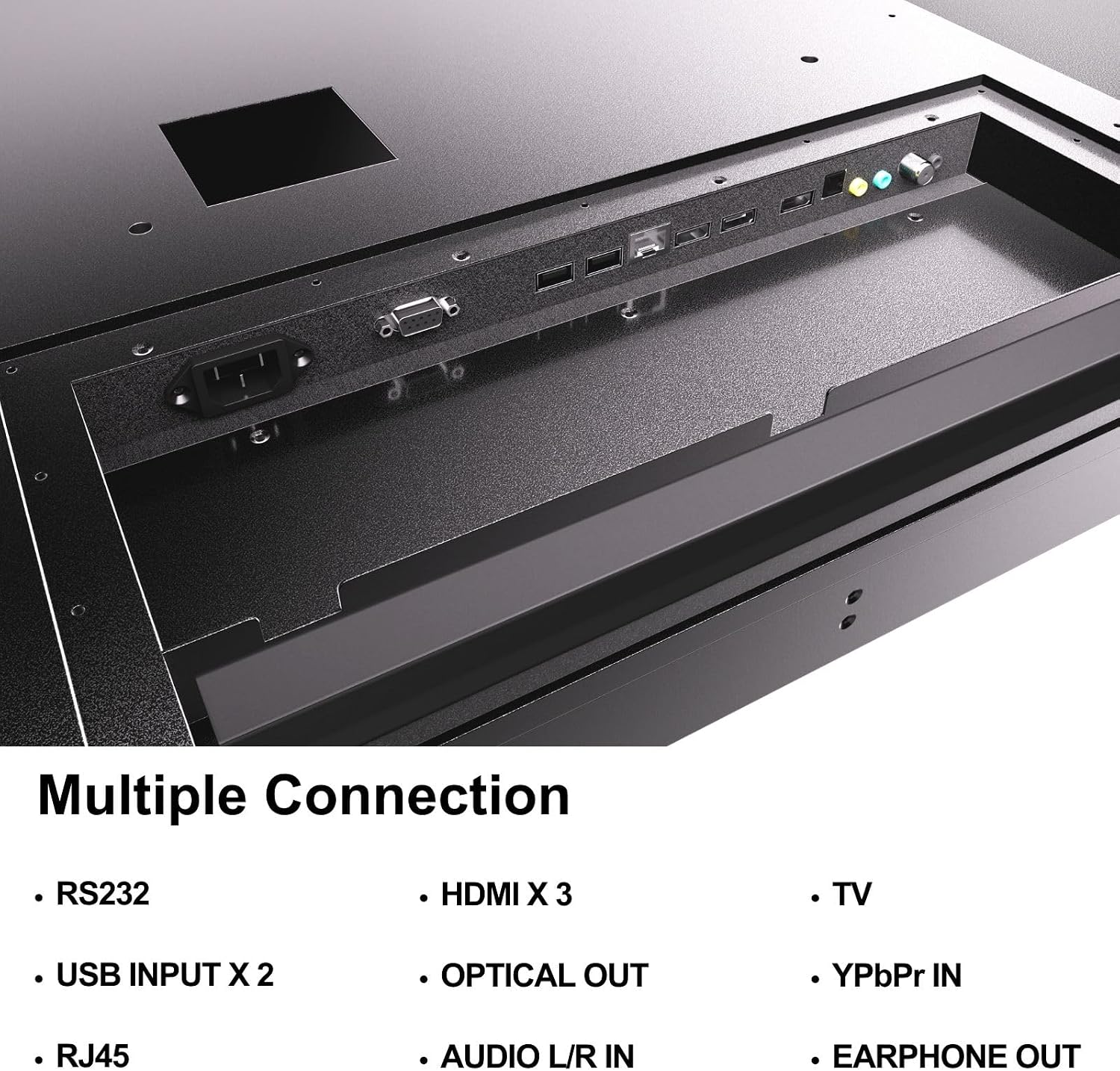
Figure 4.5: Rear panel connections of the SYLVOX Outdoor Signage TV.
5. Enstalasyon
5.1 Enstalasyon televizyon an
The SYLVOX Outdoor Signage TV supports wall mounting. Ensure the mounting surface is sturdy enough to support the TV's weight and is suitable for outdoor conditions.
- Chwazi yon kote: Chwazi yon kote ki bay pi bon sèvis la viewing and protection from extreme weather, even with the TV's waterproof rating.
- Enstale miray mòn: Attach a VESA-compatible wall mount (400 x 200 mm) to the desired location according to the mount manufacturer's instructions. Use the provided screws (BM8X14MM for full motion, BM8X28MM with gasket for fixed mount).
- Attach TV to Mount: Carefully lift the TV and secure it to the installed wall mount. Ensure all connections are tight and secure.
5.2 Premye pouvwa sou
- Konekte pouvwa: Plug the power cord into the TV's power input and then into a grounded outdoor-rated power outlet.
- Mete pil: Open the remote control battery compartment and insert the two AAA batteries, observing polarity.
- Pouvwa sou: Peze bouton pouvwa a sou kontwòl remote la oswa televizyon an.
- Inisyal Enstalasyon Sòsye: Follow the on-screen instructions to select language, time zone, and perform initial channel scanning.
5.3 Rezo Koneksyon
To access smart TV features and streaming applications, connect the TV to your network.
- Koneksyon Wi-Fi: Navigate to the TV's settings menu, select 'Network', then 'Wi-Fi'. Choose your network from the list and enter the password.
- Koneksyon Ethernet: Connect an Ethernet cable from your router to the RJ45 port on the TV. The TV will automatically detect the wired connection.
- Bluetooth: For connecting audio devices, go to the Bluetooth settings, enable Bluetooth, and pair with your desired device.
6. Operasyon Enstriksyon
6.1 Fonksyon Televizyon Debaz yo
- Pouvwa: Peze a Pouvwa bouton sou telekòmand lan pou limen oswa etenn televizyon an.
- Sous Antre: Peze a Antre button to cycle through available input sources (HDMI 1/2/3, TV, YPbPr, USB).
- Volim: Sèvi ak la Volim +/- bouton pou ajiste nivo son an.
- Chèn: Sèvi ak la Chanèl +/- buttons to change channels when using the built-in tuner.
- Navigasyon: Sèvi ak flèch direksyon yo ak OK bouton pou navige nan meni yo.
6.2 Karakteristik televizyon entelijan
The TV runs on a Linux operating system and comes with several pre-installed applications:
- Access the home screen to view and launch applications like Netflix, Pandora, Facebook, YouTube, and Twitter.
- Use the remote control's dedicated app buttons (if available) for quick access.
- Note that the Signage 1.0 series does not support downloading additional applications.
6.3 Screencasting (Android Only)
The TV supports screencasting from Android mobile phones:
- Ensure your Android device and the TV are connected to the same Wi-Fi network.
- On your Android phone, enable the screen mirroring or screencasting feature (names may vary by device, e.g., 'Smart View', 'Cast', 'Wireless Display').
- Select your SYLVOX TV from the list of available devices.
6.4 Vertical/Horizontal Display
The TV can be installed and operated in both horizontal (landscape) and vertical (portrait) orientations. When using the screen vertically, the display direction is adjusted by the input device or content source.
7. Antretyen
Proper maintenance ensures the longevity and performance of your outdoor TV:
- Netwaye ekran an: Siye ekran an dousman avèk yon twal mou ki pa gen pousyè. Pou mak ki difisil pou retire, siye l yon ti kras.ampRense twal la avèk dlo. Pa flite pwodui netwayaj yo dirèkteman sou ekran an.
- Netwayaj C aasing: Sèvi ak yon mou, damp cloth to clean the metal casing. Evite pwodui netwayaj oswa solvan abrazif.
- Kouvèti pò yo: Regularly check that all unused port covers are securely sealed to maintain the IP55 waterproof rating.
- Verifikasyon Anviwònman: Periodically inspect the TV and mounting hardware for any signs of wear, corrosion, or damage, especially after severe weather conditions.
- Mizajou lojisyèl: Check for available software updates through the TV's settings menu to ensure optimal performance and security.
NAN. Depanaj
If you encounter issues with your SYLVOX Outdoor Signage TV, refer to the following common problems and solutions:
| Pwoblèm | Kòz posib | Solisyon |
|---|---|---|
| Pa gen pouvwa | Power cord disconnected; no power from outlet; remote batteries dead. | Check power cord connection; test outlet; replace remote batteries. |
| Pa gen imaj, men gen son | Sous opinyon ki pa kòrèk la chwazi; pwoblèm ak aparèy ekstèn lan. | Press 'Input' button to select correct source; check external device connections. |
| Pa gen son, men imaj la la | Volim nan twò ba oswa twò ba; pwoblèm ak aparèy odyo ekstèn. | Unmute volume or increase level; check audio cables for external devices. |
| Wi-Fi connection unstable or disconnected | Router issue; TV too far from router; incorrect password. | Restart router; move TV closer or use a Wi-Fi extender; re-enter Wi-Fi password. |
| Remote kontwòl pa travay | Batteries dead or incorrectly inserted; obstruction between remote and TV. | Replace batteries; ensure clear line of sight to TV's IR receiver. |
If the problem persists after trying these solutions, please contact SYLVOX customer support.
9. Espesifikasyon
| Non modèl | SS43A0KAGD |
| Gwosè ekran | 43 pous |
| Teknoloji ekspozisyon | dirije |
| Rezolisyon | 4K (3840x2160) |
| Rafrechisman pousantaj | 60 Hz |
| Maximum Display Brightness | 1000 nit |
| Pwopòsyon kontras | 3000:1 |
| Tan repons | 8 Milisegond |
| Evalyasyon ki enpèmeyab | IP55 |
| Sistèm operasyon | Linux |
| Koneksyon Teknoloji | Wireless (Bluetooth, Wi-Fi), Wired (HDMI, USB, RJ45, RS232) |
| Antre odyo | HDMI, Optical, USB, Audio L/R In |
| Fòma siyal | ATSC, NTSC |
| Total Number of HDMI Ports | 3 |
| Total pò USB | 2 |
| Dimansyon pwodwi (D x W x H) | 3.4"D x 38.6"W x 22.4"H |
| Estanda Mòn VESA | 400 x 200 mm |
| Wattage | 120 Watt-èdtan |
| Manifakti | Kontech Electronics Co., Ltd. |
| UPC | 810079224838 |
10. Garanti ak sipò
10.1 Enfòmasyon sou Garanti
SYLVOX provides a Garanti manifakti 2 zan for this product. This warranty covers defects in materials and workmanship under normal use. Please retain your proof of purchase for warranty claims.
10.2 Sipò pou Kliyan
If you require assistance with installation, operation, troubleshooting, or warranty service, please contact SYLVOX customer support. We recommend checking the product upon receipt to ensure it is in good condition and functions normally.
For further support, please visit the official SYLVOX website or refer to the contact information provided on your warranty card.