
1. Entwodiksyon
This manual provides essential information for the safe and efficient operation of your Devoko 0428-1822 Height Adjustable Electric Standing Desk. This desk is designed to promote healthy working habits by allowing seamless transitions between sitting and standing positions. It features a spacious 180 x 80 cm desktop, integrated USB A charging ports, and a cable management system for an organized workspace. Please read this manual thoroughly before assembly and use, and retain it for future reference.

Image 1.1: The Devoko Electric Standing Desk in a typical office setup, showcasing its large surface area and integrated features.
2. Enstriksyon Sekirite
- Asire ke tout eleman yo byen tache anvan ou itilize.
- Kenbe timoun ak bèt kay lwen biwo a pandan w ap opere pou evite blesi.
- Do not overload the desk. Refer to the specifications for weight limits.
- Evite mete likid dirèkteman sou panèl kontwòl la oswa toupre konpozan elektrik yo.
- Dekonekte kouran an anvan ou netwaye oswa fè nenpòt antretyen.
- Do not attempt to modify the desk's electrical or mechanical components. Contact support for assistance.
- The desk is equipped with an anti-collision system. Ensure the area around the desk is clear during height adjustments to prevent damage or injury.
3. Pake kontni
Tanpri verifye ke tout konpozan yo prezan epi yo pa domaje anvan ou kòmanse asanblaj la. Si gen nenpòt pyès ki manke oswa ki domaje, kontakte sèvis kliyan.
- Desktop sections (typically 3 pieces for this model)
- Desk frame (legs, crossbar)
- Electric motor and control box
- Control panel with USB A charging ports
- Plato jesyon kab
- 360° Swivel Wheels (pre-installed or to be attached)
- Kwòk kas ekoutè
- Assembly hardware (screws, bolts, Allen wrenches)
- Adaptè pouvwa ak kab
- Manyèl itilizatè
4. Enstalasyon ak Asanble
Assembly typically takes approximately 30 minutes. Tools required for assembly are included. An electric screwdriver may expedite the process for attaching the desktop sections.
- Depake konpozan: Retire tout pyès yo nan anbalaj la avèk prekosyon epi mete yo sou yon sifas pwòp e mou pou evite reyur.
- Asanble ankadreman biwo a: Follow the included assembly diagram to connect the desk legs to the crossbar and motor assembly. Ensure all bolts are tightened securely.
- Tache Desktop la: Place the desktop sections onto the assembled frame. Align the pre-drilled holes and secure the desktop to the frame using the provided screws.
- Enstale Panèl Kontwòl la: Mount the control panel to the underside of the desktop in a convenient location. Connect the control panel cable to the motor control box.
- Install Cable Management Tray: Attach the cable management tray to the underside of the desk to organize power strips and cables.
- Mete zen pou kas ekoutè a: Secure the headphone hook to the desired location on the desk frame.
- Konekte pouvwa: Plug the power adapter into the control box and then into a wall outlet.

Image 4.1: An illustration of the desk frame assembly, highlighting the ease of installation with included tools.

Image 4.2: The integrated cable management tray, designed to keep power cords and adapters neatly organized beneath the desktop.
5. Operasyon Enstriksyon
5.1. Ajisteman Wotè
Sèvi ak la Up (▲) ak Desann (▼) buttons on the control panel to adjust the desk height. The desk can be adjusted smoothly and quietly within a range of 72 cm to 118 cm.
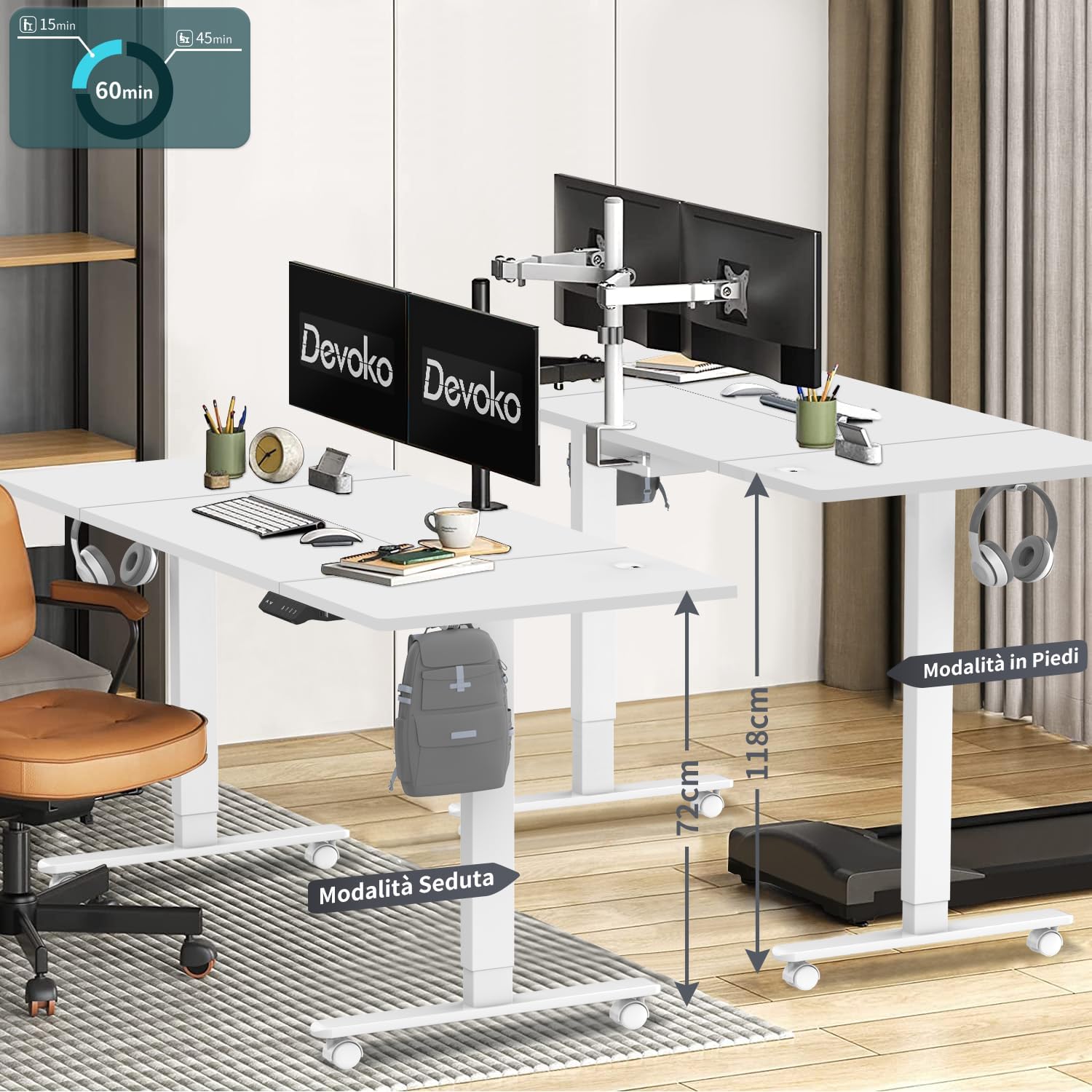
Image 5.1: The desk illustrating its adjustable height range, suitable for both sitting (72 cm) and standing (118 cm) positions.
5.2. Prereglaj Memwa
The control panel features three memory keys (1, 2, 3) to save your preferred sitting and standing heights.
- Pou konsève yon wotè: Adjust the desk to your desired height. Press the "S" button, then press one of the number buttons (1, 2, or 3) within 3 seconds. The display will confirm the setting.
- To Use a Saved Height: Press the corresponding number button (1, 2, or 3). The desk will automatically move to the saved height.
5.3. USB A Charging Ports
The control panel includes integrated USB A charging ports for convenient charging of mobile devices. Simply connect your device's USB cable to the port. Note: While the product description specifies USB A, some visual representations of the control panel may show a USB-C port. Please refer to your specific product's control panel.
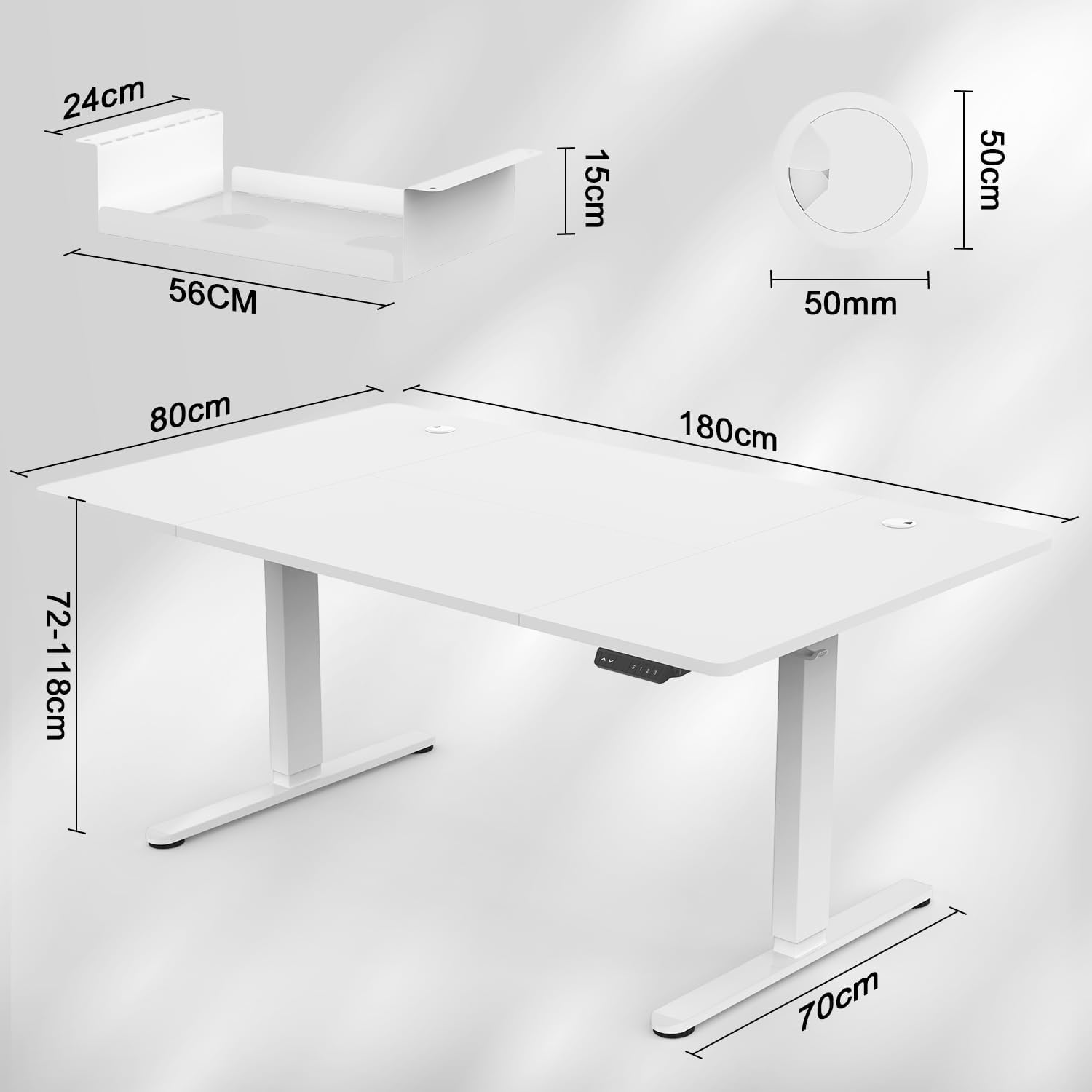
Image 5.2: The intelligent multifunction control panel, featuring memory presets, up/down controls, and a charging port (shown here as USB-C, but product features USB-A).
5.4. Sistèm Anti-Kolizyon
The desk is equipped with a sensitive anti-collision system that detects reaction forces. If the desk encounters an obstruction during height adjustment, it will automatically stop and reverse slightly to prevent damage or injury. Ensure the area around the desk is clear during operation for optimal safety.
5.5. 360° Wheels
The desk is fitted with 360° swivel wheels, allowing for easy mobility and repositioning within your workspace. Lock the wheels when the desk is in its desired position to ensure stability.
6. Antretyen
- Netwayaj: Siye biwo a ak ankadreman an avèk yon twal mou.amp twal. Evite pwodui netwayaj abrazif oswa pwodui chimik ki fò.
- Enspeksyon: Tcheke tout vis ak boulon yo detanzantan pou asire yo rete byen sere. Sere boulon yo ankò si sa nesesè.
- Jesyon kab: Regularly inspect cables for wear or damage. Ensure cables are neatly organized within the cable management tray to prevent snagging.
NAN. Depanaj
| Pwoblèm | Kòz posib | Solisyon |
|---|---|---|
| Biwo a pa deplase. | Power cable disconnected; control panel cable loose; motor error. | Check power connections. Ensure control panel cable is securely plugged in. Unplug the desk for 10 seconds and plug it back in to reset. |
| Biwo a ap deplase yon fason inegal oswa li fè yon bri dwòl. | Uneven load; loose connections; obstruction. | Ensure weight is evenly distributed. Check all assembly screws. Clear any obstructions. |
| Sistèm anti-kolizyon an aktive souvan. | Obstruction in the path of movement. | Ensure the area around the desk is clear of objects during height adjustment. |
| Pò chaje USB a pa fonksyone. | Device not compatible; cable issue; power issue. | Try a different device or cable. Ensure the desk is powered on. |
If you encounter issues not listed here or require further assistance, please contact Devoko customer support.
8. Espesifikasyon

Image 8.1: Detailed dimensions of the desk, including desktop size (180x80 cm) and height range (72-118 cm).

Imaj 8.2: Yon imaj anlè view confirming the 180 cm by 80 cm desktop dimensions.
- Modèl: 0428-1822
- Mak: Devoko
- Dimansyon biwo: 180 cm (longè) x 80 cm (lajè)
- Epesè Desktop: 15 mm
- Ranje wotè: 72 cm a 118 cm
- Mekanis leve: Elektrik
- Vitès leve: 20 mm/s
- Nivo bri: Mwens pase 45 dB
- Sètifikasyon: TÜV, CE
- Karakteristik ki enkli: USB A Charging Ports, Cable Management Tray, 360° Wheels, Headphone Hook, Anti-Collision System, 3 Height Memory Keys
- Materyèl ankadreman: Metal
- Pwa atik: 35 Kilogram
- Asanble obligatwa: Wi
9. Garanti ak sipò
Garanti: The Devoko 0428-1822 Electric Standing Desk comes with a 5-year warranty on the motor and table frame, ensuring long-term reliability and performance.
Retounen: A 30-day unconditional return policy is provided.
Sipò Kliyan: For any installation issues, operational questions, or warranty claims, please contact Devoko customer support through the Amazon platform. Our team is committed to responding within 24 hours to assist you.