
1. Entwodiksyon
This manual provides detailed instructions for the installation, operation, and maintenance of your EVTSCAN Digital Thermoregulator. This device is designed to precisely control heating equipment, such as wall-mounted boilers and gas boilers, ensuring a stable and energy-efficient temperature environment. Please read this manual thoroughly before installation and use to ensure proper function and safety.
2. Enfòmasyon sou Sekirite
Always observe the following safety precautions to prevent damage to the device or personal injury:
- Asire ke ekipman pou pouvwa a dekonekte anvan enstalasyon oswa antretyen.
- Se yon pwofesyonèl kalifye ki ta dwe fè enstalasyon an si ou pa gen sèten sou fil elektrik yo.
- Pa ekspoze aparèy la nan dlo oswa imidite twòp.
- Use only the specified battery type (2 AA batteries) and ensure correct polarity.
- Kenbe aparèy la lwen materyèl ki ka pran dife.
3. Pwodwi souview
The EVTSCAN Digital Thermoregulator features a clear LCD display for easy monitoring and a simple interface for temperature control. Its compact design allows for discreet integration into your living space.

Figi 3.1: Devan view of the Digital Thermoregulator. The LCD screen displays current settings and room temperature, with a rotary knob below for adjustments.
Konpozan kle:
- Ekspozisyon LCD: Shows set temperature, room temperature, time, and operational icons.
- Control Knob/Button: Yo itilize li pou navige nan meni yo epi ajiste paramèt yo.
- Lòj batri: Located on the rear or side for 2 AA batteries.
- Tèminal fil elektrik: For connection to the heating system.
4. Espesifikasyon
| Karakteristik | Spesifikasyon |
|---|---|
| Modèl | EVTSCANok0g9ct2zq |
| Mòd pouvwa | 2 pil AA (pa enkli) |
| Screen Accuracy | 0.5 ℃ |
| Sonde Capteur | NTC (10k) 1% |
| Kontak kapasite | Greater than 30-230 V DC working voltage, lower current. Reference: 5 A 30 V (HF relay) or 2 A 30 V (NEC relay) |
| Tanperati Display Range | 1 a 40 ℃ |
| Ranje Ajisteman Tanperati Defo | 5 a 35 ℃ |
| Fonksyone Tanperati Range | 0 a 50 ℃ |
| Kouri Pwogram | Set once a week |
| Sòti | Chanje relè |
| Materyèl | Polycarbonate ignifuge |
| Pwa | 170 g |
5. Enstalasyon ak Enstalasyon
The EVTSCAN Digital Thermoregulator is designed for simple installation. Follow these steps carefully:
5.1. Debalaj ak Enspeksyon
Retire tout konpozan yo nan anbalaj la avèk prekosyon. Verifye ke tout atik ki nan lis nan sa ki nan pake a prezan epi yo pa domaje.
- 1 Digital Temperature Controller
- 2 Vis
5.2. Enstalasyon batri
The device requires 2 AA batteries for operation. These are not included in the package.
- Locate the battery compartment on the back of the thermoregulator.
- Louvri kouvèti lòj batri a.
- Mete 2 pil AA, asire polarite kòrèk (+/-).
- Fèmen kouvèti lòj batri a byen.

Figi 5.1: Angle view of the thermoregulator, illustrating its compact size and potential location for battery access or mounting points.
5.3. aliye ak câblage
The thermoregulator is designed for wall mounting. Ensure the power to your heating system is turned off before proceeding with wiring.
- Chwazi yon bon kote sou yon mi enteryè, lwen limyè solèy dirèk, kouran lè, oswa sous chalè ki ta ka afekte lekti tanperati a.
- Mount the backplate (if detachable) to the wall using the provided screws.
- Connect the thermoregulator to your boiler or heating system according to the wiring diagram provided with your boiler and the thermoregulator's terminal markings. This typically involves connecting the switching relay output to the boiler's control input.
- Secure the thermoregulator onto the mounted backplate.
Nòt: For wiring, consult a qualified electrician if you are unfamiliar with electrical installations.
6. Operasyon Enstriksyon
The EVTSCAN Digital Thermoregulator uses a microcomputer control technology to maintain your desired temperature efficiently.
6.1. Powering On and Initial Display
Once batteries are installed, the LCD display will illuminate, showing the current room temperature, set temperature, and time.
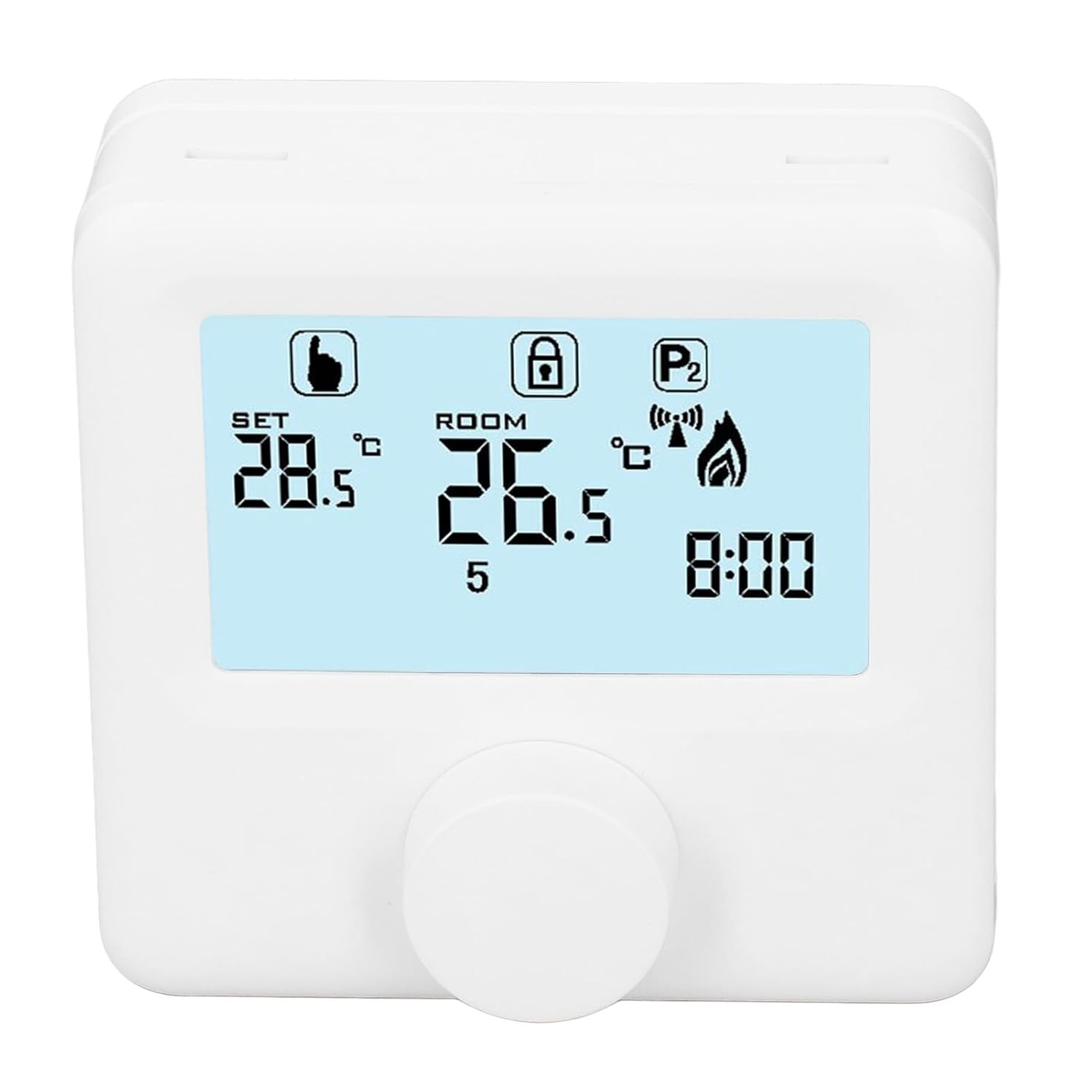
Figi 6.1: Detaye view of the LCD display. It shows the set temperature (SET), room temperature (ROOM), a lock icon, a program icon (P2), a signal icon, a flame icon indicating heating, and the current time.
6.2. Mete tanperati a
Pou ajiste tanperati a vle:
- Rotate the control knob to increase or decrease the set temperature. The "SET" value on the display will change accordingly.
- The device will automatically activate or deactivate the heating system to maintain the set temperature within the range of 1 to 40 ℃. The default adjustment range is 5 to 35 ℃.
6.3. Orè Pwogramasyon chak semèn
The thermoregulator supports a weekly programming schedule. This allows you to set different temperatures for various times of the day across the week.
- Press and hold the control knob (or a designated button, if available) to enter programming mode.
- Use the control knob to navigate through days of the week and time slots.
- Adjust the desired temperature for each programmed period.
- Confirm your settings to save the weekly program. The device will then operate according to this schedule.
6.4. Understanding Display Icons
- Mete: Indicates the target temperature you have set.
- CHANM: Montre tanperati anbyen aktyèl chanm nan.
- Ikòn Flanm dife: Li limen lè sistèm chofaj la aktif.
- Ikòn fèmen: May indicate a keypad lock feature to prevent accidental changes.
- P1/P2 Icon: Indicates the current program mode (e.g., P1 for comfort, P2 for economy, or specific weekly program segments).
- Ikon siyal: May indicate wireless communication status if applicable.
7. Antretyen
Regular maintenance ensures the longevity and optimal performance of your thermoregulator.
- Netwayaj: Siye aparèy la avèk yon twal mou epi sèk. Pa sèvi ak pwodui netwayaj abrazif oswa solvan.
- Ranplasman batri: Replace batteries when the low battery indicator appears on the display. Always replace both batteries simultaneously with new AA batteries.
- Zòn Capteur: Ensure the temperature sensor area (usually a small vent on the device) is free from dust and obstructions for accurate readings.
NAN. Depanaj
If you encounter issues with your EVTSCAN Digital Thermoregulator, refer to the following common problems and solutions:
- Ekspozisyon an vid:
- Tcheke si pil yo byen enstale.
- Ranplase ansyen pil ak nouvo pil.
- Sistèm chofaj la pa reponn:
- Ensure the thermoregulator is powered on and the flame icon is displayed when heating is expected.
- Verify wiring connections to the boiler are secure and correct.
- Check the boiler's power supply and status.
- Ensure the set temperature is higher than the current room temperature.
- Lekti tanperati ki pa egzak:
- Ensure the device is not exposed to direct sunlight, drafts, or heat sources.
- Clean any dust or debris from the sensor area.
- Cannot change settings:
- Check if the lock icon is displayed. If so, refer to the operating instructions to unlock the keypad.
Si pwoblèm nan kontinye, kontakte sipò kliyan.
9. Garanti ak sipò
Specific warranty information for this product is not provided in the available data. Please refer to the product packaging or the retailer's websit pou detay garanti.
For technical support or further assistance, please contact EVTSCAN customer service through their official channels or the retailer from whom you purchased the product.
You can visit the EVTSCAN store on Amazon for more information: EVTSCAN Store