
Entwodiksyon
Thank you for choosing the Lovskoo 6D Colorful Wired Gaming Mouse. This manual provides essential information for setting up, operating, and maintaining your new gaming mouse. Designed for precision and comfort, this mouse features adjustable DPI, vibrant lighting, and a durable build for an enhanced computing experience.
Enstalasyon
Konekte sourit ou
The Lovskoo 6D Colorful Wired Gaming Mouse utilizes a standard USB-A connection for plug-and-play functionality. No additional drivers are typically required for basic operation on most operating systems.
- Locate an available USB-A port on your computer (desktop, laptop, or compatible device).
- Mete konektè USB kab sourit la byen fèm nan pò USB-A a.
- The mouse should be automatically recognized by your operating system, and the colorful breathing lights will illuminate.
- You can begin using your mouse immediately.
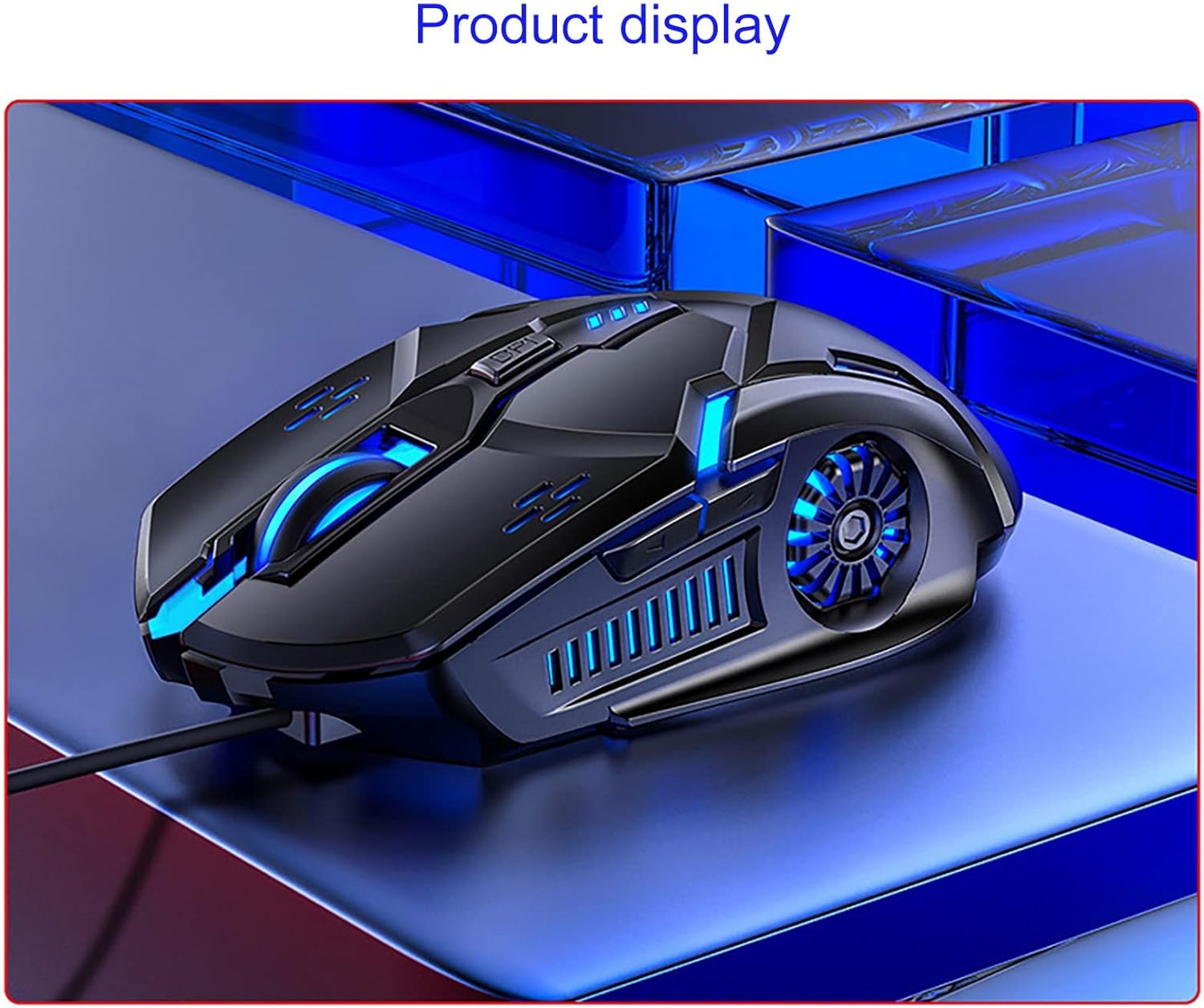
Visual Guide: Product Overview
Enstriksyon Operasyon
DPI Ajisteman
The mouse features a four-gear DPI (Dots Per Inch) one-button switch, allowing you to adjust sensitivity on the fly. This is particularly useful for adapting to different screen sizes or game requirements.
- 1200 DPI: Indicated by one flash. Suitable for general use and precise tasks.
- 1600 DPI: Indicated by two flashes. A balanced setting for everyday computing and light gaming.
- 2400 DPI: Indicated by three flashes. Ideal for faster cursor movement in gaming or large displays.
- 3200 DPI: Indicated by four flashes. Provides maximum speed for competitive gaming or rapid navigation across multiple monitors.

6D Key Layout and Lighting
The mouse features a 6D key layout for enhanced functionality and an upgraded seven-color breathing light system.
- Bouton estanda: Left Click, Right Click, and Scroll Wheel.
- Bouton DPI: Located behind the scroll wheel for quick sensitivity adjustments.
- Bouton bò: Two additional buttons on the side for forward and back navigation, or customizable functions in supported software.
- Seven-Color Breathing Light: The mouse features dynamic RGB lighting. This lighting can be turned off using a combination key (refer to specific software or manual for exact key combination if available, otherwise it cycles automatically).

Karakteristik kle
- Four-Gear DPI Adjustment: Easily switch between 1200, 1600, 2400, and 3200 DPI settings for optimal control across various applications and games.
- Seven-Color Breathing Light: Enjoy an enhanced visual experience with dynamic, upgraded seven-color lighting. The lighting can be toggled off if preferred.
- Game-Level Micro-Motion: Equipped with white dot micro-motion switches for enhanced durability, strong rebound, and consistent tactile feedback over extended use.
- High-Speed Laser Game Engine: Provides accurate positioning and reliable tracking on a variety of surfaces, minimizing skipped frames.
- 6D Key Layout: Features a newly upgraded layout with standard buttons plus a DPI switch and two convenient side buttons for faster daily operation and gaming.
Antretyen
To ensure the longevity and optimal performance of your Lovskoo gaming mouse, follow these simple maintenance guidelines:
- Netwayaj: Sèvi ak yon twal mou epi sèk pou siye sifas sourit la. Pou pousyè tè ki difisil pou retire, yon ti kras siye.amp cloth can be used, ensuring no moisture enters the internal components. Avoid harsh chemicals or abrasive cleaners.
- Swen kab: Avoid sharp bends or excessive pulling on the USB cable. Store the cable neatly to prevent tangling and damage.
- Depo: Lè w pa ap itilize sourit la, sere l nan yon anviwònman pwòp epi sèk, lwen tanperati ekstrèm ak limyè solèy dirèk.
Depanaj
If you encounter any issues with your Lovskoo gaming mouse, please refer to the following common solutions:
- Sourit la pa reponn:
- Asire w kab USB a byen branche nan yon pò USB ki fonksyone sou òdinatè w la.
- Eseye branche sourit la nan yon lòt pò USB.
- Rekòmanse òdinatè w lan.
- Mouvman Kurseur Iregilye:
- Netwaye detèktè optik ki anba sourit la avèk yon twal mou epi sèk.
- Asire w ke w ap itilize sourit la sou yon sifas ki apwopriye (pa egzanp, yon tapi sourit). Evite sifas ki reflete anpil limyè oswa transparan.
- Adjust the DPI setting to a lower sensitivity if the cursor is too fast or jumpy.
- Limyè pa travay:
- Verifye ke sourit la byen konekte ak òdinatè w la.
- Check if the lighting has been intentionally turned off via a combination key (if applicable).
Si etap sa yo pa rezoud pwoblèm nan, tanpri kontakte sèvis kliyan pou plis asistans.
Espesifikasyon
| Karakteristik | Detay |
|---|---|
| Dimansyon pwodwi | 4.85 x 2.75 x 0.1 pous |
| Pwa atik | 4 ons |
| Koneksyon Teknoloji | USB (branche) |
| Anviwònman DPI | 1200 / 1600 / 2400 / 3200 (Ajustab) |
| Teknoloji deteksyon mouvman | Optik |
| Karakteristik espesyal | Portable, Colorful Breathing Light, 6D Buttons |
| Koulè | Multikoulè |
| Nimewo Modèl | Lovskoo |
Garanti ak sipò
For warranty information or technical support, please refer to the product packaging or contact Lovskoo customer service directly. Keep your purchase receipt for any warranty claims.