
Entwodiksyon
Thank you for choosing the Devoko 140x60cm RGB LED Gaming Desk. This manual provides detailed instructions for the assembly, operation, and maintenance of your new gaming desk. Please read this manual thoroughly before assembly and use to ensure proper function and safety.

Image: The Devoko 140x60cm RGB LED Gaming Desk, fully assembled and set up with gaming equipment, highlighting its design and LED features.
Enfòmasyon sou Sekirite
AVÈTISMAN:
- Do not exceed the recommended weight limit of 60 kg (132 lbs) on the desktop. Exceeding this limit may cause instability and damage.
- Ensure the desk is placed on a stable, level surface before use.
- Kenbe tout ti pyès ak materyèl anbalaj lwen timoun yo pou evite danje toufe.
- Pa kanpe oswa chita sou biwo a.
- Evite ekspoze biwo a anba reyon solèy dirèk oswa tanperati ekstrèm.
- Tcheke tout vis ak koneksyon yo regilyèman pou asire yo rete sere.
Kontni pake
Before beginning assembly, please verify that all components are present and undamaged. Refer to the detailed parts list provided in your physical manual. Typical components include:
- Desktop sections (carbon fiber surface)
- Z-shaped leg frames
- Crossbars and support beams
- LED light strips and controller
- Kontwòl remote pou limyè LED
- Kwòk kas ekoutè
- Detantè tas
- Materyèl asanblaj (vis, boulon, kle Allen)
- Klip jesyon kab
Enstalasyon ak Asanble
Follow these steps carefully for proper assembly. It is recommended to assemble the desk with two people.
- Depake epi idantifye pyès yo: Mete tout konpozan yo sou yon sifas pwòp e mou pou evite reyur. Idantifye chak pyès lè w sèvi ak lis pyès yo bay la.
- Assemble the Z-shaped Legs: Attach the horizontal support beams to the Z-shaped leg frames using the provided hardware. Ensure all connections are secure but do not fully tighten screws until the entire frame is assembled.
- Tache seksyon Desktop yo: Carefully place the carbon fiber desktop sections onto the assembled frame. Align the pre-drilled holes and secure the desktop to the frame using the appropriate screws. Once all desktop sections are in place, fully tighten all screws on the frame and desktop.
- Install LED Lights and Controller:
The LED light strips are pre-installed. Connect the manual controller to the desk frame using self-tapping screws. Connect the extension cable to the manual controller, then connect the other end of the extension cable to the LED strip. Secure all cables with the provided fasteners.
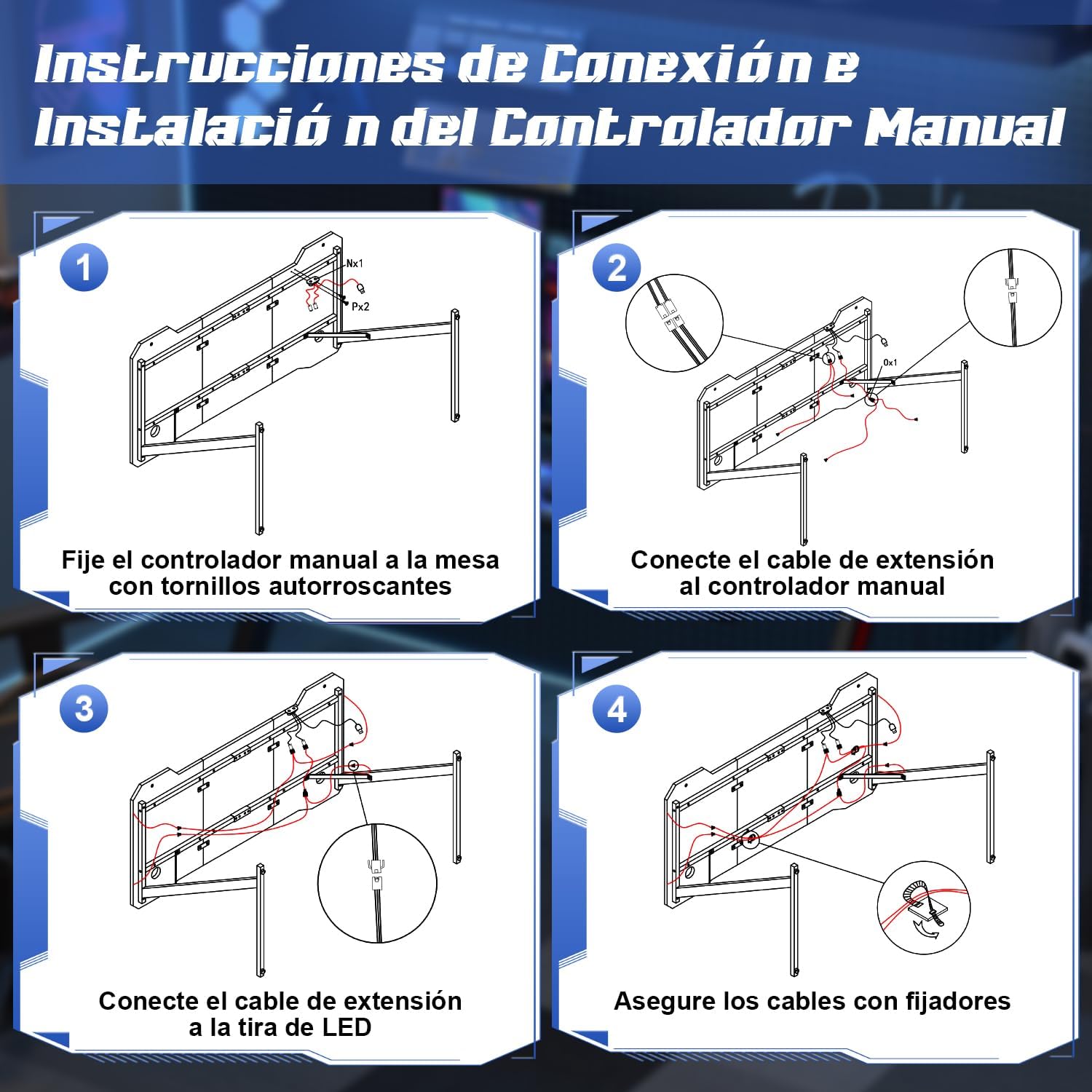
Image: Step-by-step diagram for connecting and installing the LED controller and cables.
- Tache Pwodwi pou Telefòn: Install the cup holder and headphone hook to the designated locations on the desk. These are designed to keep your gaming area organized.
- Nivo Biwo a: The desk features adjustable feet. Adjust each foot individually to ensure the desk is stable and level on your floor.
Enstriksyon Operasyon
Ki ap dirije sistèm ekleraj
Your Devoko gaming desk features integrated RGB LED lighting with multiple modes, controllable via a manual touch panel and a remote control.

Imaj: Detaye view of the manual LED control panel on the desk.
- Top Button (Touch Control): Controls the light modes. Offers 26 flash modes and 6 fixed color modes. Tap to cycle through modes.
- Bottom Button (Touch Control): Power switch and brightness regulator.
- Long Press: Turns the LED lights On/Off.
- Kout Press: Adjusts brightness. Cycles through 8 levels of brightness.
- Kontwòl Remote: Use the provided remote control to adjust colors, modes, and brightness from a distance. Refer to the remote control's specific instructions for detailed functions.

Image: The LED remote control for adjusting light settings.
Sèvi ak Pwodwi pou Telefòn
- Detantè tas: Use the integrated cup holder to securely place your beverages, preventing spills on your desk surface.
- Kwòk pou ekoutè: Hang your gaming headphones on the hook to keep them easily accessible and off the desktop, reducing clutter.
- Jesyon kab: Utilize the provided cable management clips to route and organize your cables, maintaining a tidy and safe workspace.

Image: Integrated cup holder and headphone hook for organized use.
Antretyen
Proper care will extend the life and appearance of your Devoko gaming desk.
- Netwaye Desktop la: The carbon fiber surface is waterproof, heat-resistant, and scratch-resistant, making it easy to clean. Use a soft, damp Siye twal la avèk savon dou ak dlo pou siye sifas la. Evite pwodui netwayaj abrazif oswa pwodui chimik ki ka domaje fini an.
- Antretyen ankadreman: Siye ankadreman metal la avèk yon twal sèk oswa yon ti kras mouye.amp twal pou retire pousyè.
- Limyè ki ap dirije: Ensure the LED strips and controller are kept dry. Do not attempt to disassemble the LED components.
- Tèks regilye: Tcheke tout vis ak boulon yo detanzantan pou asire yo byen sere. Sere yo ankò si sa nesesè pou kenbe estabilite.

Image: Demonstrating the scratch-resistant and easy-to-clean properties of the carbon fiber desktop.
Depanaj
| Pwoblèm | Kòz posib | Solisyon |
|---|---|---|
| Biwo a ap tranble/enstab. | Planche inegal; vis ki lach. | Adjust the leveling feet at the bottom of the legs. Check and tighten all assembly screws. |
| Limyè LED yo pa limen. | Power cable disconnected; remote battery dead; controller malfunction. | Ensure the power cable for the LED lights is securely connected. Check the remote control battery and replace if necessary. Verify all connections to the LED controller. |
| Limyè LED yo pa reponn a telekòmand lan. | Remote battery low; obstruction between remote and receiver; remote not paired. | Replace remote battery. Ensure no objects block the signal path. Refer to the LED light manual for pairing instructions if applicable. |
| Difikilte pou rasanble pyès yo. | Oryantasyon pyès ki pa kòrèk; pyès ki nan konpitè ki manke. | Review the assembly instructions carefully, paying attention to part orientation. Verify all hardware is present. Contact customer support if parts are missing or damaged. |
Espesifikasyon
- Mak: Devoko
- Nimewo Modèl: 0304
- Koulè: Nwa
- Dimansyon pwodwi (L x W x H): 140 cm x 60 cm x 75 cm (55.1 x 23.6 x 29.5 pous)
- Pwa: 15.6 kg (34.4 liv)
- Materyèl: Metal (frame), Carbon Fiber (desktop surface)
- Kapasite pwa: 60 kg (132 liv)
- Karakteristik espesyal: RGB LED lights with remote control, Z-shaped stable construction, integrated headphone hook, integrated cup holder, adjustable leveling feet.

Image: Dimensions of the Devoko 140x60cm RGB LED Gaming Desk, including an adjustable foot detail.
Garanti ak sipò
For warranty information and customer support, please refer to the documentation included with your purchase or visit the official Devoko website. If you encounter any issues not covered in this manual, please contact Devoko customer service for assistance.
Enfòmasyon pou kontakte: Please refer to your purchase receipt or the manufacturer's websit la pou jwenn enfòmasyon kontak ki pi resan yo.